AI Cover Letter Generator: Create a Tailored Letter You Can Stand Behind
A faster cover letter isn’t automatically a stronger one. An AI cover letter generator can help you get past the blank page, but a generic draft or an invented detail can weaken your application. Your job is to connect your real experience to the role.
Writing a new letter for every application takes time, especially when you’re trying to show how your skills match a specific job description. AI can speed up the first draft. Your review makes it accurate, relevant, and personal.
Use Rezumi’s AI cover letter generator to build a focused draft from your experience and the job you want. This guide shows you what information to provide, how to connect your strengths to the role’s requirements, and what to check before you submit. The goal isn’t to let AI speak for you. It’s to make your own case more clearly, with less time spent staring at a blank page.
Key Takeaways
- Use an AI cover letter generator to shape a role-focused draft, then check every personal detail against your real experience.
- Match job requirements with specific evidence from your work, education, or projects.
- Compare AI-assisted and manual writing for time, control, personalization, and fact-checking.
- Replace broad claims with verified examples that show how your experience fits the role.
- Pair your tailored letter with resume optimization and interview preparation to keep your application materials aligned.
What an AI Cover Letter Generator Can Do for Your Application
An AI cover letter generator can turn details about a job and your experience into a structured first draft. It can organize your points and help phrase them clearly, but it can’t confirm that your skills, achievements, or work history are true. You provide the evidence and decide what belongs in the final letter.
An AI cover letter generator drafts from the information you provide. You’re responsible for checking the facts and approving every claim. A cover letter should connect selected parts of your background to the employer’s stated needs, not simply repeat your resume or praise the company in broad terms.
A cover letter introduces your application and explains why your background fits a specific opportunity. A useful letter names the role and employer, presents relevant evidence, and explains the connection. If a hiring manager can’t see how your example relates to the job, make the link clearer.
What information should a useful cover-letter draft communicate?
Give the tool details that make the draft specific, then check that it represents them accurately. The job posting identifies what the employer needs. Your experience supplies the proof.
- Name the role and employer. Use the job title and company name from the posting, then check the spelling before you submit.
- Select one or two relevant examples. Choose real experience that demonstrates a skill or responsibility the posting asks for. It could come from a job, school project, volunteer role, or other relevant experience.
- Explain the link. Don’t copy a resume bullet and leave the reader to draw the connection. Show how your example relates to a requirement. If the role calls for customer support, describe a real time you helped resolve a customer issue and what you did.
Be selective. A focused example that addresses a need in the posting is more useful than a long list of duties. Your letter can add context to your resume by explaining why a detail matters for this role.
What an AI generator should not decide for you
AI can phrase the information you provide, but it can also produce confident-sounding statements that don’t match your background. Treat every detail in the draft as something to verify, not as a fact just because it reads smoothly.
- Remove any invented achievement, skill, employer, qualification, or result.
- Choose your own reason for applying. Keep only motivation that reflects what you genuinely value about the role or employer.
- Revise wording that doesn’t sound like you. You’re responsible for the claims and the final letter.
Writing support can save effort and help you shape a role-specific draft, but it can’t promise an interview or a job. The outcome depends on your fit for the role, the strength of your application, and the employer’s decision. Use the draft as a starting point, then make sure every sentence is accurate and earns its place.
How an AI Cover Letter Generator Turns Your Experience Into a Draft
A strong draft starts with two sources: the job description tells you what matters for the role, and your history provides evidence that you can meet those needs. An AI cover letter generator can bring the two together, but the match depends on what you provide and how carefully you review the result.
Specific, accurate inputs help AI connect your experience to the role instead of filling the draft with broad claims. Use this workflow to keep your letter focused from the first prompt to the final check:
- Identify the role. Note the job title, employer, and key responsibilities in the posting. Focus on requirements that genuinely fit your background.
- Gather evidence. Pull relevant examples from your work, education, volunteer experience, or projects. Record what you did and any outcome you can support.
- Draft. Provide the role details and selected evidence so the tool can organize your points into a letter.
- Personalize. Adjust the opening, motivation, and phrasing so they reflect your real interest and sound like you.
- Fact-check. Confirm every name, date, qualification, and claim before using the letter.
Prepare the job description and experience details
Start with a short list of the posting’s main needs, not every phrase in it. Match each need to a real example from your background. If you can’t point to truthful evidence for a requirement, leave it out rather than asking the tool to make the connection for you.
For example, suppose a posting asks for experience coordinating project timelines. Your notes might say that you organized milestones for a class project and tracked deadlines with a shared calendar. That gives the tool a real example to work with, rather than only the job requirement.
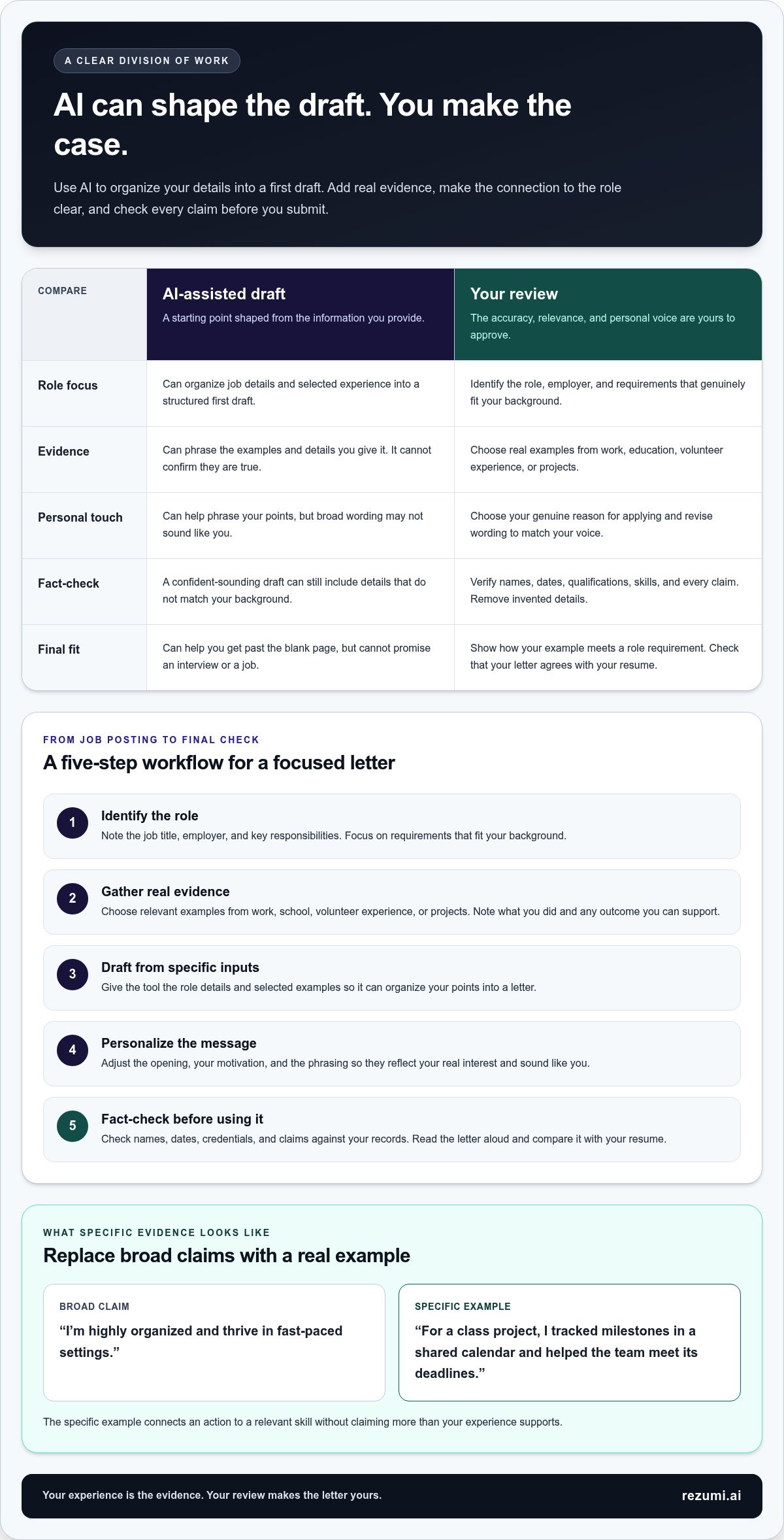
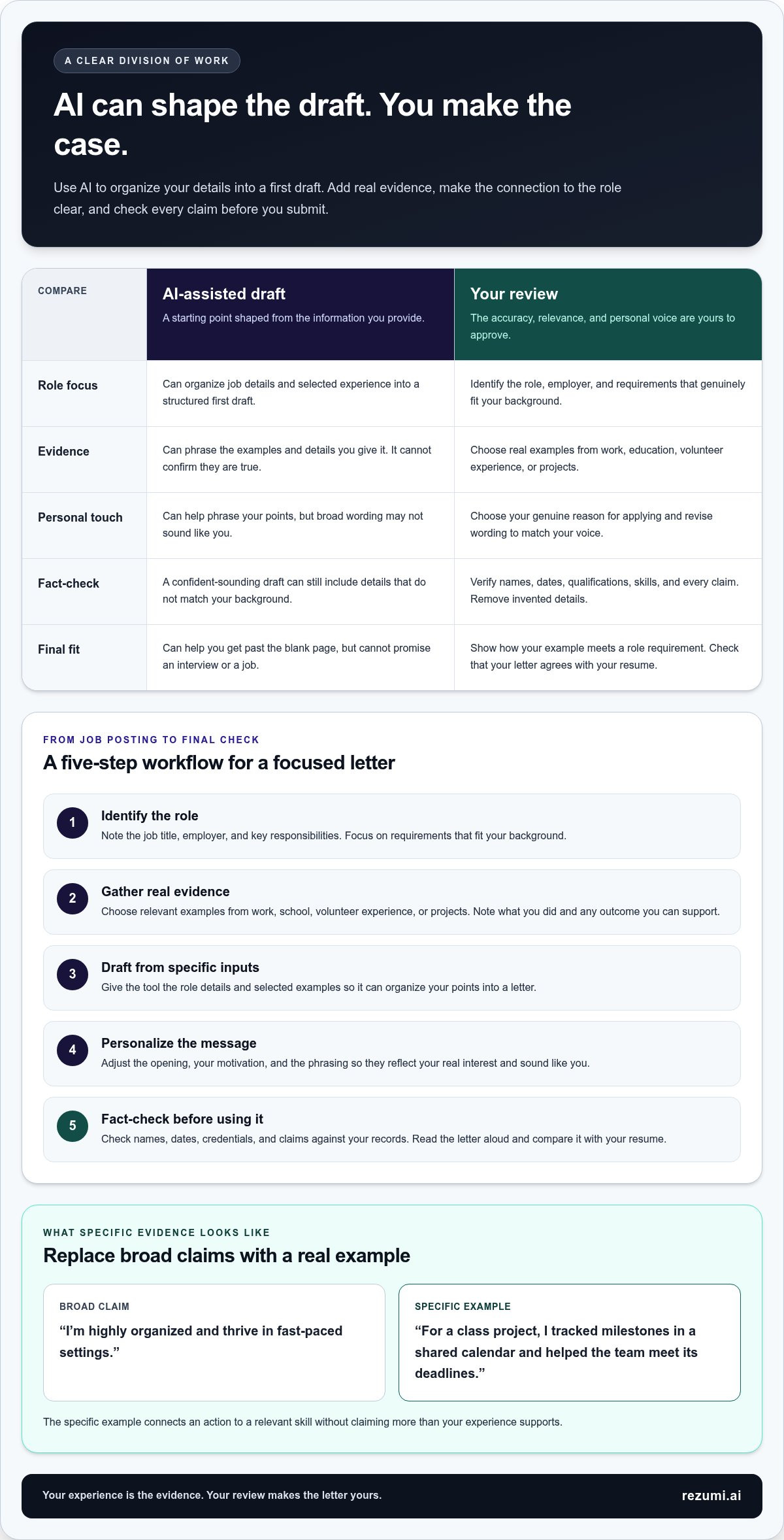
A vague draft might say, “I’m highly organized and thrive in fast-paced settings.” A more focused version could say, “For a class project, I tracked milestones in a shared calendar and helped the team meet its deadlines.” The second version gives the employer a concrete detail to assess without claiming more than your notes support.
Review the generated draft before using it
Read the letter against the original posting and your records. Check the employer and role names, dates, credentials, and every statement about your skills or experience. Replace general praise with a relevant example, and remove lines that could be sent unchanged to any employer.
Then read the letter aloud. If a sentence sounds unlike you, simplify it. Keep the meaning, but use words you’d be comfortable saying in an interview. Compare the draft with your resume, too, so dates, job titles, and descriptions of your experience agree.
As you put this process into practice, you can review Rezumi’s platform options for support with your job application workflow.
AI-Generated Versus Manually Written Cover Letters: What Should You Compare?
AI drafting can help you get a first version on the page. Writing manually gives you direct control from the start. Neither method is automatically more relevant. The result depends on how well the letter connects your real experience to the role and how carefully you edit it.
| What to compare | AI-assisted draft | Manual writing |
|---|---|---|
| Time | Can reduce time spent organizing and phrasing a first draft, especially when you provide clear role and experience details. | May take longer to shape from scratch, but you control the structure as you write. |
| Control | You guide the input and revise the generated wording. The draft may include claims or phrasing you didn’t intend. | You choose each point and phrase directly, though it’s still possible to overlook an error or miss the role’s priorities. |
| Personalization | Depends on the detail you supply and the edits you make. Thin input can produce a broad-sounding letter. | Can reflect your priorities from the start, but still needs specific evidence and a clear link to the job. |
| Fact-checking | You must verify every claim. A polished sentence isn’t proof that it’s accurate. | You’re responsible for checking facts as you write and before you submit. |
An AI cover letter generator can help with structure and momentum, but it can’t make the judgment calls for you. Manual writing gives you more immediate control, but it doesn’t remove the need to tailor the content. Either way, review the final letter beside the job posting and your resume. Neither approach guarantees an interview or a hiring decision.
When AI drafting can help you move faster
Use AI when you know why you fit the role but are slowed by a blank page or by repeating the same drafting steps for each application. Start with accurate role details and experience you can support. Treat the output as editable material: keep useful structure, replace weak or inaccurate lines, and remove anything that doesn’t fit the opportunity.
This works best when you already have a clear example to share. If a role asks for clear written communication, for instance, you might provide a real report, project, or customer update you wrote. AI can help shape that point into a paragraph, but you decide whether it represents your contribution accurately.
When a manual rewrite deserves more attention
Take the lead yourself when the letter needs careful nuance, such as explaining a personal reason for applying, addressing sensitive context, or describing a specialized achievement. AI wording can flatten those details or make your contribution sound broader than it was. Keep the facts precise, then compare the letter with your resume for consistent dates, titles, skills, and emphasis.
You don’t have to choose one method for the entire letter. Draft with AI where structure slows you down, then manually rewrite any passage that needs a closer match to your voice or experience. The final test is simple: can you support every claim, explain why it matters to this role, and stand behind the wording in an interview?
How to Make an AI Cover Letter Sound Specific, Accurate, and Human
A polished letter still needs to sound like you and show why your experience fits the role. Review the draft for relevance, evidence, voice, accuracy, and concise wording. An AI cover letter generator can help shape the text, but your edits make the claims credible and personal.
Use this checklist before you submit:
- Relevance: Does each main point connect to a need in the job posting?
- Evidence: Does each claim about your skills have a real example behind it?
- Voice: Would you use these words in a conversation with the hiring manager?
- Accuracy: Are names, titles, dates, qualifications, and numbers correct?
- Conciseness: Does every sentence help explain your fit, or can you cut it?
Don’t repeat your resume bullet by bullet. Use the letter to explain why a relevant detail matters for this role. And don’t copy long phrases from the job description. Identify the underlying need, then describe your own experience in natural language.
Replace generic sentences with evidence
Claims like “I’m a strong communicator” can fit almost any application. Tie the skill to a real example that relates to the role instead. If the posting asks for clear communication, describe how you explained a process to new team members or wrote instructions for a project, as long as that reflects your actual experience.
Keep the details precise. If you include a number, make sure you can explain what it measures and verify it from your records. Don’t let a draft turn an estimate into a fact or make your contribution sound larger than it was.
For example, replace “I’m highly organized” with “I maintained a shared task list for a student group project so each person could track their responsibilities.” This shows the skill through an action. Keep the example only if it’s true, and connect it to a role requirement that values planning or coordination.
Keep the final letter in your own voice
Read the draft aloud. Revise phrases that feel stiff, overly formal, or unlike the way you normally speak at work. Remove inflated adjectives, repeated introductions, and details that don’t help explain your fit. Clear, direct wording is stronger than language that sounds impressive but says little.
Check the employer name and role title carefully. Compare dates, job titles, skills, and achievements with your resume so both documents tell a consistent story. Use a simple structure: introduce the role, explain your strongest relevant example, and close with a clear expression of interest.
Use Rezumi’s AI cover letter generator to create a role-focused draft you can review and refine.
Use Rezumi’s AI Cover Letter Generator to Build a Stronger Application Workflow
Rezumi brings cover letter drafting into a job-search platform designed for people applying in Canada and the United States. Its AI cover letter generator helps you create a role-focused draft. You remain responsible for checking the details and deciding what to submit.
A stronger workflow keeps your application materials aligned without making them identical. Use the cover letter to explain why selected experience fits the role, and use your resume to show your skills and work history. Neither tool can guarantee that an employer will read your application, invite you to interview, or hire you.
Connect your cover letter to the rest of your application
Start with one target role. Choose a requirement you can support with real experience, then make sure the letter and resume emphasize that experience consistently. If the posting calls for project coordination, for example, your letter can explain how you handled a relevant project, while your resume lists the related tasks or skills.
Rezumi also provides resume tailoring and ATS resume optimization. An ATS, or applicant tracking system, helps employers manage applications. Align your resume with the job’s relevant requirements, but keep every skill and detail truthful. Your letter can add context that a resume bullet alone may not show. It shouldn’t repeat the resume or copy full lines from the posting.
Interview preparation is a separate next step after you submit. Review the examples in your letter and resume, and be ready to explain your contribution clearly if an interviewer asks about them. This keeps your preparation grounded in the same evidence you used to build your application.
Choose a focused next step for your job search
Keep the process manageable. Pick one role, gather supporting experience, and review your materials before moving on to another application. This helps you tailor each submission instead of sending the same broad message to every employer.
- Relevant: The letter speaks to needs stated in the target job posting.
- Truthful: You can support every claim with your real background.
- Specific: It uses a clear example to show how your experience fits.
- Recognizably yours: You’re comfortable with the wording and can explain it in your own voice.
Rezumi’s tools can support different parts of this process, from preparing a role-focused letter to optimizing your resume and preparing for an interview. Use them to organize your work, then apply your judgment at each step. Your final application should reflect your actual experience, not just polished wording.
Take the Next Step With a Clear Application Plan
Make your next application a focused one. Choose a role you genuinely want, then shape a letter around experience you can support. An AI cover letter generator can help you move from a blank page to a workable draft, but your judgment should guide what stays. The final letter should sound like something you can explain naturally if an interviewer asks about it.
As you apply to more roles, keep a record of the examples you use and the skills they show. That gives you a useful starting point for future applications without turning each letter into a copy of the last one. Adapt the details to the role in front of you.
Your experience is the strongest part of your application. Present it clearly, and take the next step with confidence.
Frequently Asked Questions
Can an AI cover letter generator write a letter without my resume?
Yes. You can prepare the information for a draft without using your resume as the source. Gather the job posting, relevant work or school examples, and the skills you can support. Provide those details directly so the draft has accurate background information to work with. Without them, it may stay broad or leave out useful context.
Should you use AI to write a cover letter for every job application?
You can use AI as a drafting aid for each application, but don’t submit the same letter unchanged. Tailor the content when the role, employer, or reason you’re applying differs. If two jobs share a skill, such as scheduling, choose an example that fits each position’s duties. If you can’t explain why a detail belongs in a letter, cut it.
Can employers tell if you used an AI cover letter generator?
There’s no dependable way to judge authorship from a letter alone. A hiring manager may notice writing that feels impersonal, repeats the posting, or makes claims you can’t explain. Focus on making the letter clear and true to your experience rather than trying to fool detection tools. Be ready to discuss any example you include in a conversation.
Do you need a cover letter when the job application says it is optional?
Not always. If the employer allows an optional letter and you can make a clear case for your fit, submitting one may add context your resume doesn’t show, such as why you’re moving into a new field. If you’d only repeat your resume or send a generic note, focus on making the required parts of your application complete and accurate.
What should you leave out of an AI-generated cover letter?
Leave out private details that don’t help explain your fit, unsupported claims, and personal information the employer hasn’t requested. Remove salary expectations or reasons for leaving a job unless the application asks for them or they’re relevant to your message. Also cut copied job-posting text, repeated resume content, and any claim you wouldn’t feel comfortable discussing in an interview.
Can an AI cover letter generator help if you are changing careers?
Yes, it can help you frame transferable skills, which are abilities you can use in more than one type of job. For example, managing schedules in retail may show planning skills relevant to an office coordinator role. Explain the original setting and what you did, then connect that experience to a task in the new role. Don’t imply you’ve held a title or qualification you haven’t.
Should you submit an AI-generated cover letter as a PDF or a Word document?
Follow the application portal’s file instructions first. If it accepts either format, choose one that keeps your letter easy to read and check the saved file before uploading. A PDF can preserve the layout across devices, while a Word document is easier to edit. In either format, use selectable text rather than an image of your letter, and confirm the uploaded file is the correct version.
Disclaimer
This article is provided for general informational purposes only and does not constitute professional, legal, financial, or career advice. While Rezumi strives for accuracy, we make no warranties as to the completeness or reliability of this content. Hiring practices, ATS behavior, and job-market conditions vary by employer, industry, and region — always verify against your specific situation. Any action you take based on this article is at your own risk.