ATS Resume Formatting Guidelines: Make Your Resume Easy to Parse in 2026
Your resume can look polished and still be hard for an applicant tracking system (ATS) to read. The right ats resume formatting guidelines make your experience, skills, and dates easier to identify, while helping a recruiter scan your qualifications.
If you’re unsure about columns, tables, graphics, or whether to submit a DOCX or PDF, start with a simple, text-based layout and follow the file type requested in the job posting. A clear structure doesn’t have to look generic. Consistent headings, spacing, and restrained emphasis can make your resume readable and professional.
This guide shows you how to organize sections, choose a file format, and use fonts and dates consistently. You’ll also learn which design choices can disrupt reading order and how to check a tailored resume before you submit it. The goal is to make your qualifications easy to extract and easy for a recruiter to review.
Key Takeaways
- Use ats resume formatting guidelines to build a clean, consistent structure that supports clear parsing and quick recruiter scans.
- Compare columns, tables, text boxes, and graphics with standard text, then choose practical alternatives for essential details.
- Review headings, dates, contact details, and extracted text before sending your resume.
- Keep the layout consistent while tailoring truthful skills and experience to each job description.
ATS Resume Formatting Guidelines: Start With a Clear, Readable Structure
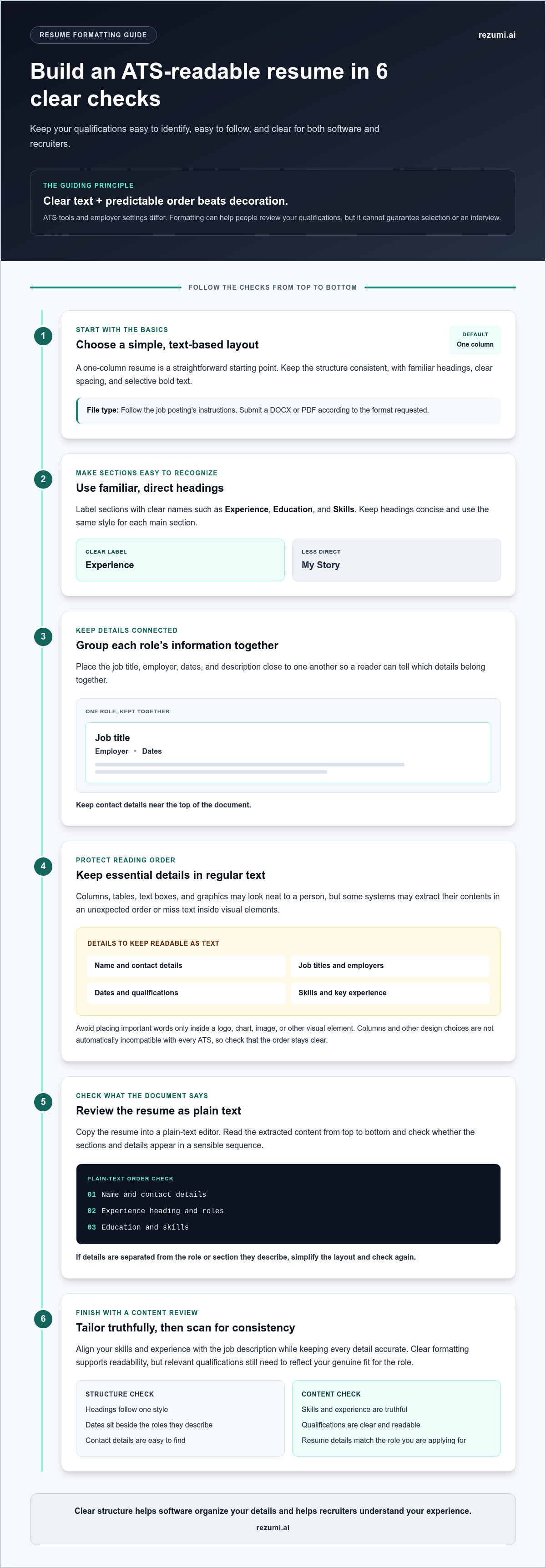
Use a simple, consistent layout with clearly labeled sections. These ats resume formatting guidelines help make your name, contact details, work history, education, and skills easy to identify. An applicant tracking system (ATS) is software employers use to organize and process job applications, including resume information.
Machine-readable structure means clear text and predictable organization, not decorative design. A straightforward resume can still look professional with familiar headings, consistent spacing, and selective bold text. Formatting can make your qualifications easier to process and review, but it can’t guarantee selection or an interview.
ATS tools and employer settings differ, so no layout works exactly the same everywhere. A general overview of Applicant Tracking Systems and online resumes explains how these systems have influenced resume writing and processing. Focus on making your content clear to both software and people rather than relying on a particular system’s behavior.
What does ATS-friendly formatting mean?
ATS-friendly formatting keeps your text, section headings, job titles, employers, and dates easy to identify. For example, put a “Work Experience” heading above your roles, then keep each job title, employer, and date close to its description. That structure gives software and recruiters a clear way to connect the details, although systems may interpret documents differently.
Formatting is only one part of a strong application. Clear sections don’t make your skills more relevant to a role, and relevant keywords can’t replace the experience or qualifications an employer needs. Treat these as separate checks: make your resume easy to read, then confirm its content reflects your genuine fit for the job.
Why should your resume work for both software and people?
A clear visual hierarchy helps an ATS identify where one section ends and another begins. It also lets a recruiter scan your experience and find key details quickly. Keep job titles and dates beside the roles they describe. If visual effects, unusual spacing, or decorative elements make those details harder to locate, simplify the layout.
A recruiter shouldn’t have to guess which date belongs to which job. Use consistent headings and spacing to guide the eye, then review the resume as plain text to check that the information still reads in a sensible order. Clean formatting reduces friction during review. It supports understanding, not a guaranteed result.
How ATS Reads Resume Formatting, Headings, and Text
An applicant tracking system may extract text from your resume and sort details into fields such as contact information, work history, education, and skills. The exact process varies by system and employer settings. Your goal is to make the information and its order clear, not to rely on a layout that only looks clear on screen.
Think of a resume as both a document and a set of details a recruiter may search or review. If a job title, date, or skill is separated from the relevant role, it may be harder to interpret. A logical reading order helps software organize your details and helps recruiters understand your experience without piecing it together.
Which resume headings make your sections clear?
Use familiar labels that describe the content directly. “Experience,” “Education,” and “Skills” are easier to recognize than creative titles such as “My Story” or “What I Bring.” Keep headings concise and use the same style for each main section so the document has a clear hierarchy.
You can make your resume personal through the achievements and skills you include. Keep the labels standard, and place each detail under the section where a reader would expect to find it.
How can columns, tables, and graphics affect reading order?
Columns, tables, text boxes, and graphics can organize information neatly for a person, but some systems may extract their contents in an unexpected order or miss text inside visual elements. For example, contact details in a text box or dates in a narrow side column could become detached from the information they describe. Since this risk varies, avoid placing essential details in design elements that may not behave like regular text.
A one-column layout is a straightforward default, not a rule for every ATS. Keep key information in selectable, regular text, including your name, contact details, job titles, employers, dates, and qualifications. Don’t put important words inside a logo, chart, or other image. To check the reading order, copy the document into a plain-text editor and see whether the sections appear in a sensible sequence.
- Keep contact details near the top of the document.
- Place each job title, employer, and date together.
- Use familiar headings and consistent section formatting.
- Make sure key qualifications remain readable as text, not just as graphics.
Once your structure is clear, tailor the content to each role and review it for readability. Explore resume optimization tools to help align your resume with a specific job description.
ATS Resume Layout Choices: Simple Formatting Versus Complex Design
Choose a layout that presents your experience clearly without making the reading order hard to follow. Columns, tables, text boxes, and graphics aren’t automatically incompatible with every ATS, but they can make details harder to extract or connect. These ats resume formatting guidelines help you weigh visual style against clarity.
| Element | Visual effect | Possible parsing risk | Safer practical choice |
|---|---|---|---|
| Columns | Creates a compact, modern page | Some systems may read across columns in an unexpected order | Use one column, or check that a two-column resume reads in the right sequence |
| Tables | Aligns dates or skills neatly | Text may be extracted in an unclear order | Use plain text with spacing or simple headings |
| Text boxes | Highlights contact details or key skills | Content may be separated from the main text | Keep essential information in the document body |
| Graphics | Adds visual interest | Words inside an image may not be readable as text | Use text for skills, contact details, and qualifications |
| Standard text | Looks clean and familiar | Usually presents fewer layout complications, though systems differ | Use clear headings and consistent spacing |
Should you use a one-column resume layout?
A one-column layout is a low-complexity choice: readers can move from your contact details to your experience and education in a clear sequence. A restrained two-column design may also be readable, but check how its text flows when copied into a plain-text editor. Keep key details such as job titles, dates, and qualifications out of sidebars when their order or connection matters.
Compare layouts by how clearly they present your qualifications and how well their text reads in sequence. A simple structure is a practical starting point when you want to reduce layout-related uncertainty.
Should you submit a DOCX or PDF resume?
Follow the application instructions first. If the employer requests a specific file type, use it. Otherwise, both DOCX and PDF may work with modern systems, but compatibility can vary. A PDF should contain selectable text, not just a scanned image. Test it by selecting and copying a sentence. If you can’t, the text may not be available for parsing.
Before applying, open the saved file and check that the layout still looks right. For a PDF, confirm that copied text appears in a sensible order. A clean design can still feel polished. Consistent headings, readable spacing, and careful alignment give your resume structure without relying on decoration.
A Practical ATS Resume Formatting Checklist Before You Apply
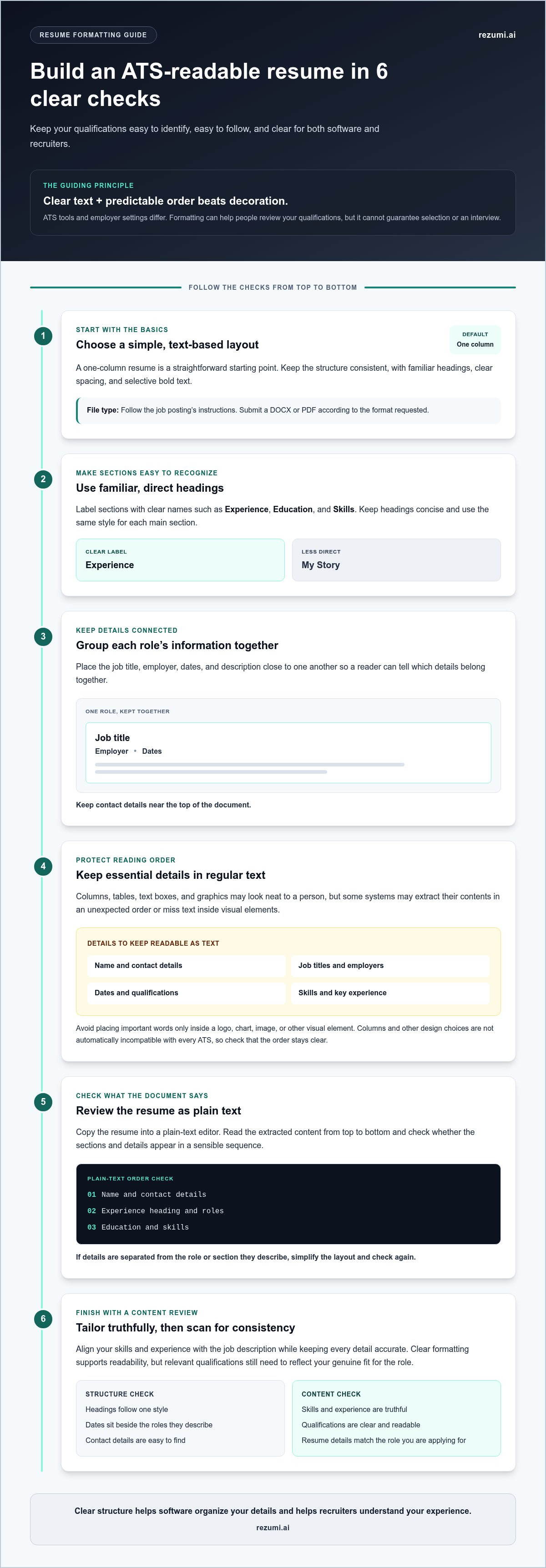
Review your resume before submitting it. These ats resume formatting guidelines can help you catch layout and text issues that make details harder to identify. Check the saved document, inspect the extracted text, and confirm you’re sending the file type the application requests.
What should you check in the document itself?
Start with the saved file, not just the version open in your editor. Confirm your name and contact details appear as selectable text, and check that the layout hasn’t shifted during export. Make sure information is easy to find and presented consistently from section to section.
- Document setup: Use a clear file name and follow the application’s file type instructions.
- Contact details: Check that your name, email, phone number, and other relevant details are visible and selectable.
- Section headings: Use clear labels such as “Experience,” “Education,” and “Skills.” Apply the same heading style throughout.
- Employment history: Keep each job title, employer, and date together. Use one date style consistently, such as “May 2022” or “05/2022.”
- Visual layout: Remove decorative elements that compete with essential information. Don’t make key details depend on an image, text box, or sidebar.
How can you check the extracted text before submission?
Copy the resume text and paste it into a plain-text editor. This removes much of the visual styling and gives you a quick way to inspect the content’s order. Read it from top to bottom. Your work history should still make sense without the original design.
Look for missing, duplicated, or misplaced text. Check that each job title appears with the right employer and dates, and that skills haven’t been split up or dropped. If a role’s dates appear before the wrong title, or a skill lands inside an unrelated section, revise the layout and test it again. For more detail, follow a dedicated guide to checking your resume for ATS readability.
- Can you find your contact details at the beginning?
- Do headings clearly mark each section?
- Do job titles, employers, and dates stay connected?
- Are all skills and qualifications readable as text?
- Does the final file open correctly and match the application instructions?
Once the structure checks out, compare your resume with the role and refine the relevant details. Review and optimize your resume for a specific job.
Tailor Your ATS-Friendly Resume to the Job, Then Review It
Keep your resume’s structure steady while you tailor its content to each role. Use the same section order, heading style, and date format across versions. Then bring the most relevant, truthful skills and experience forward so a recruiter and an applicant tracking system can identify your fit more easily.
Formatting is only one part of your application. Clear writing and specific evidence matter too. If a job asks for project coordination, describe a real project you coordinated and its result. Don’t add a skill you can’t support or repeat keywords unnaturally. These ats resume formatting guidelines work best alongside accurate, job-relevant content.
How do you tailor a resume without disrupting its format?
Start with the job description. Identify the skills and responsibilities that match your background, then adjust the order and detail of your examples without changing the basic design. Keep section names, date styles, and spacing consistent so each version remains easy to scan.
- Move the most relevant experience higher within a section when it helps show your fit.
- Use terms from the job description when they accurately describe your work.
- Support skills with examples, such as a project delivered, process improved, or tool used.
- Keep unrelated details brief rather than adding keywords that don’t reflect your experience.
This approach lets you tailor the message without rebuilding the layout for every application.
How can Rezumi support your resume review workflow?
Rezumi helps you tailor a resume to a specific job description and review its quality with real-time feedback. Use that feedback to check whether your relevant experience is clear, your wording is accurate, and the document still follows a consistent structure. Review the final version yourself before submitting it. No formatting tool can guarantee how every employer’s system will read a resume or whether you’ll be selected.
Pair job-specific edits with a final check of your text and layout. For broader guidance on tailoring resume content, use the ATS resume optimization guide alongside this review.
Build a Resume That’s Ready for Your Next Application
A clear resume starts with a simple structure. Use familiar section headings, keep key details in readable text, and check that your work history appears in a logical order. These ats resume formatting guidelines can reduce avoidable parsing issues, though no format can guarantee selection or an interview.
Before you apply, review both the document and its extracted text. Check that your contact details, headings, job titles, employers, dates, and skills remain clear. Then tailor the content to the role by highlighting relevant experience and truthful skills, supported by specific examples.
Keep your layout consistent as you make those edits. You don’t need to add every keyword or redesign your resume for each application. Make your strongest qualifications easy to find and understand.
Rezumi helps you tailor your resume to a specific job description and review it with real-time quality feedback. Use that support to refine your application, then submit with confidence in the work you’ve put into it.
Frequently Asked Questions
Can ATS systems read resumes with columns?
Some ATS systems may extract text from columns in an unexpected order, so a two-column layout can add uncertainty. A single-column resume is a straightforward way to keep the reading order clear. If you use columns, keep essential details in regular text and copy the finished resume into a plain-text editor to check the sequence. Follow the employer’s file instructions, since systems can handle layouts differently.
Is PDF or DOCX better for an ATS resume?
Neither file type is best for every application. Follow the employer’s instructions first. DOCX is commonly used for editable application documents, while a text-based PDF can preserve your layout. Avoid scanned, image-only PDFs because their words may not be selectable. Before you submit, open the saved file, check that you can select and copy its text, and make sure it appears in a logical order.
Can ATS read a resume made in Canva?
A resume made in Canva may be readable by an ATS, but the design tool alone doesn’t determine whether its content will parse clearly. The final file structure matters. Layouts that rely on graphics, text boxes, or several columns may make the text order harder for some systems to interpret. After exporting, select and copy the text to check its sequence. Keep important details in clear, standard sections.
What font and font size should you use for an ATS resume?
Choose a common, readable font and a size that’s comfortable to read on screen and in print. Apply heading styles consistently, and leave enough space to distinguish sections. Don’t shrink the text just to fit details that aren’t relevant to the role. No single font guarantees compatibility with every ATS. Review your finished resume at normal zoom to make sure the text is clear and easy to scan.
Do ATS systems reject resumes with headers and footers?
Handling of headers and footers can vary by system, so don’t put essential details only in those areas. Place your name and contact information in the main body of the document, where they’re easy to find and select. You can use headers or footers for nonessential details, but copy the resume text into a plain-text editor before applying. Confirm that nothing important has disappeared from the extracted text.
How do you check whether your resume is ATS-friendly?
Review your resume’s headings, dates, and reading order, then copy its text into a plain-text editor to check the sequence. Look for missing or repeated details, and confirm that job titles, employers, and skills remain clear. Follow the employer’s file instructions. These ats resume formatting guidelines can help you spot issues, and Rezumi’s real-time resume quality feedback can support your review, but no tool can guarantee how every system will process your file.
Disclaimer
This article is provided for general informational purposes only and does not constitute professional, legal, financial, or career advice. While Rezumi strives for accuracy, we make no warranties as to the completeness or reliability of this content. Hiring practices, ATS behavior, and job-market conditions vary by employer, industry, and region — always verify against your specific situation. Any action you take based on this article is at your own risk.