Cover Letter Template Google Docs: Your Strategic Guide for 2026
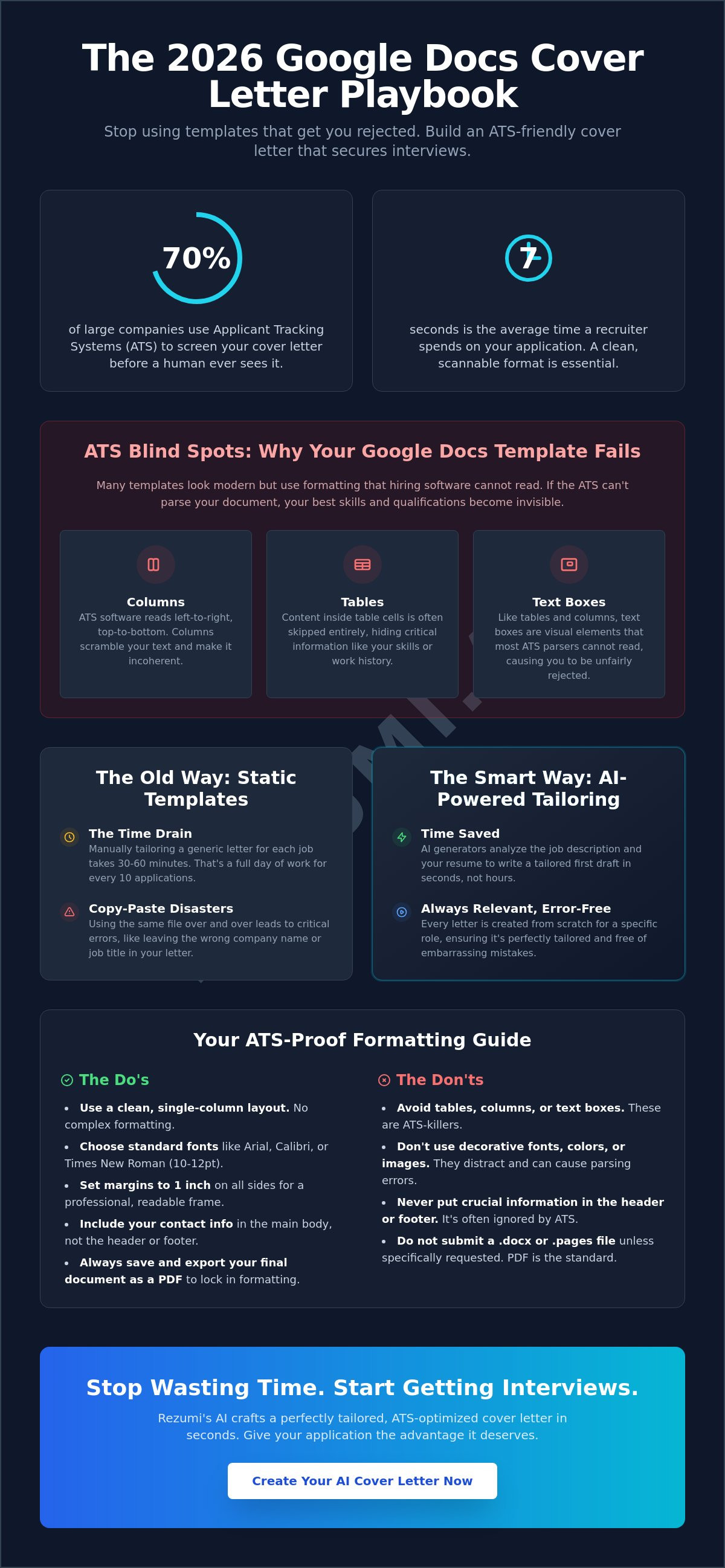
You might be surprised to learn that as of June 2026, there is no native cover letter template google docs users can find in the official gallery. Most job seekers waste hours searching for a built-in layout. They often choose designs that trigger automated rejections. The stakes are high. A single margin error can hide your best skills from a recruiter who only spends seven seconds on your application.
Generic letters lead to silent rejections. It is a waste of your talent. You deserve a process that respects your time and a document that actually works. This guide provides the exact technical standards you need to pass an Applicant Tracking System (ATS). We will show you how AI tailoring turns a basic document into a response magnet. Approximately 70% of large employers now use automated systems to screen your cover letter before a human ever sees it.
We will break down the essential 2026 formatting rules and show you how to transform a blank page into a polished, professional letter that secures more interviews.
Key Takeaways
- Understand why a native cover letter template google docs no longer exists in the gallery and how to correctly format a blank document for 2026 standards.
- Avoid common layout traps like text boxes and tables that prevent Applicant Tracking Systems from reading your professional history.
- Learn the difference between a static document shell and an AI-driven engine that writes tailored content for every specific job application.
- Apply the precise margin and font settings required to pass the initial seven-second scan performed by hiring managers.
- Transition from manual formatting to an automated strategy that increases your interview invites and cuts your application time in half.
Why Google Docs Templates Are the Starting Point (But Not the Finish Line)
Google Docs is the go-to workspace for job seekers because it costs nothing and works everywhere. Before you start typing, you need to understand what a cover letter is in the eyes of a modern recruiter. It is a strategic document designed to connect your resume to a specific job description. Many people look for a cover letter template google docs offers natively, but as of June 2026, the built-in gallery has removed these options. You now have to build your own structure or import a third-party file. This makes Google Docs a powerful editor but a difficult place to start if you don't know the technical rules of hiring.
The Pros of Using Google Docs for Your Application
Google Docs remains a top choice for finishing your application because it removes the technical friction of document management. It acts as a reliable bridge between your first draft and the recruiter's inbox.
- Universal Access: You can edit your draft on a laptop at home or make a quick change on your phone before an interview. Your work stays in the cloud and syncs across every device.
- Data Security: The auto-save feature is a lifesaver. You won't lose your progress if your browser crashes or your battery dies. It tracks every change, so you can always revert to an earlier version.
- Standardized Exporting: Recruiters in North America prefer PDF files to maintain formatting. Google Docs allows you to export your work instantly, ensuring your margins and fonts stay exactly as you intended.
The Cons: Where Static Templates Fall Short
Static files are essentially empty shells. They provide a visual look but offer no intelligence or strategy. When you use a basic cover letter template google docs compatible file, you face three major risks that can stall your job search.
- The Time Drain: Research shows that tailoring a letter manually takes 30 to 60 minutes per job. If you apply to ten jobs a week, that is a full work day spent just on repetitive formatting and typing.
- Copy-Paste Disasters: Using a static template often leads to leaving another company's name or a different job title in your text. This is an instant "no" from hiring managers who value attention to detail.
- ATS Blind Spots: Many imported templates use columns, tables, or text boxes to look "modern." Unfortunately, 70% of large employers use ATS software that cannot read text hidden in these visual elements, meaning your best qualifications stay invisible.
A template is a frame, but the content inside determines if you get the interview. You need more than a layout; you need a strategy that handles the heavy lifting of tailoring for you. While a document editor is fine for the final polish, starting with a static file often creates more work than it saves.
How to Find and Use a Cover Letter Template in Google Docs
Finding a clean layout is the first step toward a faster application. While Google Docs no longer offers a specific category for cover letters in its 2026 gallery, you can still use the "Letters" section as a high-quality starting point. Open Google Docs and click on the Template Gallery in the top right corner. Scroll down to the Letters section to view the available professional options. You need a layout that acts as a strategic guide to cover letters by highlighting your value quickly.
Select a template that matches the visual style of your resume to create a cohesive brand. Once the document opens, replace all placeholder text with your specific contact details and career history. It's vital to save a master copy before you begin making job-specific versions. This simple step prevents you from accidentally sending a letter with the wrong company name later. If you find manual formatting too slow, you can see how our automation tools compare on our pricing page.
Choosing the Right Style for Your Industry
The visual tone of your cover letter template google docs selection should align with the company culture. If you are applying for traditional roles in finance or law, stick to the Serif or Spearmint templates. These styles project stability and authority. Creative professionals in marketing or design should opt for the Modern Writer or Swiss styles. These layouts use bolder typography to show personality. For the tech world, the Coral template offers the clean, minimalist look that startup recruiters prefer.
A 3-Point Checklist for Template Selection
Before you commit to a design, run it through this technical check to ensure it meets North American hiring standards. A pretty layout that fails these rules will likely end in a rejection.
- Readability: Ensure the body text font size is between 10 and 12 points. Smaller text strains the eyes, while larger text looks unprofessional.
- Contact Header: Does the header have dedicated space for your LinkedIn profile and phone number? Modern recruiters expect these links to be easily accessible.
- Visual Balance: Check for enough white space. A cluttered page is hard to scan. You want clear margins (1 inch on all sides) to keep the focus on your achievements.
Choosing the right shell is only half the battle. Once your structure is set, the real work begins with the data-driven tailoring that happens inside those margins. A polished template ensures you look professional, but your content is what secures the interview.
Static Templates vs. AI Generators: Choosing Your Strategy
A cover letter template google docs provides is a static shell. It defines the borders and the fonts. It does not provide the strategy. You are responsible for every word. AI generators operate as engines. They don't just hold your text; they build it using live data. This is the fundamental choice in your job search. You can spend your weekend typing, or you can use technology to handle the heavy lifting.
Traditional templates are free. They are also slow. AI is faster and more precise. It identifies the hidden requirements in a job posting that a human might miss. Using a cover letter template google docs compatible file is a good start for formatting, but it won't help you match industry-specific keywords. AI technology ensures your letter aligns with the specific technical goals of the hiring manager by scanning the job description before you write a single word.
The Manual Tailoring Time Sink
Drafting a new letter from a template usually requires an hour of focused work. You have to research the company. You have to match your skills to their needs. Most serious job seekers apply to 20 or more roles to get results. This equals 20 hours of repetitive labor. AI cuts this time to less than five minutes per application. You save nearly 20 hours of writing time. This efficiency allows you to focus on interview prep instead of word processing.
Why Customization Is No Longer Optional
Recruiters spot generic, unedited templates in seconds. It looks lazy. It suggests you aren't truly interested in the role. Statistics show that tailored letters earn a 40% higher response rate than generic ones. You need a document that speaks directly to the company's current challenges. AI tools scan job descriptions to find these pain points for you. They match your career details to the employer's specific requirements automatically.
Learning how to write a great cover letter involves more than just filling in blanks. It requires a deep understanding of what the employer is actually asking for. AI identifies these subtle cues and weaves them into your narrative. This ensures your application stands out in a crowded inbox. You can explore these advanced features on our pricing page to see which strategy fits your career goals.
Making Your Google Docs Template ATS-Friendly
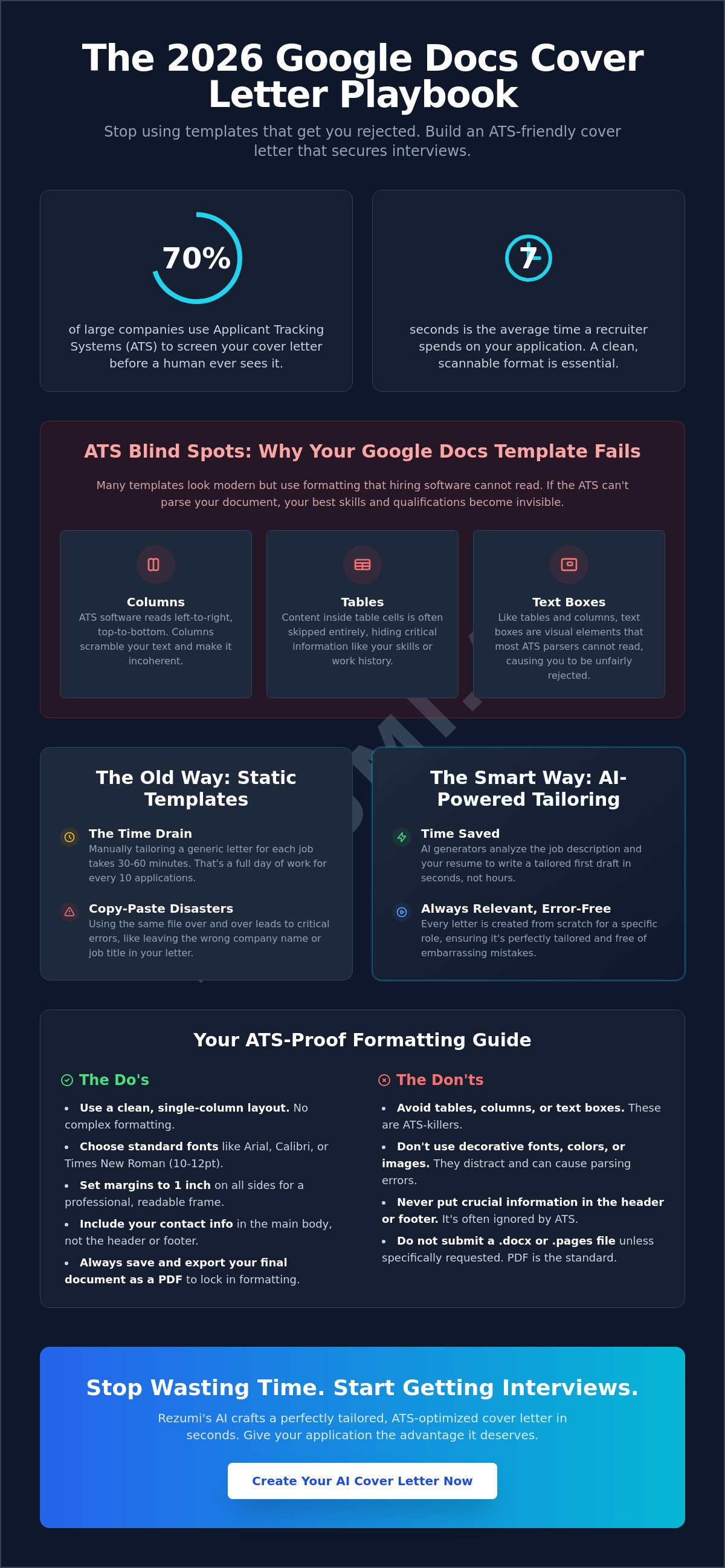
A beautiful design won't help you if a computer can't read it. Approximately 70% of large employers use Applicant Tracking Systems (ATS) to screen your application before a human ever sees it. Your cover letter template google docs must be built with a clean technical structure to survive this initial scan. If the software cannot parse your text, your application is discarded automatically. You must prioritize data accessibility over visual flair to ensure your qualifications actually reach a recruiter's desk.
Use standard fonts like Arial, Calibri, or Times New Roman to guarantee readability across all software versions. You must avoid using text boxes because most ATS software treats them as empty space. Keep your layout to a single column so the scanner reads your information in a logical top-to-bottom order. Clear headings like "Contact Information" and "Professional Summary" act as map markers for the system. If you want to verify your document's technical compatibility, explore our ATS optimization tools for a strategic advantage.
The Danger of Complex Formatting
Visual complexity is the enemy of automation. Columns and sidebars often cause the ATS to scramble your text into an unreadable mess. For example, a sidebar containing your contact info might be read in the middle of your professional summary. Images, icons, and skill progress bars might look modern, but they are completely invisible to most scanners. Stick to simple, standard bullet points instead of custom symbols or graphics. A plain document that gets read is always better than a fancy one that gets ignored by the system.
Keywords: The Secret to Passing the Screen
Keywords are the technical currency of the modern job search. You must identify the top three skills mentioned in the job description and weave them naturally into the body of your document. Don't just list them as a block of text. Write a single sentence that connects a specific past result to a requirement found in the posting. If the job asks for "Project Management," mention how you led a specific team to a 15% increase in efficiency. This proves to the software that you have the exact experience it is programmed to find. When you optimize your cover letter template google docs for these specific terms, you move from the bottom of the pile to the top of the shortlist.
Tailoring Your Application with Rezumi AI
Rezumi AI turns your application into a strategic asset that wins interviews. While a cover letter template google docs provides is a helpful shell, it remains a manual tool in an increasingly automated hiring world. Our platform moves beyond static layouts by using an AI Cover Letter Generator to write your content for you. We ensure every word is optimized for North American ATS standards, giving you a technical edge over applicants who rely on basic word processing. You stop guessing what recruiters want and start using a strategy backed by real hiring data.
Our system creates a unified professional brand by providing a design that matches your resume perfectly. This consistency signals high-level attention to detail to hiring managers. You no longer need to spend hours adjusting margins or matching font styles between different documents. We handle the technical alignment so you can focus on the substance of your career story. By replacing the anxiety of a blank page with a data-backed draft, you move from uncertainty to total control of your job search.
How the AI Cover Letter Generator Works
Our automation process is designed to be fast, efficient, and highly accurate. You don't need technical skills to produce a document that passes the most advanced screening systems. The process follows three logical phases to ensure your letter is both optimized and authentic.
- Upload and Sync: Start by uploading your current resume to our platform. This provides the AI with your full professional context and achievement history.
- Analyze Requirements: Paste the job description for the role you want into the editor. The AI identifies the specific skills and keywords the employer is seeking.
- Generate and Refine: The system produces a bespoke letter in seconds that connects your past results to the employer's current needs. You then add your personal voice to the draft to ensure it feels human and genuine.
Ready to Command the Room?
You should be spending your time mastering your interview answers, not fighting with a cover letter template google docs compatible file. Our users report higher response rates because their applications are engineered to meet the exact technical requirements of modern recruiters. Join thousands of professionals who have already secured roles at top companies by utilizing our high-performance career tools. We provide the insider knowledge you need to bypass automated hurdles and get your foot in the door.
Take the first step toward a more sophisticated and successful job search today. You can explore our different tiers and find the right fit for your career level by visiting the Rezumi pricing and plans page. It is time to replace repetitive manual labor with a strategic partner that works as hard as you do.
Command Your Professional Future
You now have the technical blueprint to outpace your competition in the 2026 job market. A cover letter template google docs allows you to build is a reliable frame, but your success depends on the data inside. Remember that passing the initial ATS scan requires a single-column layout and standard fonts. Once you've secured the technical foundation, your focus must shift to precise tailoring that addresses the employer's specific pain points.
Rezumi was built by global professionals to deliver high-stakes results for serious candidates. We provide AI-powered tailoring specifically optimized for North American hiring standards. Our ATS-optimized designs ensure your achievements are visible to both software and human recruiters. Stop wasting hours on manual formatting. Start using a strategy that respects your time and career goals.
View Rezumi Plans and Pricing to transform your application process today. You've done the hard work of building your skills. Now, use the right technology to make sure the world sees them. Your next interview is within reach.
Frequently Asked Questions
Is it better to send a cover letter as a Google Doc or a PDF?
You should always submit your final application as a PDF file. This format locks your formatting and ensures the recruiter sees exactly what you designed, regardless of the device they use. Sending a live link to a Google Doc is risky because it often requires permission access, which most hiring managers will not wait for during a busy screening day.
How do I make my Google Docs cover letter look professional?
Professionalism comes from consistency and clean technical standards. Use one inch margins on all sides and align your text to the left for maximum readability. Your contact header should match the style of your resume to create a unified personal brand. Avoid using bright colors or decorative images that can distract from your professional achievements.
Can I use a Google Docs template for an ATS-friendly application?
You can use a cover letter template google docs offers if you select a simple, single column layout. Avoid any templates that use text boxes, tables, or sidebars to organize information. These visual elements often cause automated scanners to scramble your text, which can lead to an immediate rejection. Stick to a clean, top to bottom flow to ensure your data is parsed correctly.
How do I bypass the manual work of a cover letter template?
The most efficient way to skip the manual labor is to use an AI cover letter generator. This technology analyzes your resume and the specific job description to build a tailored draft in seconds. It identifies the exact keywords you need to pass automated screens. This replaces the hour of research and typing usually required for a high quality application.
What font should I use in my Google Docs cover letter?
Stick to standard, highly readable fonts like Arial, Calibri, or Georgia. Set your font size between 10 and 12 points to ensure it is comfortable for human eyes and easy for digital scanners to read. Using exotic or custom fonts can cause technical errors when your file is uploaded to an employer's portal.
Do recruiters actually read cover letters in 2026?
Recruiters use cover letters as a critical tie breaker between candidates with similar experience levels. Approximately 70% of large employers also use software to scan these documents for specific industry keywords. A well written letter proves you have researched the company and understand their current technical challenges.
How many pages should a cover letter be?
Your cover letter must never exceed one page. The ideal length is between 250 and 400 words. Research indicates that readership rates decline rapidly once a document passes the 500 word mark. Be concise and focus only on the results that prove you are the best fit for that specific role.
Disclaimer
This article is provided for general informational purposes only and does not constitute professional, legal, financial, or career advice. While Rezumi strives for accuracy, we make no warranties as to the completeness or reliability of this content. Hiring practices, ATS behavior, and job-market conditions vary by employer, industry, and region — always verify against your specific situation. Any action you take based on this article is at your own risk.