Getting a Tech Job With No Tech Experience: Build a Resume That Shows Your Potential
Your first tech role doesn’t require a past tech title. It requires evidence that you can do the work. A resume can support getting a tech job with no tech experience by showing relevant skills through projects, coursework, and results from work you already know how to do.
It can feel like a catch-22: entry-level postings ask for technical skills, but you may not know whether a class project, certification, or experience from another field counts. It can, when you connect it to the role and explain what you did, which tools you used, and what you completed.
This guide shows you how to build a focused resume for a specific entry-level tech role. You’ll learn how to choose credible examples, describe transferable skills clearly, and match your evidence to the job requirements. You’ll also learn how to identify gaps and decide what to work on before you apply.
Key Takeaways
- Build a getting a tech job with no tech experience resume around specific, truthful examples that match the role, not just past job titles.
- Describe projects and coursework with a clear action, tool or method, purpose, and verifiable outcome.
- Put your most relevant evidence near the top, whether you’re applying for IT support, QA, or junior software work.
- Tailor each resume to the job description. Relevant wording can help ATS systems read your experience, but it can’t guarantee selection.
- Before applying, check accuracy, readability, and consistency, then track each tailored resume alongside its application.
Getting a Tech Job With No Tech Experience Starts With Relevant Evidence
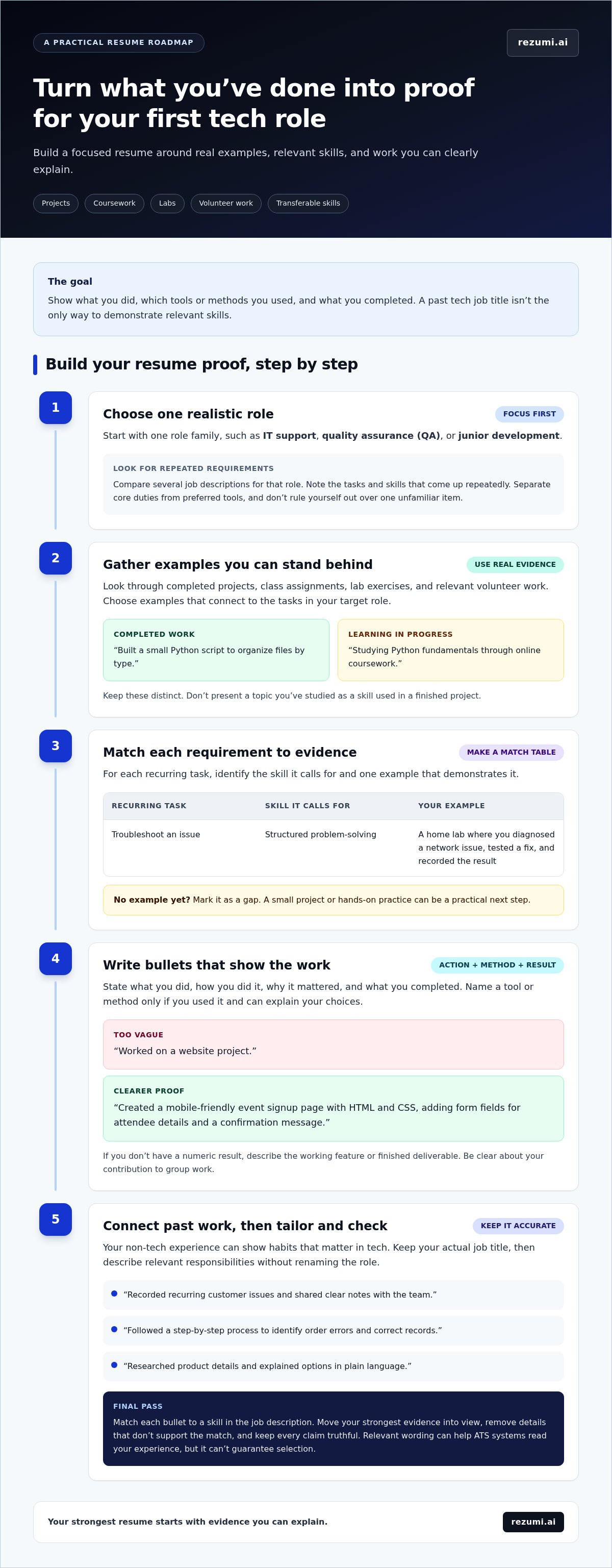
Formal tech employment isn’t the only way to show you can handle a tech role. Evidence is a specific, truthful example that demonstrates a skill named in the job description. It might come from a completed project, class assignment, lab, or relevant volunteer work. Show what you did, not just a skill you hope to use.
Having no paid tech experience doesn’t mean you have no relevant skills or completed work. If a help desk role asks for troubleshooting, for example, a home lab project could show how you diagnosed a network issue, tested a fix, and recorded the result. Be clear that practice work was not paid work or work for a client.
Your resume should make that evidence easy to understand. A resume is a focused summary for a job application, while “CV” can mean different things across regions and academic or industry settings. For background on those uses, see Curriculum Vitae on Wikipedia.
What counts as tech experience on an entry-level resume?
Relevant experience can include coursework, personal projects, lab exercises, and volunteer tasks when they connect to the role. For each completed example, name your contribution, the tools or methods you used, and the result. A course title shows what you studied; a project bullet shows how you applied it. Keep those claims distinct.
- Completed work: “Built a small Python script to organize files by type.”
- Learning in progress: “Studying Python fundamentals through online coursework.”
Both may belong on your resume, but they show different levels of experience. Don’t describe a topic you’ve studied as a skill you’ve already used in a finished project. Clear labels help hiring teams assess your background accurately.
Choose one realistic first tech role
Start with one role family, such as IT support, quality assurance (QA), or junior development. Compare several job descriptions for that role and note the tasks and skills that appear repeatedly. A posting may list preferred tools alongside core duties, so don’t treat every qualification as equally essential or rule yourself out over one unfamiliar item.
Use recurring requirements to choose which evidence deserves space. For IT support, that might be a troubleshooting lab or volunteer tech support. For QA, it could be a test plan you wrote for a project. For junior development, it might be code you built and can explain. A focused resume for getting a tech job with no tech experience connects credible examples to one role instead of presenting you as ready for every tech job.
Before drafting, make a simple match table: list a recurring task, the skill it calls for, and one example that demonstrates it. If you can’t name an example yet, mark the gap. That gives you a practical next step, such as completing a small project or getting hands-on practice, instead of adding an unsupported claim to your resume.
Turn Projects, Coursework, and Transferable Skills Into Resume Proof
Turn experience into proof by stating what you did, how you did it, why it mattered, and what you completed. This structure gives a hiring team something concrete to assess. A strong project bullet is specific, accurate, and relevant to the role you want.
Write project bullets that show what you can do
Start with the project and your contribution. Name the tool or method you used, the problem you addressed, and a result you can verify. Mention technologies only if you worked with them and can explain your choices. If you don’t have a numeric result, describe the working feature or finished deliverable instead.
A weak bullet might say: “Worked on a website project.” It doesn’t show your role or what the project did. A clearer version could be: “Created a mobile-friendly event signup page with HTML and CSS, adding form fields for attendee details and a confirmation message.” This describes a completed function without implying business impact or inventing metrics.
Keep each claim proportional to your contribution. If you built one page as part of a group assignment, say so. If you used a tool only in a guided lesson, don’t present it as an independent project. Accurate details also give you a solid foundation for interview questions.
Translate non-tech work without overstating it
Your past job can show skills that matter in tech, even if the work wasn’t technical. Customer service may involve listening closely, documenting issues, and explaining solutions. Troubleshooting equipment or process problems can show structured problem-solving. Research and process work can demonstrate careful analysis, clear records, and attention to repeatable steps.
Keep your original job title, then make the relevant responsibility clear. Don’t rename a customer service role “IT support” unless that was your actual position. Instead, describe what you did and connect it to the role’s needs:
- “Recorded recurring customer issues and shared clear notes with the team.”
- “Followed a step-by-step process to identify order errors and correct records.”
- “Researched product details and explained options in plain language.”
These examples don’t claim technical work. They make relevant habits visible, such as documentation, careful investigation, and clear communication. Include only statements that match your real duties, and add a tool or outcome when you can name it truthfully.
Match each resume bullet to a skill in the job description. Remove details that don’t support that match, and move your strongest evidence into view. Rezumi’s resume tailoring tools help you review your resume against a job description.
Choose the Resume Sections That Best Support Your Target Tech Role
Build your resume around the evidence that best matches the job, not a fixed template. Put your strongest, most relevant section near the top. For one person, that may be a technical project; for another, it may be relevant training or work that shows troubleshooting and clear documentation.
Use the role’s day-to-day tasks to decide what to feature. This comparison can help you choose which examples deserve space:
IT support: Highlight troubleshooting practice, user support, system or network basics, and clear records of issues and fixes.
Quality assurance (QA): Feature test cases, bug reports, careful checks, and projects where you found or documented errors.
Junior software development: Prioritize code projects, the tools and languages you used, and the function you built or improved.
These are evidence priorities, not required resume templates. Include only skills and tools you can support with actual experience. Group them under clear labels such as “Programming,” “Testing,” or “IT Support,” rather than listing every technology you’ve encountered.
Prioritize skills and projects for the role you want
Match each project description to the target role’s tasks and stated tools. A QA resume should explain what you tested and how you recorded an issue. A development resume should make your contribution to the code clear. Avoid skill ratings, long keyword dumps, and technologies you can’t discuss accurately. A focused list is easier to connect to your project evidence.
A short summary can help if your background needs context, such as explaining a move from customer service into IT support and naming the relevant training or project work that supports that shift. Keep it specific to the role. If it only repeats your skills section or says you’re motivated to learn, use that space for stronger evidence instead.
Order education and non-tech work with purpose
Place relevant education, training, or certifications higher when they directly support your target role and your work history doesn’t show that knowledge as clearly. Keep useful accomplishments from paid work visible, but trim unrelated duties. Preserve your actual job title and use concise bullets to show relevant tasks, such as documenting issues or following a careful process.
For a resume focused on getting a tech job with no tech experience, section order should make your fit easy to see at a glance. A common structure might place a brief summary first, followed by skills, projects, and education, with work history below. Change the order based on your strongest evidence. Arrange sections so the most relevant facts appear early and your timeline remains clear.
Before you finalize the layout, check that every item in your skills list appears somewhere in your actual experience, education, or completed work. Remove unsupported claims. This cross-check keeps your resume focused and gives you a clear basis for discussing each skill.
Tailor Your No-Experience Tech Resume to Each Job Description
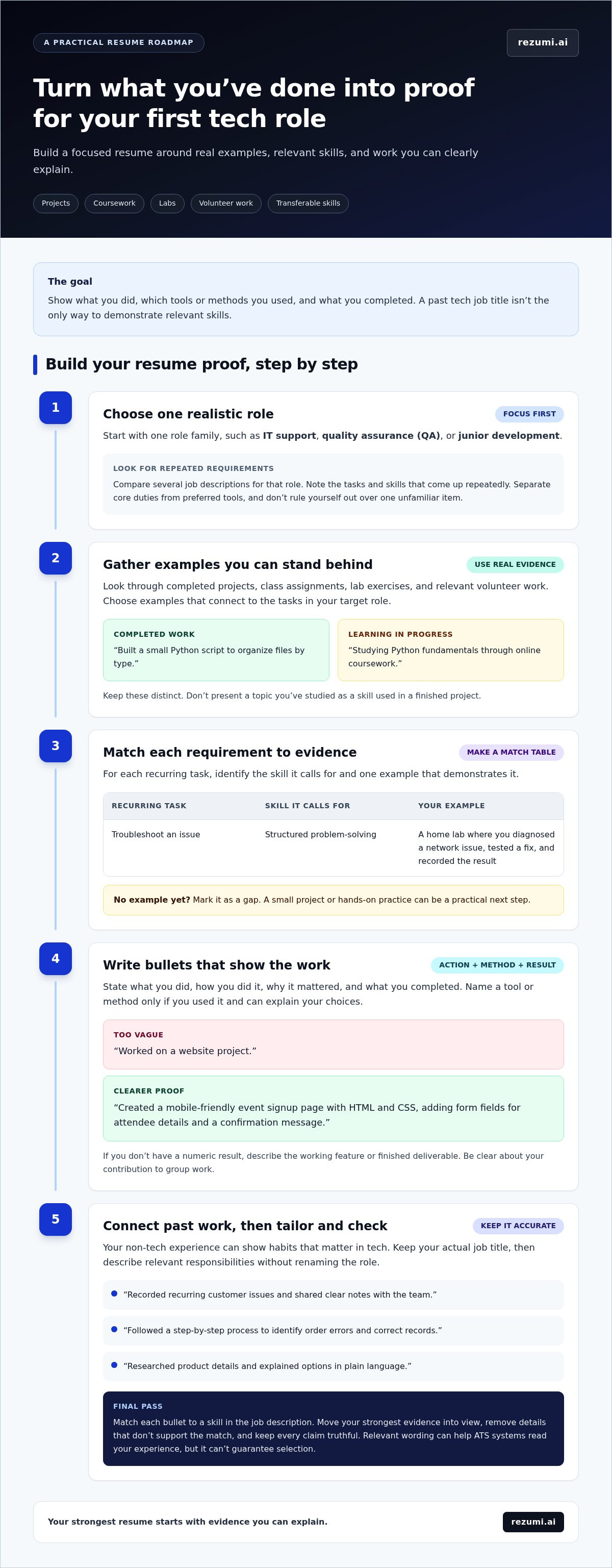
Tailoring means selecting and describing true evidence that matches a specific job, not copying every keyword from the posting. ATS-friendly wording can help software read your resume and make relevant details easier to find, but it can’t guarantee selection. Use this four-step workflow to build a resume for getting a tech job with no tech experience around examples you can explain.
- Identify requirements. Read the job description and note repeated tasks, required skills, and tools. Separate core duties from preferred qualifications so one unfamiliar item doesn’t distract you from the role’s main needs.
- Map evidence. For each relevant requirement, write down a project, course, lab, or work example that supports it. If you can’t name one, mark it as a skill gap. Don’t hide the gap with a claim you can’t prove.
- Revise wording. Use the posting’s terminology when it accurately describes what you did. If it asks for troubleshooting, describe a real time you found and addressed a problem. Don’t claim experience with a tool just because it appears in the listing.
- Review accuracy. Check that each bullet reflects your contribution, dates and titles are correct, and the revised resume still reads clearly to a person.
Match job requirements to evidence you can prove
Look for connections, not exact matches. A posting may ask for customer issue documentation, while your example comes from recording recurring problems in a non-tech role. You can describe that work in the employer’s language as long as the meaning stays accurate. Evidence-based tailoring clarifies a real match; keyword stuffing adds terms without proof.
Keep a simple match list as you work: requirement, supporting example, and any gap. It helps you decide what to feature and what to learn next. It also keeps your resume focused on the role instead of turning it into a broad inventory of every skill you’ve studied.
Keep the resume clear for people and ATS software
Use standard section names such as “Skills,” “Projects,” “Experience,” and “Education.” Keep formatting readable, avoid placing key details only in graphics or text boxes, and present job dates consistently. These choices help keep information clear for software parsing and human review, though different systems may process documents differently.
Before submitting, compare the final resume with the posting once more. Confirm that important terms appear only where they fit, your strongest evidence is easy to find, and nothing suggests experience you don’t have. Then prepare a cover letter that supports the same role-specific story without repeating the resume word for word.
Build a Stronger Tech Job Application With a Focused Next Step
A strong application is accurate, tailored, and easy to review. Before you submit, check that your resume matches the role, reads clearly, and tells the same story across every section. Save a copy of the exact version you sent. A focused resume process helps you learn from each application instead of starting from scratch every time.
Use feedback to improve the next application
Run a final review before sending your resume. Confirm that your contact details, job titles, dates, project descriptions, and skills are correct. Check that your most relevant evidence is easy to find, the formatting is readable, and your wording reflects what you actually did. Read it aloud once. Awkward or unclear lines often stand out when you hear them.
Keep a simple application record so each submission has context. You can use a spreadsheet or a centralized application workspace. Record the employer, role, submission date, resume version, and status. Add a short note about which project or skill you emphasized. When you revise your resume later, this record helps you identify which version went to each employer and avoid mixing up details.
After a meaningful revision, compare your resume with the job description again. Check whether the changes make relevant evidence clearer, not just whether they add more keywords. Rezumi supports this workflow with job-description tailoring, resume feedback, and an application workspace for organizing versions and submissions. If you earn an interview, its AI interview preparation can help you practice explaining the projects and skills on your resume.
Set a practical plan for your next application
Choose one target role and review the evidence you already have. Pick the strongest example for a key requirement, then identify one gap that could weaken your application. Make your next step specific: complete a small project that demonstrates a needed task, practice a tool named in relevant postings, or finish a course that builds a foundation. Keep the goal manageable and tied to evidence you can later describe truthfully.
- Before applying: Check accuracy, relevance, readability, and consistent details.
- After applying: Save the submitted version and note the role, employer, date, and status.
- Before the next application: Review what changed and choose one useful improvement.
You don’t need to claim every skill in a job posting. You need a clear match between the role and what you can show, plus a practical plan to strengthen your evidence over time.
Make Your Next Application a Clear Step Forward
A resume for getting a tech job with no tech experience should help you take a clear next step, not make you feel you need to master everything first. Choose a role that fits your current strengths, then set one realistic goal to build the evidence you’re missing. Progress comes from steady, honest steps.
As you apply, notice what helps you explain your value clearly. Refine your materials when you gain new experience, and focus on roles that match what you can show today. Rezumi’s tools can help you tailor your resume, prepare for interviews, and keep your job search organized.
You don’t need a perfect career history to move forward. Start with what you can demonstrate, keep learning, and give your next application your best, most focused effort.
Frequently Asked Questions
Can you get a tech job with no tech experience?
Yes, you can apply for an entry-level tech job without a previous tech job, though each employer sets its own requirements. Your application can make a stronger case if it shows relevant practice, such as resolving a computer issue, testing a small program, or helping someone set up software. Be ready to explain what you did and what you learned. If a role requires experience you don’t have, focus on postings that better fit your current skills.
What should you put on a tech resume with no experience?
Include contact details, relevant skills, completed projects, education or training, and work history that supports the role. Choose details that help an employer understand what you can contribute. For example, if you’re applying for QA work, describe how you tested a class project and recorded a defect. Keep unrelated details brief, and don’t list a skill unless you can explain where and how you used it.
How do you write a resume for an IT job with no experience?
Focus your resume on the tasks in the IT support posting, such as helping users, diagnosing common issues, or documenting fixes. A home lab or volunteer example can show your approach: describe the problem, the steps you took, and what you resolved. List operating systems or support tools only if you’ve used them. If you’re studying a skill but haven’t applied it, label it as training rather than hands-on experience.
Should you include personal projects on a tech resume?
Yes, include personal projects that demonstrate skills related to the role. A project can give an employer something specific to review, especially if you can share a working demo or code repository. Add a short description of the problem, your contribution, and how someone can see the result. Don’t include unfinished experiments as completed work. If a project is still in progress, say so and describe what currently works.
How many projects should you include on an entry-level tech resume?
There’s no fixed number that fits every resume. Start with the projects most relevant to the role, and make each entry useful rather than adding work just to fill space. Two well-explained projects may give a clearer picture than a long list of brief titles. Be prepared to discuss your decisions, the parts you completed, and what you’d change if you continued the work.
Can an ATS reject a resume with no tech experience?
An applicant tracking system (ATS) can help employers sort or review applications, and an application may not move forward if it doesn’t match the employer’s criteria. That doesn’t mean every ATS automatically rejects resumes without tech job titles. Use clear section headings and relevant terms that accurately describe your background. A readable, well-matched resume can support review, but no wording or format guarantees selection.
How can you show tech skills without a tech job?
Show skills through work you’ve completed outside paid tech employment. You might share a small app, a test plan, a lab write-up, or a volunteer task, then explain your individual contribution. A portfolio page or repository can help readers inspect the work if it’s organized and accessible. Be clear about whether an example came from coursework, personal practice, or volunteering, so employers understand the setting.
Disclaimer
This article is provided for general informational purposes only and does not constitute professional, legal, financial, or career advice. While Rezumi strives for accuracy, we make no warranties as to the completeness or reliability of this content. Hiring practices, ATS behavior, and job-market conditions vary by employer, industry, and region — always verify against your specific situation. Any action you take based on this article is at your own risk.