Harvard Resume Size: The Strategic Guide to Professional Formatting
A fancy, creative layout is often the fastest way to get your resume rejected by a top-tier firm. Recruiters at elite companies prioritize clarity over artistic flair. When you use the standard harvard resume size, you signal that you understand professional norms. This blueprint isn't just about aesthetics. It's a technical requirement for passing North American applicant tracking systems that often struggle with complex designs.
It's normal to feel overwhelmed by conflicting formatting advice. You might worry that your page looks too crowded or suspiciously empty. This guide removes that uncertainty by providing the exact dimensions you need. You'll learn the specific measurements for margins and font sizes required to master the Harvard format. These rules ensure your document looks polished and professional at first glance.
We'll break down the technical details that make a resume easy for both AI scanners and human eyes to read. This includes choosing the right paper dimensions and alignment strategies to keep your data organized. By following this guide, you will create a layout that aligns perfectly with North American hiring standards and secures your place in the interview pile.
Key Takeaways
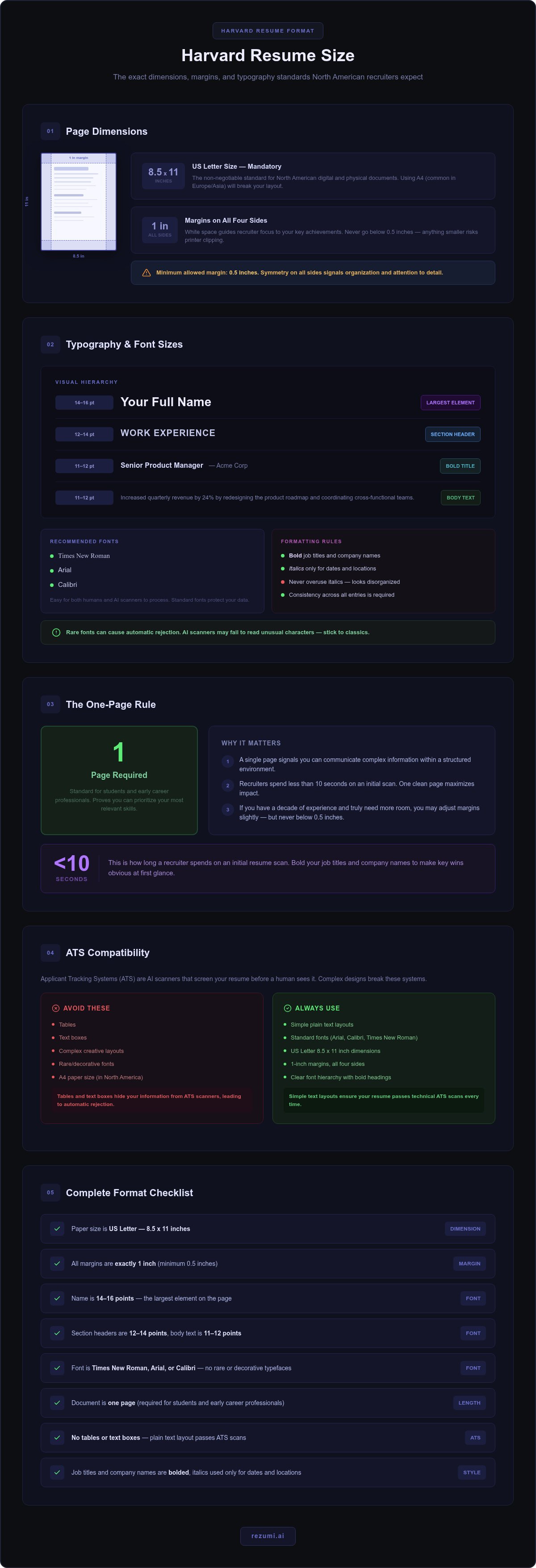
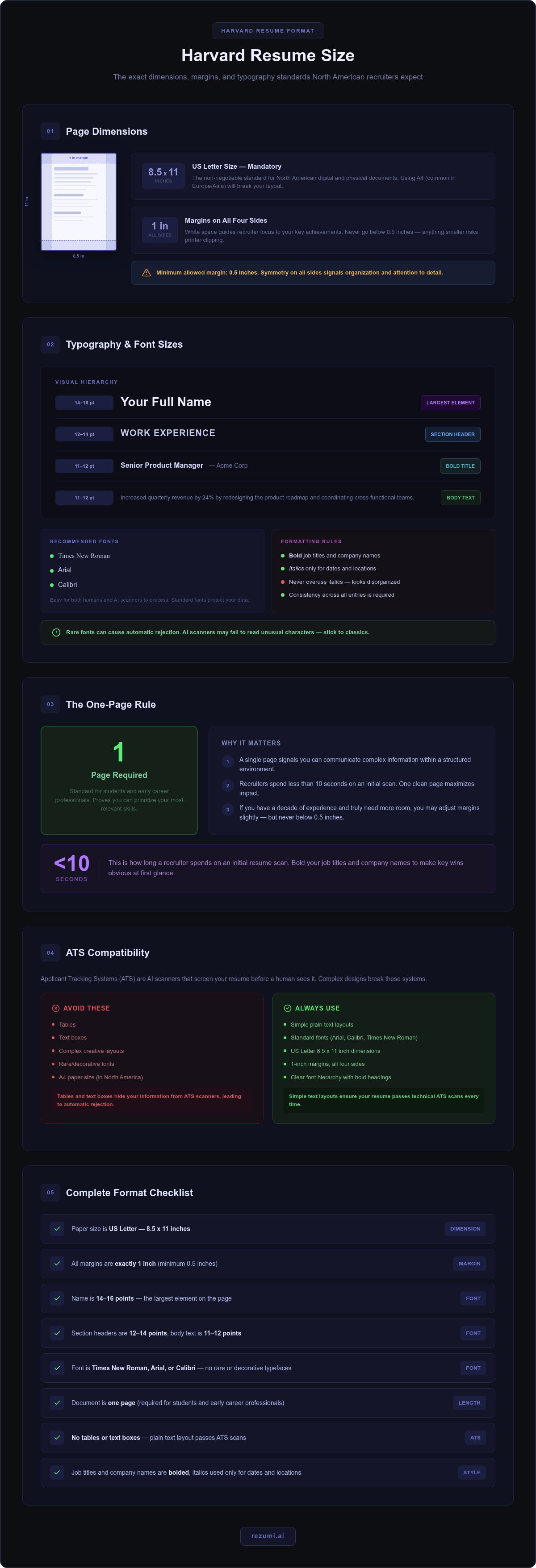
- Master the exact harvard resume size by using 8.5 by 11 inch dimensions with 1 inch margins on all sides. This creates a clean, balanced look that recruiters expect.
- Use a clear font hierarchy with your name at 14 to 16 points and body text at 11 or 12 points. This makes your document easy for recruiters to scan quickly.
- Keep your resume to a single page to prove you can prioritize your most relevant skills. This is the required standard for students and early career professionals.
- Avoid using tables or text boxes because they can hide your information from applicant tracking systems. Simple text layouts ensure your resume passes technical scans.
- Use Rezumi to automate these technical standards so you don't have to adjust margin settings manually. Our platform ensures your final PDF matches professional North American requirements.
Standard Dimensions and Margins for the Harvard Resume Format
Precision is the foundation of a high-impact application. Your resume is a technical blueprint. It signals your professional readiness before a recruiter reads a single word. Mastering the harvard resume size is your first step toward that goal. This format relies on specific dimensions to maintain a clean, authoritative look that elite firms expect.
Why US Letter Size is Mandatory in North America
The Harvard standard requires US Letter paper size. This is exactly 8.5 by 11 inches. In North America, this is the non-negotiable default for digital and physical documents. If you use A4 dimensions, which are common in Europe and Asia, your layout will likely break. A recruiter might print your resume and find the bottom half of your experience section cut off. This mistake suggests a lack of attention to regional standards.
Rezumi handles these technical requirements for you. Our platform exports your resume using the exact North American dimensions required by top firms. You focus on your career wins while the tool manages the geometry. This ensures your document looks perfect whether it is viewed on a screen or held in a recruiter's hand.
The Strategic Use of One-Inch Margins
Margins are equally critical to your success. Set your margins to exactly 1 inch on all four sides. This creates a professional frame that makes your content pop. Many job seekers try to cram extra text by using narrow margins. This is a strategic error. White space is not wasted space. It acts as a visual guide that helps a recruiter focus on your key achievements. Cluttered pages cause eye fatigue. Clean pages invite reading.
Following standard resume formatting conventions means respecting these boundaries. If you have a decade of experience and truly need more room, you might adjust your margins slightly. Never go below 0.5 inches on any side. Anything smaller risks getting clipped by printers or looking unprofessional. Symmetry signals a high level of detail. It tells the employer that you are organized and methodical. Stick to the 1-inch rule whenever possible to maintain the elite harvard resume size aesthetic.
A balanced layout reflects a balanced candidate. When your margins are consistent, your resume looks engineered for success. It shows you can communicate complex information within a structured environment. This is exactly what high-end employers look for in top talent.
Typography and Font Sizes for a Professional Look
Typography is the voice of your document. While the harvard resume size defines the physical boundaries of your page, your font choice determines how well you communicate within them. If your text is too small, a recruiter will simply stop reading. If it is too large, you appear inexperienced. You must strike a balance that looks professional on both paper and digital screens.
Your name must be the largest element on the page. Use a size between 14 and 16 points to ensure you are the focal point. For your main body text, 11 or 12 points is the standard. This size ensures your achievements are legible without crowding the page. Section headers should be slightly larger than the body text, usually 12 to 14 points. Stick to classic, reliable fonts like Times New Roman, Arial, or Calibri. These are the preferred choices for the Harvard look because they are easy for both humans and AI to process. Standard fonts also protect your data during the initial scan. AI tools can easily read these common characters, whereas a rare font might lead to an automatic rejection.
Creating a Visual Hierarchy
Recruiters often spend less than ten seconds on an initial scan. You need to make your key wins obvious. Bold your job titles and company names to create immediate impact. This technique guides the eye to your most recent roles and career progression. Use italics only for secondary details like graduation dates or locations. Overusing italics can make the text look slanted and disorganized. Every choice you make should support a clean layout. Following U.S. Bureau of Labor Statistics career guidance regarding professional document standards will help you stay within these accepted norms. Consistency is the hallmark of the Harvard style. If you bold one company name, you must bold them all.
Digital Legibility in 2026
By 2026, mobile-first recruiting is the norm. Many hiring managers will review your application on a smartphone while between meetings. Serif fonts like Times New Roman can sometimes look cluttered on small, low-resolution screens. Consider a sans-serif font like Arial for better digital clarity. You should also pay close attention to line spacing. Keep it between 1.0 and 1.15. This provides enough air between lines to prevent eye strain and keeps your content from looking like a solid block of ink. If you are worried about manual settings, you can check Rezumi's automated formatting tools to handle these technical details for you. Our system ensures your typography remains consistent across all devices and maintains the perfect harvard resume size balance.
The One-Page Rule and How to Handle Content Density
A single page is the gold standard for a professional resume. This constraint is not just a tradition; it is a test of your communication skills. When you adhere to the harvard resume size guidelines, you demonstrate an ability to prioritize your most impactful wins. Recruiters at elite firms value candidates who can distill a decade of work into a sharp, one-page summary.
Your goal is to fill the page completely without creating a wall of text. A resume that is only half-full suggests a lack of experience or effort. Conversely, a document that overflows by just three lines looks poorly planned. You must balance your content density to ensure every inch of the US Letter page serves a strategic purpose. If you have too much content, you must edit. If you have too little, you must expand on your specific achievements and metrics.
Strategies for Fitting Content on One Page
You don't need to list every job you have ever held. Focus on roles from the last five to seven years that directly relate to the position you want. If you are a recent graduate, your internships and campus leadership roles are your primary currency. Use these technical tactics to maximize your space:
- Consolidate your contact info: Place your phone number, email, and LinkedIn profile on a single line at the top.
- Use bullet points: Replace long paragraphs with punchy, action-oriented bullets that start with strong verbs.
- Audit your descriptions: Remove filler words and generic duties. Focus only on outcomes and data-backed results.
When a Second Page is Acceptable
Only move to a second page if you have more than ten years of highly relevant experience. Senior executives, academics, and researchers often require extra space for lists of publications or extensive project histories. If you use two pages, make sure the second page is at least half full. A second page with only a few lines of text looks like a formatting error and wastes the recruiter's time.
Always put your most impressive achievements on the first page. This ensures the hiring manager sees your value immediately, even if they never flip to the next sheet. If you're struggling to manage the layout, Rezumi's Profile Editor automatically adjusts spacing to help you maintain the harvard resume size while keeping your content readable. It helps you avoid the "empty page" look while ensuring your most important data stays front and center.
Technical Formatting for North American ATS Compatibility
An Applicant Tracking System (ATS) is an algorithm, not a person. It looks for patterns and structure. If your formatting is too complex, the software will fail to parse your details. This often leads to an automatic rejection before a human ever sees your name. Maintaining the standard harvard resume size is a technical necessity for modern 2026 algorithms. You aren't just writing for a human recruiter anymore. You are writing for a machine that prioritizes structure over style. Predictable layouts allow the software to map your skills to the job description without errors.
Always export your document as a PDF to protect your hard work. This format locks your layout in place. It ensures that the recruiter sees exactly what you intended, regardless of the device they use. Word documents can sometimes shift or lose formatting when opened in different versions of the software. A PDF preserves the integrity of your alignment and keeps your font sizes sharp. This consistency is vital for passing the initial technical scan at top tier firms.
How Scanners Read Your Layout
Modern scanners process information in a linear path. They move from the top of the page to the bottom and from left to right. This is why a single-column layout is the most effective choice for digital applications. If you use sidebars or multiple columns, the software may merge unrelated blocks of text. It might read your contact information and your job duties as one continuous sentence. This creates a data error that prevents you from appearing in search results. Stick to the classic Harvard structure to ensure your data remains clean and searchable for the AI.
Avoiding Common Formatting Pitfalls
Many candidates make the mistake of placing essential data in the header or footer. This is a significant risk. Some ATS platforms ignore these areas to save processing power. If your phone number or email is hidden in a header, the recruiter cannot contact you. Keep all vital information within the main body of the page. You should also avoid using tables, text boxes, or images. These elements act like walls for scanners. They often hide the text inside them, making your achievements invisible to the system. If the software cannot find your text, it assumes the information is missing.
Stick to standard bullet points throughout your document. Simple circles or squares are the best choice. Avoid using custom icons or "creative" symbols like arrows or diamonds. These can confuse the software and turn your resume into a string of broken characters. Consistency is your greatest ally here. If you use a specific bullet style for one section, use it for all of them. This uniformity helps the algorithm recognize the start of a new list. By following these technical rules, you ensure your harvard resume size and content work together to reach a human reader.
Applying the Harvard Standard with Rezumi AI Tools
Rezumi automates the technical side of your job application. You don't need to manually adjust margin settings or worry about the exact harvard resume size. Our platform locks your document into the required 8.5 by 11 inch North American standard automatically. This ensures your profile editor settings match the expectations of elite recruiters without the stress of manual configuration. You can move from uncertainty to control by letting the technology handle the geometry of your page.
Our ATS optimization tools provide real-time feedback on your content density. If your text is too sparse or too crowded, the system alerts you immediately. This helps you maintain the strict one-page standard while ensuring your layout remains fully readable by AI scanners. You get the benefit of a professional design with the technical assurance of a high-performance tool. By using our centralized workspace, you can track your applications and ensure every version of your resume meets these rigorous formatting rules.
Tailoring Your Achievements for Impact
Harvard style requires strong action verbs to demonstrate leadership and initiative. Rezumi's AI helps you draft bullet points that start with high-impact verbs like "directed," "engineered," or "refined." It also prompts you to quantify your results with specific numbers. Instead of saying you "improved sales," our data-driven suggestions help you specify that you "increased revenue by 22 percent." This level of detail aligns your experience with specific job descriptions while maintaining the elite Harvard look. The system acts as a sharp career coach, helping you refine your story for maximum impact.
Ready to Master Your Job Search?
Stop struggling with rigid Word templates. These traditional files often break or shift every time you add a new sentence or change a font size. Rezumi handles the technical details of margins and typography for you. We act as a strategic partner so you can focus on telling your career story rather than fighting with a layout. Our PDF export ensures your final document is optimized for the North American market and ready for any high-stakes application. You deserve a resume that reflects your professional value at first glance.
Check out our pricing plans to start building your professional resume today.
Secure Your Place in the Interview Pile
Professional success starts with a document that respects established boundaries. By mastering the harvard resume size, you've ensured that your layout won't be the reason for an automatic rejection. You now know that 1 inch margins and US Letter dimensions create the authoritative frame your experience deserves. These technical details signal to top firms that you are ready for high-stakes roles and understand regional standards.
Consistency is your greatest asset. Whether it is keeping your content to a single page or using ATS-friendly fonts, every choice you make should prioritize clarity. Rezumi is built specifically for the North American market to handle these complex requirements for you. Our AI-powered ATS optimization is used by professionals at top global firms to stay competitive in the modern job market. We handle the formatting so you can focus on your story.
You have already done the hard work of building a great career. Now you have a strategic blueprint to showcase those wins with confidence. It's time to hit send and land the role you've earned.
Frequently Asked Questions
Is the Harvard resume format still effective in 2026?
Yes, the Harvard format remains the gold standard for elite professional roles. Recruiters in finance, consulting, and law still prefer this clean, structured layout because it prioritizes data over decoration. It's a reliable way to ensure your achievements stand out without the risk of technical errors. Using the standard harvard resume size ensures your document looks professional on any device or printed page.
What is the best font size for a Harvard-style resume?
You should use 11 or 12 point font for your body text to ensure maximum legibility. Your name should be the largest element on the page, typically between 14 and 16 points. Section headers should be slightly larger than the body text, usually 12 to 14 points. This hierarchy creates a professional flow that guides the recruiter's eye toward your most important career wins and contact information.
Can I use 0.5-inch margins on a Harvard resume?
Yes, you can use 0.5-inch margins, but 1-inch margins are the preferred standard for a balanced look. Use the smaller 0.5-inch setting only if you have over five years of experience and need the extra space for critical data. Never go smaller than 0.5 inches. Doing so makes the page look cramped and increases the risk of your text being cut off by standard North American printers.
Should a Harvard resume be one or two pages?
One page is the strict standard for students and professionals with less than ten years of experience. A single page proves you can prioritize information and communicate your value concisely. Only move to a second page if you are a senior executive with an extensive list of relevant achievements. If you do use a second page, ensure it is at least half-full to maintain a professional appearance.
What paper size should I use for North American job applications?
You must use US Letter size, which measures 8.5 by 11 inches. This is the mandatory standard for all North American employers. Using the correct harvard resume size prevents your document from being distorted or cut off when printed or viewed on regional digital systems. Rezumi automatically handles these dimensions for you, ensuring your PDF export matches the expectations of top tier firms in the United States and Canada.
Are sans-serif fonts allowed in the Harvard resume format?
Yes, sans-serif fonts like Arial, Calibri, or Helvetica are perfectly acceptable and highly recommended for digital readability. While traditional Harvard resumes often used serif fonts like Times New Roman, sans-serif options are often easier to read on mobile devices. Choose one clean font and use it consistently across your entire document. This modern approach maintains the professional Harvard aesthetic while catering to the habits of busy hiring managers.
How do I make my Harvard resume ATS-friendly?
Keep your layout simple by avoiding tables, text boxes, images, or complex columns that confuse scanners. Use standard section headers like "Professional Experience" and "Education" so the software can correctly identify your data. Start your bullet points with strong action verbs and include specific keywords from the job description. Finally, always export your resume as a PDF to preserve your formatting and ensure the system reads your information accurately.
Disclaimer
This article is provided for general informational purposes only and does not constitute professional, legal, financial, or career advice. While Rezumi strives for accuracy, we make no warranties as to the completeness or reliability of this content. Hiring practices, ATS behavior, and job-market conditions vary by employer, industry, and region — always verify against your specific situation. Any action you take based on this article is at your own risk.