How to Check a Resume for ATS: A Practical Guide
A resume can look polished on screen and still lose key details when hiring software extracts its text. To check resume for ATS readability, look beyond a checker score: see what the system can read, then check whether your experience matches a specific role.
Columns, section headings, and missing keywords can all raise questions, but there isn’t one universal ATS or checker. A high score alone can’t prove your file is readable or that your experience fits the job. Start with the text extracted from your resume, then compare your experience with the posting.
This guide gives you a repeatable check. You’ll inspect extracted content and section order, review your file format, find relevant gaps in the job description, and make focused edits you can support with real examples. You’ll also learn how to assess checker feedback without stuffing in keywords or changing accurate details. The result is a resume that’s easier to read, clearly aligned with the role, and ready for a final review before you apply.
Key Takeaways
- To check resume for ats, compare the extracted text with your original document and fix missing or scrambled details first.
- Assess readability and job fit separately. A resume can parse correctly but still lack clear evidence for a role’s key requirements.
- Use checker scores as feedback, not verdicts. Different tools may assess different things, so focus on the specific issue each result identifies.
- Prioritize edits that restore meaning or make important information easier to find. Then sharpen wording without adding claims you can’t support.
- Rezumi guides per-job resume work through four stages: Build profile → Write & optimize → Design & export → Cover letter & interview prep.
What does it mean to check a resume for ATS?
Checking a resume for an applicant tracking system (ATS) means assessing two things: whether the system can read your resume content and whether that content is relevant to a specific job. These are separate checks. Your resume might be extracted correctly but still fail to show clear evidence of the skills or experience an employer needs.
To check resume for ats fit, treat readability and relevance as different questions. Can the system identify your contact details, work history, and education? Does your resume show examples that support the target role’s requirements? A strong result on one question doesn’t answer the other.
An ATS can help employers store and organize candidate information for recruiter workflows, but employers may configure and use their systems differently. A third-party checker can point to possible issues, but it can’t tell you exactly how a specific employer will assess your application. For a general overview, see Applicant Tracking System (ATS) on Wikipedia.
What an applicant tracking system can do with resume information
Parsing is the process of converting a resume file into information software can process. The system may identify details such as your name, job titles, employers, dates, and skills, then store or organize them for recruiters. If a heading or date is misplaced during extraction, that information may be harder to find or interpret.
A resume parser is one part of software that reads and organizes resume information. An employer’s screening process can also include recruiter review and other steps, so a parser result alone doesn’t describe the full decision process.
What an ATS resume check can and cannot tell you
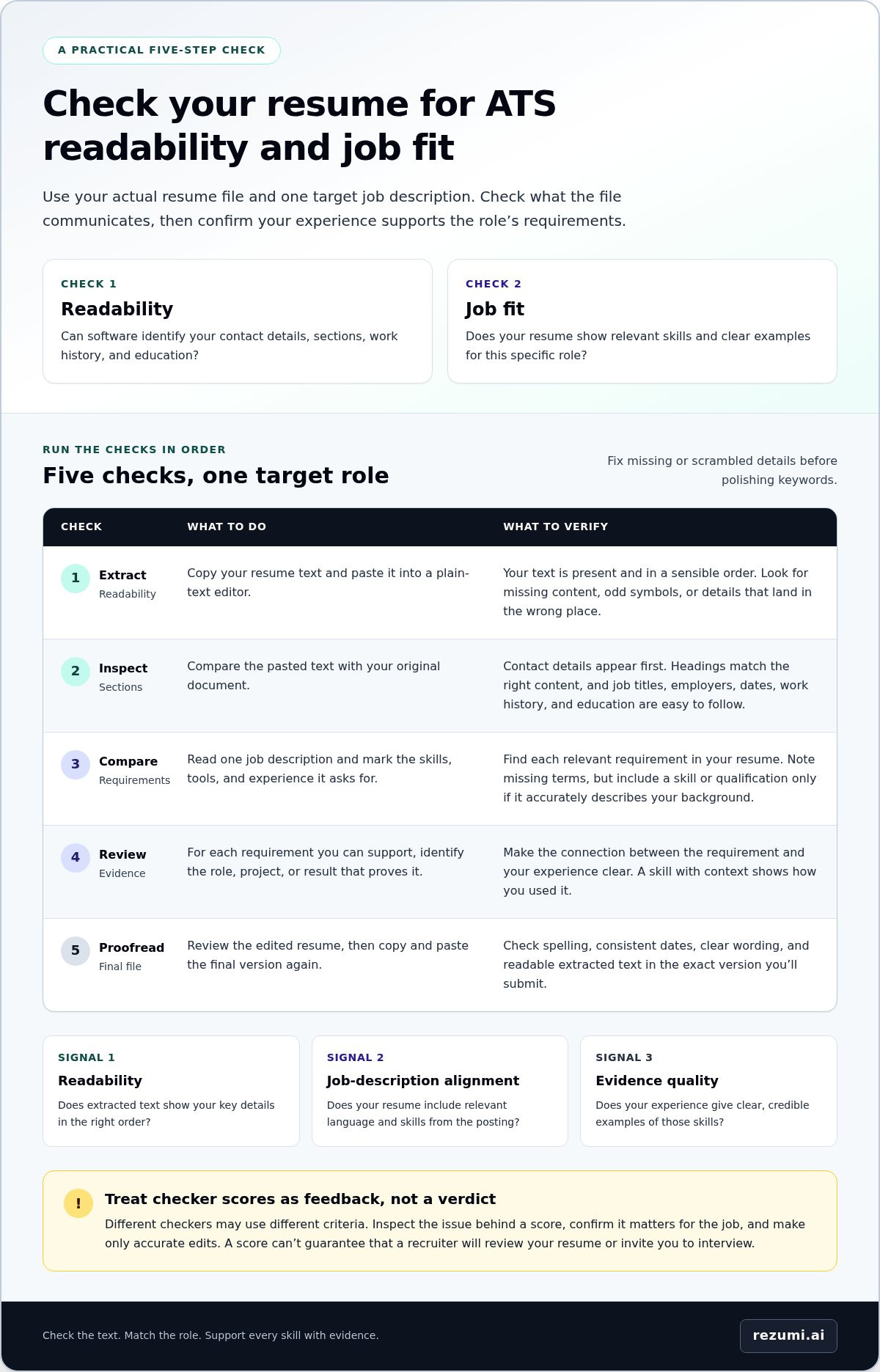
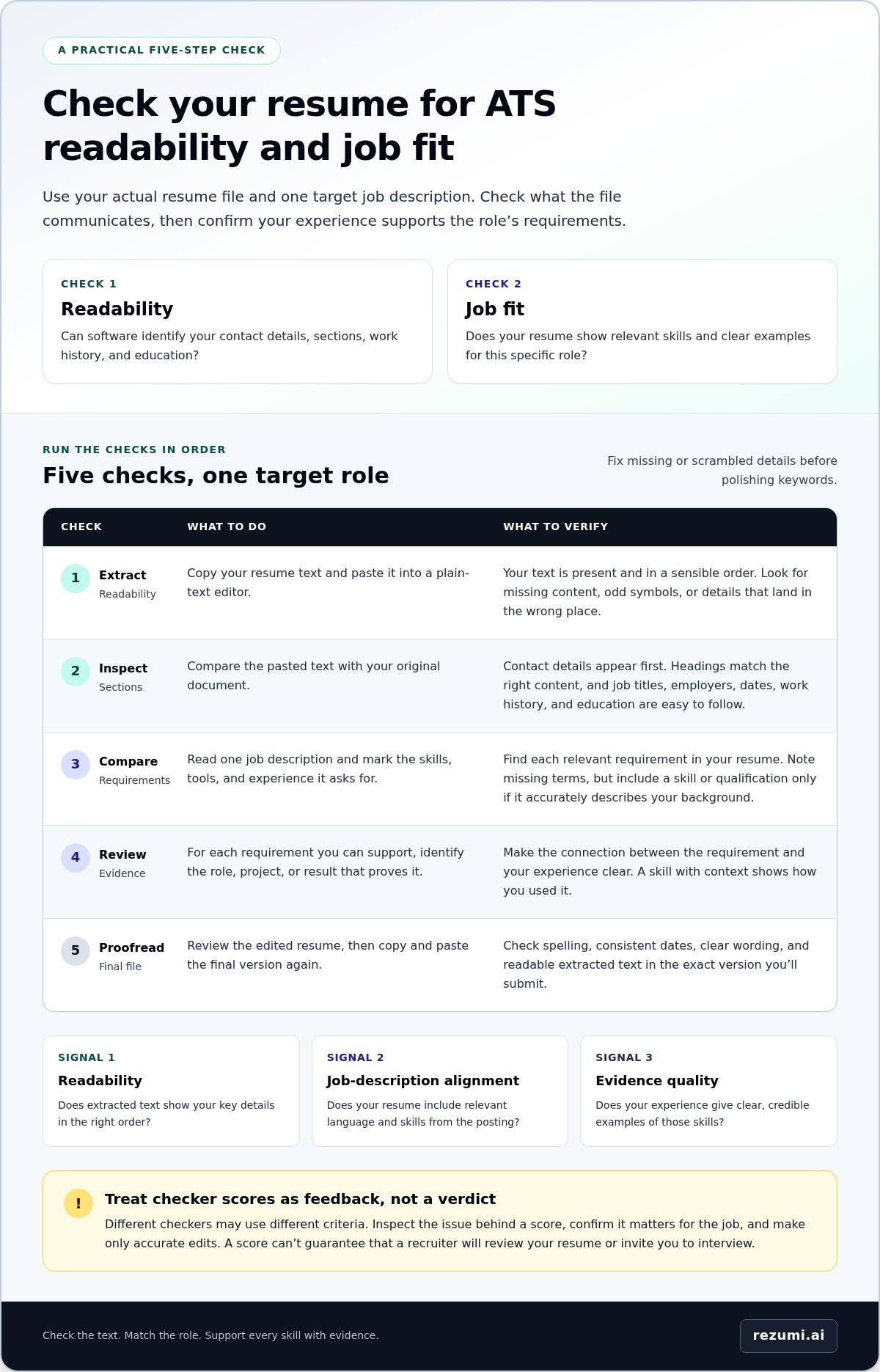
Think of an ATS check as three separate signals:
- Readability: Whether the resume’s text and key details appear in the correct order after extraction.
- Job-description alignment: Whether your resume includes relevant language and skills from the target posting.
- Evidence quality: Whether your experience gives clear, credible examples of those skills.
A checker can flag a missing term or an unreadable section. It can’t decide whether your experience is persuasive to a recruiter, and its score reflects the tool’s own scoring method. Scores from different checkers may use different criteria, so don’t treat them as directly comparable or as a hiring decision.
Use a score as a prompt to inspect the feedback behind it. If a tool flags a skill, check whether the job posting asks for it and whether you have accurate experience to support it. If the extracted text scrambles your dates or drops a section, fix that issue before polishing keywords. No checker score can guarantee that a recruiter will review your resume or invite you to interview.
How to check your resume for ATS in five practical steps
Use your actual resume file and one target job description. That keeps the check grounded in the role you want, not a generic score. Work through these five checks in order: extract the text, inspect sections, compare job requirements, review evidence, and proofread.
Test whether the resume’s text and sections remain readable
Start by copying your resume text into a plain-text editor. Compare it with the original document, line by line where needed. Check that your contact details, headings, job titles, employers, dates, and education are present and easy to identify. Look for missing text, odd symbols, or details separated from the section they belong to.
- Extract the text. Open your resume in a program that lets you select and copy its text. Paste it into a plain-text editor, which removes most visual formatting and makes the reading order easier to inspect. If content disappears or lands in the wrong place, the file may not be communicating your information clearly.
- Inspect the sections. Compare the pasted text with the original. Confirm that your name and contact details appear first, headings are attached to the right content, and work history and education are easy to follow. Check dates and employer names, too. A date shown beside the wrong role can confuse your timeline.
- Compare job requirements. Read one job description and mark the skills, tools, and experience it asks for. Look for each requirement in your resume. Note relevant terms that are missing, but don’t add a skill or qualification unless it accurately describes your background.
- Review your evidence. For each key requirement you can support, identify the role, project, or result that proves it. A skill listed without context may be less clear than a bullet showing how you used it. Make the evidence easy to connect to the requirement.
- Proofread the final version. Review the edited resume for spelling, consistent dates, and clear wording. Then copy and paste the final file again. Tailoring can introduce formatting or text errors, so check the version you’ll actually submit.
Compare the resume with one job description
Keep the job posting beside your resume as you check. For each required skill or experience, locate a truthful example in your work history, education, or projects. Use clear terms for your skills and job titles, and give enough context for a reader to understand your contribution. If you can’t support a requirement, leave it out rather than copying the posting.
This manual process gives you a concrete way to check resume for ats issues without relying on one tool’s score. For guided feedback as you tailor your resume to a specific role, explore Rezumi’s resume optimization options.
How to interpret ATS scores without treating them as a verdict
An ATS score is feedback from a tool, not a universal measure of your chances. One checker may focus on file readability, while another may compare your wording with a job description. Employers also configure and use their systems differently, so an outside checker can’t confirm how a particular employer’s ATS will handle your resume.
Read the specific findings before reacting to the number. Use this comparison to see what a result can tell you and what it can’t.
Readability feedback
Flags possible issues with extracted text, section order, or missing details. Check the finding against your resume and correct it if it affects meaning or hides information.
Keyword feedback
Points out terms from a job description that may be absent from your resume. Check whether you have relevant experience to support each term before deciding whether to include it.
Human-review feedback
A checker can’t tell you how a recruiter will judge your experience. A person can weigh context, results, and relevance in ways a score may not reflect.
Scores from different tools aren’t necessarily equivalent. Each tool may use its own criteria, weighting, and comparison method. A higher score in one checker doesn’t prove your resume will receive the same result elsewhere or in an employer’s system. When you check your resume for ATS issues, focus on findings you can verify in the document or against the job posting.
Separate parsing issues from job-match feedback
First, sort feedback by type. If text is missing, scrambled, or assigned to the wrong section, treat it as a document or structure issue and investigate it before editing for job fit. If a tool flags a missing job term, check your experience rather than treating the flag as an instruction. A keyword without relevant evidence can make your resume less clear.
Use a checker result as a starting point, not a hiring prediction
Review every suggestion with three tests: Is it specific? Is it relevant to this role? Can you support it with your actual experience? Keep edits that improve accuracy or make evidence easier to find. Skip advice that asks you to claim skills you don’t have, repeat keywords awkwardly, or change wording in a way that obscures your meaning.
Prioritize the issue, not the score. A low result caused by a genuine text extraction problem deserves attention. A high result doesn’t confirm that your experience fits the role or that a recruiter will review your application. No score threshold can promise recruiter attention or an interview.
How to fix ATS check findings while keeping your resume clear
Fix problems that hide or change information before polishing keywords. A scrambled job history or missing section can make your experience harder to understand. Once the content reads in the right order, make focused edits that connect your real skills to the job without overstating your background.
Repair unclear structure before polishing keywords
Use familiar section headings, such as “Experience,” “Education,” and “Skills,” and keep the information beneath each heading in a clear sequence. For each role, present your job title, employer, dates, and supporting details consistently. Simple formatting can make text easier to follow, but no single layout works the same way in every ATS.
Make repairs in this order:
- Restore any text that disappeared or moved away from its heading.
- Put roles, employers, dates, and details into a consistent order.
- Replace unclear labels with direct section headings.
- Recheck the exported file by copying its text into a plain-text editor and reviewing the reading order again.
That last check matters. Editing or exporting can introduce new problems, so review the version you plan to submit, not only the file you worked on.
Make job-relevant evidence easier to recognize
After fixing the structure, compare your wording with the job description. Use its terms when they accurately describe your skills or experience. Then connect each important skill to a task, project, or result your work history supports. This gives the reader context instead of a list of isolated keywords.
Fictional example
- Before: “Helped improve customer service.”
- After: “Answered customer questions, recorded recurring concerns, and shared patterns with the team to guide service updates.”
The revised bullet is more specific about the work performed and how it supported the team. Use this kind of detail only when it reflects your actual experience. Don’t add a result, tool, or level of responsibility just because it sounds stronger.
Make each edit solve a clear problem: restore meaning, clarify relevant experience, or show the connection between a skill and its evidence. Then read the resume aloud. If the wording sounds forced or unclear, simplify it.
Rezumi guides per-job resume edits and provides ATS feedback as you refine your document.
How Rezumi helps you check and tailor a resume for ATS
After your manual review, Rezumi gives you a guided way to apply feedback to each job application. It’s an AI-powered resume and career platform purpose-built for North American hiring, with real-time feedback to help you assess your resume and refine its fit for a role. Use the results to guide your edits, not to predict an employer’s decision.
The workflow follows four stages: Build profile → Write & optimize → Design & export → Cover letter & interview prep. It connects resume work with other materials you may need for an application, while keeping your experience at the center.
Use Rezumi’s job-specific workspace and feedback
Dedicated workspaces support tailoring a resume to individual job applications. Rezumi’s ATS Score, Job Match %, and Keyword % provide feedback about your resume and its alignment with a role. Use them to spot areas to review, but remember they don’t guarantee that an employer’s system will read or rank your resume in the same way.
Keyword feedback includes P1 critical, P2 preferred, and P3 nice-to-have labels to show levels of priority. Use those labels to guide your review, not to add every term automatically. Check whether your resume already contains accurate evidence for a priority skill. If it does, make that example easier to recognize. If it doesn’t, don’t claim the skill just to change a score.
Rezumi reports a 91 % average ATS score achieved by users and 20 + hours saved per application. It also lists 300 + workspaces per plan and 4× steps from profile to hired. These are platform proof points, not promises about your individual results.
Move from resume review to application preparation
Use the Profile Editor to build and update your career details, then apply them to a role-specific resume. In Design view, refine the document and export a PDF in US Letter or A4. Review the exported version before submitting it to confirm your details still appear clearly.
Once your resume is ready, Rezumi supports the next parts of your application with cover-letter generation and interview training using the CAR-framework. Use the framework to organize an answer around the challenge you faced, the action you took, and the result. Keep each example accurate and grounded in your own experience.
A free starter tier is available, with paid plans when you’re ready to upgrade. All prices exclude applicable taxes. No contracts. Cancel anytime.
Make your next application a deliberate one
Turn your final resume check into a repeatable step before each application. Keep a master resume with your full work history, then create a separate copy for each role. This lets you highlight relevant experience without losing details you may need for another opportunity.
As you check resume for ats readiness, make one last comparison with the specific posting. Confirm that your strongest, supported evidence is easy to find and that you’re submitting the version you reviewed. Small, focused edits are more useful than chasing a score or adding terms that don’t fit your experience.
When you’re ready to organize your resume work and tailor applications, explore Rezumi’s plans.
You’re in control of the details. Make your next application clear, accurate, and ready to represent your experience.
Frequently Asked Questions
Can an ATS reject a resume automatically?
It can, depending on how an employer sets up its application process. Some systems support screening, while others mainly help organize candidate information. Pay attention to required application questions, too. If a form asks for information such as work authorization or availability, answer accurately and make sure you haven’t left required fields blank before submitting.
Do all ATS resume checkers give the same score?
No. If you compare tools, use the same resume version and job description for each check. Record the specific findings, such as a section that wasn’t recognized or a term the tool flagged. This gives you a more useful comparison than looking at two numbers alone, especially when the tools present feedback differently.
Does a high ATS score guarantee an interview?
No. A high checker score can’t guarantee an interview. Before submitting, review the whole application, not just your resume. Confirm that your contact details are current, your answers match the information in your resume, and you’ve completed every required field. A missing response or outdated phone number can create avoidable problems even when your resume is ready.
Should I include every keyword from a job description?
No. Use only wording that accurately describes your background. If a posting uses a common term for work you’ve done under a different title, keep your official title and clarify the related function only if it’s accurate. Don’t rename a role to match the posting if that would misstate your job. Clear, correct wording protects your credibility.
Can I check a resume without uploading it to a checker?
Yes. You can review a local copy on your own device without submitting it to an online tool. If you choose to use an online checker, read its privacy information before uploading personal details. You can also make a duplicate with contact information removed for testing, then use your complete resume for the final application review.
Should I use a different resume for every application?
No, not necessarily. Keep one master file with your complete work history, then save a separate copy when an application needs a different emphasis. Use clear filenames, such as “Marketing Manager, Company Name,” so you can identify the right version later. A simple application log with the role, company, date, and resume filename can help prevent mix-ups.
Disclaimer
This article is provided for general informational purposes only and does not constitute professional, legal, financial, or career advice. While Rezumi strives for accuracy, we make no warranties as to the completeness or reliability of this content. Hiring practices, ATS behavior, and job-market conditions vary by employer, industry, and region — always verify against your specific situation. Any action you take based on this article is at your own risk.