How to Decide Whether to Correct a Resume Mistake
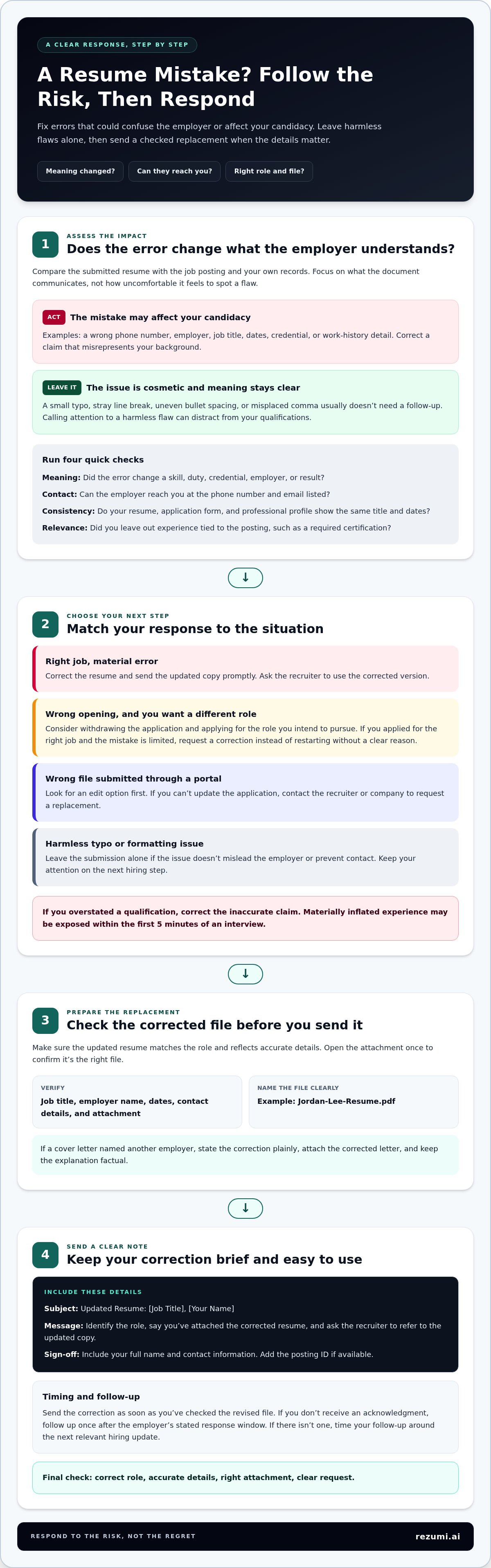
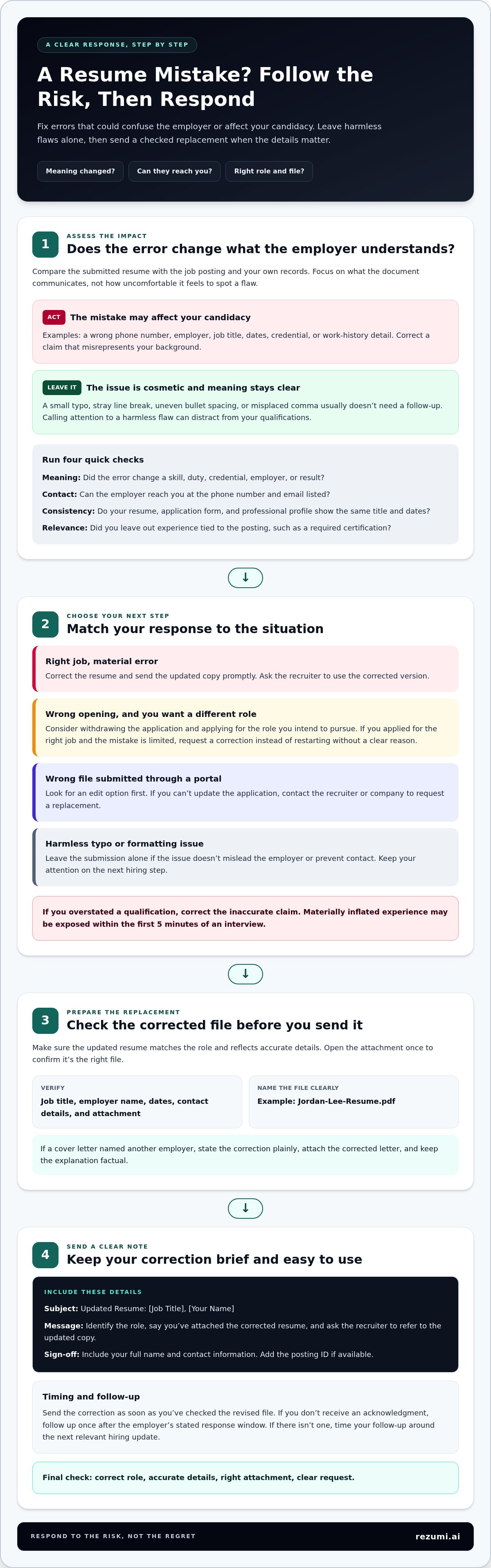
A small typo usually doesn’t need a follow-up. If you’re deciding what to do when you regret sending a resume, correct the version you sent if the mistake could affect your candidacy, such as an incorrect phone number, employer name, job title, or work-history detail. Send the updated copy promptly with a brief message.
It’s easy to fixate on every flaw once an application is out of your hands. But pointing out a harmless formatting issue can distract from your qualifications, while leaving a serious error uncorrected may cause confusion.
This guide will help you decide whether a mistake needs action, choose how to correct it, and write a clear note to accompany your updated resume. You’ll also learn what to do if you uploaded the wrong file through an application portal, so you can respond calmly and focus on your next step.
Key Takeaways
- Fix errors that could affect your candidacy, such as incorrect contact details or misleading work-history information. Minor typos and formatting issues usually don’t need a follow-up.
- Keep a correction email brief: identify the role, attach the accurate resume, and ask the recruiter to use the updated copy.
- Send a corrected resume promptly when the error matters, and make sure the new file is accurate before you submit it.
- If you want to withdraw your application, use a clear, professional message that states your decision without lengthy explanations.
- For portal submissions, look for an edit option first. If you can’t update the application, contact the recruiter or company to request a replacement.
1. Deciding whether a resume mistake needs action
If you’re deciding what to do when you regret sending a resume, judge the error by its potential effect on your application. Could it confuse the employer, misrepresent your background, or prevent them from reaching you? A typo in “managed” may be minor; listing the wrong employer beside a major role changes the facts.
Separate cosmetic issues from errors that change the meaning. A stray line break, uneven bullet spacing, or misplaced comma usually leaves your experience clear. A wrong phone number, job title, or set of dates can change how a recruiter understands your fit. Focus on what the document communicates, not how uncomfortable it feels to spot a flaw.
Use these checks to assess the risk:
- Meaning: Does the error change a skill, duty, credential, employer, or result? “Supported a team” is different from “led a team.”
- Contact: Can the employer reach you using the phone number and email shown?
- Consistency: Do the resume, application form, and professional profile show the same title and dates?
- Relevance: Did you submit a version that hides experience tied to the posting, such as a required certification?
Materially inflated experience may be exposed within the first 5 minutes of an interview. If you overstated a qualification, the issue is more than wording: the employer may rely on that claim when deciding whether you meet the role’s requirements. Correcting an inaccurate claim is different from polishing a sentence to sound stronger. Keep every stated credential and result truthful.
When is it better to withdraw an application and reapply? Consider withdrawing if you applied for the wrong opening and intend to apply for a different role. If you applied for the right job and the mistake is limited, request a correction rather than restarting without a clear reason.
What if you applied for the wrong job or sent your resume to the wrong employer? If you applied for the wrong role, decide whether you genuinely want that position before proceeding. If your resume names another employer, treat it as a substantive mix-up and direct your next step to the company you intended to apply to.
When considering what to do when you regret sending a resume, compare the submitted version with the job posting and your own records. Check each detail that could affect screening: required skills, credentials, dates, titles, and contact information. A harmless formatting flaw isn’t as important as an inaccurate qualification or wrong phone number.
Finally, consider the timing and application context. An entry-level opening or internship may have a fixed deadline, so don’t let a cosmetic edit distract you from applying on time. If the issue doesn’t mislead the employer or prevent contact, leave the submission alone and prepare for the next hiring step.
3. Replacement email wording
A good correction email is brief, specific, and easy to act on. Name the role, attach the correct resume, and ask the recruiter to use the updated copy. If the original file contained a serious error, take responsibility without going into every detail.
Use a clear subject line, such as “Updated Resume: Marketing Coordinator Application.” Include your full name and contact information, especially if the recruiter needs to match your message to an application. Add the job title or posting ID if available.
For a wrong resume version, adapt this template:
Subject: Updated Resume: Marketing Coordinator, Alex Morgan
Hello Sarah Jenkins,
I’m following up on my application for the Marketing Coordinator position. I noticed the resume I first submitted wasn’t the version most relevant to this role. I’ve attached the updated copy and would appreciate it if you’d refer to this version when reviewing my application. I apologize for any inconvenience.
Thank you,
Alex Morgan
555-019-8765 | alex.morgan@email.com
Be sure to swap out these example details with your own information before sending. Open the attachment once to confirm it’s the corrected file, and use a filename such as “Jordan-Lee-Resume.pdf.” A specific filename helps distinguish the new copy from the earlier version.
If you sent a cover letter addressed to another employer, state the correction plainly. For example: “I noticed the cover letter attached to my application named another company. I apologize for the error and have attached the corrected letter.” Keep the explanation factual. Don’t add a lengthy excuse or blame a rushed schedule.
Can you ask an employer to delete a resume or personal information you submitted? Yes. Send a direct request that identifies the role, submission date, and specific information or file you want deleted. Keep a copy of your request, and don’t assume the correction email itself removes the original application.
How long should you wait before following up about a resume correction? Send the correction as soon as you’ve checked the revised file. If you don’t receive an acknowledgment, follow up once after the employer’s stated response window. If there isn’t one, time your follow-up around the next relevant hiring update.
Before sending, check the job title, employer name, attachment, and contact details. If the corrected resume also needs stronger alignment with the posting, use resume tailoring tools to refine its wording for the role.
You can also reaffirm your interest in the position while requesting a replacement, attaching the correct documents, and asking the recruiter to use the updated version.
4. Sending an updated resume
Send a corrected resume promptly if the original contains a material error. The employer may review the first file and make a decision before seeing a replacement. Fix the content, check the new copy, then send it through the same channel when possible.
Update the full document, not just the line you noticed. If you misspelled an employer’s name, search every section for that company name. If job dates or titles were mixed up, check the related duties too. Correct one error without leaving another inconsistency behind.
Before attaching the file, follow this quick review:
- Compare the updated resume with the job posting and your work records.
- Run a spell checker, then read the resume again from top to bottom.
- Ask another person to review spelling, grammar, formatting, and timelines.
- Open the final attachment to confirm it’s the correct, readable file.
- Use a clear filename, such as “Alex-Rivera-Resume.pdf,” so the new version is easy to identify.
Present the attachment as an updated copy. Don’t make the subject line a dramatic confession; use a direct label such as “Updated Resume for Operations Analyst.” In the message, identify the role and ask the recruiter to use the revised file. A brief apology is enough if the error caused inconvenience.
For example, if you listed a project coordinator role under the wrong employer, correct the employer, dates, and duties before sending. Then write: “I’m sending an updated resume for the Operations Analyst position. Please refer to this copy when reviewing my application. I apologize for the earlier version.” Keep the explanation brief.
Timing matters. Correct a wrong phone number or company name as soon as the new file is ready. Waiting to perfect every sentence may leave the inaccurate version as the only one the hiring team sees. If you need broader revisions, check each change against the role instead of sending an unchecked replacement.
If you’ve already discussed the opportunity and need more time to revise, send a short note before too much time passes. One example in the guidance involved an applicant revising and submitting a resume a couple of weeks after discussing the opportunity. That timing isn’t a target; tell the interested person what you’re doing and ask whether a later submission would still be useful.
If the employer invites you to interview after receiving your correction, bring a properly formatted resume that matches the updated file. Review the corrected dates and titles beforehand so you can explain the change clearly if asked.
4. Can you withdraw a job application after sending your resume?
Yes. You can withdraw an application after submitting your resume. Use the company’s application portal if it offers a withdrawal option. Otherwise, send a short message to the recruiter or hiring contact named in the job posting or application confirmation.
First, decide whether you want to leave the process or fix a problem. If you applied for the wrong opening, withdrawing may be clearer than sending a resume for another role. If the issue is one incorrect date or title, request a correction instead. A small edit usually doesn’t require ending your candidacy.
Withdraw when your decision is firm, such as after accepting another offer or realizing the position doesn’t fit your goals. If you’ve received an interview invitation, reply promptly rather than leaving the employer without an answer. If your resume contains a claim you can’t support, correct it before the interview rather than withdrawing just to avoid questions.
Keep the message professional and direct. Include your full name, the job title, and any posting ID in the subject line. State that you’re withdrawing, thank the employer for considering you, and avoid sharing private details or a lengthy explanation. For example, “I’m withdrawing my application for the Sales Associate position. Thank you for your time and consideration.”
If you want to apply for a different role at the same company, make that distinction clear. You could write, “I’d like to withdraw my application for the Sales Associate opening and apply separately for the Customer Support role.” Submit the new application through the company’s stated process, and tailor your resume to that position.
Before withdrawing, review the application confirmation and portal options. A portal may let you withdraw, edit, or replace a submission, and those actions aren’t the same. If you can’t find a withdrawal option, email the hiring contact with the role title and ask to be removed from consideration.
Don’t withdraw in a panic over a minor formatting issue. A stray line break doesn’t change your qualifications, while an incorrect phone number needs a contact correction. If you’re unsure whether to withdraw or amend the application, describe the exact issue and request the appropriate next step.
Once you send the withdrawal request, keep a copy of the message and note which role you withdrew from. If you later apply for another opening at the same employer, use a corrected resume and a cover letter addressed to that company. This keeps your next application distinct and helps avoid repeating the original mix-up.
5. Can you replace or update a resume on a job application portal?
Start with the application confirmation email or confirmation screen. Look for a link or button to view or edit your submission. If you uploaded the wrong resume, use that option to replace the file, then confirm that the application shows the corrected version.
Check the portal carefully before starting a new application. A second submission could create duplicate records for the same job, while an edit option may update the existing application. Follow the portal’s instructions and save any confirmation showing the change went through.
If the confirmation provides no edit option, contact the recruiter or company as soon as possible. Use the contact details in the application message or job posting. Include your full name, the job title or posting ID, and a clear request to replace the resume attached to your application.
For example, you could write: “I applied for the Office Administrator position and noticed I attached the wrong resume. Could you replace it with the corrected file attached? My name is Sam Chen, and my application reference is [ID].” Keep the message focused on the action needed.
Before sending an attachment, open it and check its contents. Confirm that it belongs to the right applicant, matches the intended role, and has accurate contact details. Give the file a clear name, such as “Sam-Chen-Office-Administrator-Resume.pdf,” so it’s easy to identify.
Job application systems can store resumes using automated technology. Submitting a new file may replace or delete the older version, but portal behavior can vary. Don’t assume the first resume remains attached or that the replacement was received. Look for a confirmation message, updated file name, or status change after submitting.
Keep a record of the correction. Save the confirmation email or take a screenshot of the updated application page, including the job title and new attachment name. If the portal still displays the wrong file, send the recruiter a concise message explaining what you see and asking them to use the corrected copy.
Act quickly, especially if the error affects your phone number, job title, dates, or qualifications. An employer could review the original application before your request is processed. If the updated resume also needs better alignment with the role, review its keywords and experience before uploading another version.
For your next application, prepare a role-specific file and check it before uploading. A final review of the job title, employer name, contact details, and attachment can prevent another portal correction.
Rezumi: ATS Resume Optimization
Rezumi helps you prepare a resume for the role, not just fix a file after submission. Its ATS Resume Optimization lets you tailor your resume to a specific job description, making relevant experience and skills easier to identify. Use it before applying to check your wording against the position and create a stronger, role-focused version.
You can also create a matching cover letter with the AI Cover Letter Generator or prepare for interview questions with AI Interview Prep. For a polished, shareable file, use Resume Design & PDF Export to finalize your document after reviewing its content. Choose the tool that fits your next application step.
Visit rezumi.ai to prepare your next application with more confidence.
Make Your Next Application More Intentional
A resume mistake doesn’t have to define your next move. Let it sharpen how you prepare for future opportunities: keep a current base resume, then adjust its focus for each role. That gives you a clear starting point without sending the same version everywhere.
If you’re still weighing what to do when you regret sending a resume, focus on the decision ahead, not the moment you wish you could redo. Use what you’ve learned to make your next application accurate, targeted, and ready to represent you.
Rezumi can support your next step with tools for your resume and broader application preparation. Choose the support that fits your goals, and keep moving toward roles that match your skills.
Your next application is a fresh opportunity to show what you bring. Take it one clear step at a time.
Frequently Asked Questions
What should you do if you send the wrong version of your resume?
Compare the version you sent with the one you meant to submit, then identify what changed. If the file only has a different layout, don’t send another copy unless the design makes key details hard to read. If it omits a relevant certification or contains outdated information, send the accurate version and keep a copy for interview preparation. Be ready to discuss the experience and skills shown in the corrected document.
How do you correct a resume after submitting it?
Correct the source file first, then review every related detail before resending it. For example, changing a role’s end date may affect how you describe your next position or a career gap. Keep the revised version consistent with your application form and professional profile. If a recruiter later asks about a difference, explain which version is accurate and why you updated it.
What should you say in an email asking an employer to use an updated resume?
State that you’re providing an updated version, name the role, and ask the employer to use it for review. For example: “I’m sharing a revised resume for the Data Analyst position. Could you use this copy for my application? Thank you for your time.” If the company’s portal requires permission before replacing a file, ask how to update the existing submission instead of starting another application.
Should you contact a recruiter after noticing an error on your resume?
Contact the recruiter if the error could change how they understand your qualifications or reach you. A misspelled word may not need a correction, but an incorrect certification level could misrepresent your background. If you’ve already been invited to interview, correct any meaningful inaccuracy before discussing your experience. Keep your explanation factual, and make sure your spoken answers match the corrected resume.
Disclaimer
This article is provided for general informational purposes only and does not constitute professional, legal, financial, or career advice. While Rezumi strives for accuracy, we make no warranties as to the completeness or reliability of this content. Hiring practices, ATS behavior, and job-market conditions vary by employer, industry, and region — always verify against your specific situation. Any action you take based on this article is at your own risk.