How to Fix Your Resume After Rejection by Finding the Weak Spot
A rejection can point to a resume problem, but its timing is only a clue: a response within 1-2 days may suggest an applicant tracking system screened you out, while one after 3 or more days may suggest a hiring manager reviewed your application. Neither timing proves who made the decision. To learn how to fix your resume after rejection, look for specific gaps in job-title alignment, relevant keywords, experience details, and formatting.
It’s frustrating to receive a rejection without knowing what went wrong. A focused review can give you a practical next step instead of leaving you to guess. Learn how to compare your resume with the job description, request feedback, clarify your achievements, fix common formatting issues, and update LinkedIn so it supports the same professional story.
Key Takeaways
- Compare your resume with the job description and place relevant skills and terms where employers can see them.
- Ask for specific feedback after a rejection, then use any response to choose your next resume revision.
- Align your target job title with the role while keeping your actual experience and credentials accurate.
- Make your resume and LinkedIn profile tell a consistent story, with clear formatting and evidence of your impact.
- Use Rezumi’s ATS Resume Optimization when you want help tailoring your resume to a specific job description.
ATS keyword matching and job-description keywords
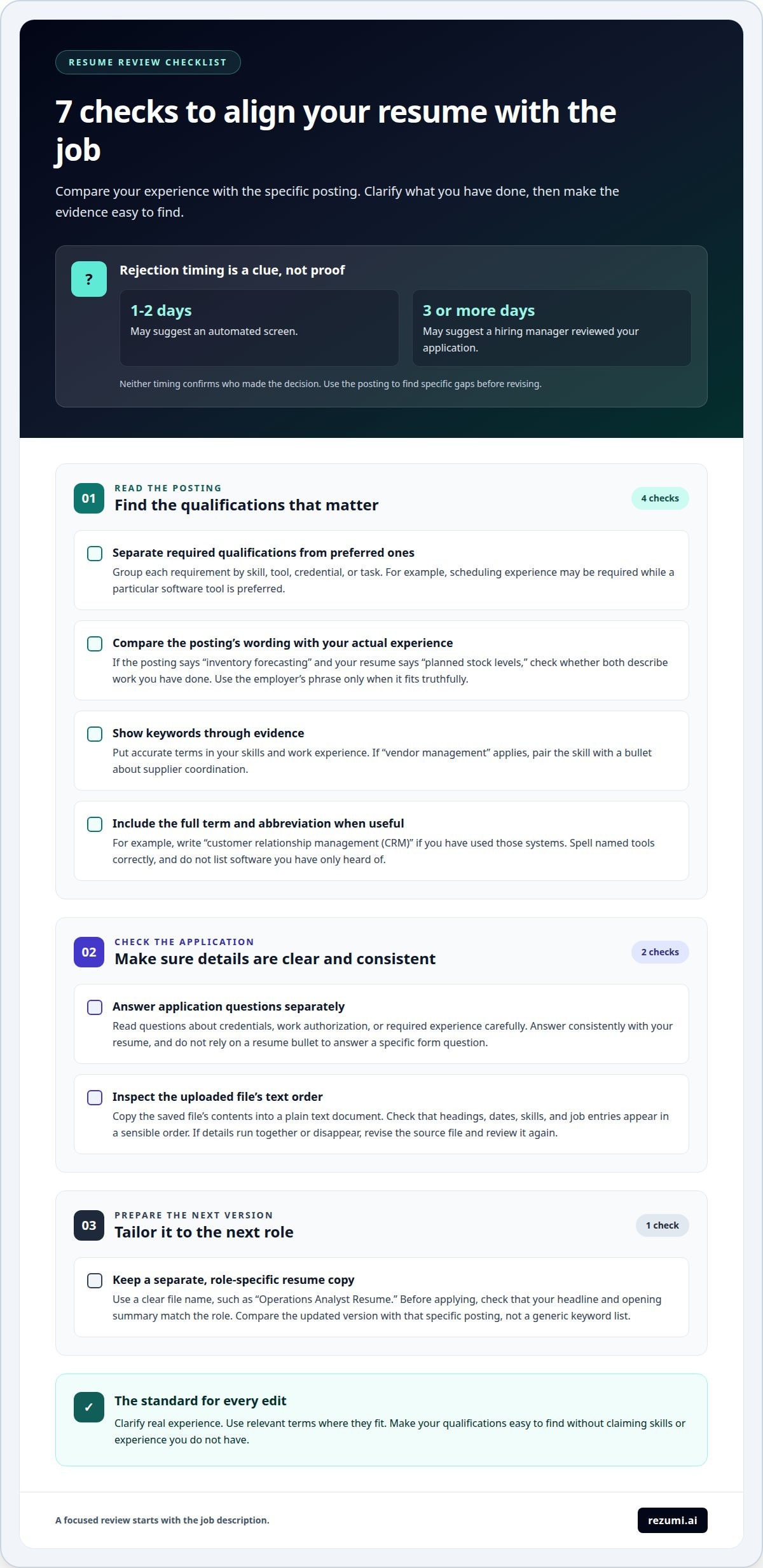
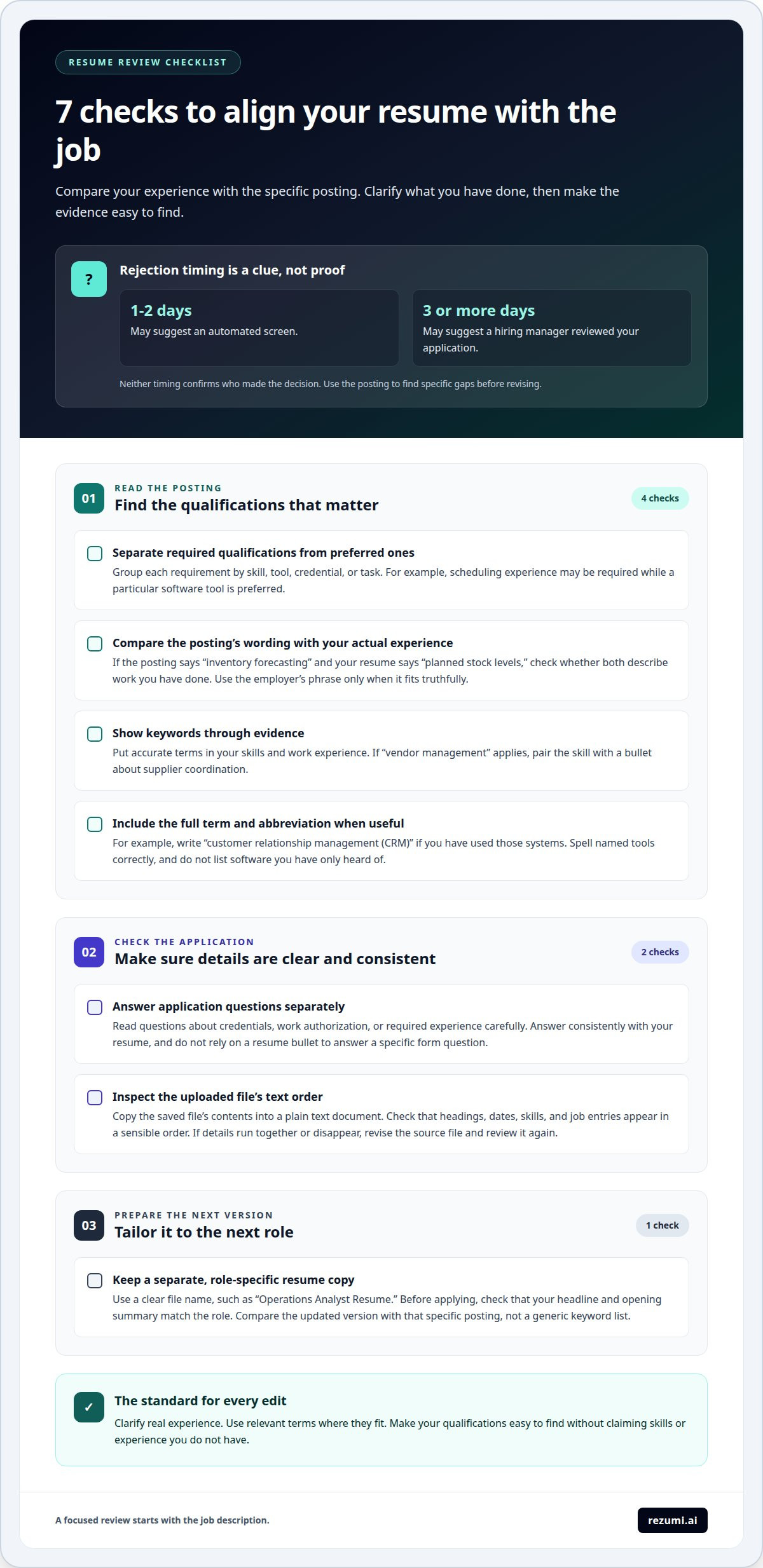
A rejection’s timing is only a clue. A response within 1-2 days may suggest an automated screen, while one after 3 or more days may suggest a hiring manager reviewed your application. Neither timing confirms who made the decision. Use the posting to find specific gaps before revising.
- Separate required qualifications from preferred ones. Mark each requirement in the job description, then group them by skill, tool, credential, and task. A project coordinator posting might require scheduling experience but list a particular software tool as preferred. This helps you focus your edits on the qualifications that matter most for the role.
- Compare exact wording with your experience. If the posting says “inventory forecasting” and your resume says “planned stock levels,” check whether both describe work you’ve done. Use the employer’s phrase only when it accurately fits. A practical way to fix your resume after rejection is to clarify real experience, not claim new skills.
- Show relevant terms through evidence, not just a keyword list. Include accurate keywords in your skills and work experience sections. If “vendor management” applies, list the skill and show it in a bullet about supplier coordination. This gives the reader context and distinguishes hands-on experience from a term added without proof.
- Include the full term and abbreviation when useful. Write “customer relationship management (CRM)” if you’ve used those systems. For a named tool, use its correct spelling and don’t list software you’ve only heard of. Check the posting for alternate names, but don’t repeat the same term in every section.
- Check application questions separately. Some employers ask about credentials, work authorization, or required experience in the application form. Read each question carefully and answer consistently with your resume. If a form asks about a specific qualification, don’t rely on a resume bullet alone to answer it.
- Review the uploaded document’s text order. Open the saved file and copy its contents into a plain text document. Check whether headings, dates, skills, and job entries appear in a sensible order. If details run together or disappear, revise the source document and review the new file before submitting.
- Tailor the next version to the next role. Keep a separate copy for each target job, with a clear file name such as “Operations Analyst Resume.” Before applying, confirm that the headline and opening summary match the role. To learn how to fix your resume after rejection, compare the revised version with the specific posting, not a generic keyword list.
Requesting feedback from employers
For an employment gap, briefly explain periods longer than six months, then highlight relevant work, training, or caregiving without oversharing. For job changes, keep each role accurate and show your contributions. Don’t hide dates or invent reasons.
- Choose the right person to contact. Reply to the recruiter or hiring manager who sent the rejection, using the same email thread. If the message came from a general inbox, address the recruiter by name when possible. A direct, relevant request is easier to answer than a message sent to several people.
- Ask promptly and keep the request brief. Thank the employer for considering you, then ask whether they can share one area to strengthen for similar roles. For example: “Could you share whether my experience, resume, or interview answers were the main gap?” A focused question gives the recipient a clear way to respond.
- Make feedback optional. Employers may not provide feedback after a rejection. They may have limited time or avoid sharing detailed evaluations. Keep your message courteous and don’t send repeated requests. If there’s no reply, continue improving your application using the job description and your own review.
- Separate useful detail from general wording. “We chose a candidate with more direct experience” points to a specific resume gap. “We moved forward with another applicant” doesn’t explain the decision. If you receive a broad response, ask one brief follow-up about a skill or responsibility relevant to the role.
- Turn the answer into a resume edit. If the employer mentions limited experience with client reporting, show a truthful example of reports you prepared, who used them, and what decision they supported. If the issue was an unclear career history, clarify role dates and add a concise description of relevant work during a gap.
- Address job changes with evidence. Don’t add a defensive explanation beside every short role. Instead, make each entry easy to understand: list the employer, title, dates, and relevant results. If you held contract roles, label them accurately. If you changed fields, show how your earlier experience supports the target role.
- Revise the application, not just the email. Compare the feedback with the next job description and update the resume where the evidence is weak. If keyword alignment is the issue, ATS resume optimization tools can help tailor your resume to a specific role. Keep a copy of each version so you can track which changes you made.
Matching the job title
- Identify the exact title in the posting. Write down the role name as shown, such as “Operations Analyst” or “Customer Success Manager.” Then compare it with your resume headline and recent job titles. A recruiter should quickly see which role you want, even if your past title used different wording.
- Use the target title as your headline when it fits. Your headline can name the role you’re pursuing without changing your employment history. For example, “Operations Analyst | Reporting and Process Improvement” signals your target clearly. Keep the title honest by choosing work you’re qualified to do, not a senior role you haven’t held.
- Keep past titles accurate. Don’t rename “Office Coordinator” as “Operations Manager” just to mirror a posting. That change can create confusion during reference checks or interviews. If your official title was unclear, add a brief functional description after it, such as “Office Coordinator (operations support),” only when it reflects your actual duties.
- Explain a title mismatch with a short context line. A company may use an internal title that differs from common industry language. Add a concise clarification in parentheses when it helps, such as “Client Partner (Account Manager).” Use this only if both titles describe the same level and core work. Don’t use it to claim a promotion or broader authority.
- Show how your responsibilities connect to the target role. A title alone can’t prove fit. If you’re applying for “Project Coordinator” after working as an “Administrative Assistant,” include relevant tasks such as tracking deadlines, preparing status reports, or coordinating team schedules. Choose examples that match the posting and accurately reflect your contribution.
- Make your resume and application consistent. Use the target title in your resume headline and cover letter when appropriate, then keep your work-history titles unchanged. If the application form asks for your current or former title, enter the accurate title from your employment records. Consistency helps readers understand your career path without guessing.
- Review each version before submitting. Compare the role title in the posting with your headline, summary, and relevant experience. For a “Data Analyst” application, confirm that your opening section names your analytical focus and your bullets show related work. Remove a headline left over from another application, such as “Marketing Specialist,” before sending the file.
Updating a resume and LinkedIn profile
- Make the opening section specific to your target. Replace a broad summary like “motivated professional” with a clear role and strengths. For example: “Customer support specialist with experience resolving account issues and documenting solutions.” Keep your resume headline, summary, and LinkedIn headline focused on the same type of work.
- Use a clean, readable resume layout. Keep the resume to 1-2 pages and choose an ATS-friendly template with one or two columns. Use standard headings such as “Experience,” “Education,” and “Skills.” Avoid putting key details in charts, images, or text boxes, where they may be harder to read.
- Make each work bullet explain the value of your task. Replace “responsible for customer reports” with a clear action and purpose, such as “Prepared weekly customer reports to help the support team track open issues.” Add a result or scale when you can support it with accurate information. Don’t guess at numbers.
- Handle longer employment gaps briefly. For a gap longer than six months, add a concise, truthful note when it helps explain your timeline. For example, “Career break for family caregiving” or “Professional development in data analysis.” Keep the focus on relevant skills and experience, not private details.
- Make LinkedIn reinforce the resume, not copy it line for line. Use the same target role, dates, employers, and core skills on both. Expand LinkedIn descriptions with context the resume can’t fit, such as the team you supported or the type of customers you served. Keep confidential information out of both profiles.
- Review your LinkedIn profile from the reader’s perspective. Check that your headline states the kind of role you want, your About section summarizes relevant strengths, and your Experience entries show evidence. If your resume says “account support” but LinkedIn focuses only on “sales,” revise the profile so the difference doesn’t confuse employers.
- Proofread both documents after every edit. Check names, dates, punctuation, and consistent verb tense. Read the resume text in order to catch layout problems, then compare its details with LinkedIn. Ask a friend or mentor to flag unclear experience descriptions, such as a job entry that lists duties without explaining your contribution.
How to quantify achievements on a resume?
- Start with the change your work created. For each role, identify a task, the action you took, and its effect. “Managed social media” describes a duty. “Grew Instagram engagement by 45%” shows an outcome. Use a result only when you can explain how it was measured.
- Look for time saved or work completed faster. Compare a process before and after your contribution. For example, “Reduced monthly financial reporting time by 30%” connects an action to a clear efficiency gain. Check project records or reports before adding a percentage, and explain what changed in your bullet.
- Include scale when it clarifies responsibility. A budget, team, customer group, or project value can show the size of your work. For example, “Built a budgeting model for a $50M operations unit” gives useful scope. Include sensitive details only when you’re allowed to share them.
- Show improvement with a starting point and an outcome. “Reduced forecast variance from 15% to 5% within one quarter” makes the change clear. Use this structure when you have reliable before-and-after data. Define the measure in plain language if a hiring manager might not know your team’s internal term.
- Quantify savings and project support accurately. A bullet such as “Identified $2M in cost savings while supporting a $10M product launch” communicates both impact and context. Don’t claim sole ownership if you worked with a team. Use verbs such as “supported,” “identified,” or “coordinated” to reflect your actual role.
- Count work that shows complexity. If you handled more than 10 concurrent projects across marketing and engineering teams, say so when that scope matters to your target role. Add the type of work and your contribution. A count without context is less useful than a count tied to planning, delivery, or coordination.
- Measure leadership through people supported. “Mentored 3 junior team members” shows a specific contribution beyond your own tasks. Add what you helped them do, such as onboarding or reviewing work, if accurate. For leadership roles, this detail can demonstrate influence without overstating your title.
- Audit every figure before submitting. Confirm each percentage, dollar amount, and project count against records you can explain. If you can’t support an exact figure, use a truthful scale description, such as “a cross-functional launch” or “multiple concurrent projects.” Choose the strongest accurate measures for the role.
Rezumi: ATS Resume Optimization
Rezumi helps you tailor your resume to a specific job description with ATS Resume Optimization. Use it when you’ve identified a weak spot, such as missing relevant skills or unclear experience, and want to refine your application for the next role. You can also use the AI Cover Letter Generator to create a cover letter aligned with your application, or AI Interview Prep to practice for a future conversation.
If your content is ready but needs a cleaner presentation, Resume Design & PDF Export helps you prepare the document for sharing. Choose the tool that fits your next step, then review every detail for accuracy before applying. Visit Rezumi to explore the options.
Turn your next application into a clearer next step
One rejection doesn’t define your value. Treat it as a prompt to make your next application more focused, accurate, and easy to assess. The practical way to fix your resume after rejection is to choose one change based on evidence, then check whether it makes your fit for the next role clearer.
Before applying again, save a clean copy of your revised resume and note what you changed for that role. This gives you a useful baseline for future applications. If you keep getting rejected, compare the roles you’re targeting and look for a shared requirement your resume doesn’t yet show clearly.
Use Rezumi when you want support refining your application materials and preparing for the next stage. Your next move doesn’t need to be perfect. It needs to be deliberate.
Keep going with a sharper plan. The right role deserves an application that shows what you can do.
Frequently Asked Questions
How can I tell whether the ATS or a human rejected my resume?
You usually can’t know for certain from timing alone. An automated status update or a message saying your application didn’t meet a listed requirement can offer clues, but employers may use automation at different stages. Check the application portal and email wording, then note whether you reached an interview or assessment. Treat these signals as evidence to guide your review, not proof of who made the decision.
What are the most common reasons an ATS rejects a resume?
Common issues include missing required qualifications, unclear dates or titles, and text the system can’t read in the expected order. Some employers also use screening questions or minimum requirements, so a readable resume may still fail a separate application filter. Check that your contact details, work history, skills, and credentials appear as selectable text. Answer every application question accurately and consistently with your resume.
How to identify why a resume was rejected?
Start with the stage where your application stopped, then look for patterns across similar roles. If you aren’t getting interviews, review role fit, required qualifications, and whether your experience is clear at a glance. If interviews happen but offers don’t, your resume may have done its job, so focus on your interview examples. Ask for feedback and compare the next posting with your application before making changes.
How to tailor a resume to a job description?
Create a separate version for each role. Mark the key duties and qualifications, then choose matching evidence from your work history. For a customer success role, a bullet about resolving account issues may fit better than a general sales achievement. Keep your experience truthful, use the employer’s wording where it describes your work, and remove details that don’t help show why you fit the position.
How to improve resume keywords for ATS screening?
Use terms from the posting when they accurately describe your experience, and include common abbreviations beside their full terms. For example, write “customer relationship management (CRM)” if you’ve used those systems. Place terms in relevant context instead of repeating them in a keyword block. Check spelling, singular and plural forms, and the names of tools or credentials, since wording differences can affect how your qualifications are recognized.
What resume formatting mistakes can cause rejection?
Key information can be missed if it appears only in a header, footer, table, or text box. Use clear section labels and simple bullets, and avoid decorative symbols that may disrupt reading order. Before sending, open the saved file and confirm its text copies in the right sequence. Follow the employer’s requested file type, since an otherwise clear document can still cause trouble in the wrong format.
Can you ask an employer for feedback after rejection?
Yes. Send a brief, courteous note to the recruiter or hiring manager who shared the decision. Thank them, then ask for one specific suggestion, such as whether your experience or interview response could be clearer. They may decline or not reply, so don’t press for a detailed explanation. If they offer a useful point, apply it to a relevant resume bullet or prepare a stronger example for your next interview.
How long should you wait before reapplying after rejection?
Check the employer’s reapplication policy. One respondent said some company websites stated a one-year limit, while another reported recruiters contacting rejected applicants about reapplying after nine months.
Disclaimer
This article is provided for general informational purposes only and does not constitute professional, legal, financial, or career advice. While Rezumi strives for accuracy, we make no warranties as to the completeness or reliability of this content. Hiring practices, ATS behavior, and job-market conditions vary by employer, industry, and region — always verify against your specific situation. Any action you take based on this article is at your own risk.