How to Manage Multiple Resume Versions and Track Them
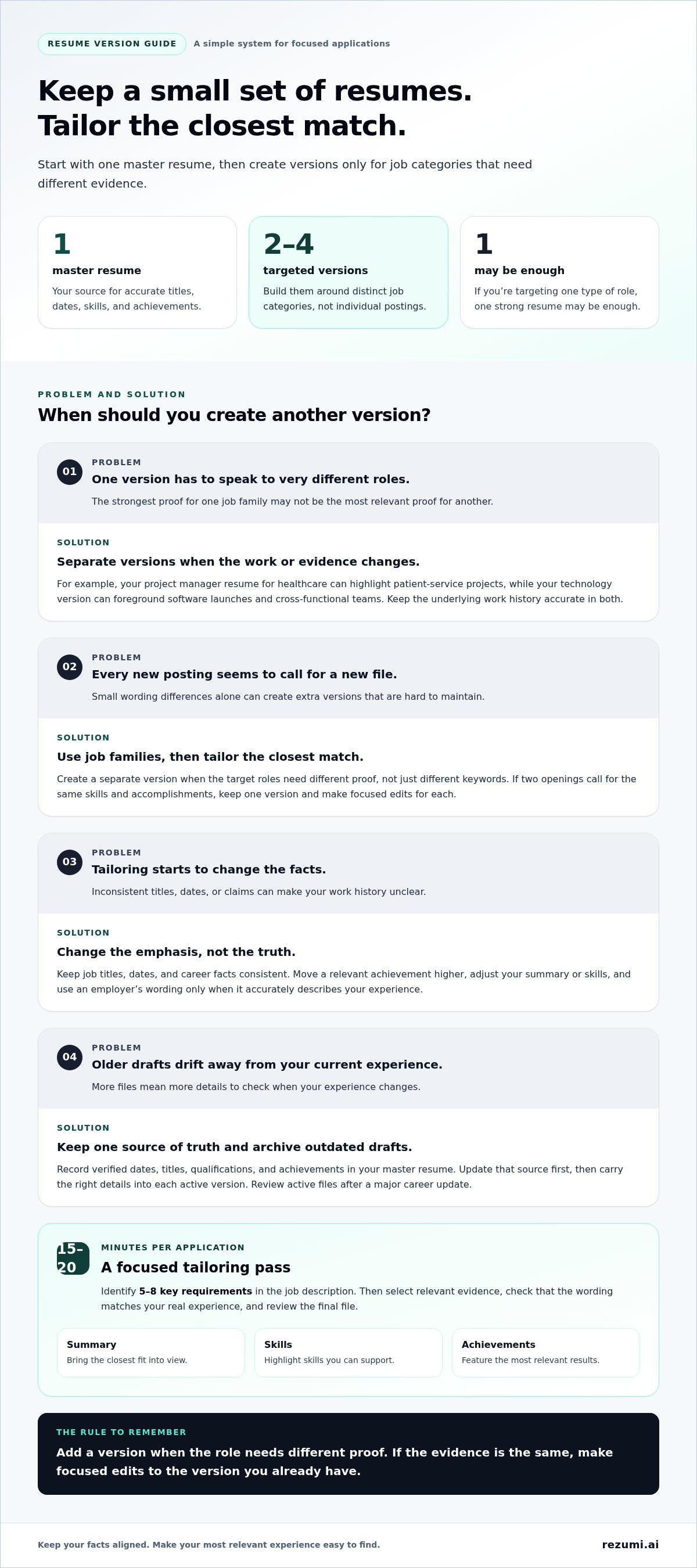
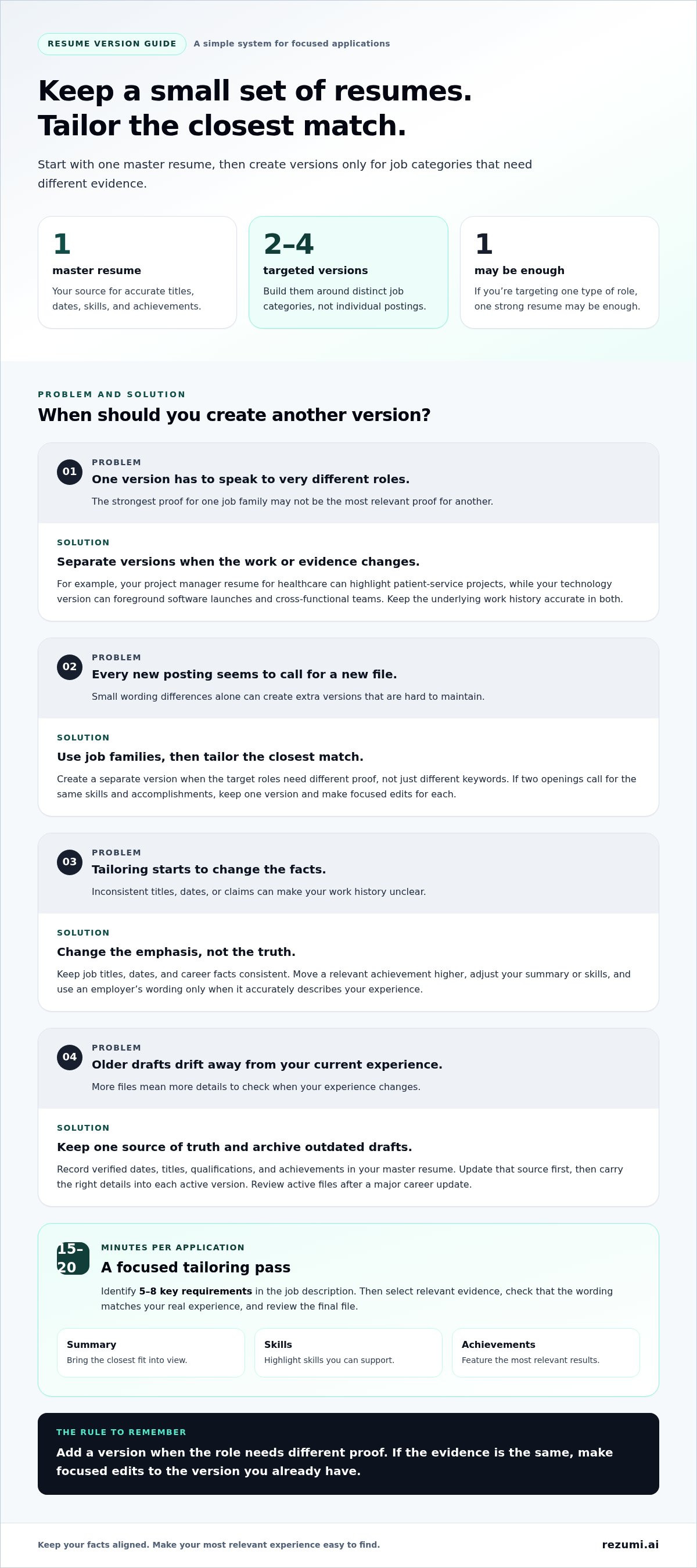
You don’t need a new resume for every application. Start with a master resume and two to four versions for distinct job categories, then tailor the closest match to each role. Knowing how to manage multiple versions of your resume also means tracking exactly which file you sent to each employer.
It’s easy to lose track when filenames look alike or an older draft stays in circulation. A clear system keeps your experience consistent and makes it easier to highlight the skills and achievements that fit each job.
This guide explains how many versions to keep, when separate versions make sense, and what to include in a master resume. You’ll also get a simple way to record the employer, role, application date, status, and submitted resume version, so you can follow up and prepare with the right details.
Key Takeaways
- Build resume versions around distinct job types, not minor wording changes.
- Weigh the extra relevance of tailored resumes against the time and upkeep they require.
- Use a consistent application log to connect each submission with the correct resume file.
- Keep a master document as a source for accurate, role-specific achievements.
- Use ATS Resume Optimization when you want help aligning your resume with a job description.
1. How Many Versions Of My Resume Should I Have?
Start with one master resume, then build two to four versions for distinct job categories. This gives you room to emphasize different strengths without creating a file for every posting. If you’re targeting one type of role, one strong resume may be enough. Add another version only when the work, sector, or required skills differ meaningfully.
Think in terms of job families, not individual employers. For example, a project manager applying to healthcare and technology roles might keep separate versions. The healthcare version could highlight patient-service projects, while the technology version foregrounds software launches and cross-functional teams. Both should reflect the same accurate work history.
A sector change can justify a separate version when employers value different evidence. Jamal’s example illustrates this: he created one resume focused on scientific research and publications, and another emphasizing advocacy and public communication. His career history stayed the same; he changed which achievements appeared and how prominently.
Keep the core facts stable and tailor the details. Start with the version closest to the opening, then compare its requirements with your experience. Identify five to eight key requirements in the job description. Adjust your summary, skills, and strongest related accomplishments to make the match clear.
For instance, a posting may call for team leadership, budget planning, and stakeholder communication. If you’ve led a team and managed project budgets, bring those facts forward. Use the employer’s wording only when it accurately describes your experience. A keyword that doesn’t fit your work can undermine your credibility.
Tailoring doesn’t mean rewriting every section. Keep job titles, dates, and career facts consistent. Instead, change the emphasis: move a relevant achievement higher, replace a less useful skill, or clarify how a result relates to the role. Keep the master resume broadly relevant to your target roles, then adapt the details for each application.
Use a simple rule: create a separate version when target roles require different proof, not just different keywords. If two postings call for the same skills and accomplishments, use one version and make focused edits. A saved tailored resume can be a starting point for similar openings, but review each new job description before applying.
A focused tailoring pass can take 15 to 20 minutes per application. Spend that time selecting relevant evidence, checking that keywords match your real experience, and reviewing the final file. This keeps your resume targeted without multiplying versions that are difficult to update.
2. Pros and cons of maintaining multiple resumes
Separate resumes can make your strongest evidence easier to spot. A project coordinator applying to construction and healthcare roles, for example, may need to foreground different projects, tools, and outcomes. The facts remain consistent, while each version helps hiring teams see relevant experience sooner.
Multiple versions can also support a career change. A communications professional moving toward nonprofit work might highlight community partnerships and public campaigns, while retaining media relations experience for communications openings. Distinct versions keep one career direction from crowding out another.
There’s a limit. One contributor argued that job seekers don’t need 14 separate resume variations. Each extra file creates another version to review when your job title, dates, skills, or achievements change. If your files drift apart, one may contain an outdated contact detail while another has a newer role description.
Too many variations can blur your professional story. If the same job appears under different titles or with inconsistent dates, readers may question the discrepancy. Keep factual details aligned across every copy. Tailor the order and emphasis of your achievements, not the truth of your work history.
Use one shared content source to manage updates. Keep verified job dates, titles, qualifications, and achievement details in a master document. When a new result belongs in a targeted version, update the source first, then copy the correct detail into each active resume. This helps prevent mismatches without requiring identical wording in every version.
Before adding a version, compare its purpose with your current files. If a new draft serves the same job family and draws on the same evidence, make targeted edits to the existing version. Keep a separate copy when its headline, skills, or featured achievements support a genuinely different direction.
A short review routine can limit the upkeep. Before sending a file, confirm its target role, current contact information, employment dates, and strongest relevant evidence. After a major career update, review every active version so promotions, new qualifications, and updated achievements appear where they belong. Archive outdated drafts instead of leaving them beside current files.
Multiple resumes work best when each file has a clear purpose and a controlled source of truth. If tailoring the content feels difficult, resume optimization tools can help you align a resume with a specific job description.
3. Tracking applications and submitted resume versions
Use one application tracker to connect each employer and role with the exact resume file you submitted. A spreadsheet works well: sort applications by date, employer, or status to find what you need.
For each version, record its name, revision date, changes, and source file. For example, “Project manager, healthcare, revised summary and added clinic rollout achievement” makes clear what changed and why.
Create a row for each application, then include these fields:
- Employer and role: Record the organization and exact job title, such as Northstar Health, Project Coordinator.
- Application date: Save the day you submitted the application, not the day you first found it.
- Resume filename: Use the precise file name attached, such as ProjectCoordinator_Healthcare_2026-10-26.pdf.
- Version label: Note the version family and revision, such as Healthcare v2.
- Status and next step: Record submitted, interview, or closed, plus a planned follow-up or interview task.
Use a consistent naming pattern so filenames are easy to identify. Include the role family, version number, and revision date; avoid labels such as “final,” “final new,” or “latest.” If you change a resume after submitting it, save a new revision rather than overwriting the submitted file. That preserves a clear record of what the employer received.
Update the tracker immediately after each submission. Add the posting’s key requirements or a brief note about your tailored content. For a marketing role, that might read, “Moved campaign results above event planning.” The note helps you recall the resume’s emphasis if a recruiter calls.
Keep status labels simple and consistent. A useful sequence is “saved,” “submitted,” “interview,” and “closed.” If an interview is scheduled, the tracker can point you to the exact resume and achievements you highlighted. You can then prepare examples that match your application instead of relying on memory.
Review the tracker before every follow-up. Confirm the employer’s name, position, submission date, and current status. If the company contacts you about a different opening, create a separate row for that role. One employer can have multiple applications, each with its own resume and timeline.
For a manageable system, keep one spreadsheet tab for active applications and another for completed or closed ones. Filter the active tab by status to see which applications need attention. A weekly review can catch missing filenames, duplicate rows, or applications without a recorded next step.
Accuracy matters when several applications are moving at once. Save the exact file you submitted, log its version, and update the status as events occur. This gives you a reliable record for follow-ups, interviews, and future applications to similar roles.
4. When multiple resume versions may be useful
Keep separate versions when you’re presenting different career stories. Carlos created two resumes while moving from corporate strategy toward development policy. One could foreground planning, analysis, and business outcomes; the other could emphasize policy research, public programs, and community impact. The goal is to show a clear fit, not to create a different identity.
A career pivot is a strong reason to split your resume. Imagine an accountant pursuing both finance roles and nonprofit program work. For finance openings, lead with budgeting, reporting, and controls. For program roles, feature grant tracking, partner coordination, and the outcomes your work supported. One draft may bury one story beneath the other.
Multiple versions can also support different job functions in the same field. A software professional pursuing both technical leadership and individual contributor roles may need different evidence near the top. A leadership-focused version can highlight mentoring and delivery planning. An engineering-focused version can prioritize system design and hands-on implementation.
Before creating another file, compare a few job descriptions from each career direction. Mark the main skills, work examples, and results each asks you to show. If the same evidence supports both, keep one resume and tailor it. If each direction calls for a different opening, skills section, and achievement order, separate versions may help.
Different audiences can also change what deserves emphasis. A university role may value teaching, research, or student support. A corporate role may focus more on project delivery, customer outcomes, or team leadership. Your background stays consistent while the first page directs each reader to the most relevant evidence.
Don’t create a new resume for every employer. If a posting changes only a few keywords, a targeted edit is usually enough. For example, two operations coordinator roles may share the same core duties, even if one mentions scheduling and the other vendor communication.
Give each separate version a clear label and purpose. Name it by career direction, such as “Policy Programs” or “Strategy Leadership,” rather than by employer. When your goals shift, retire versions that no longer support your active search. This keeps your working files focused on current roles, not past plans.
Use this rule: create another version when the target role requires a different professional narrative or substantially different evidence. Keep one version when the same experience and achievements support both applications. That distinction lets you pursue more than one path without losing control of your story.
5. Should you keep a master resume with all your experience?
Yes. Keep one master resume as a private source document, not as the file you send employers. It can hold your complete work history, projects, skills, training, and measurable results. Unlike an application resume, it can run longer than two pages because its purpose is to preserve useful evidence.
Capture details while they’re easy to recall. For each role, record your title, dates, responsibilities, tools, and achievements. Include context behind results, such as the team you supported or the problem you solved. A career-advice recommendation suggests listing eight to ten bullets for each previous role, giving you options when a job description calls for different strengths.
For example, a customer support specialist might record product training, process updates, customer feedback, and team coaching under one role. A later training position may call for coaching examples, while a service operations role may need process improvements. The master file preserves both; each tailored resume uses only the strongest relevant evidence.
Keep the document easy to search. Use clear headings for work history, education, certifications, technical skills, volunteer work, and projects. Under each job, write separate bullets rather than combining several achievements in a paragraph. Add keywords beside the evidence they describe, such as “Salesforce” beside a project that used the platform.
Separate facts from polished resume wording. Your master document can include reminders like “confirm quarterly sales figure” or a longer project explanation. Before using any detail in an application, turn it into a concise, accurate bullet. For instance, replace “helped with onboarding” with the specific tasks you handled and the result you can support.
Use a simple structure to maintain accuracy:
- Work record: Save each title, employer, and date range consistently.
- Achievement bank: Keep separate bullets for outcomes, tools, and responsibilities.
- Evidence notes: Store context that helps you explain each result in an interview.
- Review date: Record when you last checked the entry against your current records.
A seven-page master resume can still be useful. One job seeker reported keeping a document that long after three jobs; it served as a reference, not a submission to employers. The distinction is purpose: preserve detail in the master, then edit it for the role.
Keep one master file, one general-purpose resume, and a tailored version for each additional field you’re pursuing. After a promotion, new qualification, or completed project, update the master first. Then select accurate details for active resumes. This source-first routine helps prevent missing achievements and conflicting dates.
Rezumi: ATS Resume Optimization
Rezumi helps you tailor your resume to specific job descriptions with ATS Resume Optimization. Use it when you have a strong master resume and want to align the right skills and achievements with a particular role. You can also create a cover letter with the AI Cover Letter Generator, practice with AI Interview Prep, and prepare a polished file using Resume Design & PDF Export.
Keep your career facts accurate as you tailor each version. Review the updated resume before saving or sending it, then record the final filename in your application tracker. This connects your workflow from editing through submission.
Visit Rezumi to explore resume tools for your next application.
Make Your Next Application More Deliberate
Your resume system should support the direction you’re pursuing now. Choose the role you want next, then make each application reflect the experience that best supports that move. Knowing how to manage multiple versions of your resume gives you a repeatable process, as long as every version stays accurate and connected to your goals.
If you want help tailoring a resume to a job description, Rezumi offers ATS Resume Optimization. You can also use the AI Cover Letter Generator to prepare a related application document and AI Interview Prep to practice discussing your experience. Choose the support that fits your next step, then review your materials before submitting.
Small, focused improvements can make your next application clearer and easier to discuss. Keep your process organized, stay true to your experience, and move forward with confidence.
Frequently Asked Questions
How Many Versions Of My Resume Should I Have?
Start with one master resume and a few focused versions for distinct job types. Two to four versions can cover separate fields or functions without requiring a document for every employer. For example, a recent graduate might keep versions for data analysis and customer research roles. If the same experience supports both, use one version and adjust its emphasis for each opening.
But, what if I do need multiple versions?
Create separate files when you’re pursuing roles that call for different evidence or career goals. A teacher applying for classroom and curriculum-design positions might need one resume focused on instruction and another on learning materials. Keep dates, titles, and qualifications consistent between them. Give each file a clear purpose, then review it against the roles you’re pursuing.
How can candidates remember which resume they submitted?
Save a copy of the exact attachment in a submitted folder and log its filename beside the application. For example, record “Analyst_Retail_v2.pdf” next to the employer and job title. If a recruiter calls, open that saved copy before discussing your experience. This gives you a reliable reference even if you’ve since revised your working resume.
Should a resume be customized for every job?
Make focused edits when a posting emphasizes different qualifications, but don’t rebuild your resume for every application. A communications role seeking media experience may call for different accomplishments than one focused on internal updates. Keep your work history accurate, then adjust the summary, skills, and evidence that match the actual requirements. This keeps each application relevant without creating unnecessary drafts.
What is the best way to store multiple resumes?
Keep current files in one clearly named folder and retired drafts in a separate archive. Make editable documents and submitted PDFs easy to distinguish, for example with “Current” and “Submitted” folders. Store the editable version of a product marketing resume separately from the PDF sent to an employer. This reduces the chance of attaching an outdated draft and keeps working files easy to find.
How many resume versions should you keep for different roles?
Keep a separate version for each major career direction, not each job title. Two related roles, such as account manager and customer success manager, may share much of the same experience. A shift from sales to training may require a different focus. Let the evidence and responsibilities each role calls for guide whether you need another file.
How do you tailor a resume to different job descriptions?
A practical way to manage multiple versions of your resume is to compare each posting’s requirements with your documented experience. If one role emphasizes vendor coordination, feature a project where you managed supplier communication. If another highlights reporting, bring forward relevant analysis. Use the employer’s terms only when they match your work, and support each skill with a clear example.
How should you organize and name multiple resume files?
Use a filename pattern that identifies the role family, revision, and file type. For example, “UXResearch_v2_Submitted.pdf” makes the purpose easier to recognize than “Resume_Final.pdf.” For a consistent file system, use the same naming format for every file and label drafts clearly. Before sending an attachment, open it and confirm its content and formatting match the application.
Disclaimer
This article is provided for general informational purposes only and does not constitute professional, legal, financial, or career advice. While Rezumi strives for accuracy, we make no warranties as to the completeness or reliability of this content. Hiring practices, ATS behavior, and job-market conditions vary by employer, industry, and region — always verify against your specific situation. Any action you take based on this article is at your own risk.