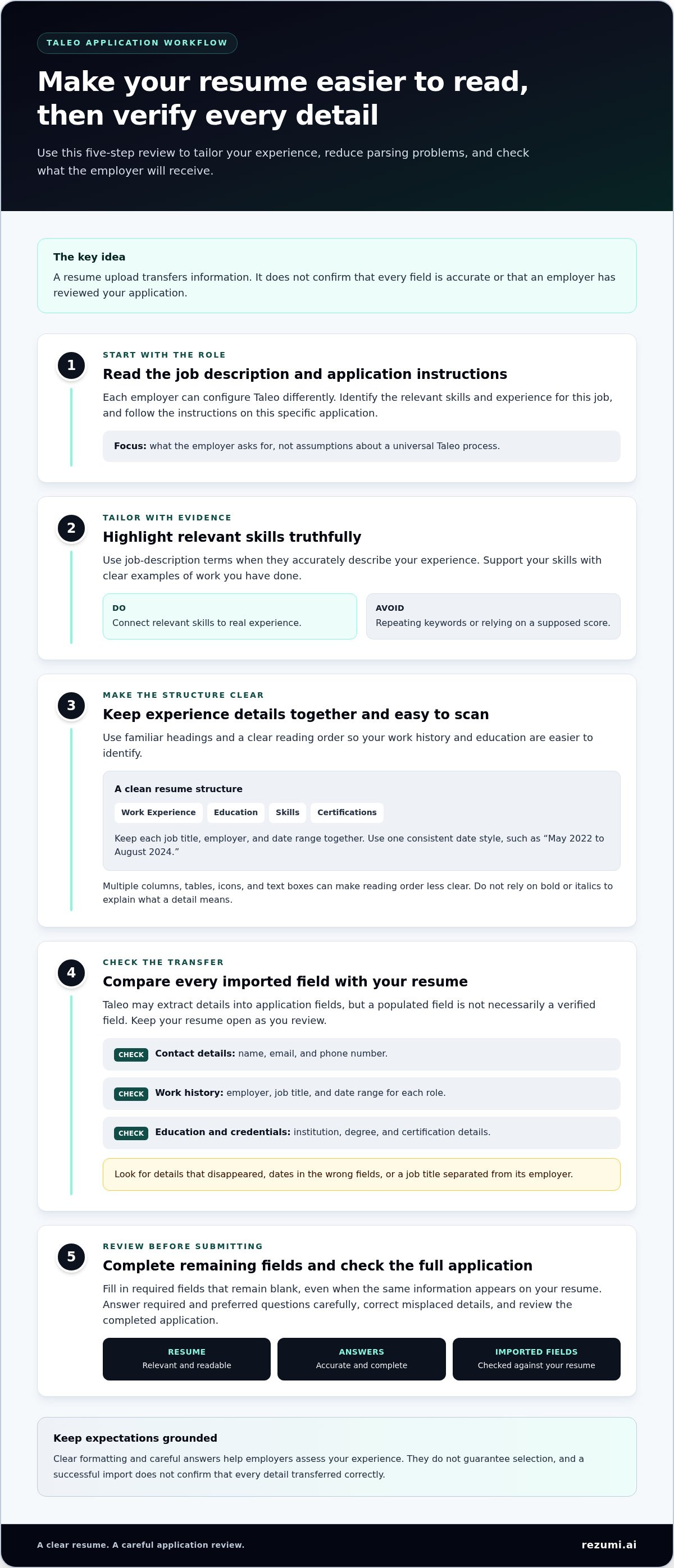
How to Optimize Your Resume for the Taleo Applicant Tracking System
A polished resume can still come through Taleo with missing or misplaced details. Optimizing resume for Taleo applicant tracking system means making your experience easy to parse and verify, not stuffing your resume with keywords.
Taleo may extract your work history and education into application fields, while your answers to required and preferred questions may also affect how your application is evaluated. Because a parser can misread a complex layout, check every imported field before you submit.
This guide walks you through tailoring your resume to a role, reducing formatting problems, and reviewing your application. You’ll learn how to make your experience easier to read, use job-description terms truthfully, and avoid relying on unverified claims about keyword scores or automatic rejection.
Key Takeaways
- Taleo application steps can vary by employer, so follow the instructions for each job.
- Use clear section headings and consistent dates to make your resume easier to read and transfer into application fields.
- For optimizing resume for Taleo applicant tracking system, focus on relevant skills and evidence of your experience, not repeated keywords or supposed scoring formulas.
- Use a consistent review process: tailor your resume, answer application questions carefully, then check every imported field before submitting.
- Rezumi helps you align your resume with a specific job description and focus your edits on the role.
Taleo Resume Optimization: What the System Can and Cannot Tell You
An applicant tracking system (ATS) is software employers use to organize and review job applications. Taleo is one such system. Oracle acquired Taleo Corporation, and employers use its tools to manage parts of the hiring process. The application experience can vary because employers configure their own steps and screening questions.
Taleo can collect your information and present it to an employer, but it isn’t the recruiter and doesn’t make every hiring decision by itself. A clear, relevant resume can help an employer assess your qualifications, but it can’t guarantee selection. The goal of optimizing resume for Taleo applicant tracking system is to make your experience easier to read and evaluate, not to force a particular outcome.
What Taleo does with your resume
When you upload a resume, Taleo may parse it. Parsing is the process of extracting information from a document and using it to fill application fields, such as contact details, education, or work history. This can save time, but it doesn’t mean the software understands your career story. A date may land in the wrong field, or a job title may become separated from its employer. Review and correct populated fields before moving on.
Think of the process in stages:
- Parsing: Resume details may be extracted into application fields.
- Application review: Your responses and resume become part of the materials the employer receives.
- Hiring decisions: Recruiters and employers assess your fit using their own process and criteria.
A successful import only means information transferred. It doesn’t confirm that every detail is accurate, that a recruiter has reviewed your application, or that you meet the employer’s requirements. Keep your resume open while checking the form. Verify names, dates, titles, and other key details rather than assuming the software copied them correctly.
Why Taleo applications can feel inconsistent
One employer may ask you to enter detailed work history after you upload a resume. Another may use different questions or steps. These differences reflect each employer’s application setup, not a change in what your resume says. Read the instructions on the specific application and use its fields and questions as your guide.
Separate the platform’s role from the employer’s screening criteria. Taleo supports the application process, while employers decide which qualifications matter and how they assess candidates. Don’t assume every Taleo application uses the same ranking rules or that one formatting choice automatically triggers rejection. Present relevant evidence clearly, answer each question accurately, and check the completed application before submitting. This gives the employer a more reliable picture of your qualifications, though it can’t guarantee selection.
How Taleo Parses Resume Information and Application Fields
Treat resume parsing as a transfer step, not a judgment of your qualifications. Parsing extracts information from a document into fields; it doesn’t determine how an employer will rank or review your application. Oracle describes Taleo’s parser as a third-party partner service delivered “as-is,” so the result may not capture every detail as you intended.
The parser may extract your name, contact details, education, employers, job titles, and dates. A clear structure helps software and people connect those details. Make the reading order obvious, then confirm that the application form reflects your resume accurately.
Make your resume sections easy to identify
Use familiar headings such as “Work Experience,” “Education,” “Skills,” and “Certifications.” Keep each job title, employer, and date range together. For example, place “Marketing Coordinator” directly above or beside the employer name and dates, not in a separate text box or decorative sidebar.
Keep the layout simple. Multiple columns, tables, icons, and text boxes can make the reading order less clear, even when the resume looks polished on screen. Use one consistent date style, such as “May 2022 to August 2024,” and list roles in a clear chronology. Don’t rely on bold or italics to explain what a detail means, since formatting may not transfer as intended.
Review information Taleo transfers into the form
After uploading, compare the populated fields with your original resume. A filled field isn’t necessarily a verified field. Check whether your employer and title have been combined, dates have moved into the wrong boxes, or key details have disappeared.
- Contact details: Confirm your name, email, and phone number.
- Work history: Check each employer, title, and date range.
- Education and credentials: Verify institution names, degrees, and certification details.
- Required fields: Complete any application fields that remain blank, even if the information appears on your resume.
If a field is split or misplaced, correct it in the form and review the full application before submitting. Follow the employer’s instructions for file choice and upload steps. Don’t assume one format or process works for every Taleo application.
Good optimizing resume for Taleo applicant tracking system practice means making information easy to interpret, then checking the transfer yourself. For a focused review of your resume against a specific role, explore resume optimization tools as part of your preparation.
Taleo Keywords and Scoring: What to Trust, What to Avoid
Use the job description to decide which skills and experience to highlight, not to reverse-engineer a secret Taleo score. Repeating a term or maximizing keyword density doesn’t guarantee a higher ranking. Taleo’s ACE system evaluates candidates based on answers to required and preferred application questions. That’s different from a resume keyword score, and the employer sets the criteria for the role.
Focus on what you can control: clear, truthful evidence that connects your experience to the job. A posting can show which skills, tools, and responsibilities matter. It can’t tell you the exact formula an employer will use to assess each application.
Match the job description without copying it
Scan the posting for recurring skills, tools, qualifications, and responsibilities. Use its terms when they accurately describe your background, but don’t copy whole lines or claim experience you don’t have. If your experience is equivalent but described differently, explain the connection in plain language.
For example, if a posting asks for “customer relationship management (CRM) software” and you used Salesforce, name Salesforce and describe what you did with it. That gives the employer a specific example instead of repeating “CRM software” without evidence.
Treat Taleo scoring claims with care
Be cautious with advice that presents keyword density, a target number of repetitions, or a universal rejection trigger as a Taleo rule. The available system information distinguishes application answers from resume content: ACE filters and ranks based on responses to required and preferred questions. Employer criteria and settings can differ, so don’t treat a claim about one scoring setup as a rule for every application.
Make each relevant term earn its place. A useful edit adds clarity or proof. A risky edit adds a keyword without support.
- Before: “Helped customers and answered questions.”
- After, if accurate: “Resolved customer account questions and documented service requests in Salesforce.”
The revised bullet names specific duties and a tool, but use it only if it reflects your actual work. If you didn’t use Salesforce, name the system you did use or leave the tool out. Don’t add hidden text, repeat keywords unnaturally, or list skills you can’t support with real experience. These tactics can make your resume harder to trust and your claims harder to discuss in an interview.
For optimizing resume for Taleo applicant tracking system, prioritize relevant evidence over repetition. Tailor your wording to the role, answer application questions fully and truthfully, and prepare to explain your examples. A focused resume helps an employer assess your fit, but it can’t guarantee a particular score or hiring decision.
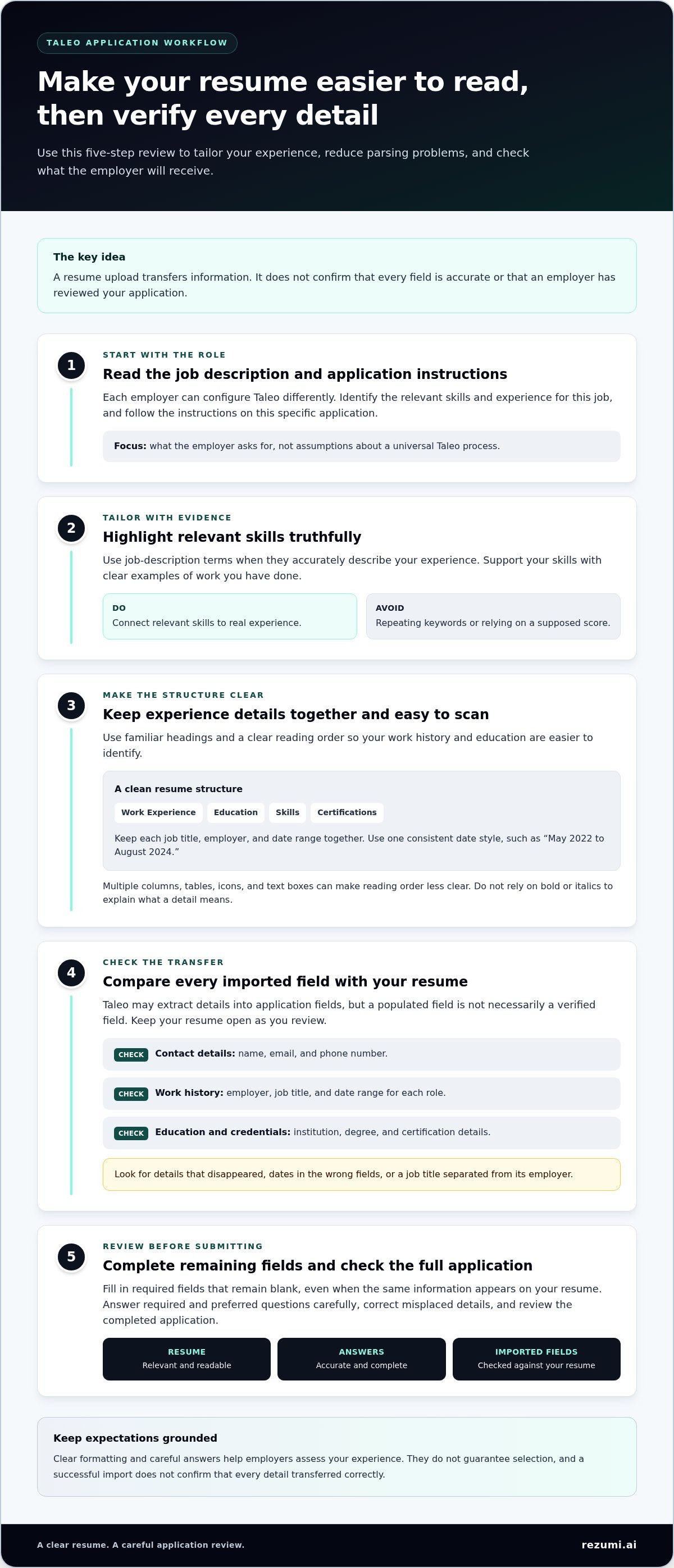
A Practical Taleo Resume Optimization Workflow Before You Apply
Start with role fit, not keyword edits. Use the job description to choose which experience to feature, then tailor your resume and review the Taleo form before submitting. This keeps your claims consistent and helps you catch errors while there’s still time to fix them.
Tailor your resume to the role
Identify the role’s main responsibilities, required skills, tools, and qualifications. Compare them with your actual experience and choose achievements that show your fit. Adjust your wording to use relevant terms from the posting when they accurately describe your work. Keep job titles, dates, credentials, and claims consistent across your resume and application.
- Review the posting. Note the core duties and qualifications, along with required questions and document instructions.
- Choose relevant evidence. Select accomplishments that show you’ve handled similar work. A specific result or example is more useful than a broad claim such as “strong communicator.”
- Tailor your resume. Bring the most relevant experience into view and use the employer’s terms when they fit your background. Don’t add skills or results you can’t support.
- Check consistency. Compare names, dates, titles, education, certifications, and claims across your resume and application materials. Explain a genuine difference, such as a formal title that differs from the title commonly used for your duties.
- Follow the application instructions. Use the file type and upload steps requested by the employer. Don’t assume every Taleo application uses the same process.
- Review and save. Check imported fields, fill in required blanks, and read your responses before submitting. Keep a copy of the resume you sent and a record of your application details.
Complete a final Taleo application review
Give the application form its own final check. Confirm that imported information is in the right fields, your answers match your resume, and every required question is complete. If you correct a field manually, verify the change before moving on. Save the submitted resume and application details together so you can refer to the same version if the employer follows up.
Before submitting, check that:
- Your dates and job titles match across the resume and form.
- Your qualifications and skills are accurate and supported by your experience.
- Your answers to application questions align with your resume.
- The uploaded file follows the employer’s instructions, and the final form has no missing required fields.
Use this workflow for each application, tailoring the evidence to the specific role. That’s the practical core of optimizing resume for Taleo applicant tracking system: a focused resume, accurate application fields, and a final review before submission.
Use Rezumi to Tailor Your Resume Before a Taleo Application
Prepare a resume for the specific role before you start the Taleo application. Rezumi helps you tailor resume content to a job description and gives you feedback before you apply. It’s a preparation tool, not a way to bypass Taleo or guarantee parsing, ranking, or an interview.
Keep your experience in control. Use feedback to spot where your resume could better reflect the role, then make only edits that accurately represent your work. The strongest version isn’t the one with the most repeated terms. It’s the one that makes relevant skills and evidence clear to an employer.
Turn job-description insights into focused edits
Start with the position’s key responsibilities and qualifications. Focus your resume on the parts of your background that match, and use role-specific language only when it describes your experience accurately. If a job emphasizes coordinating projects, for example, highlight a real example of planning timelines or working across teams. Don’t add a responsibility just because it appears in the posting.
Review feedback carefully. Check that each suggested detail is true, specific, and supported by your work history. A revised bullet should explain what you did, not just echo a skill from the job description. Keep the final document readable and consistent with the details you’ll enter in the application.
- Keep: Relevant achievements and responsibilities that show your fit.
- Adjust: Wording that can describe your real experience more clearly using the role’s terminology.
- Remove or revise: Details that are vague, outdated, or not relevant to the position.
Before uploading, compare your resume with the application details you plan to provide. Consistent titles, dates, and qualifications make your materials easier to review as a complete account of your experience. The final check in Taleo still matters, even when you’ve prepared your resume carefully.
Keep your job search organized
A tailored resume is one part of an application. Rezumi brings job-search tools together in one workspace, where you can manage applications, prepare cover letters, and practice for interviews. Keeping these tasks connected can help you carry the same understanding of the role from resume edits into the rest of your preparation.
Use the job description to focus your resume, make sure your cover letter supports the same experience, and prepare to discuss those examples in an interview. Each tool can help you get ready, but your applications should still reflect your own qualifications and judgment.
If a job-specific workflow would help you prepare and organize applications, explore Rezumi plans. Use Rezumi to refine your materials, then follow the employer’s Taleo instructions and review your application before submitting.
Make Your Next Application More Intentional
Turn the job posting into a clear plan. Before editing, choose the experience that best shows your fit. After editing, check that every claim is accurate and every application field reflects what you intend to share. This approach to optimizing resume for Taleo applicant tracking system keeps your attention on evidence and accuracy, not guesses about a hidden score.
You can’t control how an employer configures its hiring process or which candidate it selects. You can control how clearly you present your qualifications and how carefully you complete your application. Use each application to identify roles that match your strengths, then carry that focus into your next opportunity.
Take the next application one step at a time. Present your experience clearly and accurately, then check every field before you submit.
Frequently Asked Questions
Does Taleo automatically reject resumes that do not match every keyword?
No. Don’t assume that missing one keyword triggers automatic rejection. Employers can set different application questions and screening criteria, and claims about ATS scoring don’t establish a universal rule for every Taleo account. Focus on qualifications you can support, answer required questions accurately, and check the application before submitting. No resume edit can guarantee an employer’s decision.
Can I edit my Taleo application after submitting it?
It depends on the employer’s setup and the status of your application. Check your account and submission confirmation for an edit option or next steps. If you spot a mistake but can’t change the form, follow the employer’s application instructions rather than submitting a duplicate without guidance. Keep your confirmation details and the submitted resume so you can refer to them if needed.
Is Oracle Taleo the same as Oracle Recruiting Cloud?
No. Oracle Taleo is a legacy recruiting system, while Oracle Recruiting Cloud is Oracle’s newer recruiting platform. An Oracle logo or familiar-looking application page may not identify the exact system behind an employer’s process. You don’t need to determine the product version to complete the form. Follow the instructions and fields shown on the employer’s career site, since the application flow can differ.
Why does a Taleo application ask me to enter information already shown on my resume?
The employer may use form fields to collect details in a consistent format, while your resume provides a document for review. For example, a form might ask you to enter each job’s dates separately even though they appear beside the role on your resume. Enter the requested information, check it against your records, and complete required fields even if you uploaded a resume.
Can I use the same resume for every Taleo job application?
You can start with a base resume, then make focused edits for each role so your most relevant experience is easy to find. For optimizing resume for Taleo applicant tracking system, tailor truthful skills and achievements to the specific posting, then save a separate copy for that application. A clear filename, such as “Jordan-Lee-Project-Coordinator,” can help you identify which version you submitted when employers follow up.
What should I do if Taleo does not recognize my certification or qualification?
Check whether the form offers a free-text field or a matching option that accurately describes your credential. If you can enter details, use the certification’s full name and issuing organization, not just an abbreviation. Don’t choose a different credential to get past a dropdown. If a required field blocks submission, follow the employer’s application support instructions and keep the qualification clearly stated on your resume.
Disclaimer
This article is provided for general informational purposes only and does not constitute professional, legal, financial, or career advice. While Rezumi strives for accuracy, we make no warranties as to the completeness or reliability of this content. Hiring practices, ATS behavior, and job-market conditions vary by employer, industry, and region — always verify against your specific situation. Any action you take based on this article is at your own risk.