How to Streamline Job Applications with a Clearer Process
Applicant tracking systems can help employers manage applications, but your process matters too. To streamline job applications, set clear search goals, keep your resume easy to scan, and use autofill and automation to cut repetitive data entry. These steps save effort without making every application feel generic.
Entering the same work history over and over is frustrating, especially when you’re balancing applications with current responsibilities. A focused routine reduces repetitive tasks and gives you more time to tailor your experience to roles that fit.
This guide explains how to work with applicant tracking systems, narrow your search to suitable roles, prepare reusable application details, and automate routine tasks carefully. You’ll also learn where to review your work, so speed doesn’t come at the cost of accuracy or relevance.
Key Takeaways
- Keep resume formatting simple so applicant tracking systems can read your experience clearly.
- Set role, industry, and location priorities to focus your search on positions that fit.
- Use autofill to cut repeat data entry, then review each field for errors before submitting.
- Automate routine steps, but tailor your resume and application responses to each role.
- Track application dates, follow-ups, and outcomes in one place to keep your search organized.
1. Applicant tracking systems
An applicant tracking system (ATS) helps employers organize candidate information and hiring communications. It can collect applications, store resumes, and support communication between hiring teams and candidates. Because employers configure these systems differently, focus on presenting clear information rather than guessing at a hidden score.
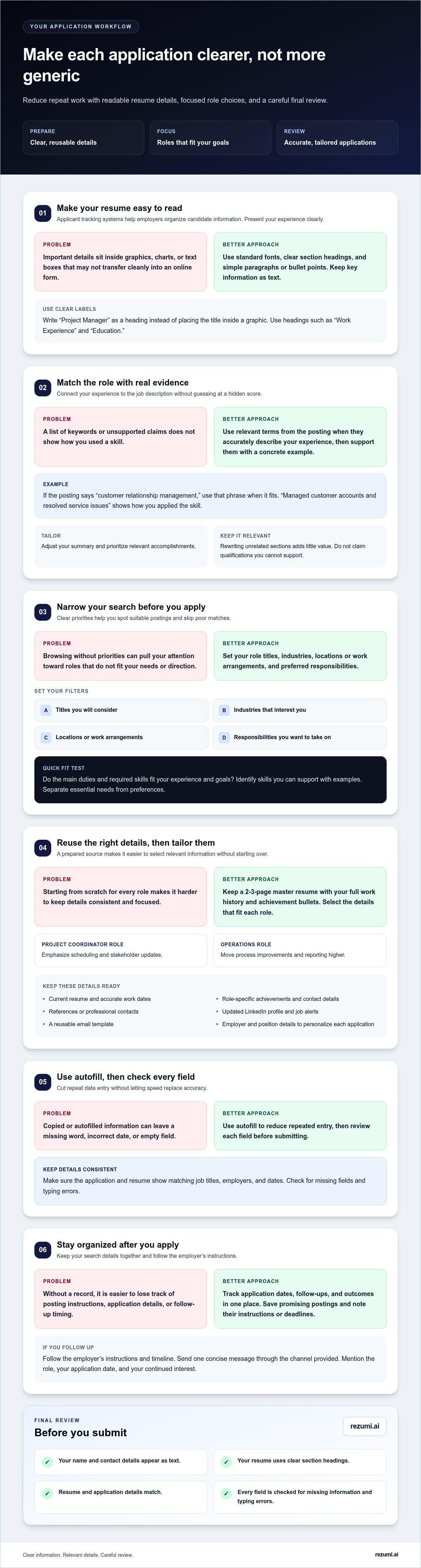
Choose a resume format that keeps your experience easy to read and transfer. Use clear section headings, standard fonts, and simple paragraphs or bullet points. Keep important details out of images, charts, and text boxes, which may not transfer cleanly into an online form. For example, use “Project Manager” as a heading rather than embedding the title in a graphic.
Compare your resume with the job description. If a posting asks for “customer relationship management,” use that phrase when it accurately describes your experience, rather than relying only on an abbreviation. Match relevant skills and role terms, but don’t claim qualifications you can’t support. A concrete example is stronger than a keyword list: “Managed customer accounts and resolved service issues” shows how you used the skill.
How much time should you spend customizing each application? Focus on changes that connect your experience to the role: adjust your summary, prioritize relevant accomplishments, and use accurate terms from the posting. A quick review of the employer’s requirements helps you decide which details matter. Rewriting unrelated sections adds little value.
Keep the application consistent with your resume. If an online form asks for work history already shown in your document, use the same job titles, employers, and dates. Review each field before submitting, especially when it was filled automatically. A copied title with a missing word or an incorrect date can confuse a recruiter.
How can you follow up without being too persistent? Follow the employer’s instructions and timeline, and send one concise message through the channel they provide. If no timeline is given, make your note polite and specific: mention the role, your application date, and your continued interest. Avoid repeated messages that add no new information.
Use this short ATS-ready review before submitting:
- Check that your name and contact details appear as text.
- Use clear headings such as “Work Experience” and “Education.”
- Confirm that your resume and application show matching job details.
- Review the final form for missing fields and typing errors.
These steps make your experience easier to process without turning your resume into a keyword list. To understand how to streamline job applications, treat the ATS as one part of the process: prepare readable information, tailor relevant details, and check the completed application before submitting.
2. Setting clear job-search goals
Clear goals help you focus on roles that match your skills, needs, and career direction. Before browsing job boards, define the work you want and the conditions you need. For example, a software analyst might prioritize healthcare employers, remote work, and roles that use SQL. These filters make relevant postings easier to spot and poor matches easier to skip.
Set practical search criteria. List the titles you’ll consider, industries that interest you, preferred locations or work arrangements, and responsibilities you want to take on. Separate essential needs from preferences. If remote work is essential but industry is flexible, focus on remote positions across several fields.
Use a clear fit test before starting an application. Compare the posting’s main duties and required skills with your experience and goals. A marketing coordinator with campaign reporting experience, for example, could prioritize roles involving analytics or campaign performance. Skip postings that depend on skills you lack and don’t want to develop.
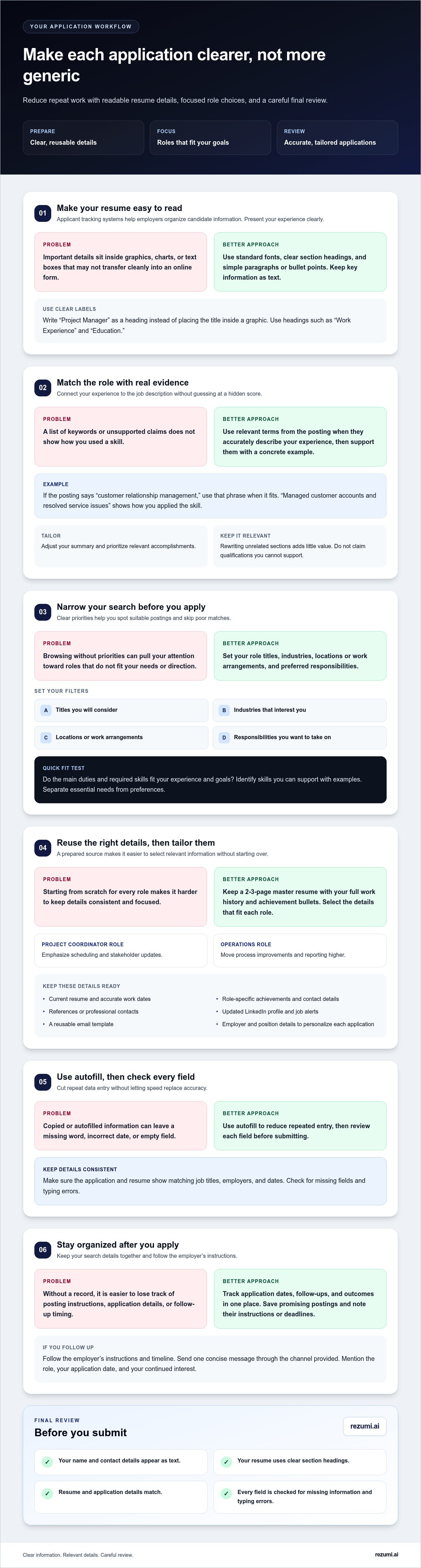
What information should you prepare before applying to jobs? Keep your current resume, accurate work dates, role-specific achievements, contact details, and references or professional contacts ready. Update your LinkedIn profile, set job alerts, and draft a reusable email template. Then personalize each application with details about the employer and position.
A master resume lets you tailor materials without starting over. Keep a 2-3-page version with your full work history and achievement bullets, then select relevant details for each role. For a project coordinator posting, emphasize scheduling and stakeholder updates. For an operations position, move process improvements and reporting higher.
A practical way to streamline job applications is to spend less time on searches that don’t fit your priorities. Set a regular time to review alerts, save promising postings, and prepare materials. Use this checklist to assess each opportunity:
- Confirm the title, location, and work arrangement fit your needs.
- Identify required skills you can support with examples.
- Save the posting and note its instructions or deadline.
- Personalize your resume and cover letter for the role.
If you’re deciding how to streamline job applications, keep your quality standard clear: connect your experience to the employer’s stated needs. Don’t rely on generic claims. If drafting a tailored letter slows your process, cover letter drafting tools can help shape a relevant first draft for you to review.
These tools can provide a starting point, but each application still needs to reflect the role’s requirements and your own evidence. One job applicant recommends updating a resume, keeping references and professional contacts active, updating a LinkedIn profile, setting job alerts, and preparing an email template before starting a search. Keep these materials aligned with your priorities so each application presents a consistent picture of the work you want and the experience you can offer.
From the employer’s perspective, hiring teams can use turnover trends, employee performance data, and department goals to refine hiring needs. As you assess a role, consider how your skills and experience align with the company’s culture and future goals. Evaluating candidates’ alignment with company culture and future goals, as well as their skills and experience, can support long-term workforce growth and reduce turnover.
3. Autofilling application forms
Autofill can transfer saved details into application forms, reducing repeated typing. Use it for stable information such as your name, email, phone number, and address. Treat every filled field as a draft, not a verified answer. A saved profile may contain an old phone number or format your address differently from the form’s expectations.
Keep a separate, current document with your employment history, education, skills, and references. Use it to compare autofilled entries with your resume for each role. If a form asks for a job title, employer, and dates, check every field directly. A resume upload may leave fields blank or put details in the wrong boxes.
Autofill works best when your information is consistent. Use the same spelling for employer names and job titles across your resume, profile, and applications. For example, if your resume lists “Customer Support Specialist,” check that a saved profile doesn’t insert an older title such as “Support Agent” unless that is the accurate title for the role.
Some forms ask for tailored details, such as why you want a role or how your experience meets its requirements. Don’t paste a generic answer just because autofill offers one. Use the posting to shape your response. For a project coordinator position, connect your experience to listed responsibilities, such as coordinating schedules or tracking project updates.
Before submitting, review the form from top to bottom. Check contact details, work history, dates, education, and required answers. Confirm that the uploaded resume is the version prepared for that position. This final review can catch errors that aren’t obvious in an autofill preview.
Use this quick review routine whenever a form fills itself:
- Compare your contact details with your current profile.
- Match each employer, title, and date to your resume.
- Rewrite generic answers to reflect the specific position.
- Open the uploaded file and confirm it’s the intended resume.
- Check required fields and correct any misplaced information.
Save only information you can verify and update. If an application asks for something outside your prepared profile, answer directly instead of forcing an inaccurate autofill result. For example, list a role-specific certification only if you hold it and can support the claim.
Autofill should reduce repetitive typing, not replace your judgment. A brief review keeps each application accurate, relevant, and consistent with your resume. Automate stable details, then check every answer that speaks to your fit for the role.
the details employers see. A LinkedIn post reported that manually entering work history after uploading a resume caused a 40% increase in hiring costs. That finding reinforces the value of checking what the form has already captured before adding information again. Review work-history fields for omissions or duplicates, and make sure each entry matches your records. Careful checking can prevent avoidable inconsistencies while keeping the application accurate.
4. Automating job applications
Automate repeatable tasks, not the decisions that show why you fit a role. A saved profile can handle basic details, while reminders and templates keep applications moving. Review everything before submitting so an incorrect field or generic answer doesn’t carry over to multiple postings.
Which job search platforms offer one-click or quick-apply features? LinkedIn and Indeed listings may display options such as Easy Apply or Quick Apply, while employer career sites use their own forms. Check the posting’s application route and review your information before submitting. A quick process can still require role-specific answers.
Build a simple workflow around each suitable posting. Save the job description, select the resume version that matches it, and prepare answers to common questions. One job seeker described applying to five targeted roles per day with an automated workflow after spending six hours building it. Treat this as one person’s approach, not a target you need to match.
Are there U.S. rules about job application data privacy and automated hiring tools? Privacy and automated-hiring requirements can depend on the state, employer, and data involved. Read the application’s privacy notice, understand what information it requests, and follow the employer’s stated process for questions about data use.
Choose tools that reduce repeat work without submitting applications blindly. A spreadsheet or task manager can track the company, role, posting date, application status, and next action. Calendar reminders can prompt you to revisit a saved posting or follow up according to the employer’s timeline. Keep your resume and answer templates somewhere secure and accessible while you apply.
What tools and templates help streamline job applications? Use a resume folder, a reusable answer document, a cover letter template, and an application tracker. Keep templates editable, with prompts such as “add one relevant achievement” or “name the employer’s product,” so you can personalize the final version rather than send a generic response.
Set clear boundaries for automation before you start. Use autofill for contact details, reminders for follow-ups, and templates for recurring questions. Review every employer name, job title, date, and tailored response before submitting. Avoid tools that send applications without your review, since they may reuse outdated details or miss a required question.
After submitting, record the role and status in your tracker. Note whether the application needs a follow-up, an assessment, or interview preparation. This gives every posting a clear next step and helps you focus on applications that still need action.
5. What are the best ways to organize and track job applications?
Use one tracker to see each role, its status, and your next action. A spreadsheet or task manager can hold the employer, job title, posting link, application date, and current status. Add a brief fit note, such as “strong match for onboarding,” to remember why the role interested you.
Choose fields that help you make decisions. Record the file names of the resume and cover letter you submitted, along with the role’s main requirements. If a recruiter contacts you, you can find the right materials and prepare with the posting in view. This is especially useful when applications have similar titles but different responsibilities.
Use consistent status labels to keep your tracker easy to scan. For example, mark roles as “saved,” “preparing,” “submitted,” “interview,” or “closed.” Update the status after each action. If an employer requests an interview, record the date and add a preparation task instead of leaving the application marked as submitted.
Keep a copy of each posting or note its key details. Listings can change or disappear, while the original requirements can help you prepare for an interview. For a data analyst role, save the requested tools and core duties. Later, use those details to choose a relevant project example or prepare a focused question.
Give every active application a next step. That could be completing a task, preparing an interview example, or following the employer’s stated timeline. Add a calendar reminder when the action has a clear date. A tracker shows how to streamline job applications by turning loose notes into a workable sequence rather than relying on memory.
Review your tracker regularly. Sort by next action or status, then focus on entries that need attention. Archive closed roles instead of deleting them. Keeping past applications gives you a record of the materials you used and helps prevent duplicate submissions to the same posting.
Make your tracker useful without making it difficult to maintain. Start with these fields:
- Employer, title, location, and posting source.
- Application date, status, and next action.
- Contact name and relevant communication notes.
- Resume and cover letter file names.
- Role requirements and a matching experience example.
For a more efficient job-search routine, decide how to streamline job applications by removing fields that don’t support a next step. Keep the tracker current, and use it to guide your attention toward the applications that need action. If a tailored cover letter is part of your next task, create a cover letter for your application.
Rezumi: ATS Resume Optimization
Rezumi helps you prepare application materials with ATS Resume Optimization, which tailors your resume to a specific job description. Use it when your experience fits a role but your resume needs clearer alignment with the posting. You can also create a cover letter with the AI Cover Letter Generator, practice responses through AI Interview Prep, and prepare a polished file with Resume Design & PDF Export.
These tools support your application workflow while you stay in control of the details. Review each tailored resume and cover letter before submitting to ensure they reflect your experience and the role accurately.
Visit rezumi.ai to explore how Rezumi can support your next application.
Make your next application more intentional
A clearer process gives you room to make better decisions, not just submit more forms. Treat each application as a chance to learn which roles match your experience and where your story needs sharper focus. If a response points to a missing skill or unclear achievement, use that insight to refine your next application.
The best way to streamline job applications is to keep improving your process without losing the personal details that make your experience relevant. Choose one practical adjustment for your next submission, then notice whether it makes the application clearer and easier to complete. Small, thoughtful changes can help you approach your search with more control.
Your next step can be simple. Start with one role that fits, prepare with purpose, and keep moving forward.
Frequently Asked Questions
How can I tailor a resume and cover letter efficiently for each job?
Start with a base resume, then adjust the details that show your fit for the specific role. For a customer success position, highlight examples of resolving client issues and supporting renewals. In your cover letter, connect one example to a responsibility in the posting and explain why the work interests you. Keep the facts accurate and remove claims that don’t match your experience.
How can I automate job alerts and application tracking safely?
Set alerts through a job board or employer site you already use, and send them to a dedicated job-search email folder. Track role names, dates, and next steps in a spreadsheet or task manager, not alongside account passwords or sensitive identity details. Before connecting a third-party tool to an email or job-board account, review its requested access and remove permissions you no longer need.
How can I optimize a resume for applicant tracking systems (ATS)?
Use the posting’s language when it accurately describes your skills, and support each key term with evidence. If a role requests “customer relationship management (CRM),” include the full term and abbreviation when both reflect your experience. Check that your file follows the employer’s requested format. As a final test, copy the resume text into a plain document and confirm that its sections and details remain in a readable order.
Disclaimer
This article is provided for general informational purposes only and does not constitute professional, legal, financial, or career advice. While Rezumi strives for accuracy, we make no warranties as to the completeness or reliability of this content. Hiring practices, ATS behavior, and job-market conditions vary by employer, industry, and region — always verify against your specific situation. Any action you take based on this article is at your own risk.