Is My Resume Getting Filtered by ATS? What Really Happens
The 75% rejection claim sounds definitive, but it doesn’t tell you whether your resume is getting filtered by an ATS. An applicant tracking system can filter or sort applications before a recruiter reviews them, but it doesn’t automatically reject every resume with a formatting issue or missing keyword. What happens depends on how the system parses your resume and how the employer uses it.
It makes sense to worry that a software filter could keep your experience from being seen. The useful move is to separate a parsing problem from a mismatch with the job requirements, instead of treating one percentage as a verdict on every application. You’ll learn what the 75% claim gets wrong, how ATS parsing, filters, formatting, and job-description matching can affect your resume, and what you can adjust to make your qualifications easier to read.
Key Takeaways
- Choose a file type the application accepts, and make sure your resume contains selectable text rather than a scanned image.
- Use a clear, single-column layout and standard section headings to help resume details parse correctly.
- Separate firm job requirements from preferences so you can see which qualifications may affect screening.
- Compare your experience with the job description and use accurate terms that describe your skills and achievements.
- Use ATS Resume Optimization to tailor your resume to a specific role and make its relevant qualifications easier to identify.
File type and abbreviation choices
Choose a file type accepted by the job posting. If it allows a Word document or PDF, use a clean .docx file or a text-based PDF. A scanned PDF may contain an image of your words rather than selectable text, making it harder for a system to extract job titles, dates, and skills. Keep a text-based copy ready for applications that accept either format.
Test a PDF before uploading it. Open the file, select a sentence, and copy it into a plain-text editor. If the words paste in the right order, the document contains selectable text. If you can select only the whole page as an image, export the original document as a PDF again. Don’t submit a screenshot of your resume as a PDF.
Follow the posting’s file instructions, even when another format seems easier. If the application requests a .docx file, upload the Word document rather than a PDF. If it accepts PDF, use the clean PDF version. Keep both files consistent, including your name, phone number, employment dates, and section content.
Abbreviations can create a separate matching problem. A recruiter or system may look for the full term, an abbreviation, or both. Write the full term first, followed by its abbreviation in parentheses. For example, use “Search Engine Optimization (SEO)” instead of writing only “SEO.” This gives readers and search tools both forms to recognize.
- For a credential: Write “Project Management Professional (PMP)” if you hold that credential. Don’t add a credential you haven’t earned.
- For a skill: Use “Customer Relationship Management (CRM)” before using “CRM” alone elsewhere.
- For a technical term: Spell out “Application Programming Interface (API)” when it accurately describes your experience.
- For a job title: Keep the official title, then clarify an internal abbreviation when needed, such as “Customer Success Manager (CSM).”
Use the expanded term only when it describes your actual experience. A longer resume filled with unrelated phrases won’t make your qualifications clearer. Match the posting’s wording when it accurately reflects your work, then add the familiar abbreviation where useful. For instance, if a posting names “Search Engine Optimization,” include that phrase alongside “SEO.”
Before submitting, compare the uploaded file with your source document. Confirm that the text remains readable and abbreviations appear beside their full terms. Check the application preview, if available. These steps can help catch a misplaced character, missing phrase, or unreadable file before your resume reaches review.
Formatting problems that can interfere with resume parsing
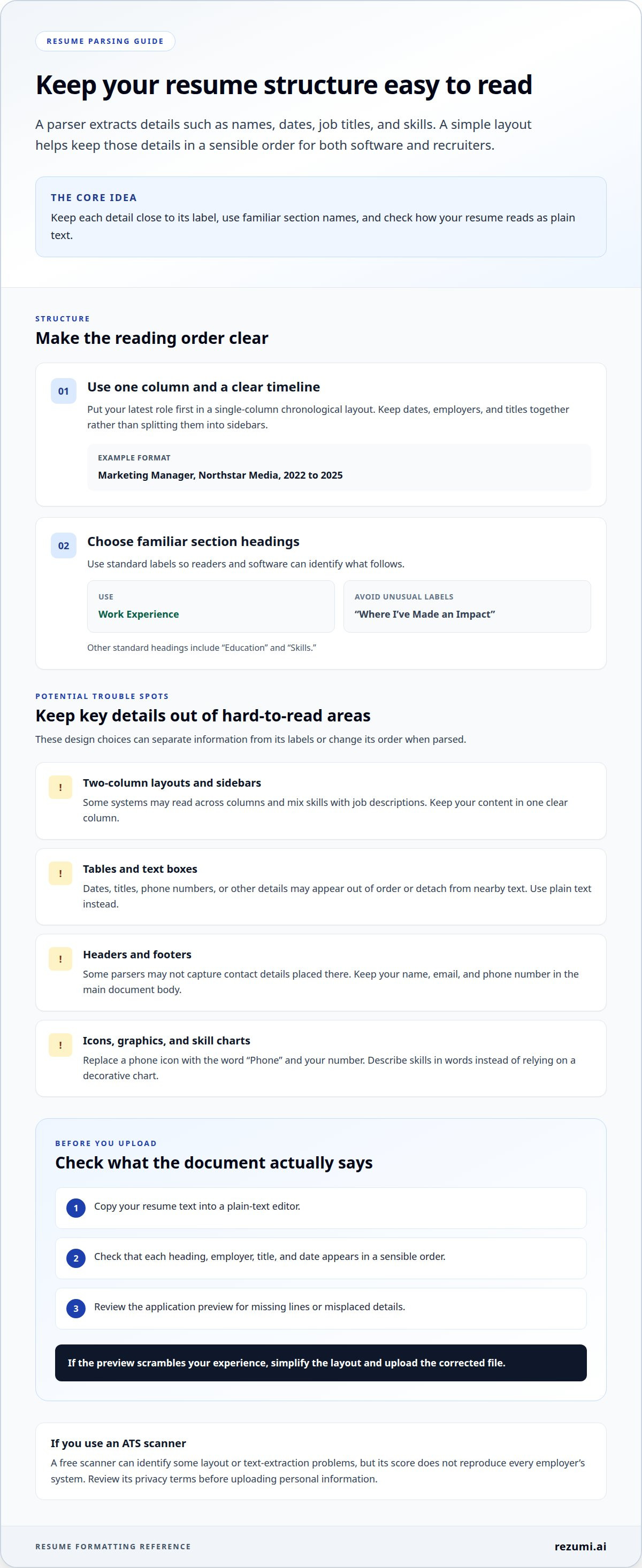
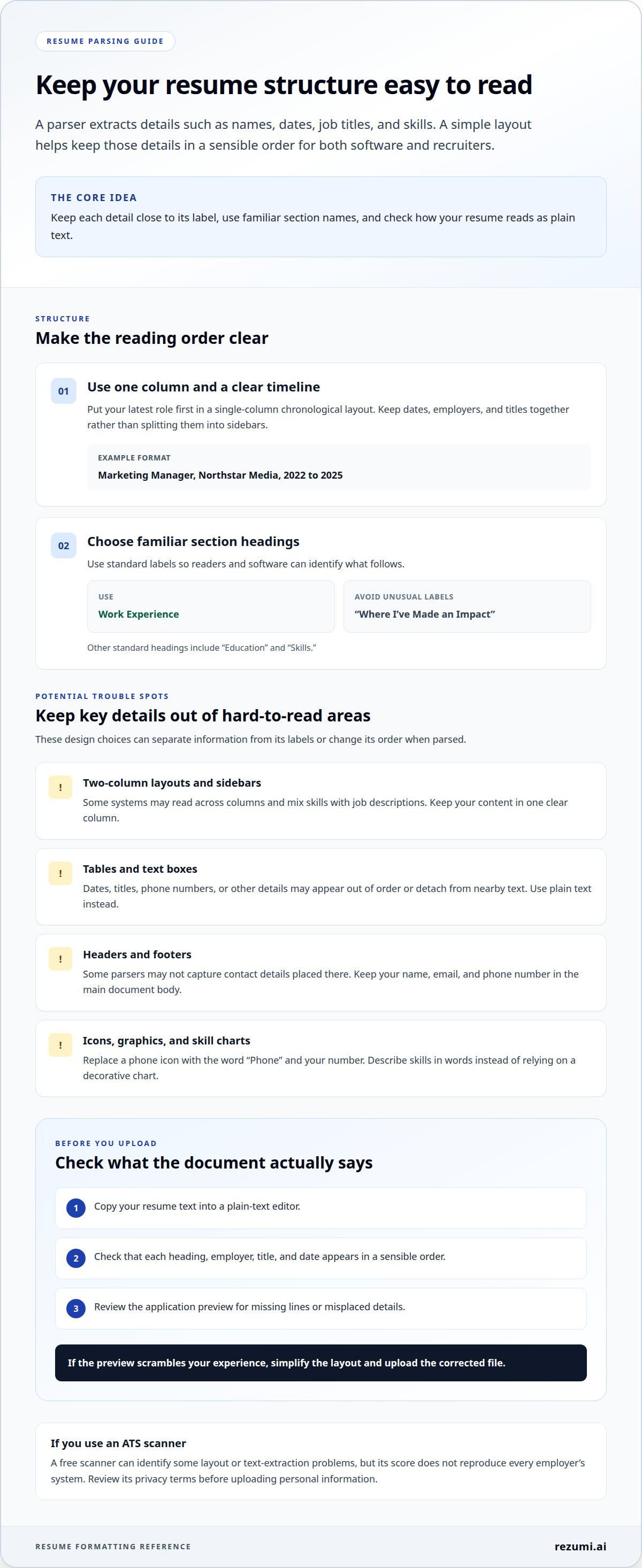
A resume can look polished in Microsoft Word yet lose structure when parsed. A parser extracts details such as names, dates, job titles, and skills. If those details sit in unusual locations, the system may read them in the wrong order. Keep the layout simple so your experience remains clear in both the document and extracted text.
Free ATS scanners can identify some layout or text-extraction problems, but their scores don’t reproduce every employer’s system. Before uploading personal information, review the scanner’s privacy terms to understand how it stores and uses your resume.
Use a single-column chronological layout, with your latest role first. Standard headings such as “Work Experience,” “Education,” and “Skills” make sections easier to identify and key details easier for a recruiter to find. Keep the same order throughout rather than placing dates or employers in separate sidebars.
Design features can cause parsing issues when they separate information from its labels. A two-column template might place “Skills” beside a job description, and some systems may read across both columns and mix the content. Text boxes can also detach a phone number or job title from the surrounding text.
- Tables: A table used to align dates and titles may cause details to appear out of order. Use plain text instead, such as “Marketing Manager, Northstar Media, 2022 to 2025.”
- Headers and footers: Keep your name, email, and phone number in the main document body. Some parsers may not capture information placed in page headers or footers.
- Icons and graphics: Replace a phone icon with the word “Phone” and your number. A decorative skill chart can’t explain what “advanced” means as clearly as a written skill.
- Unusual headings: Replace “Where I’ve Made an Impact” with “Work Experience.” The familiar label tells both readers and software what follows.
Use the format requested in the posting. When it allows them, use a .docx file or clean PDF rather than a scanned PDF or image. To test the layout, copy the resume text into a plain-text editor. Check that each heading, employer, title, and date appears in a sensible order.
Keep design choices that improve readability, but remove those that obscure meaning. A simple font, clear spacing between sections, and consistent date formatting make your resume easier to scan. Before submitting, review the application preview for missing lines or misplaced details. If the preview scrambles your experience, simplify the layout and upload the corrected file.
Hard filters such as degree or experience requirements
Myth: Every applicant tracking system automatically rejects you if your resume misses one requirement. Reality: A hard filter depends on employer settings and application questions. A system may screen for a required license or work authorization. It may also sort applicants for recruiter review instead of rejecting them. The job posting and application form offer clues about which requirements matter.
Evidence: Some criteria are easier to screen than others. An application can ask whether you hold a nursing license, for example, and your answer may determine whether it moves forward. Resume wording can also make your qualifications difficult to identify. If you completed a bachelor’s degree, list the degree and field plainly under “Education.” Don’t make a recruiter infer it from coursework.
Separate requirements from preferences before applying. Look for terms such as “required,” “must have,” and “preferred” in the posting. “Required bachelor’s degree” signals a firmer condition than “bachelor’s degree preferred.” A listed certification, such as a CPA license, may also be essential for a specific role. Don’t assume every qualification is an automatic software filter, but prioritize clearly stated requirements.
- Degree: Name the credential, field, and school. For example, write “Bachelor of Science in Accounting, Lakeview University.”
- Experience: Describe relevant work directly. “Managed payroll processing” is clearer than “handled finance tasks.”
- License: State the exact credential and status when relevant. Don’t imply that you hold an active license if it has expired.
- Work authorization: Answer the application question accurately. A resume phrase may not replace a required response in the form.
A gap doesn’t always mean you should stop applying. If a posting prefers a degree but emphasizes equivalent experience, describe that experience through specific responsibilities. For example, a project coordinator without the preferred degree can list schedules managed, teams supported, and project records maintained. Keep each claim accurate and relevant to the role.
Never add a false degree, license, or job title to match a filter. That can cause problems if an employer checks your application. Instead, use the closest truthful wording. If your credential has a different title, include its recognized name and a clear explanation. For example, identify an international degree by its official title, then describe its subject.
Before submitting, compare each stated requirement with your resume and application answers. Mark each item as clearly met, partly met, or not met. Strengthen the evidence for relevant qualifications you have. If a required license or qualification is genuinely missing, changing keywords won’t replace it. Focus on roles where your actual background fits the stated criteria.
How applicant tracking systems parse, match, rank, and filter resumes
Applicant tracking systems organize applications, but they don’t make hiring decisions independently. Depending on employer settings, an ATS may parse resume details, compare them with job criteria, and sort applicants for recruiter review. A resume’s wording and layout can affect how clearly its information is understood, but they do not by themselves determine an application’s outcome.
Parsing comes first. The system extracts details such as your name, job titles, employers, dates, education, and skills. For example, it may record “Sales Associate” as your title and “Brightline Retail” as your employer. If those details are confused or missing, your candidate profile may not reflect your actual experience.
How do ATS systems parse resume keywords and job titles? They extract text and organize it into fields, then may compare those fields with a job’s criteria. Clear titles and skills help connect your experience to the role, while unusual wording can make that connection harder to detect.
Next, the employer’s settings shape what happens. A required application response may filter out an applicant who doesn’t meet a stated condition. Other criteria may help a recruiter sort candidates by relevance. For example, a hiring team could prioritize resumes that show customer support experience for a support role.
Some systems attach a score, rating, or relevance indicator to a candidate profile. Recruiters may use those signals to sort candidates, but a score isn’t a universal ATS verdict. Its meaning depends on the system, employer settings, and information used for that job. A high score from one resume scanner doesn’t prove another employer’s system will rank you the same way.
For example, imagine a posting seeking a project coordinator with scheduling and vendor communication experience. A resume that says “created project schedules and coordinated supplier updates” provides clear evidence. A resume that says only “helped with projects” gives the software and recruiter less detail to match against the role.
- Parse: Make titles, employers, dates, education, and skills easy to identify.
- Match: Use accurate language from the posting when it describes your work.
- Rank: Treat a score or relevance label as a sorting signal, not a hiring decision.
- Filter: Read application questions carefully and answer required criteria accurately.
Employers can receive hundreds or even thousands of resumes for one opening. That volume helps explain why recruiters use systems to organize applications. It doesn’t mean software rejects every resume: an ATS may store or sort applications, or surface them for human review.
To assess your application, compare your resume with the posting. Check whether your relevant titles, skills, and accomplishments appear clearly. Then review your application answers separately. A system can organize what you submit, but a recruiter still evaluates how your evidence fits the role.
Keyword and semantic matching against job descriptions
Matching starts with the job description, not a universal ATS keyword list. A system may compare your resume’s skills, titles, and experience with the role’s stated needs. Exact terms can make a connection clearer, but repeating a keyword without relevant experience won’t prove you’re qualified.
How can you check whether your resume is ATS-friendly for a specific job? Compare the posting’s required skills and responsibilities with your resume, then confirm each relevant qualification appears in clear, accurate language. A scanner may flag text or keyword gaps, but its score can’t predict how every employer’s system will process your application.
Start with the job’s repeated terms and core duties. If a posting asks for “account reconciliation,” use that phrase when it accurately describes your work. If your resume says only “reviewed monthly accounts,” a recruiter may understand the connection, but the exact wording makes the match easier to spot.
Semantic matching means recognizing related words or ideas, not just exact phrases. For example, “managed calendars” and “scheduled executive meetings” describe related work. Systems vary in how they recognize that relationship, so don’t rely on a tool to infer every connection. State the relevant skill directly, then support it with a concrete task or result.
Job titles also need context. If your official title was “Client Partner” but the posting seeks an “Account Manager,” keep your real title. Add a short explanation in the experience description, such as “Managed client accounts, renewals, and service plans.” This gives the recruiter a clear comparison without changing your employment history.
Build a quick match check before each application:
- Identify: Mark required skills, tools, and responsibilities in the posting.
- Confirm: Keep only terms that honestly describe your background.
- Place: Add relevant terms to your skills section and the experience showing them.
- Support: Pair each important skill with an example, such as “prepared weekly budget reports.”
- Review: Remove repeated phrases that add no evidence or make sentences awkward.
For example, a posting may request “customer onboarding” and “CRM software.” If you trained new customers and updated Salesforce records, name those tasks clearly. Don’t add Salesforce if you haven’t used it. An accurate match is stronger than a list of copied terms.
Tailor each resume version to the role’s actual needs. Keep your core experience consistent, but adjust the summary and skills emphasis when a posting prioritizes different qualifications. A resume for a sales role may highlight account growth, while one for customer success may foreground onboarding and retention.
Rezumi: ATS Resume Optimization
Rezumi helps you tailor your resume to a specific job description with ATS Resume Optimization. Use it when you’ve identified relevant skills but need to align your resume’s wording and focus with the role. Review the result and make sure every qualification reflects your actual experience.
For the rest of your application, Rezumi also offers an AI Cover Letter Generator, AI Interview Prep, and Resume Design & PDF Export. These tools support different steps, from preparing application materials to practicing interview responses.
Start with ATS Resume Optimization when your next application needs a closer match to the posting. Visit rezumi.ai to explore Rezumi’s resume tools.
Take the next step with a focused application
If you’re wondering whether your resume is getting filtered by an ATS, start with what you can assess. Compare your resume with a role that fits your experience, then check whether your qualifications are clear. This gives you a practical next step instead of treating an unanswered application as proof of automated rejection.
To assess whether your resume is getting filtered by ATS, review how clearly your experience connects to the role. Make one focused revision, keep every claim accurate, and save a separate version for that application. This process helps you improve each submission without trying to solve every hiring-system question at once.
Your experience deserves to be presented clearly. Make your next application reflect the value you can bring.
Frequently Asked Questions
The “75% Rejected” Statistic: Myth or Reality?
The claim that ATS software rejects 75% of resumes isn’t a universal, established rate. Applicant tracking systems differ, and employers configure screening and sorting differently. A system may organize applications for recruiter review rather than reject them automatically. The number also blurs software filtering with an employer’s decision not to advance an application. Treat the claim as an oversimplification, not a prediction of what will happen to your resume.
How can I tell if my resume is being filtered out by an ATS?
You usually can’t tell whether an ATS filtered your resume from silence alone. An application status such as “submitted” confirms receipt, not whether a recruiter reviewed your resume or a system sorted it. Look for concrete clues you can act on: a portal error, missing text in an uploaded preview, or application questions you answered incorrectly. Correct those issues, then tailor a fresh application to the role’s stated needs.
What percentage of resumes are rejected by applicant tracking systems?
There isn’t one reliable percentage that applies to every employer and role. The result depends on how a company uses its system, which qualifications it screens for, and how many applicants meet those criteria. A resume not advancing doesn’t prove an ATS rejected it. The employer may have screened applications another way or selected candidates whose experience better matched the opening.
What resume formatting is compatible with most ATS software?
Use a clear, text-based document with familiar section labels and consistent formatting. Keep dates and job titles beside the roles they describe, and write contact details as plain text. For example, use “Email: name@example.com” rather than relying on an envelope icon. After exporting, select and copy the text into another document. Check that names, dates, and section order remain understandable.
Which resume file format is best for ATS: DOCX or PDF?
Use the format requested by the employer’s application system. If both DOCX and PDF are accepted, choose a clean DOCX or text-based PDF, not a scanned image. Before submitting a PDF, select a sentence and paste it into a text editor. If it appears correctly, the content is selectable. Keep a DOCX copy so you can revise details without rebuilding your resume.
What common resume mistakes cause ATS parsing errors?
Inconsistent dates can make work history harder to interpret. For example, switching between “Jan 2023,” “01/23,” and “January 2023” may make your timeline less clear to people and software. Check that each role has a recognizable title, employer, and date range. Also review punctuation in email addresses and phone numbers after uploading. A misplaced character can make contact details unusable even when the rest parses correctly.
Do graphics, tables, columns, headers, or footers confuse ATS software?
They can cause reading problems, but the result depends on the document and system. A logo may look clear while providing no readable text; a table may separate a date from its job title. Avoid placing essential details inside decorative elements. To test a design, copy its text into a plain document and inspect the order. If a role or skill becomes detached from its context, simplify that area.
How should I tailor resume keywords without keyword stuffing?
Use a job term only when it accurately describes your work, then support it with a specific task or outcome. For example, write “prepared customer onboarding guides” if you created those materials, rather than repeating “customer onboarding” in unrelated sections. A skills list can name a tool, while a work-history bullet shows how you used it. Read each sentence aloud and remove repeated terms that add no meaning.
Disclaimer
This article is provided for general informational purposes only and does not constitute professional, legal, financial, or career advice. While Rezumi strives for accuracy, we make no warranties as to the completeness or reliability of this content. Hiring practices, ATS behavior, and job-market conditions vary by employer, industry, and region — always verify against your specific situation. Any action you take based on this article is at your own risk.