Resume Keyword Optimization: Match Your Experience to the Job
More keywords won’t make your resume stronger. Strong resume keyword optimization means matching a job description with terms that accurately describe your experience, then showing proof in your work history. A crowded list can make your strengths harder to spot.
It’s reasonable to worry that a missing term could hide a relevant skill, or that repeating phrases will make your resume sound forced. The goal isn’t to copy every phrase in a posting. It’s to identify the requirements that matter and connect them to work you’ve actually done.
An applicant tracking system, or ATS, helps recruiters store and search applications. That doesn’t make keyword stuffing a good strategy. Your resume still needs to make your qualifications clear to the person reviewing it.
This guide shows you how to find the most relevant skills and qualifications in a job description, use its language honestly, and tie each term to evidence in your experience. You’ll also build a repeatable process for tailoring your resume to individual roles across North America.
Key Takeaways
- Prioritize skills, tools, qualifications, and responsibilities the job posting clearly emphasizes.
- Use resume keyword optimization to match relevant job language with evidence from your actual experience.
- Place keywords where they fit naturally, then show what you did or achieved with them.
- Keep one accurate source resume and tailor a separate copy for each role you apply to.
- Use Rezumi’s job-description-based tailoring and real-time feedback to support your resume review.
What Resume Keyword Optimization Actually Does for Your Application
Resume keyword optimization means choosing relevant language from a job posting and connecting it to qualifications you can support with real examples. You’re not trying to fit every phrase into your resume. You’re making it easier for an employer to see how your skills and experience relate to the role.
For example, if a posting asks for budget forecasting, include that term only if your work involved planning or estimating budgets. Then add context, such as preparing forecasts for a department or tracking spending against a plan. The keyword signals relevance. The example explains what you did.
Keyword alignment can help show a closer match, but it can’t guarantee that an ATS will advance your application, that a recruiter will rank it highly, or that you’ll get an interview. Your aim is a resume that communicates your fit clearly to both software and people.
What counts as a resume keyword?
Keywords are role-related skills, tools, credentials, responsibilities, and industry terms. A specific skill such as budget forecasting tells an employer more than a broad trait like hardworking, which is difficult to verify on its own. Job titles and qualifications can matter too, but use them only when they accurately describe your background. Don’t adopt a title or claim a credential you haven’t earned just to mirror the posting.
How ATS screening fits into hiring
An Applicant Tracking System (ATS) is software an employer may use to collect and organize applications. Its role and setup can vary between employers, so don’t assume every system uses the same filters or automatically rejects resumes for missing a term. A recruiter may search applications, review your resume, and assess your experience in context. A keyword match can help show relevance, but it isn’t the whole hiring decision.
Use a practical test: can you point to a real example for every important term you include? A tool may belong in your skills section, while a responsibility is stronger in a work-history bullet that shows how you handled it. If you can’t explain a term in an interview with a truthful example, remove it or use more accurate wording. That keeps your resume clear, credible, and ready for a human review.
How to Find the Right Keywords in a Job Description
Build your keyword list from the job’s actual needs, then rank each term by how central it is to the role and how well your experience supports it. This keeps resume keyword optimization focused: you’re selecting useful language, not copying the posting from top to bottom.
Which parts of the posting deserve the closest read?
Read the responsibilities, required qualifications, preferred qualifications, and skills sections. Note repeated role-specific terms, but don’t treat repetition alone as proof that a term matters most. Look for what the person will do, which tools they’ll use, what outcomes they’ll support, and how much responsibility the role carries.
How to rank keywords by relevance and evidence
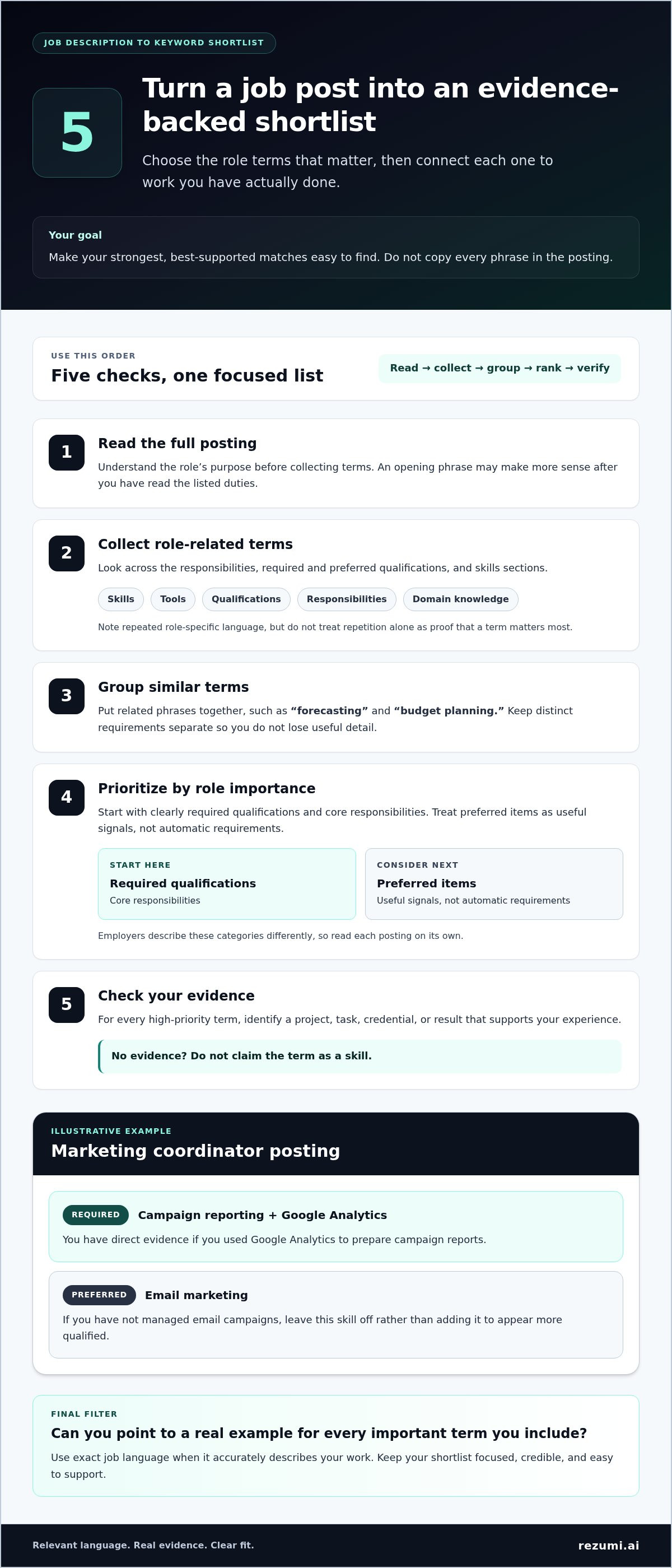
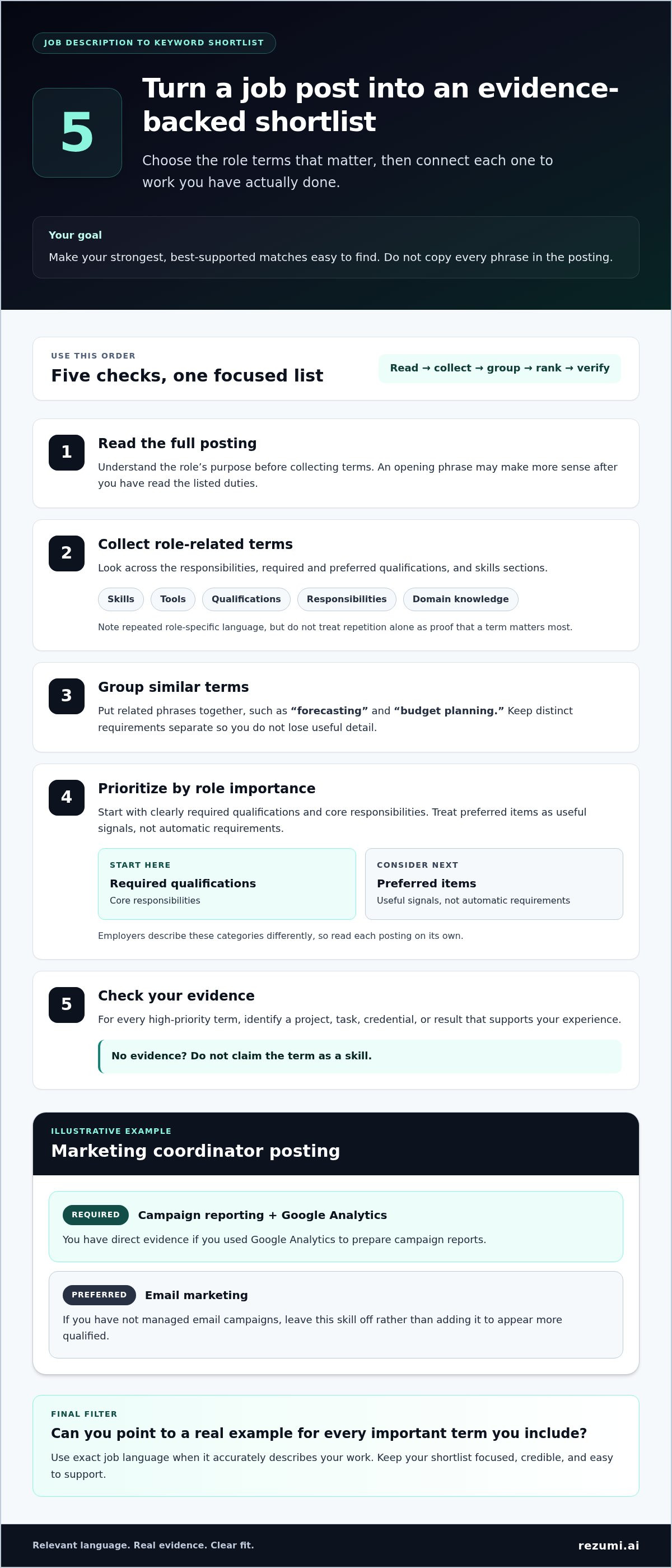
Use this order to turn the posting into a shortlist you can act on:
- Read the full posting. Understand the role’s purpose before collecting terms. A phrase in the opening summary may make more sense after you’ve read the listed duties.
- Collect role-related terms. Record skills, tools, qualifications, responsibilities, and domain knowledge. Include exact terms when they describe work you’ve done.
- Group similar terms. Put related phrases together, such as “forecasting” and “budget planning.” Keep distinct requirements separate so you don’t lose useful detail.
- Prioritize by role importance. Start with clearly required qualifications and core responsibilities. Treat preferred items as useful signals, not automatic requirements. Employers describe these categories differently, so read each posting on its own.
- Check your evidence. For each high-priority term, identify a project, task, credential, or result that supports your experience. If you can’t point to evidence, don’t claim the term as a skill.
Illustrative example: Imagine a fictional posting for a marketing coordinator. It lists campaign reporting and Google Analytics under required skills, while email marketing is preferred. If you’ve used Google Analytics to prepare campaign reports, both terms have direct evidence. If you haven’t managed email campaigns, leave that preferred skill off rather than adding it to appear more qualified.
This approach helps you weigh competing requirements. A required tool you’ve used in a key responsibility may deserve more space than a preferred skill you’ve only encountered briefly. Keep your wording accurate and make the strongest, best-supported matches easy to find.
For related screening context, review this ATS resume optimization guide as you shape your approach. A job-specific tailoring tool can also help you apply the same careful process to each posting.
How to Place Resume Keywords Without Stuffing or Overclaiming
Place each term where it gives a recruiter useful context. A skills section can name a tool, but an experience bullet can show how you used it. Good resume keyword optimization makes important qualifications easy to find without repeating phrases or claiming skills you don’t have.
Where to use keywords on your resume
Use clear section headings and give each keyword a natural home. A concise, well-organized resume helps readers find your qualifications and experience quickly.
- Summary: Include a few role-defining strengths that also appear in your skills or work history. Don’t use the summary to add unsupported claims.
- Skills: List specific tools and capabilities you can genuinely use. Name a project management tool only if you’ve worked with it.
- Experience: Use relevant terms in bullets that explain your actions, scope, and outcome. This shows more than a keyword on its own.
- Education or credentials: Add relevant degrees, certificates, or licenses using their accurate names. Don’t suggest you hold a credential you haven’t earned.
How to turn a keyword into evidence
A keyword should help a reader understand what you did, not just what you want them to notice. Compare a bare list entry, “inventory management,” with a work bullet: “Tracked inventory levels and coordinated restocking to keep daily orders on schedule.” The second example connects the skill to a work context. Use a result or number only if it reflects work you can verify and explain.
Illustrative example: If a fictional posting asks for “customer relationship management (CRM),” and you used CRM software to update client records, name the tool in your skills section and describe that task in your experience section. If you’ve only heard of the software, leave the claim off.
Use the exact phrase from a posting when it accurately describes your experience. If the posting uses an acronym, spell out the term and add the acronym in parentheses when both versions clarify your meaning, such as “customer relationship management (CRM).” Do this once where it reads naturally. Repeating both versions in several sections can make your resume feel crowded.
Clear section placement also helps a person scan your resume. A North American resume format guide can help you choose a structure that presents your qualifications clearly.
For a consistent way to tailor and review your resume against a specific posting, explore job-specific resume tailoring. Tie every keyword to truthful evidence, then make sure the finished document still sounds like you.
A Repeatable Resume Keyword Optimization Workflow for Every Application
A reliable process helps you tailor each application without losing track of what’s true. Keep one accurate source resume with your full work history, skills, projects, and credentials. Then create a separate copy for each role, so you can highlight relevant evidence without changing your facts or overwriting your original.
A five-step process from posting to tailored resume
Use the same sequence each time. It turns resume keyword optimization into a focused review, rather than a full rewrite for every application.
- Save the posting. Keep the job description with the employer and role title. If the posting changes or disappears, you’ll still have the requirements you used to tailor your resume.
- Extract the key terms. Note central responsibilities, required qualifications, tools, and skills. Separate preferred items so you can assess them without treating every listed preference as essential.
- Map terms to evidence. For each priority term, record where you can support it: a job, project, education, or credential. If you can’t point to a truthful example, don’t claim the skill.
- Tailor a copy. Revise the summary, skills, and experience sections to bring relevant evidence forward. Keep the facts intact. Tailoring means changing emphasis and wording where accurate, not adding responsibilities or qualifications you don’t have.
- Review and save. Remove unsupported terms and unnecessary repetition. Save the finished resume as a role-specific version, while keeping your source resume unchanged for future applications.
How to review the result before applying
Read the tailored copy as both a recruiter and the person who has to explain it in an interview. The key qualifications should be easy to spot, and every claim should be clear enough to discuss with a real example.
- Check relevance: Does the resume give space to the role’s central needs, rather than unrelated strengths?
- Check readability: Read each bullet aloud. Rewrite phrases that sound awkward or appear to be inserted only to match the posting.
- Check accuracy: Confirm titles, dates, tools, credentials, and results. Use numbers only when they reflect work you can verify.
- Check consistency: Keep section headings, dates, and formatting clear and consistent throughout the document.
Rezumi’s resume tailoring and feedback tools can support your review of a job-specific draft. Use the feedback as a prompt to inspect the document, then make sure the final wording reflects your experience.
How Rezumi Supports Job-Specific Resume Keyword Optimization
You’ve got a process for finding relevant terms and tying them to real experience. Rezumi helps you apply that process to each application by tailoring your resume to a specific job description and providing real-time feedback on resume quality. The goal is a focused draft you can review, not a shortcut around your judgment or a promise of a hiring result.
Use job-specific feedback to refine your resume
Start with the posting and the evidence you’ve already identified. Rezumi’s resume tailoring is designed around specific job descriptions, helping you focus your draft on the role at hand instead of relying on one generic version for every application.
Use the feedback as a review aid. Check whether the revised resume presents relevant experience clearly, then compare every suggested change with your work history, projects, education, and credentials. Keep language that accurately describes what you’ve done. Edit or remove anything that overstates your role, adds a skill you can’t support, or makes a bullet sound unnatural.
Your final judgment matters. A tool can support resume keyword optimization, but you’re responsible for making sure each claim is accurate and ready to discuss. If a phrase doesn’t sound like something you’d say about your work, rewrite it in plain language while keeping the relevant skill clear.
Keep your job search organized as you tailor
Tailoring creates role-specific materials, and keeping them organized helps you return to the right version when an employer follows up. Rezumi’s centralized workspace lets you manage job applications in one place, alongside the resume versions and related materials you use in your search.
You can also use related tools, such as cover letter generation and AI interview preparation, as separate parts of your application process. They don’t replace accurate resume evidence or careful keyword choices. They can help you keep preparation connected to the role while you review each document for consistency.
For each application, keep the job description with the tailored resume and note which version you submitted. That makes it easier to revisit the role’s requirements and prepare examples that support the experience on your resume. Rezumi’s real-time feedback adds another review point, while your final check keeps the language truthful, relevant, and recognizably yours.
Explore the Rezumi plans and tools to support your resume tailoring and job search process.
Make Your Next Application More Intentional
Use each application to learn more about the work you want to do next. After you submit, note which roles feel like a strong match and which skills appear across the opportunities that interest you. Over time, that record can help you spot career themes and choose where to focus your development.
Keep a short list of examples to prepare for future interviews, such as a project you’re proud of or a challenge you can explain clearly. Match each example to the skill or responsibility it demonstrates. That makes it easier to connect your resume claims to specific stories when you discuss your experience.
Your career story keeps growing. Give yourself room to shape what comes next.
Start your next application with a tailored, evidence-based resume using Rezumi’s job search tools.
Frequently Asked Questions
How many keywords should a resume have?
There’s no fixed keyword count that fits every resume. Use the posting as a filter, then stop adding terms when the remaining phrases describe minor duties or experience you don’t have. For example, a role may list several software tools, but name only those you’ve actually used and can discuss. Leave room for accomplishments and context, so resume keyword optimization still produces a document that’s easy for a person to scan.
Can you use the exact keywords from a job description on your resume?
Yes. Use the exact wording if it truthfully describes your work, but keep official job titles and credentials accurate. If your past title was “account coordinator” and the posting says “client success,” don’t rename your old job. Describe overlapping tasks, such as supporting renewals or resolving account issues, if those were part of your duties. This uses the employer’s term without changing your employment record.
Do soft skills count as resume keywords?
Yes, a soft skill can be useful when it’s tied to a task the role requires. For a job that calls for conflict resolution, you might describe how you handled a customer complaint, clarified the issue, and agreed on a next step. Choose a real situation with a clear action. A trait list alone gives little detail about how you work or what colleagues can expect from you.
Should you include a keyword if you have only limited experience with it?
Include it only if the wording matches your actual level. If you’ve used a reporting platform a few times with guidance, don’t describe yourself as an expert. State the task and level of support accurately. You could also mention related experience, such as preparing data in spreadsheets before a teammate imported it into the platform. That shows a useful connection without implying direct experience you haven’t gained.
Can one resume work for every job application?
A single resume can be your base, but an unchanged copy may not address different role priorities. If two applications ask for the same skill in different settings, keep your core facts and choose the example that best fits each one. Compare the skills in an online application form with those in the attached resume, too. Consistent details can reduce confusion if a recruiter reviews both.
Do resume keywords guarantee that an ATS will accept your application?
No. Keywords can’t control an employer’s full process. Some applications may also ask eligibility questions, such as whether you’re authorized to work in the stated location. A resume keyword can’t replace a direct, accurate answer in the form. Follow the employer’s instructions, check that your document opens and reads clearly, and answer required questions carefully. Treat keyword tools as review aids, not predictions of selection.
Disclaimer
This article is provided for general informational purposes only and does not constitute professional, legal, financial, or career advice. While Rezumi strives for accuracy, we make no warranties as to the completeness or reliability of this content. Hiring practices, ATS behavior, and job-market conditions vary by employer, industry, and region — always verify against your specific situation. Any action you take based on this article is at your own risk.