Resume Maker: How to Build a Job-Specific Resume for North American Roles
A polished resume can still hide the experience an employer needs to see. The right resume maker should do more than help you choose a template. It should make it easier to connect your real skills and achievements to each job.
If you’re comparing options, you may want one tool to create a professional resume and tailor it without starting from scratch every time. This guide compares resume maker features and shows you how to build a clear resume, match it to a North American job description, and export it in a suitable format.
You’ll also learn what to check before you submit, from relevant keywords and readable layout to file type. Rezumi’s guided workflow takes you from building your profile to writing and optimizing your resume, then designing and exporting it, with cover letter and interview prep as next steps. Tools such as ATS Score and Job Match % can help you review alignment, while you keep every claim grounded in your experience. The goal is a professional resume that makes your fit for the role easy to spot.
Key Takeaways
- Choose a resume maker based on how well it supports job-specific tailoring, useful feedback, design, export, and application organization.
- Build tailored versions from accurate work history, then adjust the details to reflect each role’s requirements.
- Prioritize the features you need, especially if you apply often or customize your resume for every job.
- Explore Rezumi’s guided workflow, from building your profile to preparing a cover letter and interview.
What should a resume maker do for your North American job search?
A resume maker should help you create and edit a clear job application document, then make it easier to adapt that document to a specific role. These are separate tasks. Formatting affects how your experience looks on the page. Tailoring brings forward the skills, responsibilities, and results that match the job description.
A tool may also provide ATS feedback. An applicant tracking system, or ATS, is software employers can use to collect and review applications. Feedback can help you spot missing terms or sections that need attention, but it can’t assess every part of your experience or predict an employer’s decision.
That distinction matters for remote applications, too. A remote job still has its own requirements, team needs, and preferred skills. Adjust your resume to show relevant evidence for that role instead of assuming one general version will fit every opening. A resume maker can support your preparation, but no tool can promise an interview or a job.
A resume’s purpose is to present qualifications relevant to a position. For a broader overview of its purpose and formats, see What is a Résumé? Use that context to assess whether a tool helps you communicate your qualifications, not just arrange them attractively.
Resume maker versus resume template: what changes?
A template gives you a layout. A resume maker may add editing tools and export options, and some tools also support job-specific tailoring or ATS feedback. Compare the features that help you revise and prepare an application with those that only affect its appearance.
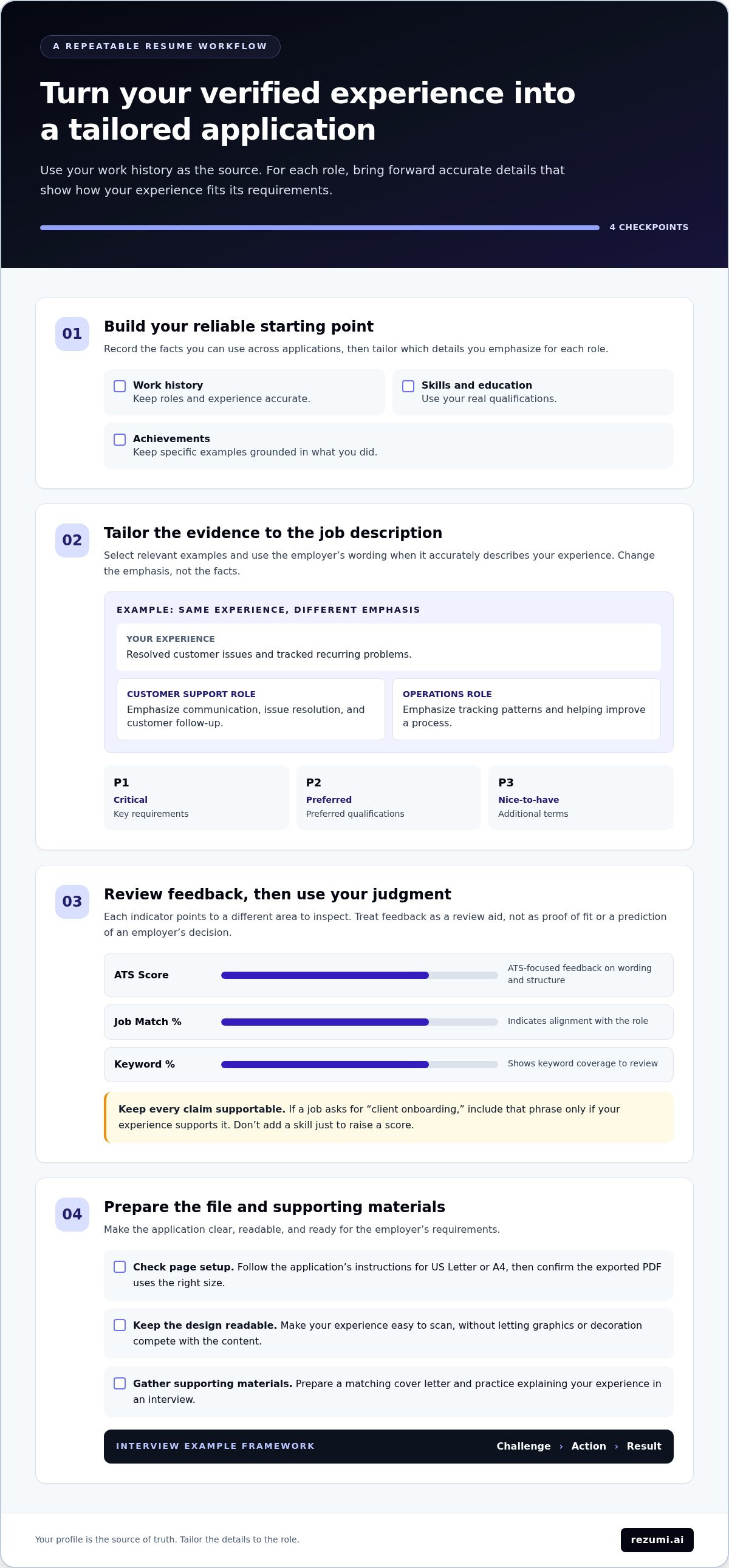
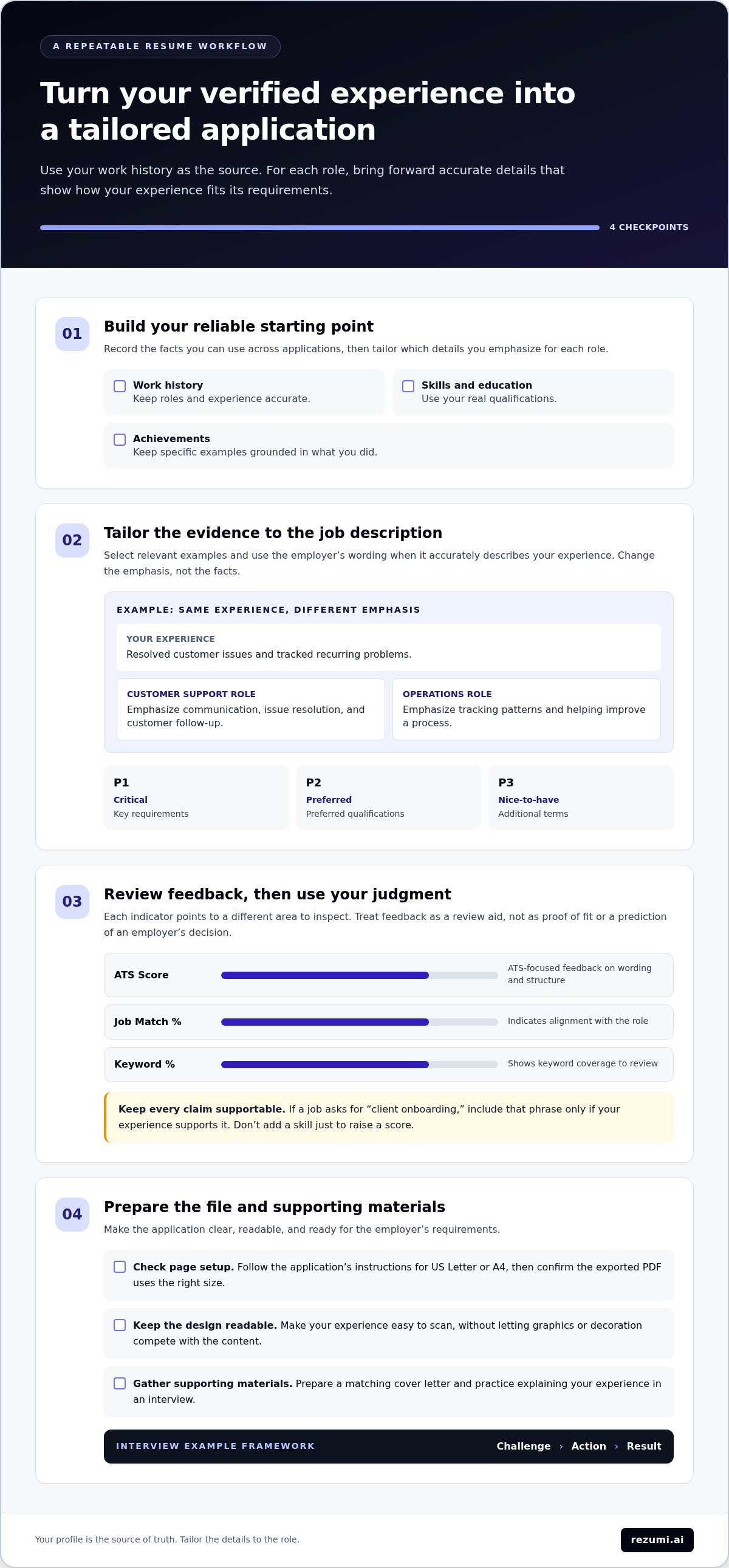
For example, imagine your experience includes resolving customer issues and tracking recurring problems. For a customer support role, emphasize communication, issue resolution, and customer follow-up. For an operations role, describe how you tracked patterns and helped improve a process. Your experience stays accurate, but the details you foreground change to match the job description. A polished template alone won’t make that connection clear.
What North American applicants should check first
Start with the job description, not the template. Identify the skills and responsibilities the employer states, then compare them with your real experience. Use the employer’s wording when it accurately describes your work, and don’t add qualifications you can’t support.
- Match evidence to the role. Select responsibilities, skills, and results that are relevant to the position.
- Review the page setup. Check whether the application calls for US Letter or A4, then make sure the exported PDF uses the right size.
- Keep the design readable. Choose a layout that makes your experience easy to scan, rather than letting graphics or decoration compete with the content.
- Use feedback as a review aid. Treat ATS feedback as a prompt to check wording and structure, not as a hiring prediction.
Regional conventions can affect page setup and presentation. Follow the employer’s instructions first, then consult North American resume format guidance if you need help choosing a format. Before exporting, check that the document is readable, accurate, and tailored to the role.
How resume makers turn your experience into a tailored application
A repeatable workflow helps you create a focused application without rewriting your work history from scratch. Your verified profile is the source. For each opportunity, select and refine the details that best show how your experience meets the role’s requirements.
A job-specific resume connects your relevant experience to the requirements stated in a particular role. It doesn’t mean adding skills you don’t have or changing your history. It means choosing accurate evidence and clear wording that helps an employer see the match.
A guided resume maker can support the process in four steps:
- Build your profile. Record your work history, skills, education, and achievements as a reliable starting point.
- Write and optimize. Adapt relevant content to the job description, then review feedback on your resume’s wording and alignment.
- Design and export. Apply a readable design and prepare the document for submission.
- Prepare supporting materials. Create a matching cover letter and practice explaining your experience in an interview. The CAR-framework, Challenge, Action, Result, can help you organize your examples.
Your profile remains the source of truth. Tailoring changes emphasis and wording, not the facts. If one role calls for customer communication and another focuses on process improvement, bring forward different examples from the same verified work history.
Match resume content to the job description
Use feedback to guide a careful review, not replace your judgment. ATS Score gives ATS-focused feedback, Job Match % indicates alignment with the role, and Keyword % shows keyword coverage. Each points to a different area to inspect. None can confirm that you’re qualified or predict an employer’s decision.
Keyword priority tiers help you decide what to review first: P1 critical refers to key requirements, P2 preferred to preferred qualifications, and P3 nice-to-have to additional terms. If a job description asks for “client onboarding,” include that phrase only if your experience supports it. Don’t copy a requirement into your resume just to raise a score. Describe the work you actually did, then connect it to the role in plain language.
Keep multiple applications organized
Separate workspaces can keep each opportunity’s job description, tailored resume, and related materials together. That makes it easier to review the right version before applying and update it without overwriting another application. A profile editor gives you a consistent starting point, so each version draws from the same accurate work history.
Rezumi provides 300 + workspaces per plan. That capacity can help applicants managing many opportunities, but you may need far fewer. Choose an organizational approach that fits your application volume. If you want a guided process for building, tailoring, and preparing applications, explore Rezumi’s plans and features.
Resume maker options compared: design, tailoring, feedback, and export
The right fit depends on where you need the most support. Some tools focus on visual editing and templates. Others help you build a resume or review its alignment with a role. Compare the steps each option supports, then choose based on how you prepare and manage applications. A polished design or strong score can’t replace accurate content that shows why your experience fits.
| Tool | Tailoring | Design | Export | Workflow focus |
|---|---|---|---|---|
| Resume.com | Job-tailored examples. | Resume templates and samples. | PDF and plain-text downloads. | Resume building. |
| Canva | Editable content for your resume. | Editable templates and drag-and-drop editing. | Download or share designs. | Visual editing. |
| Rezumi | Tailoring resumes to individual jobs. | Resume design tools. | PDF export. | Per-job workspaces and real-time ATS Score, Job Match %, and Keyword % feedback. |
Use the comparison to identify which parts of your workflow matter most, from shaping the document to reviewing role alignment and keeping versions apart. A design tool can help you control appearance, while job-specific editing and feedback can support your review of each application.
When a design-first resume maker fits
Canva offers editable templates, drag-and-drop editing, and options to download or share your design. That can suit you if you want direct control over the look of your resume. Keep the role in view as you customize. Check that key information remains easy to find and that your final document follows the employer’s requested file format.
When feedback and per-job tailoring matter more
Rezumi combines job-specific editing with real-time ATS Score, Job Match %, and Keyword % feedback. Resume.com is described with templates and resume-building tools, as well as job-tailored examples. If you’re comparing ATS-focused feedback, this ATS resume optimization guide explains what to review.
Use a score as a prompt to check your content, not as a verdict on your chances. Confirm that each skill and keyword reflects your actual experience, then make sure a reader can quickly understand your contribution. If a guided workflow for tailoring, feedback, design, and export fits your needs, explore Rezumi’s resume tools.
How to choose a resume maker for remote job applications
Choose a resume maker that supports the way you apply, not just the way you want your resume to look. Remote work is a job context, not a reason to claim skills you haven’t used. Match your experience to each role’s stated needs, whether the position is remote, hybrid, or on-site.
Use this checklist to compare your options:
- Profile reuse: Can you keep your work history and skills in one place, then use them as a starting point for different applications?
- Job-specific editing: Can you adjust the content for each role without losing the accuracy of your original experience?
- Transparent feedback: Does the tool explain what its feedback measures, so you can review suggestions rather than accept them automatically?
- Readable design: Can you make a clean document that helps employers find your experience and qualifications quickly?
- Suitable export: Can you prepare the file type and page size required for the application?
Prioritize the features that match your needs. If you apply occasionally, a straightforward editor and reliable export may be enough. If you apply often and tailor each resume, profile reuse, per-job editing, and clear feedback may matter more. In either case, check that every claim reflects work you can explain in an interview.
Match the tool to your application volume
A reusable profile can reduce repeated data entry while leaving room for role-specific edits. Maintain a consistent record of your experience, then select the most relevant skills and achievements for each opening. Rezumi reports 20 + hours saved per application. This is a platform claim, not a promised time saving for your own job search.
Consider how you manage applications now. If you often copy details between documents, a profile-based workflow may help reduce that repetition. If you apply to fewer roles, focus on whether the editing and review tools support the level of tailoring you need.
Check design and export before applying
In Rezumi’s Design view, you can prepare a resume for PDF export in US Letter or A4. Select the page size that fits the application instructions, then review the exported file for readability, spacing, and complete content. A layout that looks good in an editor still needs to work as a finished document.
Remote roles can have different requirements, so don’t assume one resume version fits every opening. If a posting asks for experience with remote collaboration, highlight it only when your work history supports that claim. Keep the document focused on the role, and use the requested file format.
How Rezumi brings resume making into one guided workflow
Rezumi is purpose-built for North American hiring, with a guided process that connects your profile, job-specific resume, document design, and application preparation. Instead of treating resume creation as a one-time formatting task, it helps you work through the steps for each opportunity while keeping your experience at the center.
The workflow follows four steps: Build profile → Write & optimize → Design & export → Cover letter & interview prep. Rezumi describes this as “4× steps from profile to hired.” That’s a process description, not a promise of a job or interview. The platform reports a 91 % average ATS score achieved by users, an average result rather than a guaranteed score for every applicant.
- Build profile: Add your experience and skills to create a starting point based on your background.
- Write & optimize: Tailor resume content to a specific job and review feedback on alignment.
- Design & export: Choose a resume design and prepare a PDF for the application.
- Cover letter & interview prep: Create supporting materials and practice discussing your experience.
You can begin with the free starter tier and upgrade to a paid plan when you’re ready. No contracts. Cancel anytime. All prices exclude applicable taxes. The workflow supports your application process, while you remain responsible for checking your facts and making the final edits.
Build, optimize, and export your resume
Start at the Dashboard, then use the Profile Editor to maintain the details that inform your resume. In Write & ATS, shape those details for a particular opportunity and review the real-time ATS Score, Job Match %, and Keyword %. These measures offer different views of your resume’s alignment. Use them to spot areas to review, then keep only wording that accurately reflects your skills and work.
When the content is ready, move to Design view and export your resume as a PDF in US Letter or A4. Select the page size that fits the application instructions, then check the exported file for clear text, complete sections, and clean spacing. A score can guide an edit, but your resume still needs to represent your experience truthfully.
Prepare beyond the resume
Your application can include more than a resume. Rezumi’s cover-letter generation helps you prepare a supporting letter, while interview training gives you role-specific questions and tips. The CAR-framework, Challenge, Action, Result, can help you organize an answer: explain the challenge, describe what you did, then state the result. Use your own examples so your answers stay specific and credible.
Bring your profile, tailored resume, export, and preparation into one guided process with Explore Rezumi plans.
Make your next application more intentional
Your next application is a chance to connect what you’ve done with what the role needs. Choose one job posting and mark the responsibilities you can support with clear examples. Then make a deliberate edit, such as moving a relevant result higher or explaining how you used a skill. Keep a note of what you changed and why. That gives you a useful reference for your next application.
A resume maker should support your decisions, not make them for you. Review every suggestion, remove wording that doesn’t reflect your work, and check the final document against the employer’s instructions. Your experience is the evidence. Your judgment makes the application yours.
When you’re ready to put this approach into practice, explore Rezumi plans and choose the tools that fit your application process.
Take the next step with a clear target and an honest account of what you bring. Make each application more focused, one thoughtful edit at a time.
Frequently Asked Questions
What is a resume maker?
A resume maker is a tool that helps you create or edit a resume, often with templates and export options. Some tools also offer feedback or help tailor content to a job description. For example, you might use one to update a resume after earning a new certification, then adjust which past achievements appear first for a specific role. Choose features based on the work you need to do.
Is a resume maker different from a resume builder?
The terms often describe tools with similar purposes, so the product name alone won’t tell you what you can do. Compare the actual steps: can you edit an existing resume, adjust content for a job, review feedback, and export a finished file? Choose a workflow that supports your next application without pushing you to use wording that doesn’t fit your experience.
Can I use a resume maker for remote job applications?
Yes. A resume maker can help you prepare a resume for a remote role by organizing relevant experience and tailoring it to the posting. For example, if the job asks for written communication, include a real example of a report, customer response, or project update you handled. Don’t add remote-work skills just because the role is remote. Use the job description and your actual work as evidence.
Should I make a new resume for every job application?
You usually don’t need to start with a blank page. Keep a current base resume, then save a separate version for each application and adjust its summary, skills, and experience details to fit the role. Before sending it, check the employer name, job title, and any tailored wording. This final pass helps catch details left over from another application and keeps each copy accurate.
Can a resume maker guarantee that my resume will pass an ATS?
No. An ATS Score or other feedback can’t guarantee how an employer’s system or hiring team will assess your application. Rezumi provides real-time ATS Score, Job Match %, and Keyword % to help you review alignment with a job description. Use the feedback to spot relevant terms you may have missed, but include them only when your work supports them. Follow the employer’s file and application instructions, too.
Does Rezumi have a free resume maker option?
Yes. Rezumi offers a free starter tier, with paid plans available if you want to upgrade. Review the plan details to compare what fits your needs before choosing. No contracts. Cancel anytime. All prices exclude applicable taxes. A resume maker can support your application process, but it can’t promise an interview or job offer.
Disclaimer
This article is provided for general informational purposes only and does not constitute professional, legal, financial, or career advice. While Rezumi strives for accuracy, we make no warranties as to the completeness or reliability of this content. Hiring practices, ATS behavior, and job-market conditions vary by employer, industry, and region — always verify against your specific situation. Any action you take based on this article is at your own risk.