Resume Review Checklist: How to Improve Your Resume in 2026
A resume review works best when it’s tied to your target role. Generic scores and broad advice won’t show whether your experience makes a clear case for this specific job.
Compare your resume with the job description to find missing evidence, replace vague duty lists with specific examples, and fix formatting that makes details hard to read. The goal isn’t to squeeze in every keyword or make your experience sound bigger than it is. It’s to present your real strengths clearly and honestly.
Use this checklist to focus on changes that matter before you apply. Review role fit, achievement statements, keywords, layout, and consistency. Then tailor your resume without losing your own voice. AI feedback can help flag gaps against a job description, but you make the final call on what accurately reflects your experience. Start with the target role and work through each section with a clear purpose.
Key Takeaways
- Measure your resume against the role’s required skills and responsibilities, not an abstract ideal.
- Check whether your summary, experience, skills, and education make your fit easy to see.
- Use clear section labels and simple formatting to help ATS tools read your information.
- Sort feedback by role relevance, clarity, and effort so you can focus your edits.
- Use a resume review tool to compare your resume with a job description, then fact-check suggestions before making changes.
What a resume review should check before you apply
A useful resume review checks whether your experience fits a specific role, supports your claims with evidence, reads clearly, and is easy to scan. Assess relevance, evidence, clarity, and presentation against the job you want, not an abstract idea of a perfect resume.
That’s different from proofreading, which catches spelling and grammar errors but can miss weak examples or irrelevant details. It’s also more useful than a generic score, which can’t tell you whether your experience matches a particular position. A review identifies changes to consider, but it can’t guarantee an interview or hiring outcome. It also isn’t the same as rewriting your resume from scratch.
What does a resume review actually evaluate?
Each part answers a different question about how well your resume supports your application:
- Role fit: Can an employer quickly see how your skills and background connect to the position?
- Achievement evidence: Do your examples show what you accomplished, rather than only listing duties?
- Readability: Are your wording and section order easy to understand at a glance?
- Document presentation: Is the layout consistent and easy to scan on screen or in print?
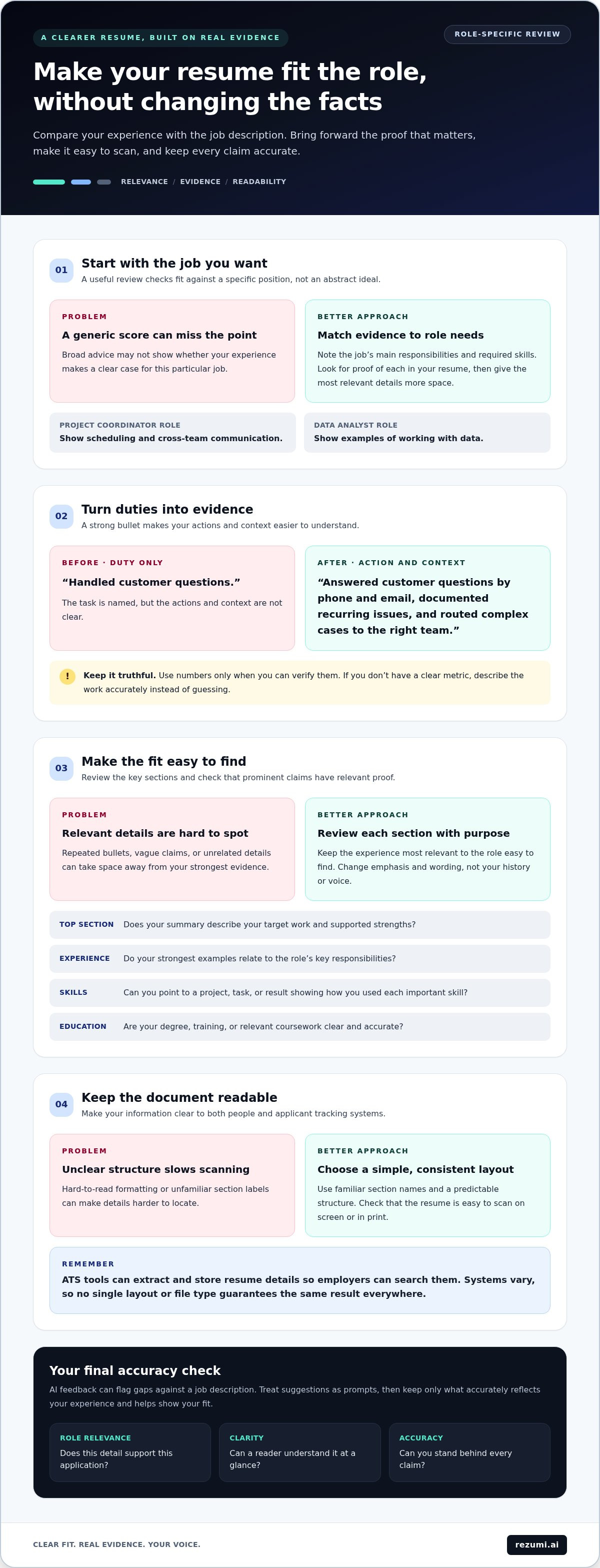
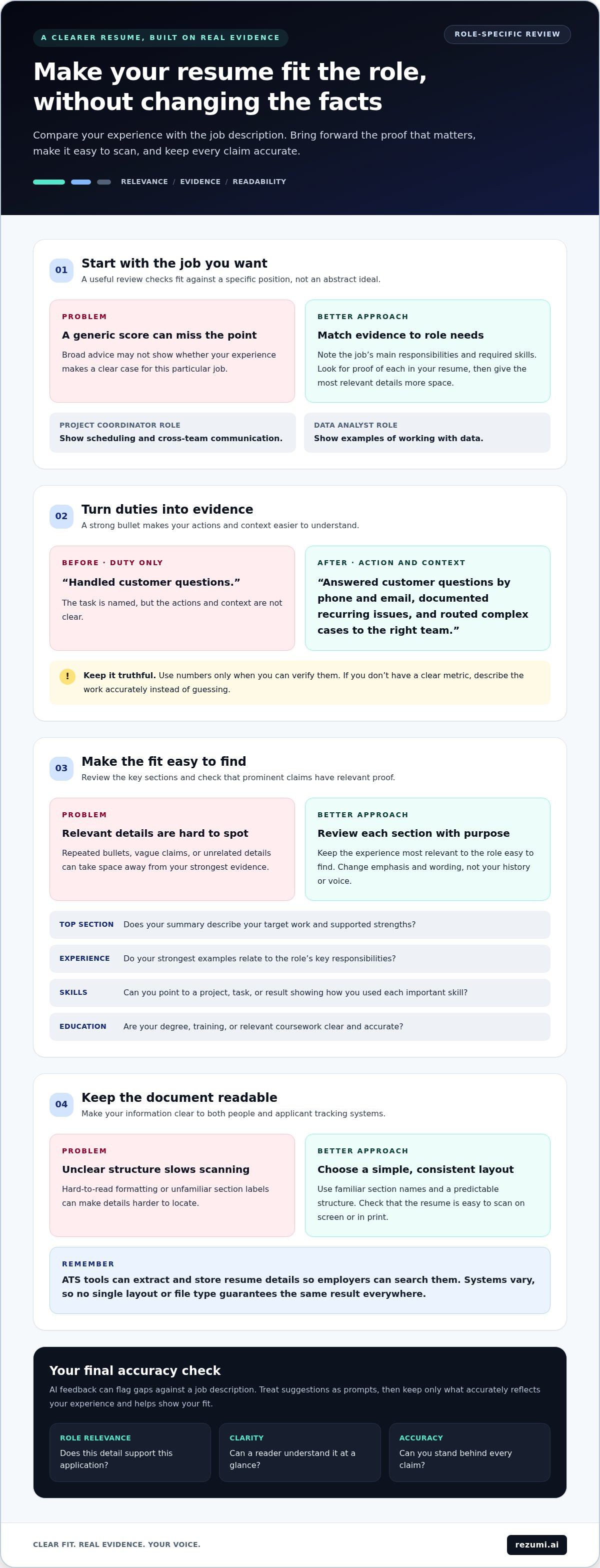
A resume gives employers a summary of your qualifications and work history. What belongs in that summary depends on the role. A project coordinator application, for example, may need clear evidence of scheduling and cross-team communication. A data analyst application may need examples of working with data. A good review helps you decide which true details to bring forward for each position.
When should you review your resume?
Review your resume before each application, after a career change, or when your responsibilities shift. A promotion, new project, or added skill can change which parts of your background deserve space. Check that your dates, titles, and claims are accurate each time you tailor it.
Keep a master resume with your full work history, projects, skills, and accomplishments. Use it as a source document, not as the file you send to every employer. For each application, create a tailored version that highlights the experience most relevant to that role. You can change the emphasis and wording without changing the facts.
When comparing layouts, choose one that keeps your most relevant details easy to find. The right format depends on your experience and the role, so review the presentation alongside the content rather than treating design as a final step.
How to review resume relevance, achievements, and clarity
Review your resume from top to bottom, checking each section against the job description. Start with your summary, then assess your experience, skills, and education. The goal is to make relevant evidence easy to find, not to include every detail from your career.
Does your resume show fit for this specific role?
Read the job description and note its main responsibilities and required skills. For each one, look for proof in your resume. Your summary and most relevant experience should make the connection clear. Give relevant details more space, but don’t copy the posting or claim a qualification you don’t have.
Check each section:
- Top section: Does your summary describe the work you’re targeting and the strengths you can support?
- Experience: Do your strongest examples relate to the role’s key responsibilities?
- Skills: Can you point to a project, task, or result that shows how you used each important skill?
- Education: Is your degree, training, or relevant coursework clear and accurate?
Every prominent claim should connect to relevant evidence. If you describe yourself as a project coordinator, for example, show where you coordinated a project, what you handled, or who you worked with.
Do your bullet points show outcomes, not only duties?
A duty tells the reader what you were assigned to do. A stronger bullet also shows your action, the context, and a truthful outcome. Use numbers only when you can verify them. If you don’t have a clear metric, describe the work accurately instead of guessing.
Before: “Handled customer questions.”
After: “Answered customer questions by phone and email, documented recurring issues, and routed complex cases to the right team.”
The revised example adds specific actions and context without inventing a result or number. Use it only if it reflects what you actually did. A useful resume review also removes repeated bullets, vague claims such as “responsible for many tasks,” and details that don’t support this application. That gives your strongest evidence more room to stand out.
Does the whole resume tell a clear story?
Read your resume once for relevance, then again for clarity. Make sure job titles, dates, and skills are easy to understand. Explain uncommon terms that may not be familiar outside your field. A tailored version should shift attention toward the role without changing your history or voice.
For another check, compare your resume with the job description using Rezumi’s resume tools. Treat suggested edits as prompts, then keep only the changes that are accurate and useful for the role.
How to assess ATS readability without chasing a perfect score
An applicant tracking system (ATS) can extract and store resume details so employers can search them. Systems vary, so no single layout or file type guarantees the same result everywhere. Make your information clear to both software and people instead of aiming for a perfect score in one checker.
Use familiar section names and a predictable structure. These labels make your content easier to locate and understand:
| Clear section label | Less clear alternative |
|---|---|
| Work Experience | Career Journey |
| Education | Learning Path |
| Skills | What I Bring |
| Professional Summary | My Story |
Creative labels can look polished, but they may not tell a reader or system what a section contains. Let visual style support your content, not hide it. Keep dates consistent, use readable text, and avoid crowded sections or layouts that place key details in hard-to-find areas.
Which formatting issues can make a resume harder to read?
Look for mixed date styles, headings that change from section to section, tight spacing, and columns or design elements that interrupt the reading order. These issues don’t automatically mean your resume will fail, but they can make information harder to follow or extract. Check that job titles, employers, dates, and section labels are easy to locate.
Inspect the saved file, not just the editable version. Open the exported document and scan every page. You can also copy the text into a plain text document. If words appear out of order, disappear, or merge together, simplify the layout and export it again. No single format works best in every situation, so follow the employer’s file instructions and make sure your chosen file remains readable.
How should you use ATS feedback and keyword suggestions?
Treat an ATS score as diagnostic feedback, not a hiring prediction or universal pass mark. A score may point to missing terms or sections, but it can’t confirm that you’re qualified or predict an employer’s decision. Systems and job requirements differ.
Compare each suggested term with the job description and your actual experience. Add relevant wording where it fits naturally, such as naming a tool you used in a project. Don’t repeat keywords without evidence or claim skills you can’t support. For more system-focused checks, read the ATS resume optimization guide.
How to turn resume review feedback into a focused revision plan
Don’t apply every suggestion at once. Sort feedback by how much it improves your fit for the role, how clearly it fixes a problem, and how much effort it takes. This keeps your edits focused on what matters for the application.
Which resume changes should you make first?
Use this order to turn feedback into a short, practical plan:
- Fix errors and confusing content. Correct inaccurate dates, unclear wording, and details that are hard to understand. These issues can distract from your qualifications.
- Strengthen evidence for the role. Prioritize changes that make a required skill or responsibility easier to see. If a role calls for vendor coordination, for example, bring forward a relevant project where you worked with vendors, if that reflects your experience.
- Remove competing details. Cut repeated points or unrelated content that pushes stronger evidence out of view. Keep information that supports your application or adds useful context.
- Polish lower-priority details. Once the content is clear and relevant, review spacing, font choices, and other design details. Don’t adjust small visual choices while a key claim remains unclear.
Keep a brief change log for each application version. Note the role, the main edits, and why you made them. This helps you organize versions and understand the purpose behind each change, instead of ending up with files that have no clear difference.
How can you keep AI-assisted edits accurate and authentic?
AI feedback can help you spot gaps or unclear wording, but it doesn’t know your full work history. Assess each suggestion rather than following it automatically. Verify names, dates, skills, responsibilities, and results against your own records and memory.
Reject advice that changes what you did, adds a result you can’t support, or makes your writing sound unlike you. Don’t accept a stronger title or claim ownership of a project if your role was to support it. You should be able to explain every line in a conversation with an employer. If a suggestion makes a real accomplishment clearer, revise it in your own words and confirm that the meaning stays accurate.
Before you finish, read the revised version from top to bottom. Confirm that each edit serves the target role, sounds natural, and reflects your experience. That final check turns resume review feedback into a reliable plan, not a collection of unchecked suggestions.
How Rezumi supports a job-specific resume review
Rezumi helps you compare your resume with a specific job description, review feedback, and choose edits that fit your experience. The platform supports your judgment. It doesn’t promise an interview or guarantee that an employer’s ATS will read or rank your resume in a certain way.
What can job-specific feedback help you spot?
Start with your current resume and the role you want. Feedback can help you spot relevant skills or experience that are hard to find, claims that need clearer evidence, or wording that could better reflect work you’ve actually done.
For example, if a job description asks for project coordination experience, check whether your resume explains what you coordinated and what your role involved. If the evidence is already there but buried in a long bullet, move it higher or make the wording more direct. Don’t add experience just because a tool suggests a missing term.
Use feedback as a revision checklist, not a verdict on your chances. Check each suggestion against the job description and your work history. Keep edits that make accurate, relevant details clearer. Skip suggestions that add unsupported claims or change what you did. You’re responsible for the final version.
How does resume review fit into your wider job search?
A focused resume version helps keep each application aligned with its target role. Track the employer, role, date, and resume version you sent. That record makes it easier to return to the right details when preparing for a conversation later.
Rezumi also includes tools for cover letters and interview preparation. Use them alongside resume feedback and job-description tailoring to support other parts of your application process. Keep the steps straightforward:
- Prepare an accurate resume with your relevant experience.
- Compare it with one target job description.
- Review feedback for gaps, unclear evidence, or wording to improve.
- Verify every change before using the tailored version.
Begin with one role and one focused review. Make a small set of purposeful edits, then save the version with a clear label so you know which application it supports.
Make your next application more focused
A strong resume review starts with the role you want. Check that your most relevant experience is easy to find, your claims have clear evidence, and your format keeps details readable. Treat ATS feedback as guidance, not a hiring prediction or a score you must reach.
Rezumi provides AI-powered feedback and tools to tailor your resume to a specific job description. Review each suggestion, verify it against your experience, and keep only edits that are accurate and sound like you. The platform is designed for job seekers in the United States and Canada.
Start with one target role and a few purposeful changes. Your experience is yours to present, and a clear, truthful resume helps you make that case with confidence.
Frequently Asked Questions
What should you look for during a resume review?
Check whether your resume fits the target role, supports key claims with evidence, reads clearly, and uses a consistent layout. Look for examples that show what you did and the outcome, not just a list of duties. Confirm that your contact details, job titles, dates, and skills are accurate. A useful resume review focuses on changes that make relevant experience easier to understand, not on chasing a perfect score.
How do you review a resume for a specific job?
Compare your resume with the job description. Note the main skills and responsibilities, then find accurate examples in your experience that show you have them. Check that your summary and strongest examples make the fit clear. Use the employer’s language when it matches your experience, but don’t copy whole phrases or add qualifications you can’t support. Tailor the emphasis and wording while keeping your work history truthful.
Can AI review a resume accurately?
AI can help flag unclear wording, missing details, or a mismatch between your resume and a job description. It can’t confirm your work history or judge every employer’s priorities. Check its suggestions against your actual skills, responsibilities, dates, and results. Keep edits that make your experience clearer and more relevant. Reject any suggestion that changes what you did or adds a claim you can’t explain.
Is a resume score enough to tell if your resume is ready?
No. A score can point to areas worth checking, but it isn’t a hiring prediction or a universal pass mark. Different tools and applicant tracking systems may assess information in different ways. Review the details behind the score: Are important skills clear? Can software and people read your sections? Do your examples support your claims? Use the score as one diagnostic signal, then make your own role-specific judgment.
How often should you review your resume?
Review your resume before each application so you can focus it on that role. Update your master version when you gain a skill, complete a project, change responsibilities, or move into a new field. You don’t need to rebuild the whole document each time. Keep your full experience in a master copy, then make a tailored version with the most relevant, accurate details for each application.
Should you use a PDF or Word document for your resume?
Follow the employer’s file instructions first. If no format is specified, a Word document or a text-based PDF can work, but resume systems vary in how they read files. Avoid placing important details inside images, and check the saved file before submitting it. Open it on screen and confirm the text, spacing, dates, and section order remain clear. A clean export helps prevent layout issues from obscuring your information.
How can you tell if resume feedback is worth following?
Follow feedback when it helps you show relevant experience more clearly without changing the facts. Check whether the suggestion connects to a real job requirement and whether you can support it with an example from your work history. Be cautious of edits that add skills, results, or responsibilities you didn’t have, or make your wording sound unnatural. Treat feedback as advice to assess, then verify every change before applying.
Disclaimer
This article is provided for general informational purposes only and does not constitute professional, legal, financial, or career advice. While Rezumi strives for accuracy, we make no warranties as to the completeness or reliability of this content. Hiring practices, ATS behavior, and job-market conditions vary by employer, industry, and region — always verify against your specific situation. Any action you take based on this article is at your own risk.