Software to Track Job Applications for Your Job Search
A job search can lose momentum when applications, recruiter conversations, and follow-up dates are scattered across emails and notes. Software to track job applications gives you one place to organize those details, so you can see what you’ve sent and what needs attention next. Job seekers may apply to 20-50+ positions before receiving an offer, making a clear record useful as the search grows.
You may already track applications in your own way. A spreadsheet can work well for a small search, while software to track job applications can make a busier search easier to organize. The best option is the one you’ll keep up to date.
This guide covers why tracking matters, what information to record, and how to manage recruiter contacts and timelines. You’ll learn when a spreadsheet is enough, when dedicated software may fit better, and how to keep your search organized without creating extra work.
Key Takeaways
- Record each application’s role, company, status, and next action so you can quickly see where your search stands.
- Keep recruiter and hiring-manager names, contact details, conversation notes, and follow-up dates beside the relevant application.
- Choose a tracker based on how many applications you manage and which features you’ll use consistently.
- Use a spreadsheet for a simple, flexible setup, and update it regularly to keep statuses and timelines current.
- Review your application history to spot follow-ups and prepare for interviews with the right details at hand.
Why should I track my job applications?
A tracker helps you decide what to do next instead of relying on memory. You can see which roles need a response, which call for preparation, and which are no longer active. That clarity matters when employers contact you close together or an interview invitation arrives while you’re finishing another application.
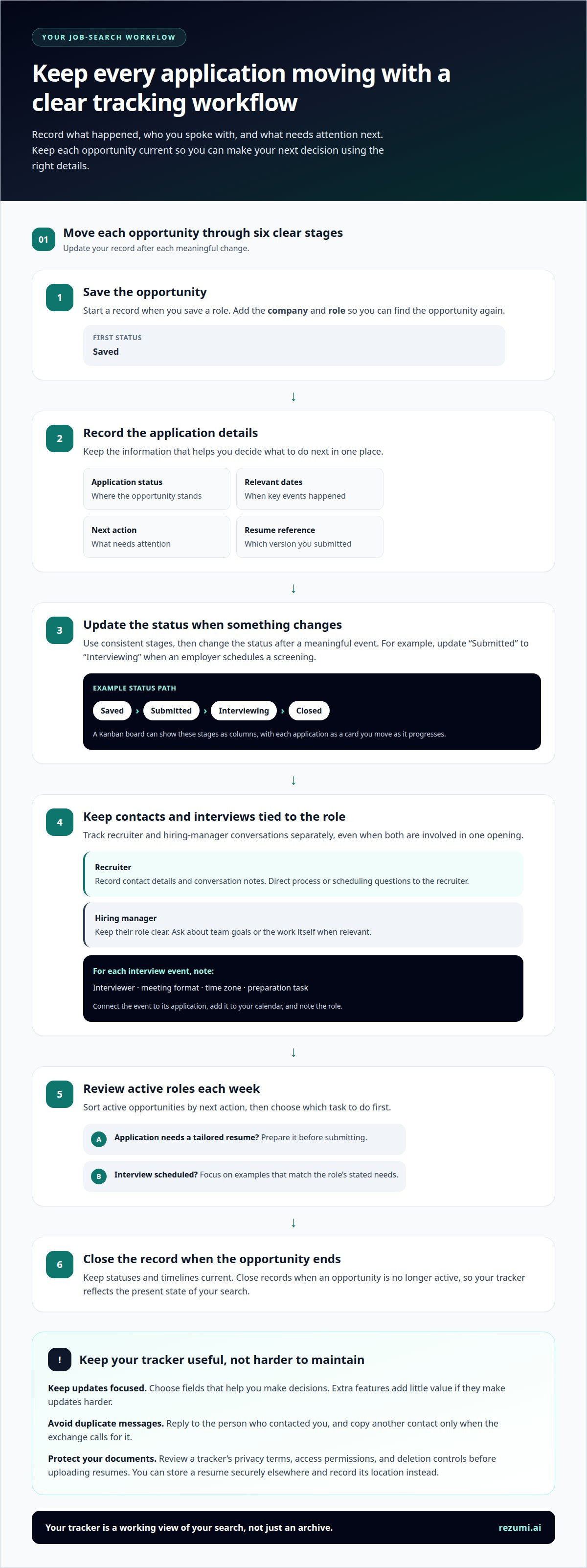
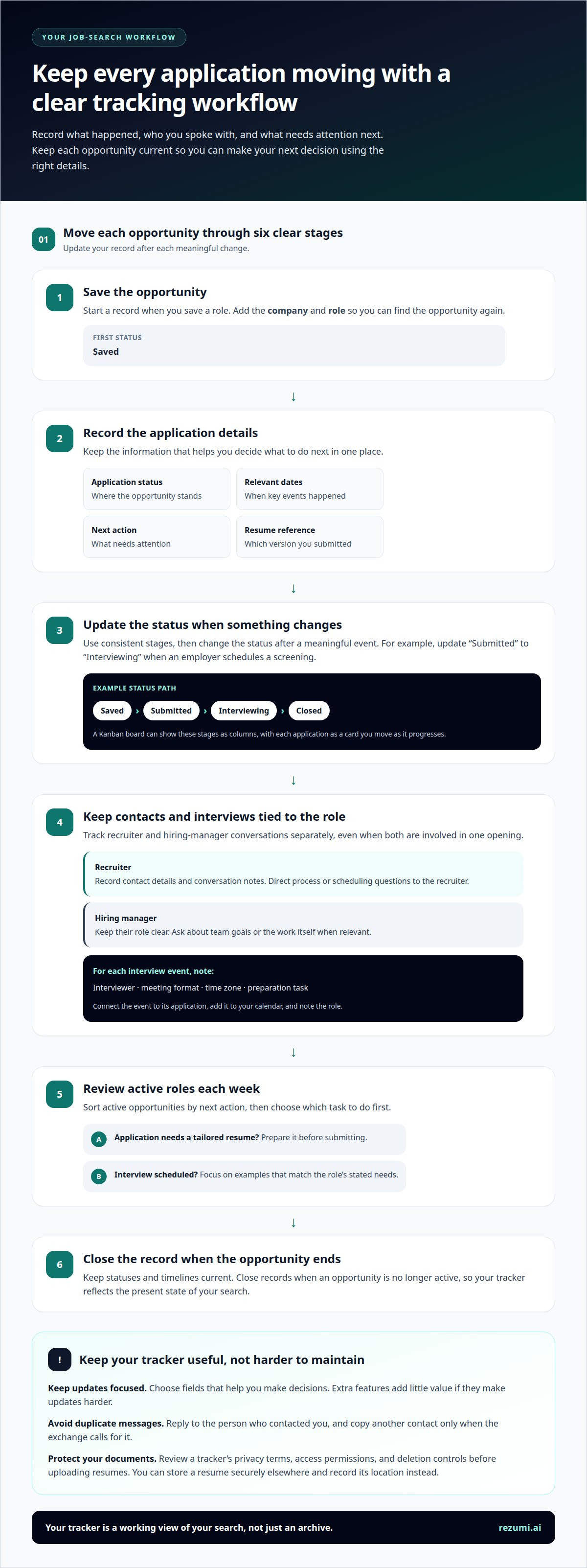
Give each application a clear status, and update it after a meaningful event. Use stages such as “saved,” “submitted,” “interviewing,” and “closed.” For example, change “submitted” to “interviewing” when an employer schedules a screening. Consistent statuses make your workload easier to review.
Paid job-search tracking apps don’t have one standard cost. The amount depends on the app’s plan and included features, so compare what each plan provides before paying.
A tracker should let you record the company, role, application status, relevant dates, and next step. Notes and document references can connect an application to the resume version you submitted. Choose fields that help you make decisions; extra features add little value if they make updates harder.
Job application trackers come in different formats, including mobile apps and browser-based tools. Some support iPhone, Android, or both, while spreadsheets may be accessible through a mobile browser or app. Choose a format you can update when you save a role or hear from an employer.
A Kanban board gives your search a visual flow. It arranges tasks in columns, with each application shown as a card. Try columns such as “Saved,” “Applied,” “Interview,” and “Closed,” then move each card as the opportunity progresses. This view helps you spot a crowded column or a role that has stalled.
For interview scheduling, link each event to its application. Record the interviewer, meeting format, time zone, and preparation task. If an employer schedules a video call, add it to your calendar and note the role. That connection makes it easier to open the right job details before the call.
Use a weekly review to turn records into decisions. Sort active roles by next action, then choose which task to do first. If an application needs a tailored resume, prepare it before submitting. If an interview is scheduled, focus on examples that match the role’s stated needs.
A useful tracker gives you a working view of your search, not just an archive. Update it after each important change, and close records when an opportunity ends. Then you can make your next decision using current information rather than an old email or a half-remembered conversation.
Tracking recruiter and hiring-manager contacts
Track recruiter and hiring-manager conversations separately, even when both contacts are involved in the same opening. A recruiter may coordinate the process, while a hiring manager can explain the team’s priorities. Keep their roles clear so you can direct each question to the person best placed to answer.
Use a Kanban view to track relationship stages as well as application progress. A card might move through “new contact,” “conversation started,” and “active relationship.” Add the role or company for context. This can help you notice when a connection extends beyond one application without treating it as a guaranteed opportunity.
Match your message to the person’s role. For example, ask a recruiter about process steps or scheduling, and ask a hiring manager about team goals or the work itself. If you’re unsure who owns a question, phrase it neutrally and let the contact redirect you.
Keep messages professional and specific. Use the name and role details the person used in their email. If you’re discussing a software analyst opening with a recruiter, refer to that role rather than sending a broad message about any available position. This makes your interest clear without making them reconstruct the conversation.
When a recruiter and manager are both involved, avoid sending duplicate updates to both. Reply to the person who contacted you, and copy another contact only when the exchange calls for it. For example, send scheduling details to the recruiter who arranged the meeting instead of starting a separate thread with the manager.
Organize application documents by opportunity and share only the requested file. Label versions with the company and role, such as “Northstar Labs, Analyst Resume.” Keep your master resume separate from submitted copies. This reduces the chance of sending an outdated draft or attaching materials for a different opening.
Job trackers handle personal data and resumes differently. Before uploading documents, review the tool’s privacy terms, access permissions, and deletion controls. If you’d rather not store a resume in an app, keep it in your own secure storage and record its location without adding sensitive details.
Use contact records to support respectful communication, not repeated messages. After receiving a reply, follow the person’s stated process and timing. If you have a new question, keep it concise and relevant to the role. Clear, considerate communication helps maintain a professional connection, even if one opening doesn’t progress.
Choosing a tracker for different job-search needs
Choose a tracker that fits the shape of your search. A focused search for one role type needs different tools than a career change across several fields. Before choosing, list the sources you use, the documents you create, and how you compare opportunities. This quick audit shows which features could save effort and which might add clutter.
Consider how much tailoring each application needs. If you’re targeting different roles, look for ways to group job descriptions and application materials by opportunity. For example, a project manager applying to healthcare and technology roles may want separate folders or workspaces. This makes it easier to review the right requirements before adapting a resume.
Integrations with LinkedIn and job boards vary by tracker. Choose a tool that supports the sources you use, and check which details it can add to a record. If you often find openings on company career pages, make sure your process can capture those too, rather than relying on one platform.
Think about how you review your search. A visual board can help if you like seeing opportunities grouped by stage. A searchable database may work better when comparing roles by employer, industry, or location. Try both approaches with the same sample openings and see which helps you decide faster.
Use these criteria to compare options:
- Search scope: Can you separate different industries, role types, or locations?
- Document workflow: Can you keep the job description and tailored materials together?
- Review tools: Can you find and compare openings without rebuilding your records?
- Data portability: Can you export your information if you change tools?
Data portability matters when your process changes. A tracker that exports records in a usable format lets you keep your history if you switch systems. Check that exported notes and dates remain readable, not just whether the tool has an export button.
Test a tracker with real examples before moving your full search. Add a role from LinkedIn, one from a company careers page, and one that needs a tailored resume. Then search for each record and see whether its details are easy to retrieve. This test reveals gaps more clearly than comparing feature labels alone.
Choose the simplest tool that supports your actual workflow. A rarely used feature shouldn’t outweigh clear organization or easy retrieval. Revisit your choice when your search changes, such as when you shift industries or start managing different types of roles. A good fit should make the work you already do easier.
DIY tracking with spreadsheets
A spreadsheet gives you control over fields and layout. Templates are quick to use, but usually static, so you must update statuses and dates yourself. Start with one row per opening. In Google Sheets or Excel, freeze the header row so the company, role, and status stay visible as you scroll.
Build columns around the decisions you need to make. Include the company, job title, posting source, date saved, application date, status, and next action. Add the resume version or file name you submitted. For example, “Data Analyst, Northstar Labs, resume tailored for healthcare reporting” gives you useful context before an interview.
- Company and role: distinguish similar openings at the same employer.
- Source: note LinkedIn, a company careers page, or a referral.
- Status: use consistent labels such as “saved,” “applied,” and “closed.”
- Next action: write a task, such as “prepare examples for screening.”
- Contact: record the recruiter’s name and email thread location.
Use drop-down lists for status and source fields. A fixed set of labels prevents “interview,” “interviewing,” and “screen” from appearing as separate groups. Add filters to sort by status or next action. For example, filter to “applied” before reviewing roles that still need follow-up.
Keep the sheet readable. Use one tab for active applications and another for closed roles, or filter a single table by status. Avoid merged cells, which can make sorting harder. If you color-code stages, pair each color with a written label so the status remains clear without color.
Spreadsheets won’t move an application forward on their own. Set a regular review time, then update each record after an application, email, or interview. If you schedule a call, add it to your calendar too. The sheet can hold role details while the calendar keeps the appointment visible.
Protect your records with a clear file name and careful sharing settings. A title such as “Job Search Tracker” is easier to find than “Sheet 1.” Keep resume files in a separate folder, then paste each file’s name or storage location into the matching row. Don’t place private notes in a shared sheet unless collaborators need them.
Review the layout after using it for real applications. If you keep adding notes to one crowded cell, create a separate notes column. If the next action is hard to find, move that column beside the status. A spreadsheet works best when each update takes only a few clear steps.
Application history and timelines
Your application history shows what happened at each stage, not just a role’s current status. Record key events in order, including when you saved the posting, applied, received a reply, and completed an interview. A Northstar Labs timeline, for example, might show: saved, application sent, recruiter replied, screening completed.
Add an event date whenever the status changes. This creates a reliable sequence when an employer’s process includes several interviews or follow-up messages. If a recruiter refers to an earlier conversation, your notes can clarify what you discussed and agreed to send.
Keep the original posting details with each application. Save the job title, company, location, and a brief note about the role’s main requirements. If the posting later disappears, those details help you review the position before an interview. A note such as “Northstar Labs, product analyst, reporting and customer research” provides useful context.
Build a timeline around events you control. Record when you submitted materials, replied to a recruiter, or sent requested information. For employer decisions, enter the date they shared the decision or sent a next-step message. This keeps your history factual instead of treating an estimated response date as a promise.
Use these records to prepare for interviews. Before a call, review the resume version, job description notes, recruiter messages, and previous interview topics. If an earlier conversation covered customer research, prepare a relevant example rather than repeating a general introduction. Your history should help connect each answer to the role.
During a weekly review, scan active applications from the oldest unanswered event to the newest. Decide whether to follow up, prepare for a scheduled step, or leave the record unchanged. Add a brief reason when you pause an application, such as “role scope changed” or “accepted another interview.” That note can inform future decisions.
Past timelines can reveal where your process needs adjustment. If several applications stop before interviews, compare the roles, resume versions, and application details. If interviews progress but follow-ups slip, add a calendar reminder after each conversation. Treat patterns as prompts to review your process, not proof that one cause explains every result.
Keep closed applications in your history rather than deleting them. Mark the final status and retain useful notes, such as recruiter feedback or a role requirement you missed. When a similar opening appears, that record can help you tailor your materials and prepare more relevant examples.
Use a tailored cover letter when an application calls for one, then record the version you submitted alongside its timeline. Prepare a tailored cover letter for your next application
Rezumi: ATS Resume Optimization
Rezumi helps you turn the job details in your tracker into focused application materials. Use ATS optimization to tailor your resume to a specific job description, then keep that version aligned with the role. This is useful when your application history shows you’re pursuing positions with distinct requirements.
You can also create a role-specific cover letter with the AI Cover Letter Generator, prepare for conversations with AI Interview Prep, and format your resume with Resume Design & PDF Export. These tools support the steps around tracking: preparing, submitting, and getting ready to discuss your experience.
Explore Rezumi when you’re ready to connect your organized search with tailored application materials.
Turn your next application into a clear move
The right software to track job applications should help you make decisions, not just store details. Use your records to choose which opportunity needs your attention next, then act with purpose. A focused search comes from consistent choices, not keeping every option active at once.
Before your next application, pause and define what you want from the role. Identify the experience you want to highlight and the questions you need answered. This small reset helps you tailor your materials and prepare for a more useful conversation with an employer.
Rezumi supports your next step with tools for preparing your resume and cover letter, and practicing for interviews. Choose the support that fits your stage in the search, then keep moving at a sustainable pace.
You’ve built a clearer process. Keep using it, make your next move deliberately, and trust the preparation you’ve put in.
Frequently Asked Questions
Can I import my existing jobs from a spreadsheet?
Yes, if your chosen tracker supports spreadsheet imports. Check whether it accepts your file type and lets you match spreadsheet columns to tracker fields. Before importing, save a copy of your original sheet and remove duplicate rows. For example, use the company name and job title together to spot repeated listings. After importing, review a few entries to confirm dates, notes, and statuses landed in the right fields.
What are job tracker tools?
Job tracker tools help you store and manage information about the roles you’re pursuing. They range from spreadsheets to dedicated apps and project-management boards. You can keep application records, contact notes, and tasks together. For example, a board can show which roles need attention, while a spreadsheet can help you sort openings by company or location.
What is the best free job tracker app in 2026?
There isn’t one free app that suits every job search in 2026. The best fit depends on whether you need simple records, reminders, mobile access, or saved job details. If you’re comparing free options, try entering a real role and completing a typical update. Choose the tool that makes those actions clear and check whether its free plan limits entries, exports, or features you rely on.
What are the best software tools for tracking job applications in 2026?
The best software to track job applications is the tool that fits your routine and keeps records easy to update. In 2026, compare three practical formats: spreadsheets for flexible sorting, dedicated trackers for job-search features, and project boards for visual workflows. Test how each handles a saved listing, a changed status, and a note. A smooth process for those tasks matters more than a long feature list.
Which job application trackers offer free plans, and what are their limits?
Some tracking tools have free plans, but features and limits vary. Check current plan details for entry caps, reminders, imports, exports, and device access before moving your records. Consider whether you can keep useful notes without upgrading. If a plan restricts a feature you rely on, a spreadsheet may be a simpler way to maintain your search history.
How can I track job applications in a spreadsheet or free tool?
Create one record per opening, with consistent fields for company, role, source, status, and next action. In a spreadsheet, use filters to group records and a drop-down list to keep status labels consistent. In a free tool, set up equivalent fields before adding your full search. Try sorting by next action and company to check that your layout answers the questions you ask most.
How do I organize and follow up on job applications effectively?
Keep a separate record for each role, even when one company has similar openings. After an interaction with an employer, note what you discussed and any action you agreed to take. Follow the employer’s stated timeline when provided. If there isn’t one, use your judgment and send a concise message that names the role, refers to your last contact, and asks about the next step without repeating earlier messages.
Disclaimer
This article is provided for general informational purposes only and does not constitute professional, legal, financial, or career advice. While Rezumi strives for accuracy, we make no warranties as to the completeness or reliability of this content. Hiring practices, ATS behavior, and job-market conditions vary by employer, industry, and region — always verify against your specific situation. Any action you take based on this article is at your own risk.