The Best Resume Format for the 2026 North American Job Market
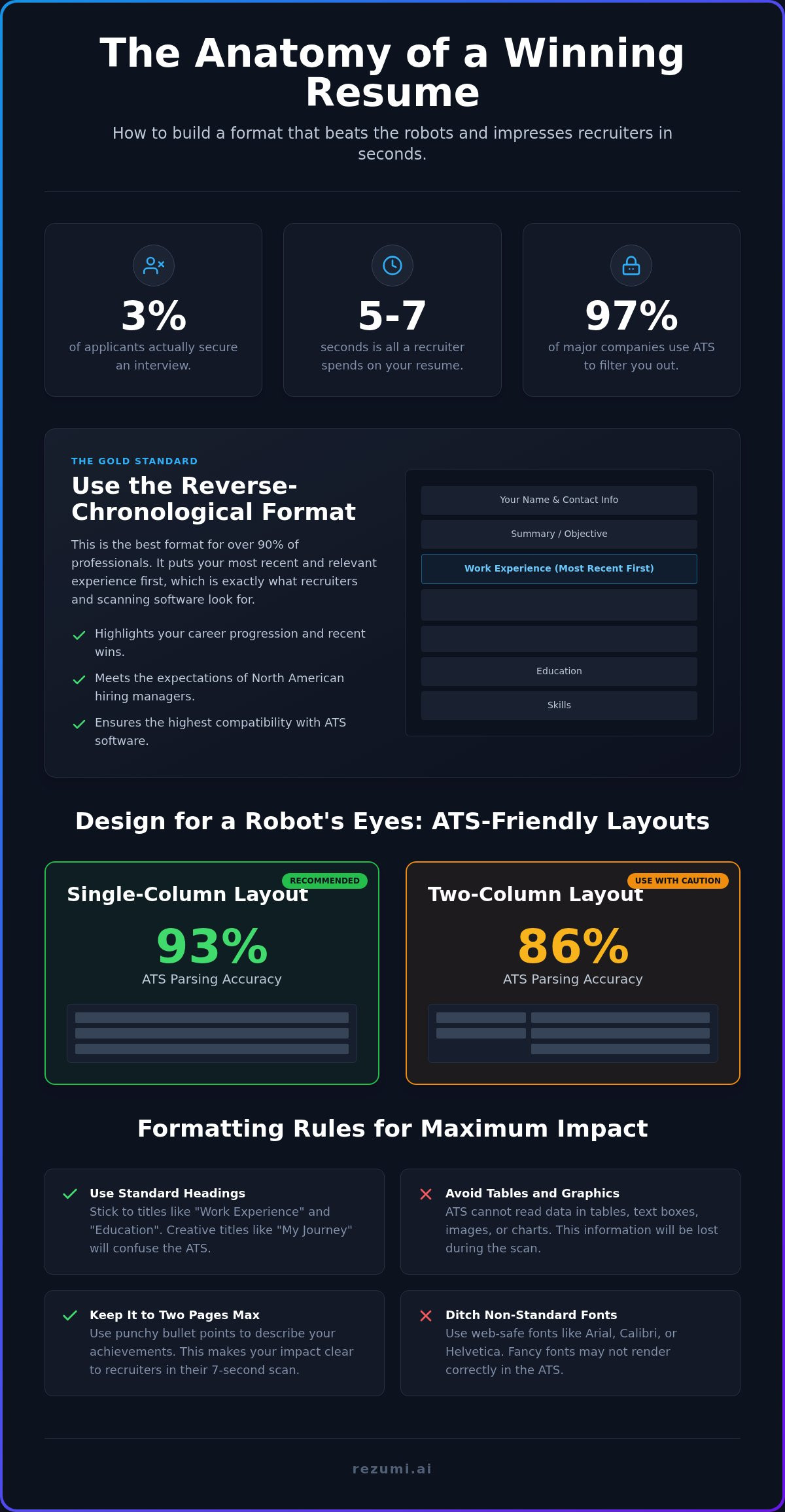
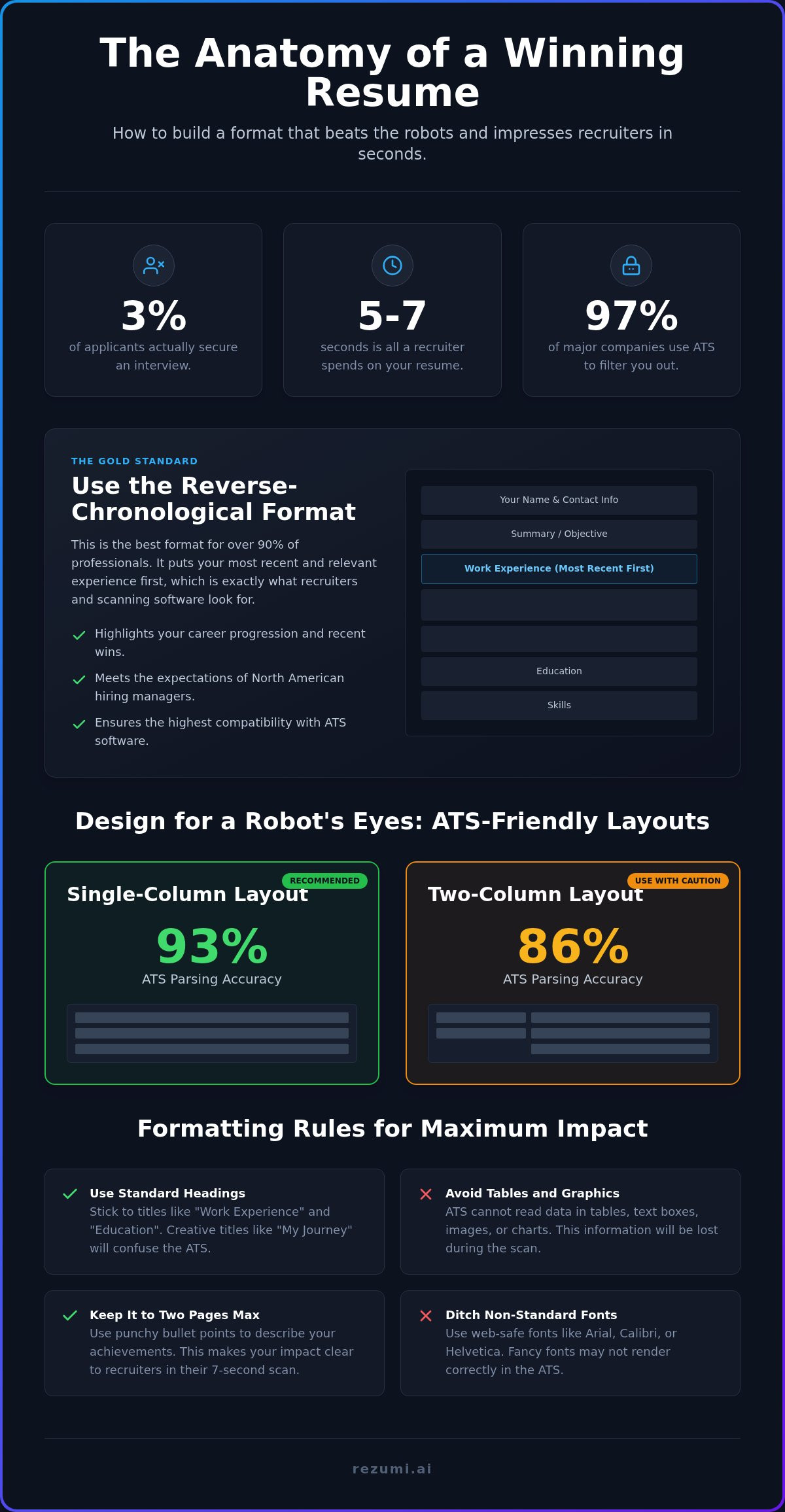
Only 3% of applicants for a typical job posting actually secure an interview in 2026. This is a sharp decline from previous years. Most resumes never reach a human because they fail the initial digital scan. If you feel like your applications are falling into a black hole, you are right to be concerned. Finding the best resume format is no longer just about looking professional. It is about engineering a document that survives the five to seven seconds a recruiter spends on a first glance. It must also remain perfectly readable for an AI.
You may feel stuck between a flashy design and a traditional layout. Many candidates waste hours on complex templates that machines cannot read. Single-column layouts have a 93% parsing accuracy, yet many people still use broken formats that recruiters dislike. This guide gives you the exact structure you need to stop the guesswork. You will discover how to build a resume that scans perfectly and presents your skills with high impact. We provide a clear path to satisfy both the algorithm and the hiring manager. You can start securing more interviews today.
Key Takeaways
- Select the reverse-chronological structure to lead with your most recent wins. This is the best resume format for 90 percent of professionals because it proves your career progression clearly.
- Ditch multi-column designs for a clean, single-column layout. This technical choice increases your parsing accuracy and keeps your data visible to modern applicant tracking systems.
- Condense your history into two pages using punchy bullet points rather than long blocks of text. This strategy ensures your key achievements stand out during the few seconds a recruiter spends scanning your file.
- Align your document with specific job descriptions to pass modern ranking algorithms. Rezumi automates this process by structuring your data to meet exact North American hiring standards.
The Best Resume Format for North American Jobs
The reverse-chronological layout is the best resume format for 90 percent of professionals. It is the gold standard for a reason. This structure lists your most recent experience first and moves backward through your professional history. Recruiters in the US and Canada expect this specific layout. It shows your current career level immediately. You don't want a hiring manager to hunt for your current job title. They want to see your most recent wins at the very top of the page.
This format is also the most compatible with Applicant Tracking Systems (ATS) like Workday or Taleo. Workday currently holds over 40% of the market share for Fortune 500 companies. With 97.4% of major companies using some form of ATS, your choice of standard resume structures is a technical decision. The chronological approach is reliable. It ensures that digital filters can read your dates and titles without errors. If you use a non-standard layout, you risk your data being scrambled before a human ever sees it.
Why Recruiters Prefer Reverse-Chronological
Recruiters are under immense pressure in 2026. The average initial scan of a resume now lasts only five to seven seconds. This is a tight window. Your current role must sit at the top of the document to survive this scan. This structure provides a clear timeline of your professional growth and achievements. It highlights the skills you are using right now. These are usually the most relevant skills for the job you want next. A clear timeline proves you have the experience you claim without creating confusion.
The Role of ATS in Your Format Choice
Modern hiring software is methodical. These systems parse your data from top to bottom and left to right. Standard headings like "Work Experience" and "Education" help the system categorize your life correctly. If you use creative titles like "My Professional Path," the software may fail to recognize the section. This leads to a blank profile in the recruiter's database. You must prioritize machine readability to get your foot in the door.
Technical formatting choices directly impact your success rate. Consider these facts about document parsing:
- Single-column layouts have a 93% parsing accuracy.
- Two-column designs drop to an 86% accuracy rate.
- Standard headings ensure your years of experience are calculated correctly.
- Plain text within standard sections prevents data loss during the upload process.
Avoid fancy graphics or complex sidebars. While 92% of recruiters do not set their systems to auto-reject candidates, a low ranking is just as dangerous. If the ATS cannot read your best resume format, you will end up at the bottom of a list of hundreds of applicants. Use a clean, vertical flow to stay visible.
Comparing the Three Standard Resume Structures
Selecting the best resume format for your specific situation is a strategic move. Picking the wrong one can signal to an employer that you are hiding something. Recruiters in the US and Canada are trained to look for specific patterns. If you break those patterns, your application may end up in the trash. There are three main options to consider. Each one serves a different purpose for your job search.
The reverse-chronological format focuses on your work history and career progression. It is the most common choice. Functional resumes focus on skills rather than when or where you worked. This approach is often risky. Hybrid resumes combine a skills summary with a detailed work history section. This gives you the benefits of both styles. You need to pick the one that highlights your strengths without raising red flags for a hiring manager.
The Gold Standard: Reverse-Chronological
Use this if you have a steady work history in the same industry. It is the best resume format for showing promotion and increased responsibility over time. Recruiters can see your growth at a glance. They want to see that you have mastered your current level before moving to the next. This format is the safest bet for passing any automated screening tool. Systems like Workday or Taleo are built to read this specific flow. They expect to find your most recent job first. If you provide that, the software can rank you higher based on your recent experience.
When to Use Functional or Hybrid Formats
Functional formats are risky. Recruiters often view them with suspicion. When you hide dates and company names, people wonder why. They might assume you have a long career gap or a lack of relevant experience. Only use this style if your skills are far more impressive than your timeline. For example, if you are a freelancer with many small projects, a functional list might make sense. However, for most corporate roles, it is a dangerous gamble.
Hybrid formats work well for career changers who need to highlight transferable skills. You lead with a skills section but still include a clear timeline. This satisfies the recruiter's need for context while showing why you are a fit for a new field. If you are applying for specific public sector roles, you might also want to review federal resume writing tips to see how government standards differ from the private sector. These roles often require even more detail than a standard private resume.
Only use a non-traditional format if you have significant career gaps or a very diverse background. Most people should stick to the standard chronological layout. It builds trust through transparency. If you want to ensure your layout is perfect before you hit submit, explore our optimization tools to find the right plan for your needs.
Layout Elements That Beat Modern ATS Scanners
Your layout is a technical blueprint. If the blueprint is messy, the computer fails to build your profile. Achieving the best resume format requires stripping away visual clutter that confuses algorithms. You are not just writing for a human. You are writing for a database. Your goal is to make the data extraction process as smooth as possible for the software.
Single Column vs. Multi-Column Layouts
Stop using multi-column templates. They might look modern, but they often fail the technical scan. Most ATS tools read text from left to right across the entire page. When you use two columns, the software often blends the text from both sides into one confusing sentence. Research from 2025 shows that single-column layouts have a 93% parsing accuracy. Two-column designs drop that success rate to 86%. A simple, vertical flow ensures your experience is read in the order you intended. Complex graphics and sidebars are not worth the risk of your data becoming a jumbled mess.
Safe Fonts and File Types for 2026
Readability is about more than just font size. You should stick to sans-serif fonts like Arial, Calibri, or Roboto. These fonts are designed for digital screens and keep your text sharp during a scan. Avoid using images, charts, or icons. An ATS cannot interpret the information inside a graphic. If you put your skills in a chart, the machine sees a blank space. This effectively hides your best qualifications from the recruiter.
Your file type choice also matters. While many people prefer PDFs to lock in their design, data shows that plain DOCX files have only a 4% failure rate. PDFs have an 18% failure rate in some older systems. Always save your resume as a PDF to preserve the look for human eyes, but keep a Word version ready. If a job description specifically asks for a Word document, follow that instruction to the letter. It usually means their specific system handles DOCX better.
Margins and Professional Naming
Don't crowd the page. Use standard margins of at least 0.5 inches on all sides. This ensures your text is not cut off if a recruiter prints your document or views it on a mobile device. Finally, name your file professionally. Use a clear convention like FirstName_LastName_Resume.pdf. This helps recruiters find your document instantly in their database. Simple headers like "Work Experience" and "Education" are essential. They act as signposts for the software. Using the best resume format means making it impossible for the system to ignore your qualifications.
Strategic Formatting Rules for Maximum Impact
To maintain the best resume format, keep your document to two pages or less. Senior executives or academics may need more space, but for everyone else, brevity is a requirement. Recruiters manage massive workloads. They don't read long paragraphs. They scan for impact. Use bullet points to describe your duties. This makes your achievements pop. Paragraphs hide your value. Bullets highlight your wins.
Perfecting Your Contact Information and Links
Place your contact information at the very top. Do not use the actual header or footer features in Word or Google Docs. Many ATS scanners in 2026 still fail to extract text from these specific zones. If the machine misses your phone number, you don't get the call. Include your city and state (or province). Skip your full street address. Privacy is a priority, and recruiters only need to know your general location for tax purposes. Use a professional email that includes your name. A customized LinkedIn URL is also essential. It provides the human recruiter with deeper context that a two-page document cannot hold.
Ensure your phone number is formatted correctly for the North American market. Use the standard (XXX) XXX-XXXX format. This helps automated dialers and scheduling tools recognize your data instantly. If you are applying for roles in different time zones, mention your availability clearly. Small technical details like this reduce friction for the hiring team.
Quantifying Your Experience with Real Numbers
Quantify your experience. In a 2025 survey, 58.2% of recruiters identified measurable achievements as the top factor that makes a candidate stand out. Start each bullet point with a strong action verb like "Directed," "Engineered," or "Optimized." Avoid weak phrases like "Responsible for." Use percentages, dollar amounts, or timeframes to prove your results. Follow the Action-Context-Result formula. For example: "Reduced operational costs by 15% (Result) by implementing a new vendor management system (Action) across three North American offices (Context)."
The best resume format isn't just a container. It is a strategic tool. Modern AI models in 2026 use semantic analysis to judge the strength of your claims. They don't just look for keywords. They look for the logic in your results. If you provide clear numbers, the algorithm can verify your seniority level instantly. This moves you from the "maybe" pile to the "must interview" list.
Optimizing Your Format with Rezumi AI
Rezumi handles the technical burden of formatting so you can focus on the interview. Our platform automatically structures your data to meet the highest North American standards. You don't have to guess if your margins are correct or if your headers are readable. We've engineered the system to ensure your document passes the initial digital scan every time. You can manage your entire application process from a single professional workspace. This moves you away from generic templates and toward a high-performance career document. Formatting is a technical hurdle. We provide the solution.
Success in the 2026 market requires more than just a clean layout. It requires strategic alignment with employer expectations. Rezumi provides an authoritative path from uncertainty to control. Our system replaces the anxiety of the "black hole" with a data-backed strategy. You gain a strategic partner that understands the hidden mechanics of modern hiring. This is how you secure a competitive advantage in a crowded field.
Dynamic Formatting for Specific Job Descriptions
Tailoring is the most effective way to increase your interview rate. Job seekers who tailor their resume to a specific job description are 6 times more likely to get an interview. Rezumi makes this process rapid and accurate. Our platform checks your resume against specific job descriptions to ensure keyword alignment. It analyzes the job posting and identifies the most critical skills. You can then adjust your professional summary to match the specific needs of the employer in seconds. This ensures the best resume format is backed by the right content. Beyond the document, our AI-driven coaching for interview prep helps you prepare for the next phase of the journey. Learn more about our ATS Resume Optimization.
Exporting Your Optimized PDF
Formatting errors often happen during the final export. A document that looks great on your screen might look like a jumbled mess on a recruiter's tablet. Rezumi solves this by generating a clean, ATS-friendly PDF with one click. We ensure your formatting remains consistent across all devices and operating systems. This technical precision protects your professional image. You can stop worrying about whether the machine can read your text. Our PDF export is built for high performance. Review our pricing plans to start building your professional profile today.
Take Control of Your Career Path
You now have the technical blueprint for the best resume format in the 2026 market. Success depends on balancing machine readability with human impact. By choosing a single-column, reverse-chronological structure, you eliminate the formatting errors that sideline most candidates. You've also learned to quantify your wins with data, which 58.2% of recruiters identify as the top factor for standing out. These choices move your application out of the black hole and into the hands of hiring managers.
Rezumi acts as your strategic partner by providing real-time quality feedback and tailoring tools specific to the North American landscape. You don't have to manage complex ATS requirements alone. Our platform ensures your document meets every standard while our AI-driven interview coaching prepares you for the conversation that follows. Transitioning from uncertainty to control starts with a document that performs under pressure.
Your next professional milestone is within reach. Use these strategies to build a resume that commands attention and secures the interviews you deserve. It's time to stop guessing and start applying with confidence.
Frequently Asked Questions
What is the best resume format for 2026?
The reverse-chronological layout remains the best resume format for the 2026 market. It lists your current role first. This structure allows recruiters to see your most relevant experience in seconds. It also aligns perfectly with ATS parsing logic used by 97.4% of Fortune 500 companies. While hybrid formats have their place for career changers, the chronological approach is the safest bet for passing automated filters and building immediate trust with hiring managers.
Is a one page resume better than two pages?
A one page resume is standard for new graduates or those with less than five years of experience. However, a two page document is acceptable and often preferred for mid-career professionals. You should never stretch your history to fill space. If your relevant achievements require a second page, use it. Focus on high-impact bullet points. Recruiters value concise, data-backed evidence of your success over a specific page count.
Can an ATS read a PDF file?
Modern ATS tools can read PDF files easily. However, technical parsing accuracy varies. Research shows that plain DOCX files have a lower failure rate of 4% compared to 18% for some PDFs. If the job portal allows for either, a PDF is usually better for preserving your visual layout for human eyes. Just ensure you are using a text-based PDF rather than an image-based scan which machines cannot interpret.
Should I include a photo on my resume for US jobs?
You should never include a photo on a resume for a US or Canadian job. North American hiring norms prioritize anti-discrimination practices. Many companies will automatically reject resumes with photos to avoid potential bias claims. This rule applies to all industries except for modeling or acting. Stick to a clean, text-based layout. Save your professional headshot for your LinkedIn profile where it is expected and helpful for networking.
What are the best fonts for a professional resume?
Sans-serif fonts are the top choice for digital readability. Arial, Calibri, and Roboto are excellent options for the best resume format because they remain sharp on all screens. Avoid decorative or script fonts that confuse ATS scanners. Use a font size between 10 and 12 points for the body text. This ensures your document looks professional when printed and stays perfectly legible during a recruiter's five-second initial scan.
How do I format a resume with no experience?
Lead with your education and relevant coursework if you lack traditional work history. You should also include a "Projects" or "Volunteer Experience" section to demonstrate your skills. Quantify these activities just as you would a paid job. For example, mention specific technical tools you used or the size of a team you led. This approach proves your potential to employers and provides the ATS with the keywords it needs to rank you.
Are creative resume templates bad for ATS?
Creative templates often cause significant parsing errors. Complex sidebars, icons, and non-standard headers jumble the data during extraction. An ATS might miss your contact info or miscalculate your years of experience if the layout is too busy. If you want to stand out, focus on the quality of your achievements rather than the "flair" of your design. A clean, single-column layout is the most effective tool for landing an interview.
How should I list my LinkedIn profile on my resume?
Include a customized LinkedIn URL in your contact header at the top of the page. You should remove the "https://www" prefix to save space. For example, use "linkedin.com/in/yourname". This link provides recruiters with a deeper look at your professional network and endorsements. Ensure your profile is up to date and matches the dates on your resume. This consistency builds credibility and reinforces your personal brand during the hiring process.
Disclaimer
This article is provided for general informational purposes only and does not constitute professional, legal, financial, or career advice. While Rezumi strives for accuracy, we make no warranties as to the completeness or reliability of this content. Hiring practices, ATS behavior, and job-market conditions vary by employer, industry, and region — always verify against your specific situation. Any action you take based on this article is at your own risk.