Harvard Resume Margins: The 2026 Guide to Professional Formatting
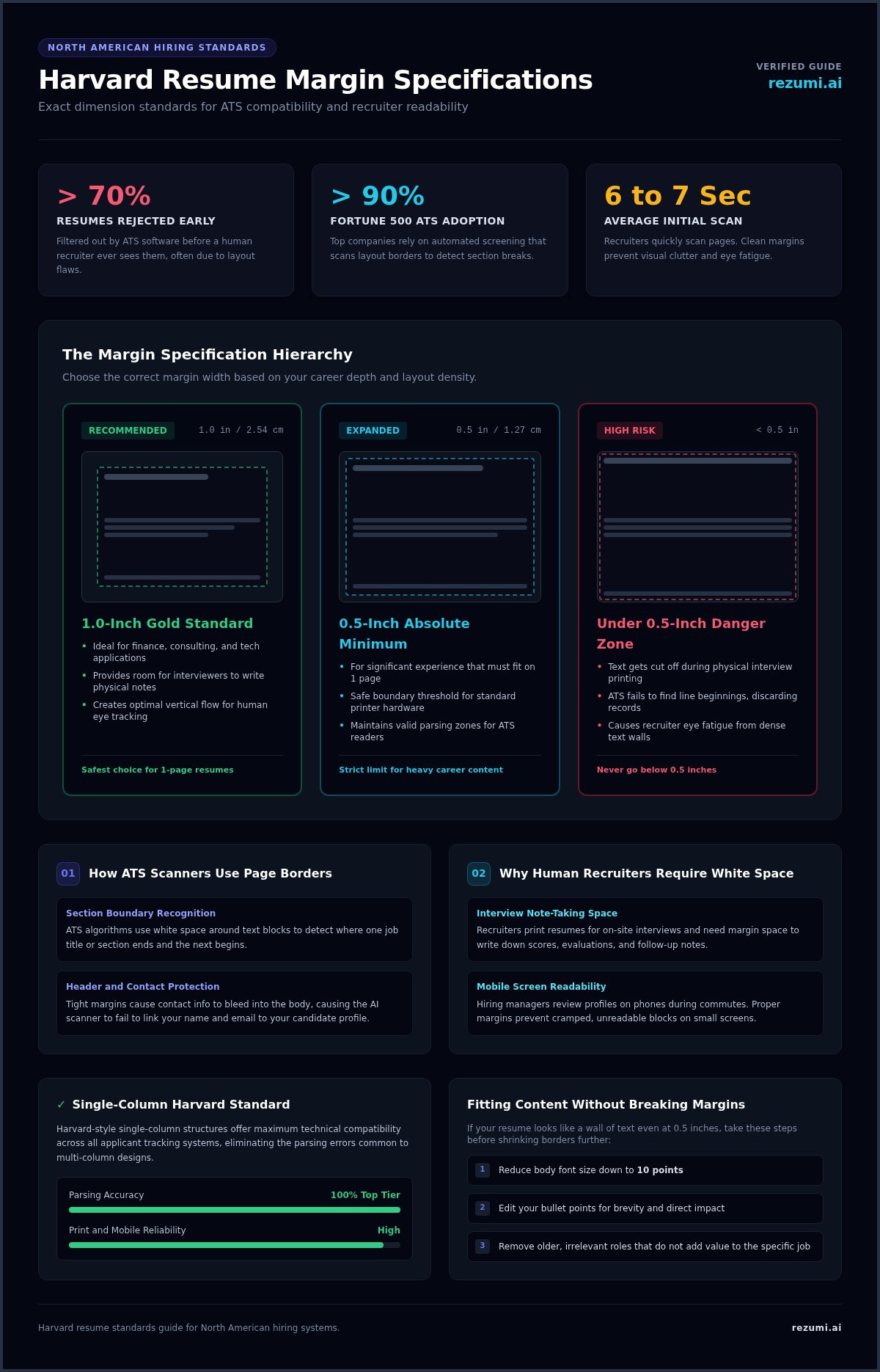
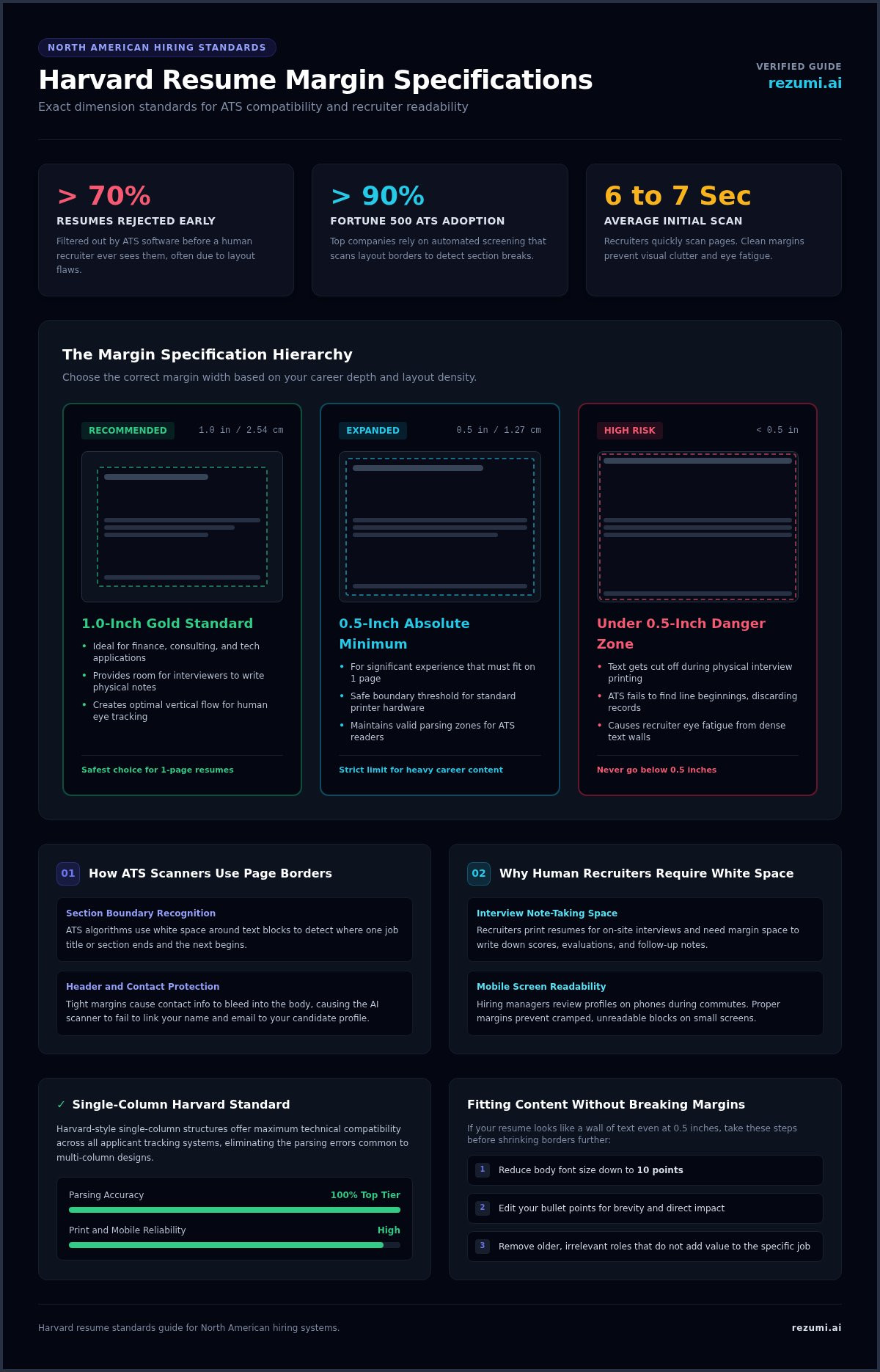
Over 70% of resumes are never seen by a human recruiter. It's a harsh reality of modern hiring. Most documents are filtered out by an Applicant Tracking System (ATS) before a person even clicks open. Often, the culprit isn't your experience. It's your formatting, specifically failing to meet the standard harvard resume margins that recruiters expect.
You've likely felt the pressure of trying to squeeze years of achievements onto a single page. It's tempting to shrink your borders to make room. But when your resume looks cluttered, it becomes unreadable for both AI scanners and the recruiters who spend only six seconds on an initial scan. You want a layout that signals authority and precision without the technical headaches.
In this guide, you'll learn the exact specifications required to meet North American hiring standards in 2026. We'll break down the 1-inch gold standard, explain why you should never go below 0.5 inches, and show you how to use white space to your advantage. By the end, you'll have a document that's clean, professional, and ready for any high-stakes application.
Key Takeaways
- Set your borders to 1 inch on all sides to meet the standard for top-tier professional applications.
- Learn how to adjust harvard resume margins down to 0.5 inches if you need extra room for your career achievements.
- Understand how white space helps Applicant Tracking Systems (ATS) correctly read your job history and skills.
- Use a single-column layout to avoid the technical errors that often come with creative or multi-column resume designs.
- Discover how Rezumi handles technical formatting and PDF exports to ensure your layout stays perfect for every recruiter.
The Standard Harvard Resume Margin Specifications
The Harvard margin standard is exactly 1 inch on all sides for maximum readability. This measurement creates a balanced frame for your professional story. While it seems like a minor detail, these dimensions represent the gold standard for high-stakes applications in finance, consulting, and tech. Consistency is vital for your layout. Uneven borders signal a lack of attention to detail and make your document look messy. When you define what a resume is, you are defining your professional brand. A clean layout shows you understand industry norms and respect the reader's time.
The 1-Inch Margin Standard
Choosing 1-inch borders is the safest move for most applicants. It provides ample white space that serves a functional purpose. Recruiters often print resumes during interviews. They need that space to jot down notes, scores, or follow-up questions. If your text runs to the very edge, you leave them no room to work. A balanced page also helps with eye tracking. Hiring managers spend less than 10 seconds on their first scan. Standard harvard resume margins create a vertical flow that guides the human eye. It makes your headers pop and your bullet points easy to digest. You want the reader to focus on your wins, not struggle with your layout.
When to Use 0.5-Inch Margins
Sometimes, a single inch is too much. If you have significant experience to fit on one page, you can reduce your margins. The absolute minimum is 0.5 inches. This is the threshold for most modern printers and scanners. Don't go below half an inch. If you do, you risk your text getting cut off. Even worse, Applicant Tracking Systems (ATS) might fail to parse your data correctly. If the AI can't find the start of a sentence because the margin is too thin, it might discard your application entirely.
Look at your document objectively. If it looks like a wall of text even at 0.5 inches, your margins aren't the problem. You likely have too much content. Try these steps before shrinking your borders further:
- Reduce your body font size to 10 points.
- Edit your bullet points for brevity and impact.
- Remove older, irrelevant roles that don't add value to the specific job.
Precision matters. If you can't get the formatting right, use a tool that handles the technical details for you. You can find professional templates that preserve these exact specifications in our Resume Design and PDF Export tools. This ensures your layout meets the 2026 standards every time you hit send.
Why Margin Precision Matters for ATS and Recruiters
Your resume is a data file before it's a human document. Over 90% of Fortune 500 companies use an Applicant Tracking System (ATS) to screen candidates. These systems don't read like humans do. They use the white space around your text to identify where one section ends and the next begins. If your harvard resume margins are too narrow, the software may struggle to parse your information correctly. This technical failure is why more than 70% of resumes are rejected before a person ever sees them.
How ATS Scanners Read Your Page Borders
AI scanners look for specific patterns in your layout. They search for the gaps between your header, your experience, and your skills. When your text sits too close to the physical edge of the page, parsing errors become common. Your contact information is especially vulnerable. If your name and email are shoved into a tiny header with no margin, the AI might fail to link that data to your profile. Standard harvard resume margins act as a buffer. They ensure your header and footer don't bleed into the main body of the document. This clear separation helps the AI map your career history without confusion.
Balancing White Space and Content
Recruiters are busy. On average, they spend only 6 to 7 seconds on their initial scan of your application. If they encounter a dense wall of text with no breathing room, they'll likely experience immediate eye fatigue. White space isn't empty room. It's a strategic tool that guides the reader's eye to your most important wins. A balanced layout also ensures your resume is readable on mobile devices. Many hiring managers review candidates on their phones during commutes or between meetings. Proper margins keep your text from looking like a cramped, unreadable block on a small screen. It shows you have professional polish and understand North American hiring norms. You can use Rezumi’s ATS Resume Optimization to check if your layout is truly machine-readable. Taking these steps proves you have the attention to detail that top-tier employers demand.
Harvard Format vs. Creative Resume Layouts
Harvard-style resumes use a single-column layout for maximum compatibility. While creative templates might look visually striking, they often rely on multi-column designs that confuse older Applicant Tracking Systems. If the software can't read your layout, it won't matter how good your skills are. Many job seekers fall for the trap of using sidebar columns for their skills or contact info. These columns often get scrambled during the parsing process, leaving your data in a mess. For more details on finding the right structure, check out our guide on choosing the best resume format.
Why Modern Employers Prefer Traditional Layouts
Modern employers value professional reliability over flashy design. The Harvard format is the de facto standard for industries like finance, law, and management consulting. These conservative fields expect a 1-inch margin standard because it signals you understand corporate norms. By sticking to a traditional layout, you ensure your achievements remain the focus. You aren't asking the recruiter to decode a complex design. Instead, you're providing a clear, high-performance document that proves you're ready for serious results. In high-stakes hiring, a traditional layout acts as a strategic partner, letting your data speak for itself.
Avoiding the Over-Designed Trap
Over-designing is a common mistake that can lead to an immediate rejection. Graphics, images, or icons placed within your harvard resume margins can cause parsing errors. Some ATS scanners interpret images as garbled text. This clutters your profile with junk data that makes you look less qualified. If you want to stand out, don't use flashy colors or complex charts. Use strong, active verbs to describe your impact. For senior-level roles, a simple design is often the most effective way to project authority. It shows you don't need gimmicks to prove your value. A clean, single-column document is easier for both humans and AI to read. It reduces friction in the hiring process. You can use Rezumi’s Resume Design and PDF Export tool to ensure your layout stays clean and professional without the risk of technical glitches. This tool handles the technical formatting so you can focus on telling your story.
Troubleshooting Margin and Layout Issues
Start with 1-inch margins as your baseline. If your content doesn't fit, don't immediately slash your borders. Start by adjusting your font size first. If you still need more room, reduce your margins in small 0.1-inch increments. This slow approach prevents sudden shifts that can ruin your visual hierarchy. You should also audit your line spacing and paragraph breaks to save vertical room. Reducing the spacing before and after your paragraphs can give you back significant vertical real estate without making the lines feel crowded. To keep your technical score high, follow the ATS resume checker guidelines. These rules ensure your document remains machine-readable while maximizing space.
What to Do if Your Resume Hits Two Pages
Spilling onto a second page by only three or four lines is a common layout error. In North America, recruiters expect one page for every ten years of professional experience. If you're a new graduate or a mid-level professional, you should aim for a single page. Use your margins to pull those stray lines back. Lowering your harvard resume margins from 1 inch to 0.75 inches can often reclaim that lost space. However, you must evaluate the content itself. If the second page only contains a few minor skills or an old internship, it's better to delete them. A tight, one-page document projects more confidence than a loose two-page file.
Adjusting Font Size Without Losing Readability
Font size and margin width must stay in sync. A 12-point font is the standard for 1-inch margins because it creates a readable, professional flow. If you decide to shrink your borders, you may need to drop your font size to 10.5 or 10 points. Never go below 10 points. Text that's too small becomes a physical strain for the recruiter to read. It can also cause parsing errors in older ATS software. Choose classic, professional fonts that retain their clarity at smaller sizes. Times New Roman is the traditional Harvard choice, but modern alternatives like Calibri or Georgia also work well. This careful balance ensures your resume remains easy for both humans and AI to read.
Automate Your Harvard Formatting with Rezumi
Stop fighting with your word processor and start focusing on your career story. Rezumi handles the technical formatting so you don't have to spend hours tweaking page borders. Manual layout adjustments are often the reason job seekers lose time and confidence. Our platform automates these complex tasks, ensuring your application meets the strict 2026 North American standards without the guesswork. You get a document that looks perfect every time you hit save.
Tailoring Your Resume for North American Standards
Rezumi ensures your application is ready for top employers by locking in the correct dimensions. You won't have to worry about your contact info getting cut off or your headers confusing an older ATS. Our AI-powered workspace tracks your progress and gives you real-time feedback on your layout and content density. This means you'll know exactly when your document is balanced enough to impress a human recruiter. Automated formatting is the fastest way to build a professional resume that actually gets results. It removes the friction between your experience and the hiring manager's desk.
Ready to Command the Job Market?
Take the stress out of formatting and start optimizing your profile today. You've already seen how critical harvard resume margins are for passing both AI scans and human reviews. Instead of manually tweaking borders by 0.1-inch increments, you can use our Resume Design and PDF Export tools to get it right instantly. This gives you a strategic advantage over other candidates who submit messy or unreadable files. A clean, professional layout signals that you're ready for high-performance roles.
Our system generates a professional PDF that preserves your margins exactly. It doesn't matter what device the recruiter uses to view your file. You get access to premium tools that refine your bullet points and check your ATS compatibility in seconds. It's time to stop worrying about technical hurdles and start focusing on your next big move. Check out our pricing to get started on your professional journey and secure the interviews you deserve.
Master Your Layout and Secure Your Next Interview
Stick to the 1-inch standard for harvard resume margins to ensure your document looks authoritative and professional. If you have extensive experience, don't go below the 0.5-inch limit to avoid printing and scanning errors. These settings aren't just about looks. They are functional requirements that help AI scanners parse your contact details and career history without glitches.
Precision formatting signals that you understand North American hiring norms and respect a recruiter's time. You've worked hard to build your career. Don't let a messy layout or a parsing error stop you from getting through the door. Rezumi provides built-for-purpose tools like AI-driven ATS optimization and professional PDF exports to keep your formatting perfect.
You have the skills and the story. Now you have the layout to prove it. Take control of your application and land the role you deserve.
Frequently Asked Questions
What are the best margins for a one-page Harvard resume?
1 inch on all sides is the gold standard for a Harvard-style document. This measurement provides the necessary white space that recruiters use for taking notes during your interview. It also creates a balanced frame that makes your professional story easy to scan. While you can technically go lower, staying at 1 inch is the safest default for meeting North American hiring standards in 2026.
Can I use 0.5-inch margins to fit more experience on my resume?
You can use 0.5-inch margins as an absolute minimum for a dense resume. This is often necessary if you have significant experience to fit on a single page. However, you shouldn't go any narrower than half an inch. Borders smaller than this risk your text being cut off by physical printers. They can also cause technical parsing errors when your file is uploaded to an Applicant Tracking System.
Will narrow margins cause my resume to be rejected by an ATS?
Narrow margins won't trigger an automatic rejection, but they often lead to parsing failures. If your text is too close to the physical edge, the AI might fail to see where a new section begins. This technical glitch is a primary reason why many qualified resumes never reach a human recruiter. Using standard harvard resume margins provides a buffer that helps the software map your career data correctly.
Should my resume margins be the same on all sides?
Consistency is vital for a professional look, so your margins should be the same on all sides. Balanced borders create a clean frame that guides the recruiter's eye through your achievements. If you must adjust them to save space, always keep the left and right margins identical. Uneven borders make your document look messy and suggest a lack of attention to detail during the application process.
How do I change the margins on a Google Docs resume template?
To change margins in Google Docs, click File and select Page Setup from the menu. Enter your measurements, usually 1 for top, bottom, left, and right, in the margin boxes. Click OK to apply the new settings to your document. If you're using a pre-made template, double-check that your headers and footers haven't shifted. You may need to manually move text boxes to fit the new layout.
What font size should I use with 1-inch margins?
A font size between 10 and 12 points works best with 1-inch margins. This range ensures your text is legible for human eyes and easy for AI to scan. If you shrink your borders to 0.5 inches, you should stay at 10 points or higher. Never go below 10 points for your body text. Small fonts are physically straining to read and can make your resume look cluttered and unprofessional.
Is the Harvard resume format still effective in 2026?
The Harvard resume format is still the preferred choice for top employers in 2026. Its single-column layout is specifically designed for maximum compatibility with modern Applicant Tracking Systems. While creative designs might look nice, they often fail the technical scan. This traditional structure forces you to focus on your wins and achievements, which is exactly what hiring managers in finance, law, and tech are looking for.
Do recruiters prefer 1-inch or 0.5-inch margins?
Recruiters generally prefer 1-inch margins because they make the document feel less crowded. White space is a strategic tool that helps a reader scan your resume in under ten seconds. However, if you have over a decade of experience, a 0.5-inch margin is a professional way to fit your career history on one page. It shows you have prioritized high-value achievements while still respecting the technical limits of the page.
Disclaimer
This article is provided for general informational purposes only and does not constitute professional, legal, financial, or career advice. While Rezumi strives for accuracy, we make no warranties as to the completeness or reliability of this content. Hiring practices, ATS behavior, and job-market conditions vary by employer, industry, and region — always verify against your specific situation. Any action you take based on this article is at your own risk.