Choosing the Best Resume Format for the 2026 North American Job Market
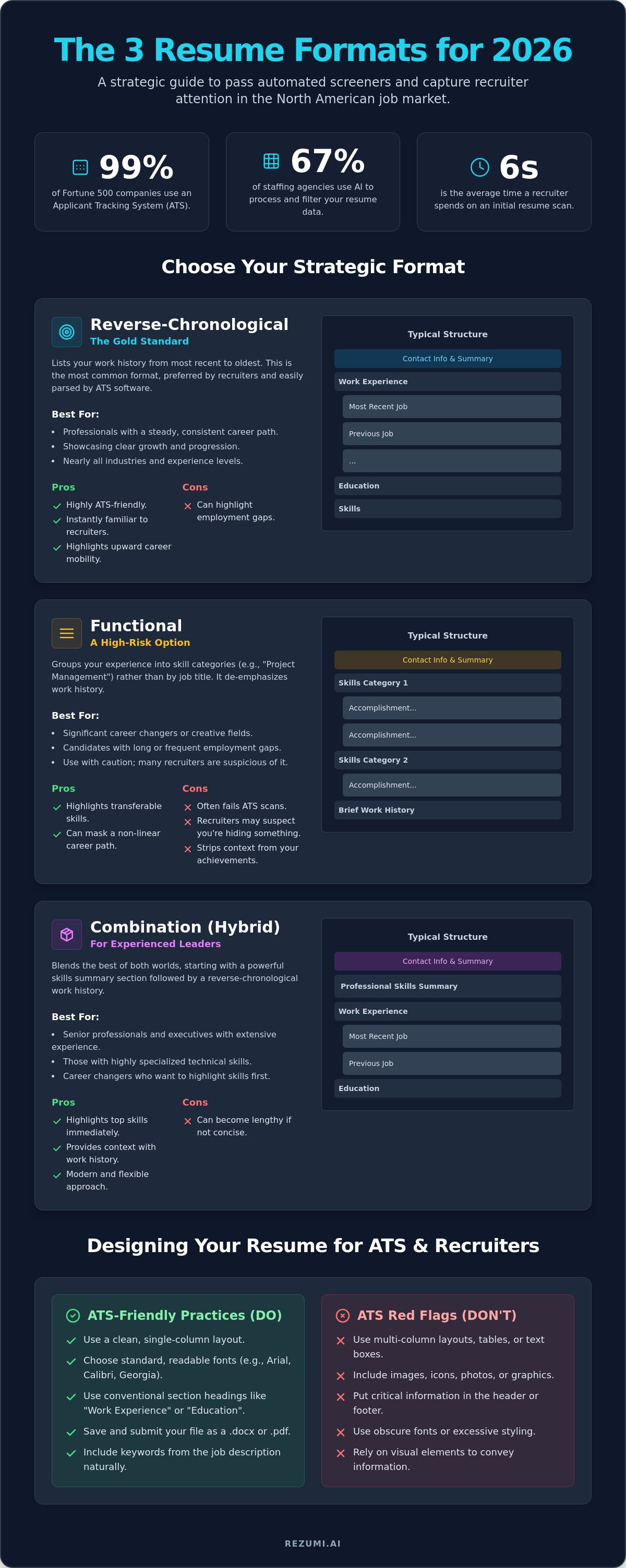
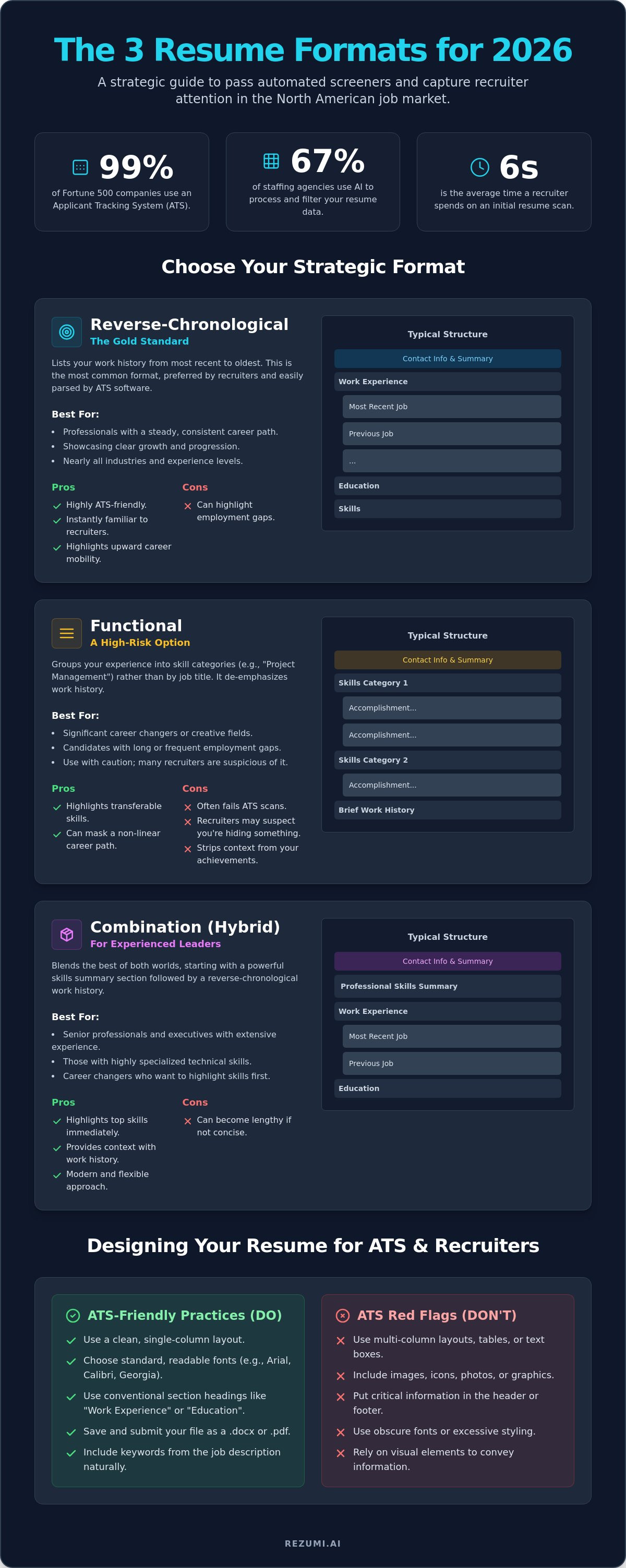
Nearly 99% of Fortune 500 companies use an Applicant Tracking System (ATS) to screen candidates. If your resume format isn't optimized for these digital gatekeepers, your application might never reach a human recruiter. You've likely felt the frustration of a silent rejection after spending hours on a design that looked perfect to you. It's a common struggle. Currently, 67% of staffing agencies use AI to process your data.
Choosing between a creative layout and a professional standard shouldn't feel like a gamble. You'll learn how to select and structure a resume format that passes automated filters and catches the eye of hiring managers. This guide provides the strategy needed to turn your work history into a data-backed success story. We replace uncertainty with control.
We'll examine the three primary formats used in the 2026 North American market. You'll discover which structure best explains career gaps, how to emphasize skills, and the exact steps to make your document readable for both robots and people. This is about more than just aesthetics. It's about building a high-performance tool for your career.
Key Takeaways
- Your resume format acts as a technical blueprint that determines if a recruiter sees your skills within the first six seconds.
- Identify which of the three primary North American layouts aligns with your career stage to highlight leadership or manage employment gaps.
- Learn to remove complex design elements like multi-column grids that often cause automated filters to reject qualified candidates.
- Discover how to structure your sections so that high-impact achievements appear exactly where human eyes and AI algorithms expect them.
- Use AI to instantly reorder your professional history and match the specific requirements of any job description in seconds.
Why Your Resume Format is Your Strategy for 2026
Your resume format is the first strategic decision that determines your success in a job search. It isn't just a design choice or a way to make your contact info look pretty. It is the logical structure you use to organize your professional history so that a recruiter can find what they need in seconds. In the North American market, this structure acts as a filter. It either invites the reader to learn more or pushes them to the next candidate. You need a layout that acts as a map for your career story.
Bad formatting is the primary reason Applicant Tracking Systems (ATS) fail to read your data. When you use complex tables, icons, or unusual fonts, the software cannot parse your information. This leads to an immediate rejection before a human ever sees your name. Your strategy must prioritize technical compatibility over visual flair. The right choice highlights your greatest strengths while naturally minimizing weaknesses like career gaps or industry changes.
The Definition of a Winning Resume Format
A winning format serves as the skeleton of your career story. It provides the rigid support needed to hold your achievements together while remaining flexible enough to adapt to different roles. You must balance white space with text density. If a page is too crowded, a human will skip it. If it is too empty, it looks unprofessional. A standard North American resume requires specific sections: contact information, a professional summary, work experience, education, and technical skills. There are three main resume formats widely recognized by hiring teams. Each one serves a different purpose based on your unique history.
Recruiter Expectations in the US and Canada
Recruiters in the US and Canada look for familiarity. They have a mental map of where information should be. When you use a unique or "creative" layout, you slow them down. Most recruiters spend only six seconds on an initial scan. If they can't find your job titles or key skills instantly, they move on. The top third of your resume is your most valuable real estate. You must place your most impressive results here. 2026 hiring standards favor clarity and measurable results. Don't use fluff like "hard worker" or "team player." Instead, use data to show your impact. A clean resume format ensures that your value is the first thing they see.
Three Main Resume Formats for North American Jobs
Your choice of resume format acts as the primary frame for your professional story. Selecting the wrong structure doesn't just make your document hard to read; it can actually signal to a recruiter that you are hiding something. In North America, hiring managers expect specific layouts that align with your career stage and goals. If you pick a layout that doesn't fit your history, you create friction that leads to a rejection. You must understand the strengths and weaknesses of the three standard structures to ensure your application remains competitive in 2026.
The Reverse-Chronological Format: The Gold Standard
The reverse-chronological layout is the most common and safest choice for most professionals. You list your jobs starting from the most recent and move backward through your history. This is the ideal setup for anyone with a steady career path in a single industry. Recruiters prefer this because it shows your career growth in a logical timeline that they can scan in seconds. It is also the most ATS-friendly option because it clearly links your achievements to specific dates and companies. For a detailed look at how to master this style, you can read our guide on the Harvard resume format.
The Functional Format: A High-Risk Option
A functional layout groups your history into skill categories like Project Management or Software Development. While it sounds useful, it is actually a high-risk option for most seekers. Recruiters and Applicant Tracking Systems often dislike this format because it strips away the context of your achievements. It doesn't show where or when you applied your skills, which can make it look like you are trying to hide long employment gaps. This format is best reserved for creative fields or extreme career pivots where your transferable skills are more relevant than your previous job titles. If you have a traditional work history, avoid this style to keep your credibility intact.
The Combination Format: Best for Experienced Leaders
The combination or hybrid resume format offers a sophisticated mix of high-level skills and work history. It starts with a strong skills summary followed by a standard chronological timeline. This is the best choice for senior leaders or professionals with more than ten years of diverse expertise. It allows you to highlight your biggest wins at the top of the page while keeping a clear record for the ATS to parse. This format balances the need for technical optimization with the human desire for a clear narrative of success. It ensures that your leadership scale is visible immediately without sacrificing the details of your professional growth. To start building your own professional layout, you can view our optimization plans and pick the right tools for your search.
Designing Your Resume for Applicant Tracking Systems
Applicant Tracking Systems (ATS) are the first hurdle in your job search. These systems don't see your resume the way a human does. They strip away styling to read the raw text of your document. If your resume format uses complex layouts, the software often sees a jumbled mess of characters instead of your professional history. You must design for the machine first to ensure a human eventually reads your work. Technical compatibility is the foundation of a successful application.
Fonts and File Types That Pass the Filter
Your choice of font is a technical decision. Stick to standard fonts like Arial, Calibri, or Georgia. Every system recognizes these, which prevents your text from turning into unreadable code during the parsing process. In 2026, PDF remains the best file type for North American applications. It preserves your layout while remaining readable for modern parsers. You should avoid placing your contact information or key skills inside headers and footers. Many systems ignore these areas entirely, leaving you with a blank profile in the recruiter's database even if the document looks perfect to you.
The Danger of Tables and Graphics
Most ATS software reads data from left to right across the entire page. When you use multi-column grids or tables, the system often reads the first line of the left column and then immediately jumps to the first line of the right column. This jumbles your job titles with your dates and locations. It makes your experience impossible to categorize correctly. You should avoid tables, graphics, and icons. Use simple horizontal lines or bold text to create visual separation. These elements provide the structure humans need without confusing the automated filters that stand between you and an interview.
Matching Format to Job Descriptions
Strategic formatting extends to how you order your bullet points. You must place the most relevant keywords at the very start of your lists. This ensures that even a quick scan by an algorithm or a human identifies your fit for the role immediately. Standard headings like "Work Experience" and "Education" are mandatory. Using creative titles like "Where I've Been" or "My Journey" will prevent the system from categorizing your data correctly. You can test your current resume format with our ATS resume checker to find and fix these technical errors before you submit your next application.
Selecting the Right Format for Your Career Stage
Your career stage is the most important factor when picking a resume format. A student layout will not work for a CEO. A senior executive's structure will overwhelm a recent graduate. The goal is to answer the recruiter's biggest question before they even ask it. You want to show them exactly why you are the right fit for the role by putting your most relevant wins in the spotlight. By selecting a strategic structure, you control the narrative of your professional life.
Format Guide for Students and Entry-Level Roles
If you have less than two years of work experience, place your Education section at the top of the page. This highlights your most recent and relevant qualification. You should include academic projects, relevant coursework, and volunteer work to fill the page. These details prove you have the technical skills even if you haven't held a full-time job in the field yet. For entry-level seekers, a one-page limit is a strict rule. It shows you can be concise and professional. Internships should be listed clearly under your experience, but your degree remains your strongest selling point at this stage.
Managing Career Gaps and Industry Pivots
Career changers and those with employment gaps must bridge the gap between industries. You should use a hybrid style that leads with a strong Professional Summary. This summary sets the narrative for your transition and explains your goals. Group your skills by function rather than by specific job title. For example, use a "Technical Sales" heading to combine experience from two different industries. This helps a recruiter see your transferable value immediately. If you need help organizing these custom sections, our resume builder free guide offers specific strategies for non-traditional paths. It helps you focus on what you can do rather than just where you've been.
Executive and Senior Management Layouts
Senior executives need a resume format that emphasizes leadership, scale, and high-level expertise. You should include a "Core Competencies" or "Executive Profile" section right at the top. This area should focus on your ability to manage large teams, drive revenue, and influence company culture. While junior roles stick to one page, a two-page resume is appropriate for senior management. You need the extra space to show the full scope of your career impact and measurable results. We cover the technical details of page limits in our guide on how long should a resume be in 2026. Focus on outcomes like "increased efficiency by 20%" rather than just listing your daily responsibilities.
Stop guessing which layout works for your current professional level. Select an optimization plan to build a resume that commands respect from North American recruiters and passes every digital filter.
Using AI to Optimize Your Resume Format
AI removes the guesswork from your application strategy. It analyzes a job description and suggests the most effective section order for that specific role. Manual formatting often takes hours of trial and error. AI completes these complex adjustments in seconds with higher technical accuracy. By using automation, you ensure your resume format aligns perfectly with what a specific North American company is looking for right now.
Optimization is a continuous process. You should not use a single, static document for every application. Instead, you must refine your layout for every job you target. A system that works for a tech firm might fail at a traditional financial institution. AI makes this constant tailoring possible without draining your time or energy. It turns a difficult technical task into a rapid, manageable phase of your job search.
The Rezumi Approach to Formatting
Rezumi uses a sophisticated extraction process to handle your professional history. The platform pulls your data and fits it into templates that have already been proven to pass North American filters. You receive a real-time feedback loop on your design choices. This means you see exactly how your layout impacts your visibility as you build it. Our system ensures your document is technically perfect for modern Applicant Tracking Systems. Once your content is optimized, you can export clean, PDF versions. These files are designed to be easy for humans to scan and even easier for machines to read.
Your Next Steps to a Perfect Resume
Your first step is to choose a clean, professional resume template. This provides the skeleton for your career story. Once you have a foundation, use Rezumi to audit your current resume format for ATS compatibility. Even small errors in how you list your dates or titles can lead to a digital rejection. A technical audit finds these flaws before a recruiter ever sees them. This transition from uncertainty to control is the key to a faster job search.
Don't let a technical formatting error stand between you and your next role. You now have the insider knowledge to navigate automated hurdles with confidence. Check our pricing plans to start your optimization today and build a resume that gets results.
Master Your Application Strategy
Your professional history deserves a layout that works as hard as you do. By choosing a strategic resume format, you've moved past the guesswork that stalls most job searches. You now understand how to align your experience with recruiter expectations and the technical requirements of modern Applicant Tracking Systems. Clarity is your greatest advantage in a competitive market. It replaces the anxiety of the unknown with a structured path to success.
Success in 2026 depends on precision and timing. Rezumi provides the tools you need to build a document that is specifically engineered for the North American market. Our platform offers AI-powered ATS optimization and real-time feedback on your design quality. You don't have to wonder if your file will be readable for digital gatekeepers. You'll know it is ready for the highest level of scrutiny from both robots and humans.
Take control of your career narrative and start securing more interviews. Optimize your resume format with Rezumi today and apply with total confidence. Your next professional milestone is within reach.
Frequently Asked Questions
What is the best resume format for 2026?
The reverse-chronological layout is the most effective resume format for nearly all professionals in 2026. It provides the clear timeline that North American recruiters expect. This structure highlights your recent successes and demonstrates steady career growth. It is also the most reliable option for passing through automated filters without technical errors.
Can I use a two-column resume format?
You should avoid a two-column layout because it often confuses Applicant Tracking Systems. Most software reads from left to right across the entire page. A multi-column design can jumble your bullet points and dates into an unreadable mess. Stick to a single-column structure to ensure your data remains organized for both machines and humans.
Is the functional resume format bad for ATS?
The functional style is risky because it often fails to provide the chronological context that ATS algorithms require. Many systems need to see your skills linked to specific dates and job titles to verify your experience level. Without this data, your application might be ranked lower than candidates using a standard resume format. Use a hybrid style instead if you need to emphasize skills.
Should I use a PDF or Word format for my resume?
A PDF is the superior choice for submitting your application in 2026. It preserves your exact layout and prevents your text from shifting on different devices. While Word files are also readable, they can appear differently depending on the recruiter's software version. A PDF ensures that the human who eventually opens your file sees exactly what you intended.
How do I format a resume if I have no experience?
You should lead with your Education section if you are a student or a recent graduate with limited work history. Include academic projects, internships, and volunteer roles to demonstrate your technical abilities. Focus on measurable achievements from your coursework to show you can deliver results. A one-page limit is essential for entry-level candidates to keep the document focused.
Can I use colors and icons in my resume format?
You can use a single accent color, but you should avoid using icons or heavy graphics. Many automated systems turn icons into strange characters or unreadable code during the parsing process. This can hide your contact information or key skills from the recruiter. Use bold text and simple lines for visual separation instead of decorative elements that add technical risk.
What font size should I use for a professional resume?
Use a 10 to 12 point font for your body text and 14 to 16 points for your section headings. This ensures your document remains readable on both digital screens and printed paper. If you use a size smaller than 10 points, you risk frustrating human recruiters. If you go too large, you lose valuable real estate for your achievements.
How do I format a resume for a career change?
A combination or hybrid format is the best strategy for a career transition. This layout allows you to group your transferable skills at the top under a professional summary. You then follow this with a shortened chronological work history. This structure proves you have the required expertise for the new role while still providing the timeline that hiring managers expect.
Disclaimer
This article is provided for general informational purposes only and does not constitute professional, legal, financial, or career advice. While Rezumi strives for accuracy, we make no warranties as to the completeness or reliability of this content. Hiring practices, ATS behavior, and job-market conditions vary by employer, industry, and region — always verify against your specific situation. Any action you take based on this article is at your own risk.