The 2026 Resume Template Checklist: How to Choose a Design That Actually Gets Interviews
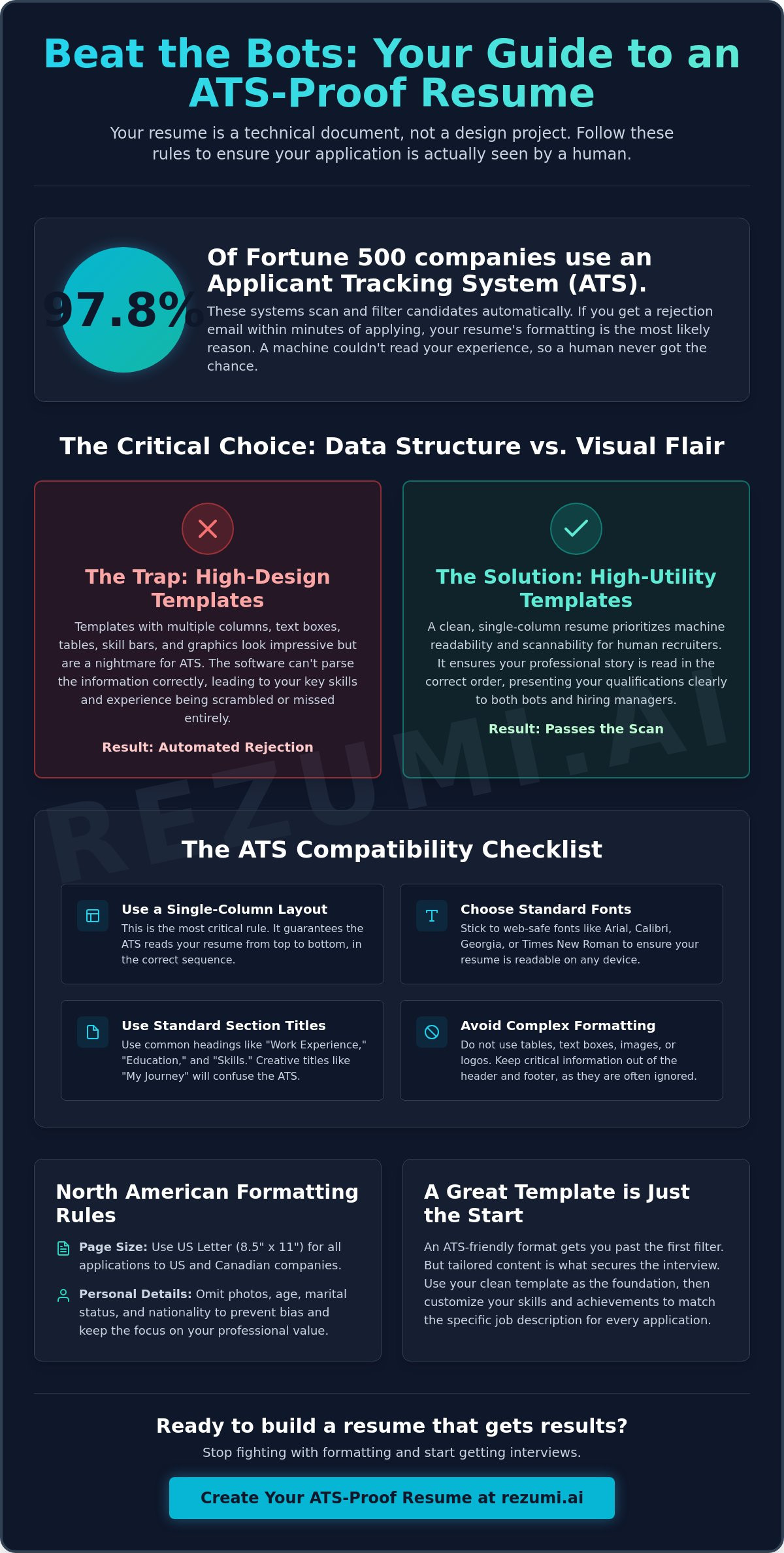
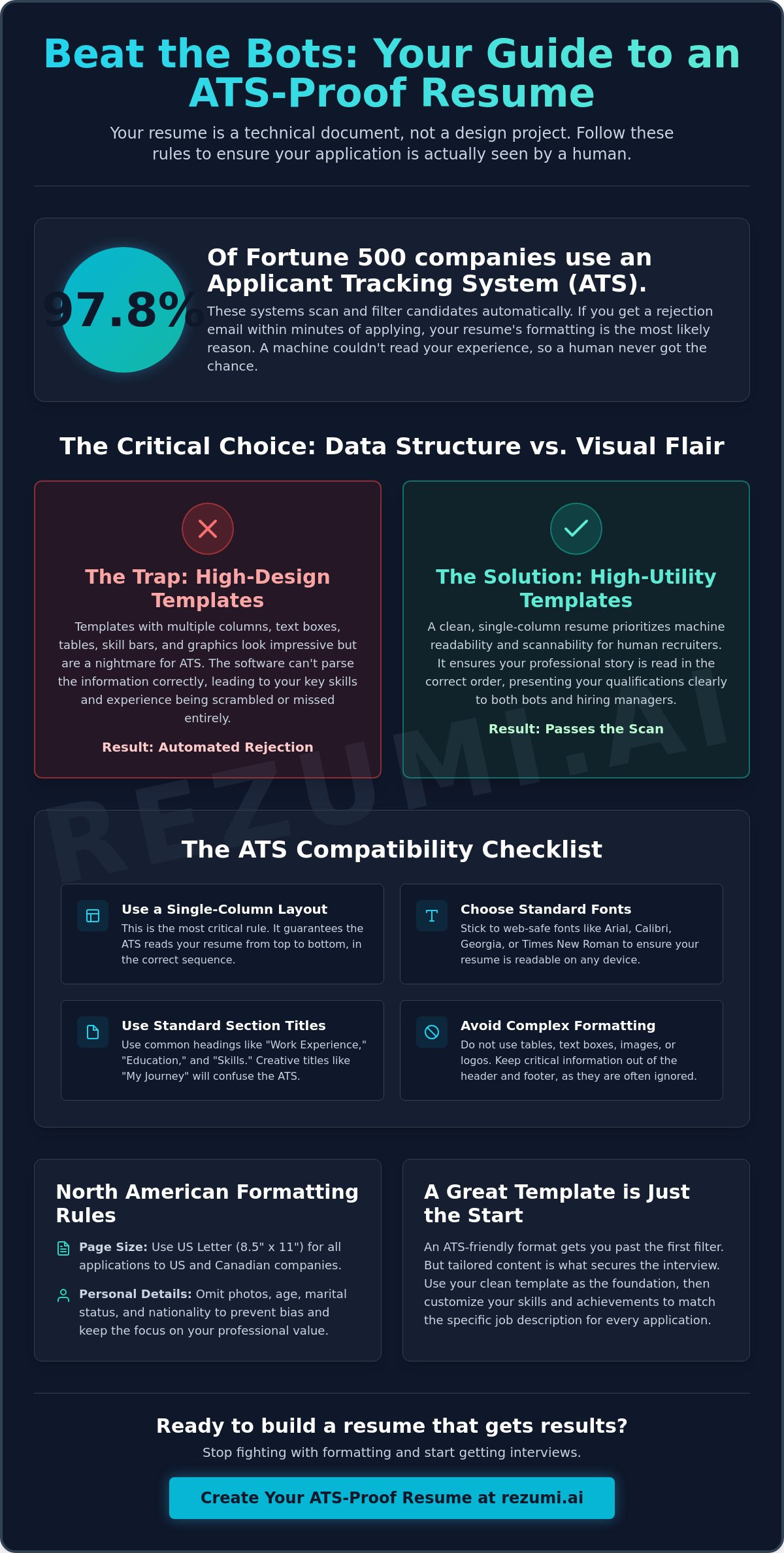
97.8 percent of Fortune 500 companies use an Applicant Tracking System (ATS). These systems screen candidates before a human recruiter ever sees a name. If you get rejection emails within hours of applying, your design is likely the culprit. Many people choose a resume template based on visual flair. In reality, a resume is a technical delivery vehicle. It is not a graphic design project.
You deserve a process that rewards your experience. It should not punish your formatting choices. It is exhausting to fight with margins and text boxes only to stay stuck in the rejection pile. We are going to fix that. You will learn how to evaluate any layout for North American hiring standards and machine readability using our performance checklist.
This guide breaks down the exact requirements for a high performing design. We will cover why single column layouts win. You will see which file types are safest for modern systems. We will also show you how to ensure your skills are actually parsed by the latest AI screening tools.
Key Takeaways
- Your resume template acts as a technical filter that determines if a human ever sees your application. Prioritize data structure over visual flair to bypass automated screening systems.
- Use standard fonts and text-based headers to ensure your information is read correctly. Creative formatting often causes machines to skip your most important work experience and skills.
- Follow North American standards by using US Letter page sizing and removing personal details like age or marital status. This keeps the focus on your professional results and prevents formatting errors.
- Combine a polished design with AI-powered tailoring to match specific job descriptions. A static layout provides the frame, but customized content is what actually secures the interview.
The Foundation: Why Your Resume Template Choice Dictates Your Success
Your resume template is the primary filter between your hard-earned experience and a recruiter's desk. It is a technical delivery vehicle. Most candidates treat it like a graphic design project, but this is a mistake that leads to "black hole" rejections. If your layout is too complex, the machine cannot read your data. Your best achievements stay hidden because the software simply cannot find them.
A bad template choice does more than just look messy. It actively works against you by scrambling your professional narrative. Choosing a standard format reduces the risk of parsing errors. It ensures that when a recruiter searches for a specific skill, your name actually appears in the results. You want a design that highlights your value, not one that requires a manual to understand.
The Role of the Applicant Tracking System (ATS)
An ATS acts as a digital filing cabinet for your application. It scans your document and pulls out key information like your current title, years of experience, and core skills to create a digital profile. When you use a resume template with text boxes, tables, or images, the software gets confused. It might skip your entire work history or miscategorize your education. A standard, single-column format is the safest bet for 90 percent of professional roles. Understanding the history and styles of resumes shows that while designs change, the need for clear, logical progression remains the most important factor for success.
Aesthetics vs. Utility in 2026
There is a massive divide between high-design templates and high-utility templates. We often see candidates fall into the "Canva Trap" by picking visual-heavy options with colorful sidebars and skill bars. These look great to the naked eye but are a nightmare for high-volume hiring. Recruiters spend an average of six seconds on an initial screen. They want to find your impact metrics quickly. They do not want to hunt through a creative layout to find your contact details.
Minimalist designs perform better because they prioritize utility. This is why the Harvard Resume Format: The 2026 Guide to the Gold Standard remains the benchmark for senior professionals. It values clarity over decoration. It ensures your data is accessible to both humans and machines. When you choose a resume template, follow these rules for maximum impact:
- Stick to a single column: This prevents the ATS from reading your text out of order.
- Use standard fonts: Stick to Arial, Calibri, or Georgia to ensure readability on all devices.
- Avoid the header and footer: Many systems ignore text placed in these areas entirely.
- Focus on white space: A clean layout makes your achievements pop and reduces eye strain for the reader.
The ATS Compatibility Checklist: Evaluating Your Template for Machine Readability
A visually stunning design is a liability if the machine cannot parse your data. Evaluating a resume template requires a technical eye. You must ensure the software can extract your work history, skills, and contact details without errors. If the system fails to read your document, you remain invisible to the recruiter regardless of your qualifications.
Your resume template must use standard section titles like "Experience" and "Education" to be categorized correctly. Creative headings like "My Journey" or "Toolbox" often lead to miscategorization or skipped sections. Stick to a single-column layout. Avoid tables, text boxes, and complex columns that scramble the reading order of the software. A clean margin of at least 0.5 inches ensures the page remains scannable and professional when printed or viewed on a screen.
- Text-based headers: Ensure all headings are actual text, not images or graphics.
- Standard font usage: Use web-safe fonts like Arial, Calibri, or Georgia for maximum compatibility.
- Zero tables: Tables often cause the ATS to read horizontal rows as a single jumbled sentence.
- Standard titles: Use "Work Experience" instead of "Professional Background" to guarantee parsing accuracy.
Testing Your Template for Hidden Errors
You can verify your document's technical health by checking our ATS resume optimization tools. To do this manually, use the "Select All and Copy" test. Open your document, press Ctrl+A (or Command+A), and copy the text into a basic Notepad or TextEdit file. If the text appears garbled, out of order, or missing, the ATS will see the same mess. You should also try the "Save as Plain Text" test. This reveals exactly what the machine sees. Watch out for custom bullet points or icons. These often turn into unreadable characters like question marks or squares, which can trigger errors in older databases.
Font and File Type Requirements
The file format you choose dictates how well the system preserves your layout. While modern systems like Workday and Greenhouse handle clean PDFs well, a .docx file remains the safest bet for older systems. Never use an "image-only" PDF created by a scanner or a graphic design tool. These are entirely unreadable by any ATS because they lack a text layer. Stick to web-safe fonts to ensure your layout stays intact across different devices. Many Microsoft Word resume templates provide a solid starting point for these technical requirements. They offer a balance of standard formatting and professional appearance that machines can process with 100 percent accuracy.
Structural Integrity: Organizing Your Template for Maximum Impact
A clean layout doesn't just pass the machine. It guides the human eye. Place your contact information at the very top of your resume template. Recruiters need to know who you are instantly. Include your name, phone number, professional email, and LinkedIn URL. Do not hide this data in a sidebar. Sidebars often confuse older software and can lead to your contact details being stripped from your profile entirely. Keep it centered or left-aligned for maximum visibility.
Use a professional summary to frame your narrative. You have about six seconds to make an impression before a recruiter moves to the next candidate. This summary acts as your elevator pitch. It highlights your most relevant achievements and sets the tone for the rest of the document. This is your chance to tell the reader why you are the perfect fit before they even look at your job history. Avoid generic objectives. Focus on the specific value you bring to the role.
List your work experience in reverse-chronological order. This is the gold standard for North American hiring. It shows your most recent and usually most relevant experience first. Recruiters want to see your current trajectory. If you use a functional format, you risk looking like you are hiding gaps in your employment. Machines also struggle to parse functional formats because they cannot easily calculate your total years of experience. Stick to the standard timeline to build trust and clarity.
Group your skills into clear categories. Instead of a massive wall of text, use headers like "Technical Skills" or "Industry Tools." This helps the ATS match keywords to the job description more efficiently. It also makes the section more readable for human eyes. Use bulleted lists to create distinct groups of expertise. This organization allows a hiring manager to verify your qualifications at a glance without hunting through paragraphs.
The F-Pattern and Visual Hierarchy
Hiring managers scan resumes in an "F" pattern. They look across the top, then down the left side, then across the middle. You can influence this behavior by using bolding and larger font sizes for your job titles and company names. Avoid dense paragraphs that discourage reading. Large blocks of text are intimidating and often get skipped. Use bullet points for your achievements to keep the reader engaged. Focus on results and metrics rather than just listing your daily duties.
Customizing Sections for Your Career Level
Your resume template should adapt to your specific situation. If you are a new graduate, move your "Education" section to the top. Your degree is your primary asset. If you are a senior professional, your experience should lead the way. You can add "Projects" or "Certifications" sections to highlight specific wins, but don't let them interrupt the flow of your work history. For more tips on automating this process, check out The Strategic Guide to Using a Resume Builder Free in 2026. This ensures your layout remains professional as your career evolves.
The North American Standard: Formatting Rules You Cannot Ignore
If you are applying for roles in the United States or Canada, your resume template must follow specific local conventions to avoid immediate rejection. The most basic requirement is page size. You must use US Letter size (8.5 x 11 inches) rather than the international A4 format. Using the wrong size can lead to awkward margins or cut-off text when a recruiter prints your file for an interview panel. This small technical error can make you look like an international candidate who does not understand the local market.
Eliminate all personal data that does not relate to your professional ability. North American hiring is governed by strict anti-discrimination laws. Including your age, gender, religion, or marital status is a major red flag for hiring managers. Most recruiters will discard these resumes immediately to protect themselves from potential legal complications. Focus purely on your qualifications and the professional value you bring to the organization.
Follow a strict "No Photo" rule. While headshots are common in Europe and parts of Asia, they are a liability in North America. Including a photo can introduce unconscious bias into the hiring process and may cause your application to be filtered out by the ATS. Instead of decorating your page with an image, fill that space with quantifiable results. Use numbers and percentages to prove your impact. Saying you "increased revenue by 15 percent" is always more powerful than saying you were "responsible for sales."
Privacy and Bias Prevention
Modern privacy standards mean you should omit your physical street address. Your city and state (or province) are enough for the ATS to confirm your location for local roles. Including a full address is a safety risk and offers no benefit to the hiring process. Keep your LinkedIn URL as your only external social link. Ensure your profile is updated and matches the data in your resume template to maintain consistency across your digital presence.
Language and Spelling Context
Use American English for all US-based roles. This means using "Optimized" instead of "Optimised" or "Color" instead of "Colour." Small spelling differences can make you look like you have not tailored your application for a local audience. Ensure your template supports standard North American date formats (Month, Year) and uses industry-standard job titles that recruiters recognize. If you want to ensure your formatting meets every one of these regional standards, you can access our ATS optimization tools to scan your document for formatting errors before you hit send.
Beyond the Static Template: Using AI to Drive Conversions
A resume template provides the shell, but AI provides the substance. You can have the cleanest layout in the world and still fail if your words don't match the job post. Modern hiring requires more than a static document. You need a dynamic strategy that adapts to every role you target. Transitioning from a simple file to a high performance workspace is the secret to consistent interview invites.
Tailoring your content to every job description is no longer optional. According to a Wellfound study, candidates who tailor their resume to each specific job description receive a 78 percent higher response rate. Doing this manually takes hours of formatting and editing. Using AI allows you to maintain your professional design while instantly aligning your skills with the employer's needs. This ensures your experience is always presented in the most relevant light.
Measuring your resume score before you hit "Apply" gives you a massive advantage. You should never have to guess if your document will pass the automated filters. Data-driven tools allow you to see exactly where your content is weak. You can identify missing keywords or vague bullet points before a recruiter ever sees them. This proactive approach replaces the anxiety of the job search with the confidence of a proven strategy.
The Limitations of Static Templates
Traditional templates have a major blind spot. They cannot tell you if your keywords match the job description. A static design doesn't provide feedback on the strength of your bullet points or your impact metrics. It is just a container. This "one-size-fits-all" approach leads to lower response rates because it lacks the precision needed to beat specific ATS filters. You need a tool that analyzes the text inside the frame.
How Rezumi Optimizes Your Chosen Format
We built Rezumi to bridge the gap between design and data. Our ATS Resume Optimization tool provides real-time feedback on your content. It checks your formatting against North American standards and ensures your skills are parsed correctly. You can check the pricing plans to access premium features like our AI Cover Letter Generator and Profile Editor. These tools work together to create a cohesive professional brand.
Your resume is a living document, not a one-time project. It should evolve as you gain new skills and target new opportunities. By combining a technical resume template with AI driven insights, you turn a simple PDF into a dynamic career tool. Stop spending hours on formatting and start focusing on the results that get you hired.
Secure Your Next Interview with a Technical Edge
Your choice of a resume template is the first step in a data-backed career strategy. You now know how to bypass automated filters by prioritizing machine readability and North American hiring standards. Stick to single column layouts. Remove personal bias triggers like photos and street addresses. Focus on the metrics that prove your professional impact to both humans and machines.
A clean design gets you through the door, but data-driven optimization keeps you in the room. You can optimize your resume for the North American market with Rezumi. Our platform provides AI-powered ATS optimization and real-time resume scoring. It's built specifically for US and Canadian standards to ensure your data is parsed with 100 percent accuracy. Stop guessing and start measuring your success.
Take control of your professional narrative today. You have the tools to turn a static document into a high performance interview magnet. We're ready to help you land your next role.
Frequently Asked Questions
What is the best resume template for ATS compatibility in 2026?
A single column, text-based layout is the best choice for passing automated filters. This structure ensures that parsing software reads your experience in the correct chronological order without skipping sections. You should avoid any design that uses sidebars or graphic elements. Stick to standard fonts like Arial or Calibri to guarantee that the machine can extract your data accurately.
Can I use a two-column resume template for corporate jobs?
No, you should avoid two-column layouts for corporate applications. Most Applicant Tracking Systems read from left to right across the entire page. A second column often causes the software to jumble your text, which makes your work history appear as a confusing mess of unrelated words. Stick to a clean, single-column format to ensure your professional narrative remains intact.
Should I use a free resume template from Google Docs or Microsoft Word?
You can use these tools, but you must select the most basic options available. Many creative resume template options in these programs rely on hidden tables or text boxes that break the data extraction process. If you choose a free version, pick a minimalist design with zero decorative elements. This reduces the risk of technical errors during the submission process.
Is a 1-page or 2-page resume template better for senior roles?
A 2-page resume is the standard for senior professionals with over 10 years of experience. You need the extra space to demonstrate your leadership and measurable impact across multiple roles. For new graduates or entry-level workers, a 1-page limit is still the best practice. Regardless of length, ensure your most impressive achievements appear on the top half of the first page.
Why do some resume templates get rejected by the ATS?
Rejections usually happen because the template uses unreadable formatting like images, icons, or complex tables. If the software cannot find your contact info or work history because it is trapped inside a graphic, it will flag your file as incomplete. Non-standard section titles also cause the system to miscategorize your data, which leads to your profile being ignored by recruiters.
How do I know if my resume template is North American compliant?
A compliant resume template uses US Letter page sizing and excludes all personal photos. It should never ask for your age, gender, or marital status. You can verify compliance by ensuring the document uses American English spelling and standard date formats. If your layout looks like a clean business document without any headshots or personal data, it likely meets the regional standard.
Can I use icons or progress bars in my resume template?
Avoid icons and progress bars because they are invisible to most screening software. A progress bar for a skill like "Project Management" cannot be translated into a data point the machine understands. It is better to use plain text and specific metrics to define your proficiency. Icons often turn into garbled characters during the parsing process, which makes your document look unprofessional.
Do I need a different template for every job application?
No, you do not need a different layout for every job, but you must update the content. You can use the same high-performing, single-column design for every application you send. Your goal is to change the keywords and achievements to match the specific job description. The design provides the frame, but the tailored text is what actually secures the interview.
Disclaimer
This article is provided for general informational purposes only and does not constitute professional, legal, financial, or career advice. While Rezumi strives for accuracy, we make no warranties as to the completeness or reliability of this content. Hiring practices, ATS behavior, and job-market conditions vary by employer, industry, and region — always verify against your specific situation. Any action you take based on this article is at your own risk.