How to Beat the ATS: Get Your Resume Seen in 2026
Large enterprises account for over 60 percent of the automated screening market in 2026. This means an algorithm likely sees your resume before a human ever does. It is a digital wall. You spend hours tailoring your experience only to receive a generic rejection email minutes later. Knowing how to beat the ats is a requirement for the modern job market. You have done the work. Now you need the system to recognize it.
You can move your resume past automated filters and into a recruiter's hands by organizing your data as a technical filing system. This guide provides the exact strategies to ensure your resume is read and organized correctly by systems like Ashby and Greenhouse. We'll cover the specific layout rules for 2026, the right way to use industry keywords, and how to build a resume that satisfies both algorithms and humans. You'll learn how to format your skills to avoid common reading errors and how to use both acronyms and full terms to maximize your match score. It is time to replace application anxiety with a data-backed strategy that gets results.
Key Takeaways
- Learn how to beat the ats by treating your resume as a technical filing system instead of a design project.
- Stick to standard section headers like "Work Experience" to ensure the parser correctly identifies your professional history.
- Identify and include specific hard skills from job descriptions to help the system rank your profile higher in search results.
- Simplify your layout to a single column to prevent automated software from garbling your contact details or experience.
- Use AI tools to manage the technical tailoring required for each job application without wasting hours on manual edits.
What Does It Actually Mean to Beat the ATS?
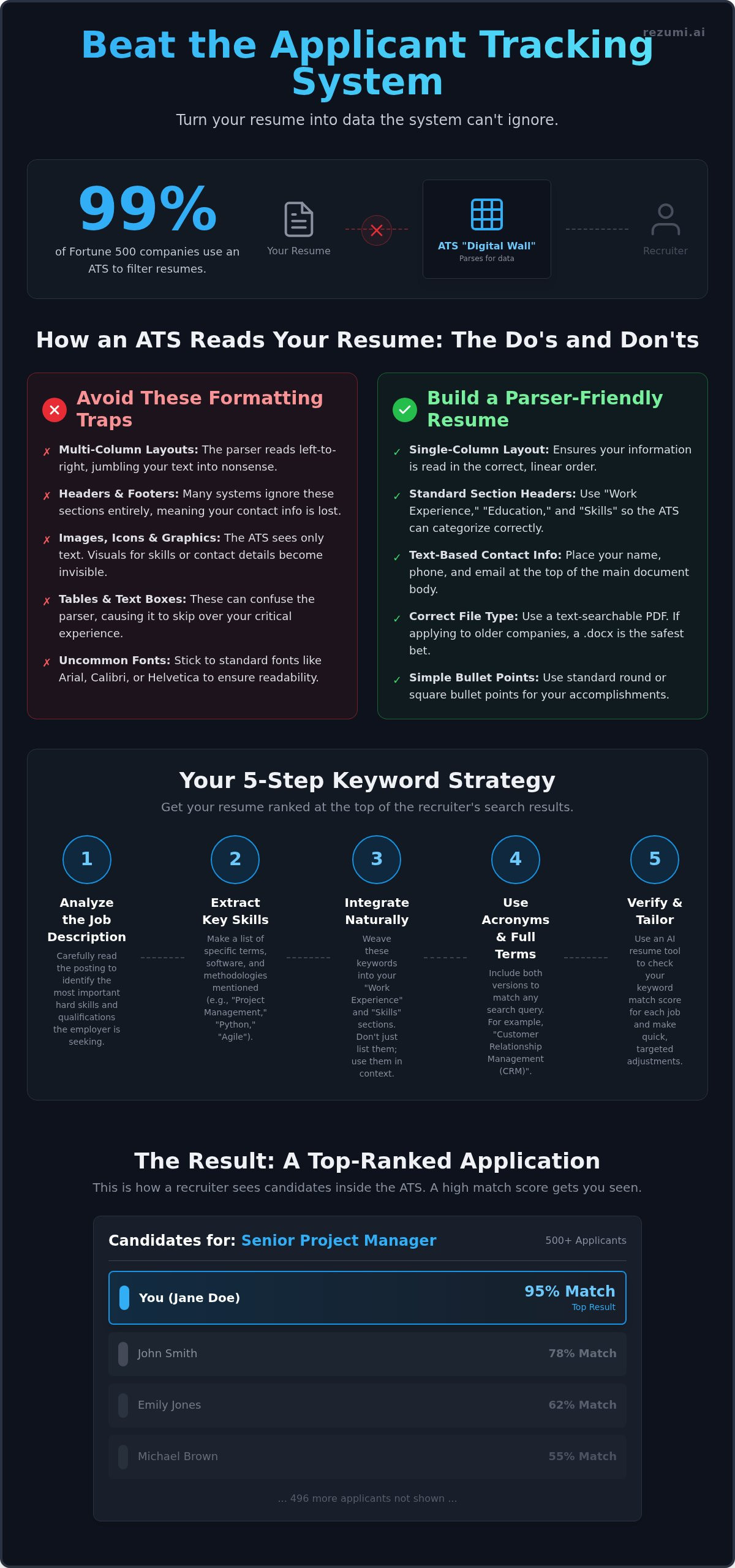
Beating the system is not about magic tricks or using white text to hide keywords. It is about technical clarity. An Applicant Tracking System (ATS) acts as a digital filing cabinet for your career data. Currently, 99 percent of Fortune 500 firms use this software to manage high application volumes. In 2026, large enterprises account for over 60 percent of the ATS market share. If the system cannot read your details, you don't exist to the recruiter. Success comes from making your information impossible to miss.
Learning how to beat the ats requires a shift in mindset. You are not writing for a human first. You are writing for a database. Recruiters use these systems to search for specific skill sets, much like you use a search engine to find a local restaurant. You can find more details on what an applicant tracking system (ATS) is to understand its role as a database. If your resume is not optimized for these searches, you remain buried on page fifty of the results. You are qualified, but the system has made you invisible.
The Truth About Automated Rejections
Most instant rejections happen because of knockout questions, not your work history. These are simple "yes or no" filters. If you answer "no" to a requirement like "Are you authorized to work in North America?", the system moves you to the rejected pile immediately. Beyond these filters, rejections often stem from poor formatting. If your experience is trapped in a complex graphic or an unusual font, the system sees a blank page. The software doesn't decide you are a bad candidate. It simply fails to find the data it needs to prove you are a good one.
How Recruiters Use ATS Filters
Recruiters view a dashboard that ranks candidates by a match rate. This percentage shows how well your resume aligns with the job description. In a stack of five hundred applications, a recruiter may only look at the top ten or twenty results. To reach that top tier, you must use a resume format that the software understands. Systems like Ashby, Crelate, or Greenhouse are designed to find standard headings. When you use predictable labels like "Work Experience" instead of creative titles, you increase your visibility. Knowing how to beat the ats means understanding that a recruiter’s search bar is your primary hurdle. If you don't appear in their filtered list, your skills never get a chance to shine.
How the ATS Parser Reads Your Resume
Your resume is a string of text to a computer, not a visual document. The parser is the specific part of the software that strips away your design to find your work history. If this software fails to map your skills to the right categories, your profile appears blank to the recruiter. This is the primary reason highly qualified candidates receive automated rejections. They built a resume for a human, but the machine could not process the data.
Understanding how to beat the ats requires you to think like a database manager. While 2026 recruitment systems are more advanced, they still rely on predictable patterns to extract data. If you use icons for your phone number or graphics for your skill levels, that information becomes invisible. The parser simply skips over what it cannot identify as standard text. You can avoid these technical errors by using ATS-ready optimization tools that verify your data is readable.
Standard Text vs. Visual Clutter
Tables and multi-column layouts are the most common causes of a failed parse. Most software reads from left to right across the entire page. If you use two columns, the parser might read the first line of the left column and immediately jump to the first line of the right column. This blends two different thoughts into one nonsensical sentence. Similarly, avoid placing contact information in the "Header" or "Footer" sections of your document. Many systems ignore these areas completely, making your phone number and email address impossible to find. Images and icons are also invisible to most parsers, so stick to plain text for all critical details.
The PDF vs. Word Document Debate
The old advice to always use a Word document is no longer a strict rule in 2026. Modern systems like Ashby, which holds 15.6 percent of the market, handle PDFs with ease. However, you must ensure your PDF is "text-searchable." If you scan a physical piece of paper and save it as a PDF, the parser sees it as one large image. It cannot "read" the words inside an image file. If you are applying to a legacy corporation using older software, a standard .docx file is still the safest bet. Always save your file with a clear name like "Firstname-Lastname-Resume.pdf" to help the recruiter find your file after it passes the initial screen.
Critical Formatting Rules to Avoid Technical Rejection
Your formatting is either a bridge or a barrier. To move past the initial scan, you must use predictable labels that the system expects. Standard headings like Work Experience, Skills, and Education tell the software exactly where to find your data. If you use creative titles like My Professional Journey or Where I Have Been, the system may fail to categorize your history correctly. This leads to a blank profile in the recruiter database, regardless of your actual qualifications.
A single-column layout is the most effective way to ensure your text is read in the correct order. While multi-column designs look modern to humans, they often confuse the automated reader. The software may read across the entire page, mixing the first line of your contact info with the first line of your professional summary. Sticking to a linear, top-to-bottom structure is a core part of how to beat the ats in 2026. It guarantees that your career story remains coherent when it is converted into a text-only format.
Use simple bullet points like solid circles or squares. Avoid using custom emojis, arrows, or checkmarks to highlight your achievements. These graphical characters often fail to render in the text-only version of your resume. When the system encounters a character it does not recognize, it often replaces it with a generic placeholder or deletes the entire line of text. You don't want your best accomplishments to vanish because of a decorative icon.
Safe Fonts and Clear Hierarchies
Arial, Calibri, and Georgia are standard choices because they are universally encoded. If you use a custom font you downloaded online, the ATS might not have the same character set. This can turn your carefully written achievements into a string of unreadable symbols or question marks. You should also maintain a consistent date format, such as MM/YYYY, across your entire document. This helps the system calculate your total years of experience accurately and prevents errors in your professional timeline.
The Danger of Tables and Text Boxes
Tables and text boxes are technical traps that often lead to data loss. A parser often reads a table by scanning the entire top row from left to right, ignoring the vertical borders you see on the screen. This blends separate columns into a single, garbled sentence that makes no sense to a recruiter. Text boxes are even riskier because many automated scanners skip them entirely to save processing power. You can create a professional, organized look using simple bold text and clear spacing without relying on invisible formatting tricks. Mastering how to beat the ats requires prioritizing technical readability over visual flair.
A 5-Step Strategy to Optimize for Keywords
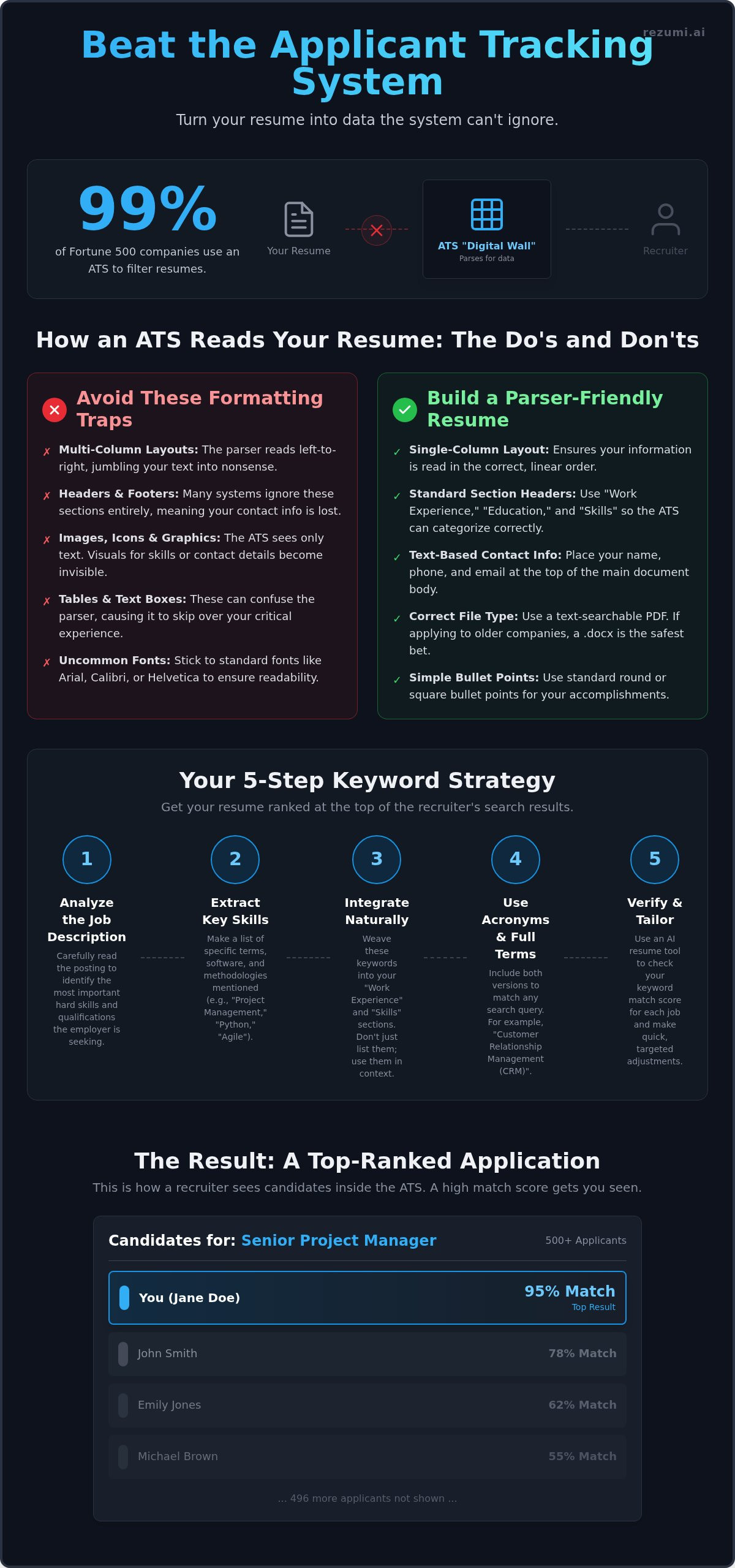
Keywords are the specific search terms recruiters use to filter through thousands of applications. If your resume does not contain the exact phrases found in the job description, you will likely remain invisible. Start by identifying the hard skills mentioned in the posting. These are technical abilities like SQL, financial modeling, or bilingual proficiency. Count how often these terms appear. If a skill is mentioned multiple times, it is a high priority for the recruiter's search filter. This is the first practical step in how to beat the ats.
Integrate these terms naturally into your work history bullets instead of just listing them in a skills section. Mentioning a skill within the context of an achievement proves you have used it successfully. You should also include both the acronym and the full term for any certifications or technical skills. Write "Project Management Professional (PMP)" or "User Experience (UX) Design." This ensures the system finds your resume regardless of whether the recruiter searches for the abbreviation or the full name. Once you have integrated these terms, use an ats resume checker to verify your match rate.
Contextual Keyword Integration
Avoid the temptation of "keyword stuffing" or hiding text in white font at the bottom of your page. Modern systems in 2026 can detect hidden text and may automatically blacklist your profile for attempting to "game" the system. Instead, focus on hard skills. While soft skills like leadership or communication are valuable, they are rarely the primary filters used in an initial search. Prove your hard skills by using them in achievement-based sentences that show the scale of your impact. This data-driven approach is a more reliable way how to beat the ats than using outdated tricks.
Matching the Job Title
Your current job title might not match the industry standard. If your company uses creative titles like "Sales Ninja," change it to "Account Executive" on your resume to match what recruiters actually type into their search bars. You can use a professional summary at the top of your page to bridge the gap between your past experience and the new role you want. This summary acts as a technical anchor for the parser. Additionally, include your city and state clearly. Many North American recruiters use location-based filters to find local talent first, even for hybrid roles. If your location is missing, you might be filtered out of the results entirely.
Using AI to Command the Hiring Process
Recruiters in 2026 don't just scan for keywords. They use AI agents to summarize your entire career in seconds. To stay competitive, you must use these same tools to build and refine your documents. Manual tailoring for dozens of job applications is no longer realistic. You need a strategy that handles the technical heavy lifting so you can focus on the actual interview. Rezumi aligns your experience with North American standards instantly, ensuring your data is ready for machine analysis.
Knowing how to beat the ats involves more than just formatting. It requires achieving a high Resume Score before you ever hit the submit button. This score acts as a benchmark for your application's health. It tells you exactly how a machine perceives your value relative to the job description. By the time a recruiter sees your profile, you have already verified that the system can read and rank your experience correctly.
Real-Time Feedback and Scoring
An ai resume builder identifies the specific technical terms you might have overlooked. It provides a machine-eye view of your document, flagging gaps in your skills or experience. You see what the computer sees. Instead of managing fifty different Word files on your desktop, you can use a centralized workspace. This keeps your search organized and ensures every version of your resume is technically sound and ready for export.
Beyond the Resume: Cover Letters and Interviews
Your strategy shouldn't stop at the resume. You need a consistent profile across your cover letter and LinkedIn to build trust with recruiters. Maintaining a unified keyword profile makes it easier for the system to verify your expertise. You can also prepare for the next stage with AI-driven interview coaching that targets your specific industry. Check out Rezumi’s pricing to find a plan that matches your current search speed. This is the final step in mastering how to beat the ats and moving your career forward with confidence.
Move Your Resume to the Top of the Pile
Beating the ATS isn't about luck. It's about technical precision. You've learned that a single-column layout and standard headers are non-negotiable for the 2026 market. You also know that matching the specific frequency of hard skills is the only way to satisfy the algorithm's search requirements. Mastering how to beat the ats is the first step toward securing more interviews and controlling your career path.
Rezumi handles the technical heavy lifting for you. Our platform is trusted by professionals landing roles at top North American firms. We provide real-time scoring to ensure your resume is ready before you hit submit. Our AI-powered tailoring saves you hours on every application by identifying exactly what a recruiter's search filter is looking for.
You have the skills and the experience. Now you have a data-backed strategy to make sure the recruiter actually sees them. Stop letting a digital filing system stand between you and your next role. It's time to apply with confidence and get the response you deserve.
Frequently Asked Questions
Does the ATS automatically reject resumes with a low score?
No, an ATS rarely rejects you based on a score alone. It simply ranks you for the recruiter to review. Most instant rejections come from failing knockout questions about work authorization or minimum requirements. If you don't meet these basic criteria, the system moves your profile to the rejected pile immediately.
Is it better to send a PDF or a Word document to an ATS?
Both are acceptable in 2026, but a text-based PDF is often preferred for maintaining your layout. If you are applying to a large enterprise with older systems, a standard Word file is the safest choice to prevent parsing errors. Ensure your PDF is not a scanned image, as the software cannot read text within a picture.
Can I use colors and bold text in an ATS-friendly resume?
Yes, you can use bold text and standard colors to improve readability for humans. These styling choices don't interfere with the parser because they don't change the underlying text structure. Avoid using graphics or charts to convey critical information, as the system will likely skip them entirely.
How many keywords should I include to pass the filters?
Aim for a match score of 75 percent or higher by using keywords found directly in the job description. Focus on hard skills and technical requirements that appear multiple times in the posting. Knowing how to beat the ats means matching the recruiter's specific search terms without overstuffing your document with irrelevant phrases.
Do images or headshots break the ATS parser?
Yes, images and headshots frequently break the parser or result in a garbled profile. In the North American market, headshots are generally discouraged for most industries due to bias concerns. Keep your file clean to ensure every word is indexed correctly by the system.
What are the most common formatting mistakes that lead to rejection?
Tables and text boxes are the most frequent causes of technical failure. These elements scramble the reading order of the software, making your experience unreadable. Other common errors include putting contact information in the header or using non-standard section titles that the system cannot categorize.
How do I know if a company uses an ATS?
You can usually tell by looking at the application URL in your browser. If the web address contains names like Greenhouse, Ashby, or Workday, the company is using a tracking system. Most large North American firms use these portals to manage high candidate volumes and filter for specific skill sets.
Can I use a creative resume for a North American job?
Creative resumes are risky for automated systems and often lead to parsing errors. While they may look good to a human, they often fail the initial technical scan. Use a clean, single-column layout to understand how to beat the ats while still appearing professional to the hiring team.
Disclaimer
This article is provided for general informational purposes only and does not constitute professional, legal, financial, or career advice. While Rezumi strives for accuracy, we make no warranties as to the completeness or reliability of this content. Hiring practices, ATS behavior, and job-market conditions vary by employer, industry, and region — always verify against your specific situation. Any action you take based on this article is at your own risk.