How to Prepare for a Video Interview: Command the Camera in 2026
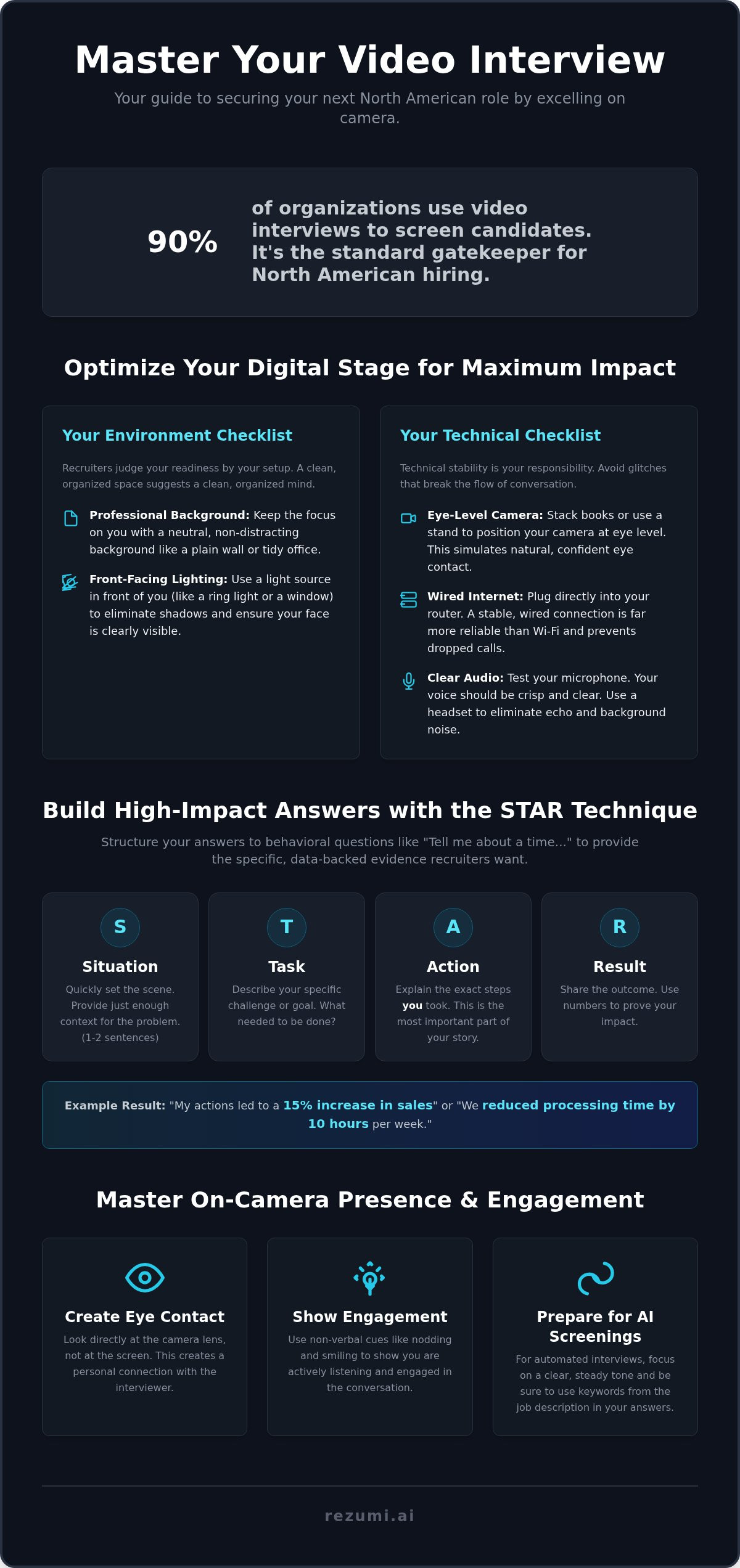
Ninety percent of organizations now use video interviews to screen candidates before they ever meet a human in person. It is no longer a temporary fix. It is the standard gatekeeper for North American hiring. Knowing how to prepare for a video interview is the difference between a generic rejection and a final round invitation. You likely feel the pressure of that red recording light. It is natural to worry about spotty internet or sounding robotic when talking to a piece of glass.
We know that making a real connection through a webcam feels difficult. You want your personality to shine, but the technology often feels like a wall. This guide will show you how to master the technical, psychological, and strategic elements of video interviews to secure your next North American role. You will gain total control over your digital environment. We will cover how to optimize your lighting, handle AI-led screenings with confidence, and structure your behavioral answers for maximum impact. From the first login to the final thank you, you will have a clear, data-backed strategy to win.
Key Takeaways
- Control your environment by using front-facing lighting to remove shadows and signal professional attention to detail.
- Learn how to prepare for a video interview by using the STAR technique to provide data-backed results for every behavioral question.
- Master on-camera engagement by looking directly at the camera lens to create the eye contact necessary for a personal connection.
- Prepare for AI-led screenings by optimizing your tone and keywords for the automated algorithms used by many North American employers.
- Refine your delivery with AI coaching tools that identify filler words and pacing issues before your actual meeting.
Optimizing Your Digital Stage for Maximum Impact
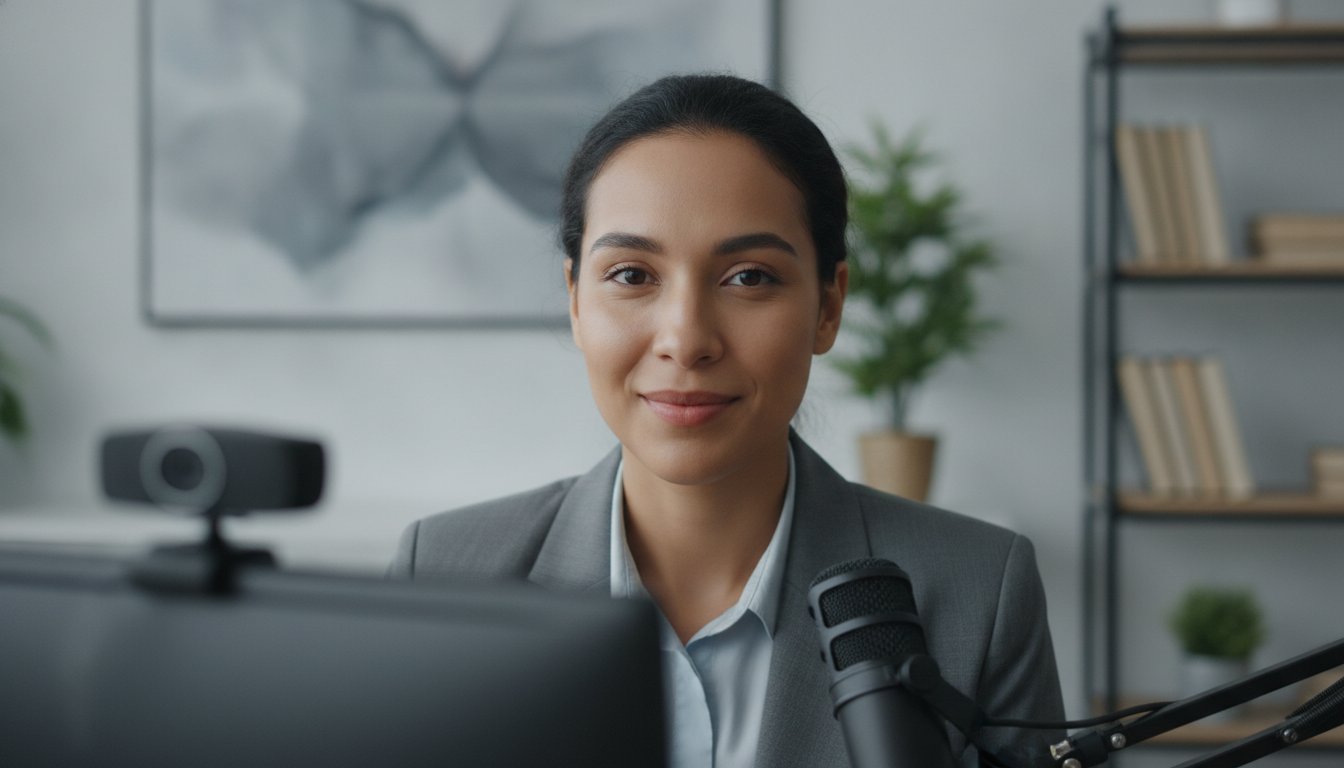
Your digital environment is a proxy for your professional attention to detail. Recruiters in the US and Canada judge your readiness by your setup before you even speak. If your background is cluttered or your face is buried in shadow, it signals a lack of preparation. When you consider how to prepare for a video interview, think of your room as your first impression. A clean, organized space suggests a clean, organized mind.
Lighting must be consistent and front-facing. Side lighting or overhead lights create harsh shadows that make you look unapproachable or tired. Audio quality is actually more critical than video resolution for clear communication. A recruiter can forgive a slightly grainy image, but they will lose patience with distorted sound. If they cannot hear your value proposition clearly, they cannot hire you. Clear audio ensures your message lands without friction.
Backgrounds should be neutral or professional to keep the focus on you. A plain wall or a tidy office space works best. This is especially vital for one-way video interviews where you won't have a live person to help you adjust your frame. Mastery of your "stage" shows you respect the interviewer's time and the standards of the role.
The Technical Checklist for 2026
Your hardware must function perfectly to avoid breaking the flow of the conversation. Technical stability is your responsibility, and failure here suggests a lack of technical literacy. Follow these steps to ensure your gear is ready:
- Position your camera at eye level. Stack books or use a stand if necessary. This simulates natural eye contact and prevents the "looking down" effect that feels condescending.
- Use a wired internet connection. Wi-Fi is prone to interference. A dropped call during a high-stakes interview can be fatal to your candidacy, so plug in directly to your router.
- Test your microphone levels. Your voice should be crisp and clear without background hum or echo. Use a dedicated headset if your laptop microphone picks up too much room noise.
Software Settings and Platform Mastery
Software glitches are often preventable with early preparation. Knowing how to prepare for a video interview includes mastering the specific platform the recruiter chooses. Use these settings to minimize distractions:
- Update your software. Run updates for Zoom, Teams, or Google Meet at least 24 hours before the call to avoid forced last-minute patches.
- Disable all desktop notifications. A stray Slack message or email alert sound is distracting and unprofessional during your pitch. Close all unnecessary tabs and apps.
- Check your display name. It must match the name on your professional resume exactly. This helps the recruiter identify your file quickly and keeps the process moving.
Building High-Impact Answers with the STAR Technique
Behavioral questions like "Tell me about a time you handled a difficult client" are standard in North American hiring. You need a logical structure to avoid rambling on camera. The STAR technique is the best framework for this. It ensures you provide the specific data recruiters crave while keeping your response tight. When you learn how to prepare for a video interview, mastering this framework is your top priority.
Recruiters in the US and Canada look for evidence of your past performance to predict future success. They want to see how you think and how you solve problems. Vague answers suggest you didn't actually do the work. Mapping your resume achievements to common behavioral prompts before the call gives you a library of stories to use. Conciseness is vital in video formats because digital attention spans are significantly shorter than in-person ones.
What is the STAR Technique?
The STAR technique breaks your story into four manageable parts. This structure prevents you from getting lost in unnecessary details. Follow this progression for every behavioral answer:
- Situation: Set the scene quickly. Provide just enough context for the interviewer to understand the environment. Keep this to two or three sentences.
- Task: Describe the specific challenge or goal. What was the problem that needed a solution? Be clear about the stakes involved.
- Action: This is the most important part. Explain the exact steps you took to address the situation. Focus on your individual contribution rather than the team's general effort.
- Result: Share the outcome. Use quantitative data whenever possible, such as "increased sales by 15 percent" or "reduced processing time by 10 hours." Numbers prove your impact.
Applying STAR to Video Responses
Talking to a camera can make you lose track of time. You must be disciplined with your delivery to keep the recruiter engaged. Use these guidelines to refine your performance:
- Watch the clock. Keep your total response time between 90 and 120 seconds. Anything longer risks losing the interviewer's focus.
- Use active verbs. Choose words like "coordinated," "built," or "resolved." Match these verbs to the job description to show you are a perfect fit for the role.
- Sound natural. Practice your delivery until the structure feels like second nature. You want to sound like a prepared professional, not a robot reading a script.
Refining these stories is easier when you have objective data on your performance. You can use AI interview coaching to track your pacing and ensure your STAR method answers hit the right marks every time.
Mastering On-Camera Presence and Engagement
Engagement in a video interview requires intentional non-verbal communication. In a physical office, you have the benefit of shared energy. On screen, that energy is lost unless you manufacture it. You must work harder to show you are present and interested. When you research how to prepare for a video interview, remember that your movements are magnified by the camera frame.
Posture influences your vocal projection and your perceived confidence level. Slouching restricts your diaphragm and makes your voice sound thin. Sit on the edge of your chair to keep your spine straight. This small adjustment forces you to lean slightly forward, which signals engagement to the interviewer. Active listening must be demonstrated through visible cues like nodding and subtle facial expressions. Since you are often muted while the recruiter speaks, these visual signals are the only way they know you are following the conversation.
The Eye Contact Trick
Looking at the camera lens is the only way to establish eye contact. It feels counterintuitive because your brain wants to look at the person's face on the screen. If you look at the screen, you appear to be looking down or away from the recruiter's perspective. This breaks the personal connection. Follow these steps to fix your focus:
- Avoid looking at your own image. Most platforms allow you to hide your self-view or "pin" the interviewer. Do this immediately to prevent yourself from checking your hair or distracting yourself during the call.
- Place a small sticker next to your camera lens. Use a bright color like red or neon green as a focal point. This reminds you exactly where to direct your gaze when you are speaking.
- Maintain a steady gaze. Avoid darting your eyes around the room or looking at your notes too often. A calm, focused look projects authority and trustworthiness to North American hiring managers.
Dress Code for the Modern Era
Your appearance sets the tone before you say a word. Even in a remote world, first impressions are durable. You need to dress for the role you want, not the room you are currently in. Part of knowing how to prepare for a video interview is matching the company's specific professional standards.
- Research the company culture. Check their LinkedIn page or "About Us" section for team photos. If the staff wears casual clothes, a polo or blouse is appropriate. If they wear suits, you should follow suit.
- Avoid busy patterns. Small stripes or complex prints can cause visual distortion on camera. This creates a shimmering effect that is highly distracting for the person on the other side.
- Wear solid colors. Choose shades that contrast well with your background. If you have a white wall, avoid a white shirt. Deep blues, greens, or grays usually look best on digital sensors and keep the focus on your face.
Managing AI-Led and One-Way Video Interviews
Many North American employers use AI to screen candidates via recorded videos before a human recruiter ever sees your face. This is the new gatekeeper. Sixty percent of recruiters now utilize one-way interviews during the initial screening stages according to data from cvmark.io. You aren't just talking to a camera. You are feeding data into an algorithm that analyzes your keywords, tone, and facial expressions for alignment with the role.
Success in this format depends on hitting specific keywords found in the job description. If the AI doesn't hear the right technical terms, you won't pass to the next round. This requires a different psychological approach than live calls. You have to maintain high energy without a human giving you feedback. When you consider how to prepare for a video interview, realize that the machine is looking for consistency and relevance. Sixty-three percent of job seekers have already experienced an interview scored by AI according to Truffle research.
The Mechanics of One-Way Interviews
You usually get a set amount of time to read a prompt before the recording begins. Use every second of that preparation time. Don't rush into your answer. Read the prompt carefully and jot down three main points you want to cover. This keeps your response structured and prevents you from rambling when the timer starts.
Even though an AI might score you first, assume a human will eventually watch the recording. Treat the camera as a real person to maintain a warm tone. Smile and use natural hand gestures within the frame. This prevents you from looking stiff or robotic, which can negatively impact your tone score. Knowing how to prepare for a video interview in an AI-driven market means being precise with your language while staying human in your delivery.
Keywords and Semantic Alignment
Your verbal answers should mirror the language in your written application. Use the same terminology you used to optimize your resume for ATS. If the job description asks for "cross-functional collaboration," use that exact phrase in your response. Focus on industry-specific skills that the AI is programmed to identify. These algorithms look for a direct match between your spoken words and the requirements of the role.
Accuracy is the key to passing these automated hurdles. You want your spoken record and your written record to stay in perfect sync. Ensure your resume is updated via Rezumi before the interview starts. This alignment signals to both the AI and the recruiter that you are a high-intent candidate who understands the specific needs of the company.
Final Polish with AI Interview Coaching
Modern preparation requires objective feedback on your delivery and content. Practicing with a friend is no longer enough because peers often give subjective or inaccurate feedback on technical performance. AI coaching tools identify filler words and pacing issues instantly. This data allows you to refine your delivery before the high-stakes call begins. Knowing how to prepare for a video interview in 2026 means using technology to perfect your human performance.
Consistency between your resume and your verbal answers builds essential credibility. Your resume got you the meeting, so your spoken responses must back up every claim you made on paper. If your application highlights specific percentages or revenue growth, your stories must match those figures exactly. Mock interviews help eliminate the nerves that cause candidates to misspeak or forget their key achievements under pressure.
Using Rezumi for Interview Readiness
Rezumi connects your written application directly to your interview performance. The platform analyzes your resume to identify the most likely behavioral questions you will face based on your specific experience. You can record practice sessions to review your body language and tone from the recruiter's perspective. Refine your answers based on data-driven feedback to ensure you project confidence and authority. You can access these tools through our AI interview prep module to start your final training phase.
The Final 15-Minute Countdown
Success often comes down to the final moments before you click the join button. Use this time to eliminate potential technical friction and settle your focus. A calm start leads to a confident performance. Follow this tactical checklist to ensure you are ready:
- Do a final mic and camera check. Technology can be unpredictable. Test your hardware one last time to ensure everything is working exactly as it did during your practice sessions.
- Keep essentials within reach. Place a glass of water and a printed copy of your resume nearby. Having your resume available allows you to glance at specific data points without searching through digital files.
- Close all unrelated tabs. This ensures your computer runs smoothly and prevents accidental notification sounds. Your processing power should be dedicated entirely to the video platform.
- Review your strategy. Reference our guide on Strategic Interview Tips for more ways to command the conversation.
Taking these final steps transforms your preparation into a professional performance. You have optimized your stage, structured your answers, and mastered your on-camera presence. Now, you just need to execute the plan. When you know how to prepare for a video interview with this level of detail, you aren't just hoping for the best. You are engineering your own success.
Secure Your Next Role with Digital Mastery
Mastering the technical and psychological aspects of the screen is no longer optional. You now have the tools to control your environment and the framework to deliver high-impact answers using the STAR technique. By aligning your spoken responses with your optimized resume, you build the credibility needed to win over North American recruiters and hiring managers.
Knowing how to prepare for a video interview in 2026 involves more than just a basic camera check. It requires real-time feedback and data-driven refinement to ensure your delivery is perfect. Rezumi was built specifically for the standards of top employers in the US and Canada. Our platform provides integrated ATS optimization and AI coaching to help you handle both human and automated screenings with absolute confidence.
You are ready to command the camera and secure your next professional milestone. Take these strategies and turn your next invitation into a concrete job offer. You have the skills and the strategy to succeed.
Frequently Asked Questions
How far away should I sit from the camera during a video interview?
Sit about 20 to 30 inches (arm's length) from the lens. This framing should show your head and shoulders clearly. It leaves enough room for natural hand gestures without them appearing too large on screen. This distance prevents your face from looking distorted by the lens while maintaining a personal, conversational feel with the recruiter. Aim to center yourself horizontally in the frame for a balanced and professional look.
Is it okay to use notes during a video interview?
Yes, but keep them at eye level. Digital notes or a physical sticky note placed near the camera lens work best. Avoid looking down at your desk, as this breaks eye contact and suggests you are reading a script. Use bullet points rather than full sentences to keep your delivery natural. Part of knowing how to prepare for a video interview is ensuring your aids don't distract the interviewer or slow down your response time.
What should I do if my internet cuts out during the call?
Stay calm and switch to your backup connection immediately. If you can't reconnect within 60 seconds, call the recruiter on their direct line or send an email explaining the technical failure. Most North American hiring managers understand that hardware issues happen. Proposing an immediate alternative shows you have a clear strategy for problem solving and respect their schedule. Always have the interviewer's phone number saved before the call starts to act quickly.
Should I wear headphones or use my computer speakers?
Wear headphones to ensure the best audio quality. Computer speakers often cause echo or feedback that can distract both you and the interviewer. A headset with a built-in microphone provides the most consistent sound. This setup is a vital part of how to prepare for a video interview because clear communication is more important than video resolution for passing the initial screening. It signals that you are technically ready for a remote role.
How do I handle a video interview if I live in a small apartment?
Find a plain wall or a corner that looks professional. If space is limited, position your desk so your back faces a neutral surface like a door or a bookshelf. Avoid showing your bed or kitchen area if possible. If you cannot find a clear spot, sit close to the wall to minimize the visible background. This focus signals your professional attention to detail and helps you stay focused on the conversation without distractions.
Can I use a virtual background for a professional interview?
Use a virtual background only if it looks high quality and stable. Low-end computers often cause glitching (distorted visual artifacts) around your hair or shoulders, which looks unprofessional. A blurred background is a safer choice for most North American roles. It keeps the focus entirely on you while hiding any personal items in your room. Ensure your lighting is bright enough to help the software distinguish you from the background without creating a halo effect.
How long should my answers be in a one-way video interview?
Keep your responses between 90 and 120 seconds. One-way platforms usually have a timer, so you must be concise. Lead with your strongest achievement immediately and use the remaining time to provide specific data points. AI algorithms and human recruiters both prefer structured, punchy answers over long stories. Practice your pacing with AI coaching tools to ensure you don't get cut off mid-sentence. Short, high-impact answers are always better than rambling through a story.
What is the best time of day to schedule a video interview?
Mid-morning is typically the best time for both you and the recruiter. Aim for 10:00 AM or 11:00 AM in the interviewer's local time zone. This avoids the early morning rush and the late afternoon fatigue. You will likely be more alert, and the recruiter will have finished their initial tasks for the day. Always confirm the time zone carefully to avoid missing the call or showing up late for the meeting.
Disclaimer
This article is provided for general informational purposes only and does not constitute professional, legal, financial, or career advice. While Rezumi strives for accuracy, we make no warranties as to the completeness or reliability of this content. Hiring practices, ATS behavior, and job-market conditions vary by employer, industry, and region — always verify against your specific situation. Any action you take based on this article is at your own risk.