What Do Recruiters See in ATS? The 2026 Insider Guide to Your Digital Profile
Recruiters don't actually see your beautifully designed PDF. They see a digital profile generated by a machine. It's frustrating to send out dozens of applications and hear nothing back. Understanding what do recruiters see in ats is the only way to stop guessing and start getting interviews. You're right to be concerned. 98% of Fortune 500 companies use an Applicant Tracking System (ATS) to manage candidates.
This guide will show you the recruiter side of the screen. You'll learn how the system parses your data, how automated filters work, and how to fix the formatting errors that make you invisible to hiring teams. We'll replace the anxiety of the job hunt with a clear, data-backed strategy. By the end, you'll know how to rank higher in searches and finally get the feedback you deserve.
Key Takeaways
- Stop focusing on your PDF layout and start optimizing the plain-text digital profile that recruiters actually use to evaluate you.
- Discover exactly what do recruiters see in ats by mastering the parsing process that turns your resume into searchable data fields.
- Learn how keyword searches and automated knockout questions allow hiring teams to filter hundreds of applicants down to the top ten.
- Identify the specific formatting traps, such as complex columns and graphics, that cause the system to ignore your professional experience.
- Use AI-driven simulations to check your resume's search rank and compatibility before you submit your application.
The Recruiter Dashboard: What Happens After You Click Submit?
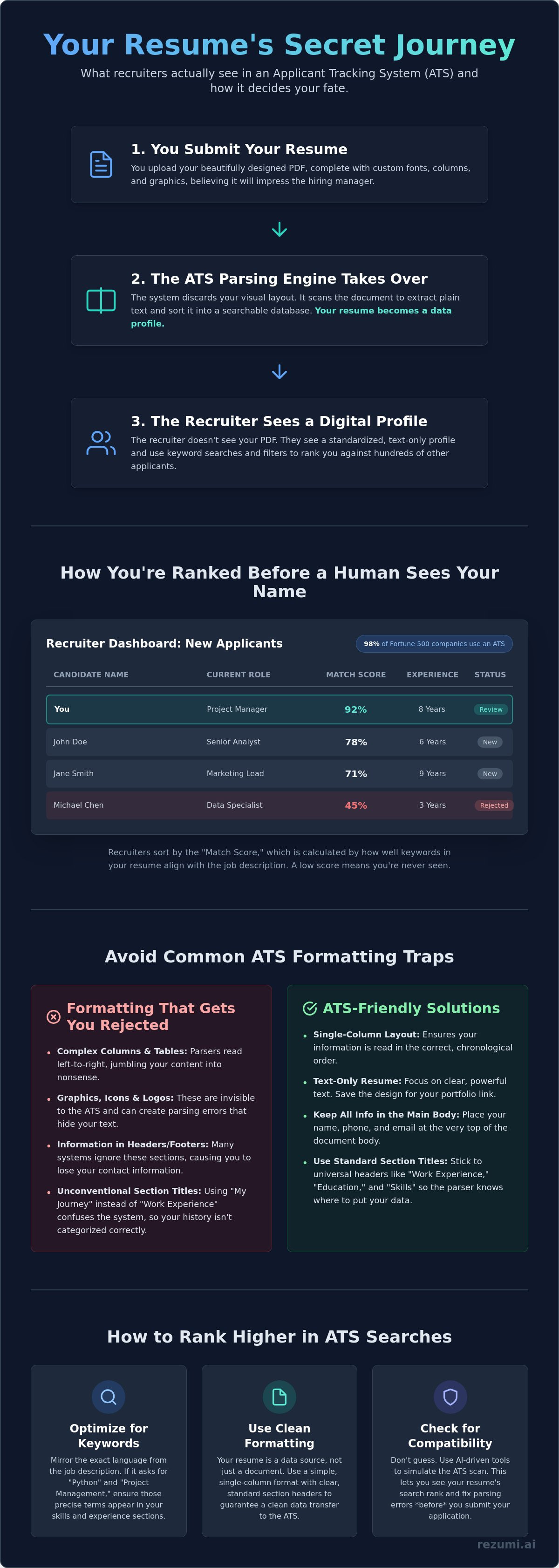
Your resume does not sit in a digital folder. It lives in a searchable database. When you click submit, the system shreds your formatting to populate a row in a massive spreadsheet. This is the reality of what do recruiters see in ats during the first five seconds of your application's life. The software acts as a gatekeeper, turning your professional history into a standardized data point.
Most recruiters start their day in a high-level dashboard. They do not open files one by one. Instead, they view a summary called a Candidate Snapshot. This header pulls your contact details, current job title, and highest degree into a standardized block. If your resume is not formatted for an Applicant Tracking System (ATS), this snapshot might be blank or filled with errors. 82% of organizations use this data to drive their hiring strategy, so an empty profile means an immediate rejection.
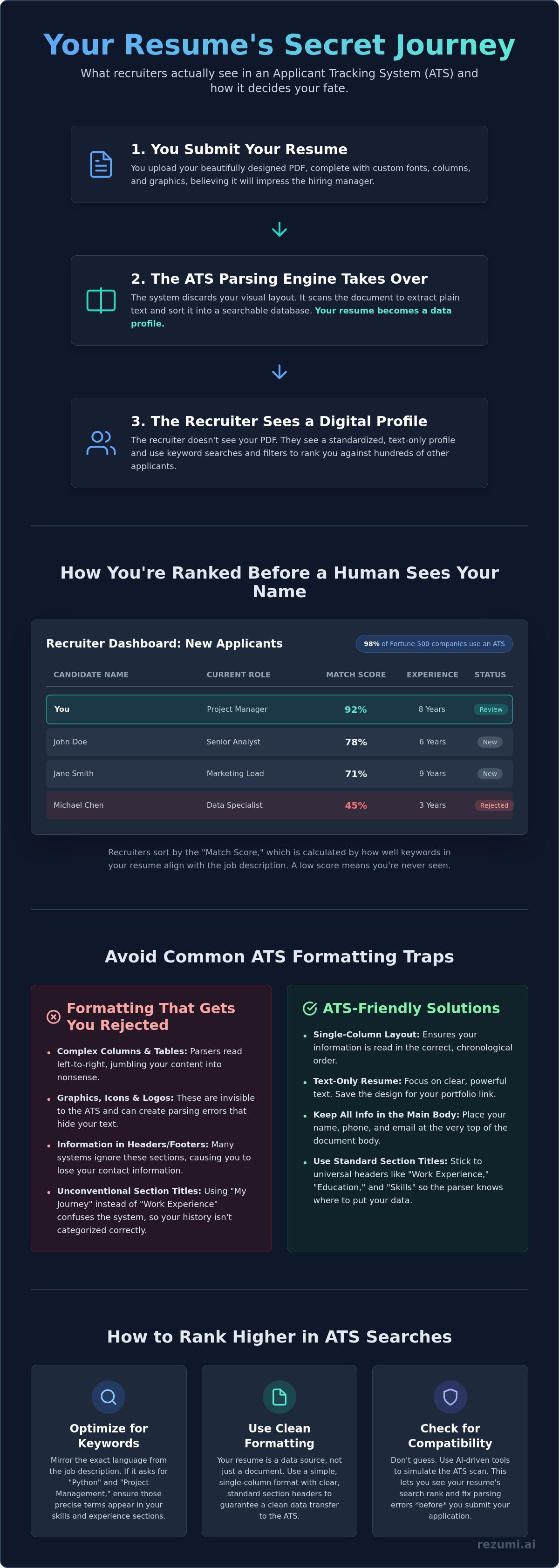
A "Match Score" or ranking percentage often sits next to your name. This score reflects how well your skills align with the specific job description. If the job requires "Python" and "Project Management" but your resume uses different phrasing, your score drops. Recruiters often sort their list by this score to decide which candidates to call first. You are being ranked before a human even sees your name.
The Candidate List View
The list view is where the first round of filtering happens. Recruiters scan a table containing dozens of applicants at once. They see columns for your name, current company, total years of experience, and a rating. A status indicator tells them if you are "New," "Reviewed," or "Rejected." If your "Years of Experience" column does not meet their minimum requirement, they can reject you with a single click without ever looking at your full profile. This is why clarity in your dates and titles is essential.
The Full Profile View
If you pass the initial scan, the recruiter clicks your name to open the Full Profile View. This is the digital version of your resume created by the system parser. It strips away your custom fonts, colors, and icons to show plain text data. Understanding what do recruiters see in ats profiles helps you realize that your resume is a data source, not just a document. While recruiters can toggle to see your original "PDF View," many stay in the "Parsed View" because it is faster to read. If the parser fails to read your sections correctly, your experience will look like a jumbled mess of text.
The Transformation: How Your PDF Becomes a Plain-Text Profile
Parsing is the engine of the modern application process. It is the technical process where the ATS reads your resume and sorts data into structured fields like job titles, dates, and skills. The system acts as a digital filter. It scans your document to build a database entry that a recruiter can actually search. When you ask what do recruiters see in ats, you must realize they are looking at the output of this machine. All your careful branding and design choices are stripped away. You are left with a raw, plain-text profile.
Accuracy is more important than aesthetics. If your formatting is too complex, the parser puts data in the wrong fields. Your phone number might end up in the "Skills" section. Your current job title might disappear entirely. A broken parse makes you look unqualified. It doesn't matter if you have the perfect background for the role. If the machine cannot map your experience to the job requirements, the recruiter will never see your name in the search results. You can avoid these errors by using ATS-optimized resume templates that guarantee a clean data transfer.
Common Formatting Traps
Complex layouts are the primary reason resumes fail the initial scan. Tables and columns often confuse parsers. While some 2026 systems handle columns well, many legacy platforms still read text from left to right across the entire page. This turns your side-by-side columns into a jumbled mess of unrelated words. Headers and footers are also problematic. Many ATS platforms ignore these areas during the initial scan. If your contact information is tucked away in a header, the recruiter won't be able to reach you. Images, charts, and icons are invisible to the parser. At best, they are ignored. At worst, they create digital noise that prevents the system from reading the text around them.
The Importance of Standard Headers
The machine needs clear signposts to navigate your professional history. Use "Work Experience" instead of "Professional Timeline." Stick to "Education" instead of "Academic Achievements." These standard terms act as anchors for the parser. They ensure your data lands in the correct bucket. You should also avoid custom bullet points. Stick to the standard solid circle or square. Fancy graphics can appear as garbled characters in the recruiter's view. This makes your resume look unprofessional and difficult to read. Understanding what ats-friendly actually means in 2026 is the first step toward building a profile that the system actually likes.
Sorting and Ranking: How Recruiters Use Keywords to Find You
Recruiters don't start by reading your resume. They start by searching a database. For a popular role, a hiring manager might receive 500 applications. Reading every single one is physically impossible. Instead, they treat the ATS like a private search engine. They enter specific requirements and only review the top results. When you ask what do recruiters see in ats, the answer is a ranked list of candidates who used the right terms.
Keywords are the bridge between your experience and the recruiter's screen. These include hard skills like "Financial Modeling," software names like "Adobe Creative Suite," and specific job titles. The system tracks how often these terms appear and where they are placed. A keyword in your current job title carries more weight than one buried in a bullet point from five years ago. To get seen, your resume must mirror the language of the job description exactly. If the job post asks for "Customer Success," don't just write "Client Relations."
The Power of Search Filters
Search filters are the recruiter's fastest way to eliminate unqualified applicants. They set hard requirements for "Location," "Degree Level," and "Years of Experience." If a recruiter needs five years of experience and your resume only shows three, you are filtered out instantly. They also use Boolean searches to refine their results. This is a technical method of combining terms, such as "Product Manager" AND "SaaS." If your resume says "Software as a Service" instead of "SaaS," you might miss the cut. Precision is your best tool for staying visible in these filtered searches.
Match Scores and AI Ranking
Modern systems now use AI to generate a score for every applicant. This score compares your digital profile directly to the job description. A low resume score often moves your application to the bottom of the digital pile. Recruiters usually only have time to review the top 10 percent of ranked candidates. To stay at the top, you must analyze the job post for recurring terms and integrate them naturally into your bullet points. This is not about cheating the system. It is about proving your readiness for the role. By matching the recruiter's language, you ensure that your experience is accurately represented in the search results.
How to Check Your Resume for ATS Compatibility Before Applying
You need to verify your resume's integrity before it hits a recruiter's inbox. If you don't check your work, you risk appearing unqualified due to technical errors rather than a lack of skill. The goal is to ensure your data remains organized, searchable, and readable after the system shreds your formatting. This proactive step prevents you from sending a broken file to your dream job and wasting a high-value opportunity.
Checking your resume ensures the recruiter sees exactly what you intended. Most candidates assume their PDF looks perfect on every screen, but the system parser sees things differently. You should treat your application like a technical product that needs testing before launch. By running a few simple checks, you can identify the formatting traps that cause 75% of resumes to be ignored by hiring technology.
Step 1: The Plain Text Test
A simple manual test can reveal major parsing errors. Save your resume as a .txt file and open it in a basic text editor like Notepad. This shows you a rough version of what do recruiters see in ats when the system strips away your design. Look for jumbled text, missing dates, or contact info that migrated to the bottom of the page. If the text is a mess in a .txt file, it will likely be a mess in the recruiter's database.
Step 2: Use an ATS Scanner
Manual tests are a good start, but they don't provide a competitive match score. You should upload your file to an ats resume checker to see how you rank against a specific job description. These tools identify keyword gaps and formatting traps that a human eye might miss. They simulate the actual search logic recruiters use to filter out hundreds of candidates. You can optimize your resume now to ensure your data structure is flawless and your ranking is high.
Step 3: Verify Your North American Standards
Small regional details can trigger automated filters. Ensure your document is set to US Letter size (8.5 x 11 inches) rather than the international A4 standard. Many North American systems are calibrated for local formatting, including how you list your phone number and zip code. If you are applying for roles in Toronto or Vancouver, using an ai resume optimizer in Canada can help you align with specific local hiring norms. These checks ensure that what do recruiters see in ats is a polished, professional profile that meets all their technical requirements.
Beyond the Scan: Building a High-Performance Resume with Rezumi
Rezumi uses advanced AI to simulate how top ATS platforms parse your data. You no longer have to wonder what do recruiters see in ats dashboards when you apply. Our technology provides a real-time score based on actual recruiter search patterns and industry standards. This allows you to identify and fix parsing errors before you hit the submit button. You can tailor your resume to every job description in seconds. Stop guessing and start controlling your professional narrative.
The system provides a direct look at your digital profile. It shows you exactly how your data maps to specific fields like job titles and years of experience. If the AI sees a gap, you see it too. This transparency replaces the anxiety of the application black hole with a clear, data-backed strategy. You move from being a passive applicant to a strategic partner in your own career growth. Data drives hiring. We give you the data you need to win.
Optimization That Works for Humans and Bots
We balance technical parsing needs with clean, professional design for the human eye. Your resume must pass the machine, but it also needs to win over the hiring manager. Our templates are rigorously tested against major systems like Workday, SAP SuccessFactors, and Greenhouse. These platforms manage millions of applications every year. We ensure your document remains readable and professional in every possible view. You don't have to choose between a bot-friendly layout and a beautiful design.
You get specific suggestions for keywords that recruiters are actually searching for. We analyze the job description to find the terms that carry the most weight in search filters. This is not about keyword stuffing. It is about alignment. We help you use the language of the employer to prove your readiness for the role. When you match their search terms, you move to the top of the list.
Take Control of Your Career Strategy
Manage all your applications and resumes in one centralized workspace. Our Profile Editor allows you to make rapid adjustments for different industries or roles. You can keep your data organized and ready for any opportunity. This efficiency is crucial when you are targeting high-competition roles in North America. You can save time and focus on the roles that actually matter.
Prepare for the next step with our AI-driven interview coaching tools. Once your resume secures the meeting, our platform helps you practice your responses. We provide feedback on your tone and content to ensure you stay confident. Check out our pricing plans to start optimizing your application today. Success in 2026 requires more than just a list of jobs. It requires a high-performance digital profile built for results.
Take Control of Your Application Strategy
You now have the insider knowledge to move past the automated gatekeepers. Your resume is no longer a mystery; it is a strategic data tool designed to rank high in recruiter searches. Success in the North American market requires a document that is both machine-readable and human-ready. By focusing on standard headers and precise keywords, you ensure that your professional experience is never lost in translation. Understanding what do recruiters see in ats is the first step toward securing your next big role.
Don't leave your career to chance. Our platform is specifically tested against major systems like Workday, Taleo, and Greenhouse to ensure your profile stays intact. You can identify critical keyword gaps and fix formatting errors in seconds with our AI-powered analysis. Optimize your resume for the ATS with Rezumi today and start seeing real results from your applications. You have the experience. We make sure the world sees it.
Frequently Asked Questions
How do I know if my resume is being read by an ATS?
You can safely assume an automated system is reading your application if you apply through an online portal. 98% of Fortune 500 companies use this technology to manage their hiring pipelines. Check the website address when you apply. If the URL contains names like "Workday," "Greenhouse," or "Taleo," your resume is definitely passing through a parser first.
Can recruiters see the changes I make to my resume after I apply?
Recruiters generally only see the version you submitted at the time of your application. Most systems take a static snapshot of your file to create your digital profile. If you find a major error, you usually need to withdraw your application and resubmit a new file. Some candidate portals allow you to upload an updated document, but there is no guarantee the recruiter will check the new version.
Is it better to submit a PDF or a Word document to an ATS?
Modern systems in 2026 handle both formats well, but a text-based PDF is the professional standard for North American roles. It preserves your layout for the human recruiter while allowing the machine to extract data. Avoid using "flattened" PDFs or image scans. If the text cannot be highlighted with your cursor, the parser cannot read it, and your profile will remain empty.
What happens if the ATS cannot read my resume?
A failed parse makes you invisible to the hiring team. When the system cannot categorize your data, your entry in the recruiter's database will show blank fields for your job titles and dates. Since recruiters use these fields to filter candidates, you will never appear in their search results. This is what do recruiters see in ats dashboards when formatting is too complex; a jumbled mess that leads to an instant rejection.
How many keywords should I include to rank higher in the ATS?
Focus on including the core skills from the job description two or three times throughout your resume. You should prioritize natural integration over sheer volume. Keyword stuffing may help you rank higher in the initial search, but it will look unprofessional when a human recruiter eventually reviews your profile. Use the exact phrasing found in the job post to ensure the system recognizes your expertise.
Do recruiters ever look at the original PDF design?
Recruiters typically view your original design only after you pass the initial keyword and experience filters. They use the "Parsed View" to quickly scan your qualifications in a standardized format. Once they identify you as a top candidate, they often toggle to the "Original View" to see your professional branding. Your design matters for the human stage, but your data structure matters for the machine stage.
Can I use colors and fonts in an ATS-friendly resume?
You can use standard colors and modern fonts like Arial, Calibri, or Roboto without causing system errors. The key is to ensure your text layer remains accessible to the parser. Avoid using light colors for important headings, as some older systems struggle with low-contrast text. Understanding what do recruiters see in ats profiles helps you realize that while they see your text, your fancy icons and graphics are often ignored.
What is the most common reason resumes get rejected by the ATS?
Missing mandatory "knockout" requirements is the primary cause of automated rejection. These are basic filters for work authorization, location, or minimum years of experience. If a job requires five years of experience and your resume only documents three, the system will automatically move you to the "Rejected" pile. Always ensure your experience and requirements are stated clearly and match the job's core criteria.
Disclaimer
This article is provided for general informational purposes only and does not constitute professional, legal, financial, or career advice. While Rezumi strives for accuracy, we make no warranties as to the completeness or reliability of this content. Hiring practices, ATS behavior, and job-market conditions vary by employer, industry, and region — always verify against your specific situation. Any action you take based on this article is at your own risk.